Ghostty Dock: One Window for Every Claude Code Session, With Claude Burst and a Live Cost Panel

Ghostty Dock is a free, open source build of the Ghostty terminal for macOS that shows every Claude Code session in a Chrome style vertical sidebar. Each row displays whether the session is running, idle or waiting on you, plus its context size and cost, so you stop cycling through tabs.
Ghostty Dock: One Window for Every Claude Code Session, With Claude Burst and a Live Cost PanelAndrew Baker's Technology Blog Posts, 21/Oct/2026
https://andrewbaker.ninja/2026/10/21/ghostty-dock-one-window-for-every-claude-code-session-with-claude-burst-and-a-live-cost-panel/
A free, open source macOS terminal that puts every Claude Code session in a Chrome style sidebar, shows which ones are running, idle or waiting on you, and what each one is costing. Paired with Claude Burst and the Claude Code Cost Sidebar, it turns a pile of terminal tabs into something you can actually run.
I run six or seven Claude Code sessions at once most days: a WordPress plugin, a security tool, a gateway, a risk scoring engine, and whatever I am building that afternoon. Each session sits in its own terminal tab. The problem is that a terminal tab tells you almost nothing. You cannot see which session finished ten minutes ago and is waiting for you, which one is stuck on a permission prompt, which one is quietly burning $30 an hour, and which one is about to hit its context limit. So you cycle through tabs, read the last screen of each, and lose the thread of whatever you were thinking about.
This is what my screen looks like now:
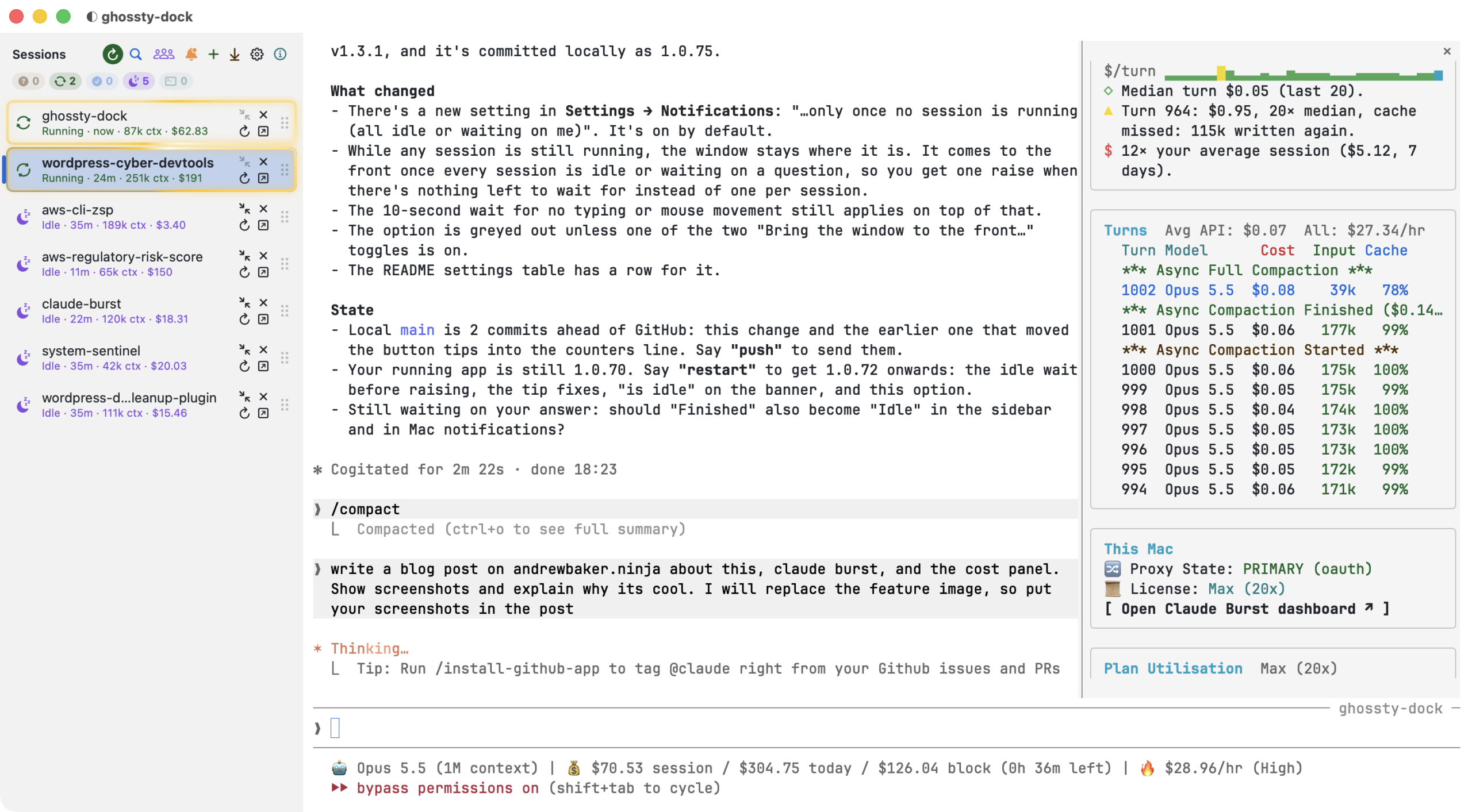
That is three tools working together, all free and open source:
- Ghostty Dock, the new one: a build of the Ghostty terminal with a vertical session sidebar. It is the subject of most of this post.
- Claude Burst: a local gateway between Claude Code and Anthropic that adds pauseless compaction, session coordination and failover.
- Claude Code Cost Sidebar: the panel on the right, a live view of what the current session is costing, turn by turn.
Each works on its own. Together they answer the three questions I kept asking: which session needs me, what is it costing, and is it about to fall over?
1. Ghostty Dock: Tabs That Tell You Something
Ghostty is Mitchell Hashimoto’s GPU accelerated terminal and it is excellent. Ghostty Dock is Ghostty 1.3.1 plus a single patch file, built as its own app with its own icon, so it sits beside a normal Ghostty install rather than replacing it. Every Claude Code session is a tab, and the tabs live in a sidebar down the left hand side, like Chrome’s vertical tabs.
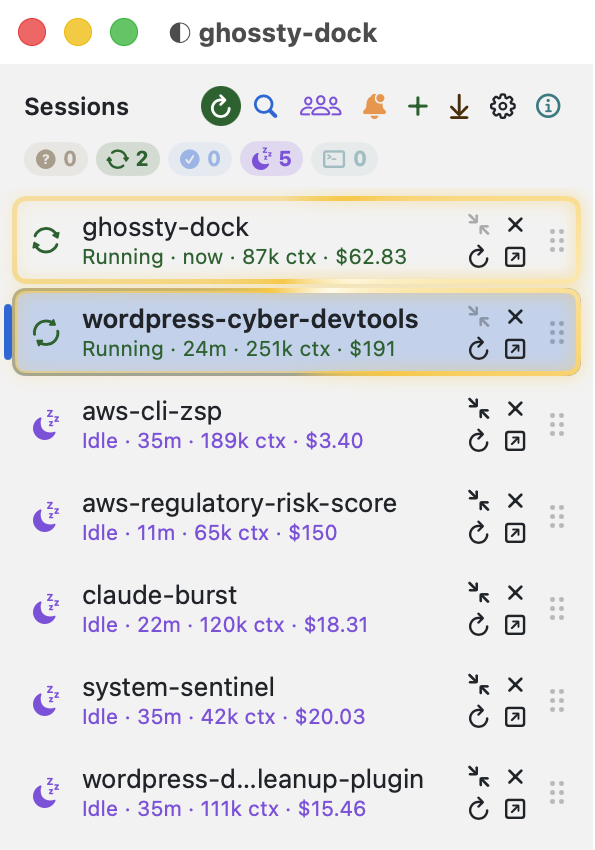
Every row tells you four things without opening the session:
- State, by colour and icon. Peach with a pulsing question mark means the session needs you: a question or a permission prompt. Green spinning arrows mean it is running, and running rows get a gold shimmer so they stand out at a glance. Blue tick means it finished and you have not looked yet. Mauve moon means idle. Teal is a plain shell.
- How long it has been in that state, so “idle 35m” tells you which session you forgot about.
- Context size, such as
251k ctx. That is the number of tokens the session’s last reply read. It is the number that drives cost, and it tells you which sessions are close to compaction. - Cost so far, read from Claude Code’s own transcripts.
The counters under the title add up each state (0 need you, 2 running, 5 idle), and they are filters: click one to show only those rows. The header buttons are each colour coded: search (⌘P to jump to any session by name), Agents, notifications, new tab, next session that needs you, settings and About.
1.1 It comes and gets you, politely
The feature I use most is the one I do not touch. When a session asks a question or goes idle, Ghostty Dock can bring its window to the front, select the right tab, and show a five second banner saying why: “claude-burst needs an answer” with the question, or “aws-cli-zsp is idle“.
Doing this well took more care than doing it at all. A window that jumps in front of you while you are typing in another app is worse than useless, so it waits:
- until you have not typed or moved the mouse for 10 seconds, anywhere on the Mac;
- and, by default, until no session is still running, so you get one raise when everything is waiting on you instead of one interruption per session.
Ctrl-Opt-J does the same thing on demand, from any app: it jumps to the next session that needs you, then to the next one that has finished. The Dock icon badge counts sessions waiting for you, and macOS notifications are there if you want them.
1.2 Sessions that survive
Restart, undock and recovery are where a session manager earns its keep:
- Restart (↻ on a row) stops Claude Code and resumes the same conversation in a fresh tab, which is how you pick up a new agent definition or a changed
CLAUDE.md. - Undock moves a session into its own normal window, and Dock brings it back.
- If Ghostty Dock quits or crashes, every session that was open comes back as a tab with
claude --resume, in the same order, with a loading screen that counts them back in. - Updating Ghostty Dock itself uses a restart script that waits until every session has been quiet for 45 seconds and you have not touched the keyboard for 10, then restarts and resumes them all. I learned that last rule the hard way when it restarted mid sentence.
Rows can be renamed, pinned, coloured and grouped, dragged into any order, and each one can show the git branch, open pull request and listening ports. There are 20 themes. It also has a small file API and a ghostty-dock CLI, so a script can open, rename or move sessions.
1.3 The Agents window: what your subagents are doing and what it costs per hour
Claude Code can hand parts of a job to subagents: helpers that each get their own fresh context, do one piece of work, often in the background or in their own git worktree, and report back a summary. They are the best way to keep a session’s context small, and they are completely invisible from a terminal tab.
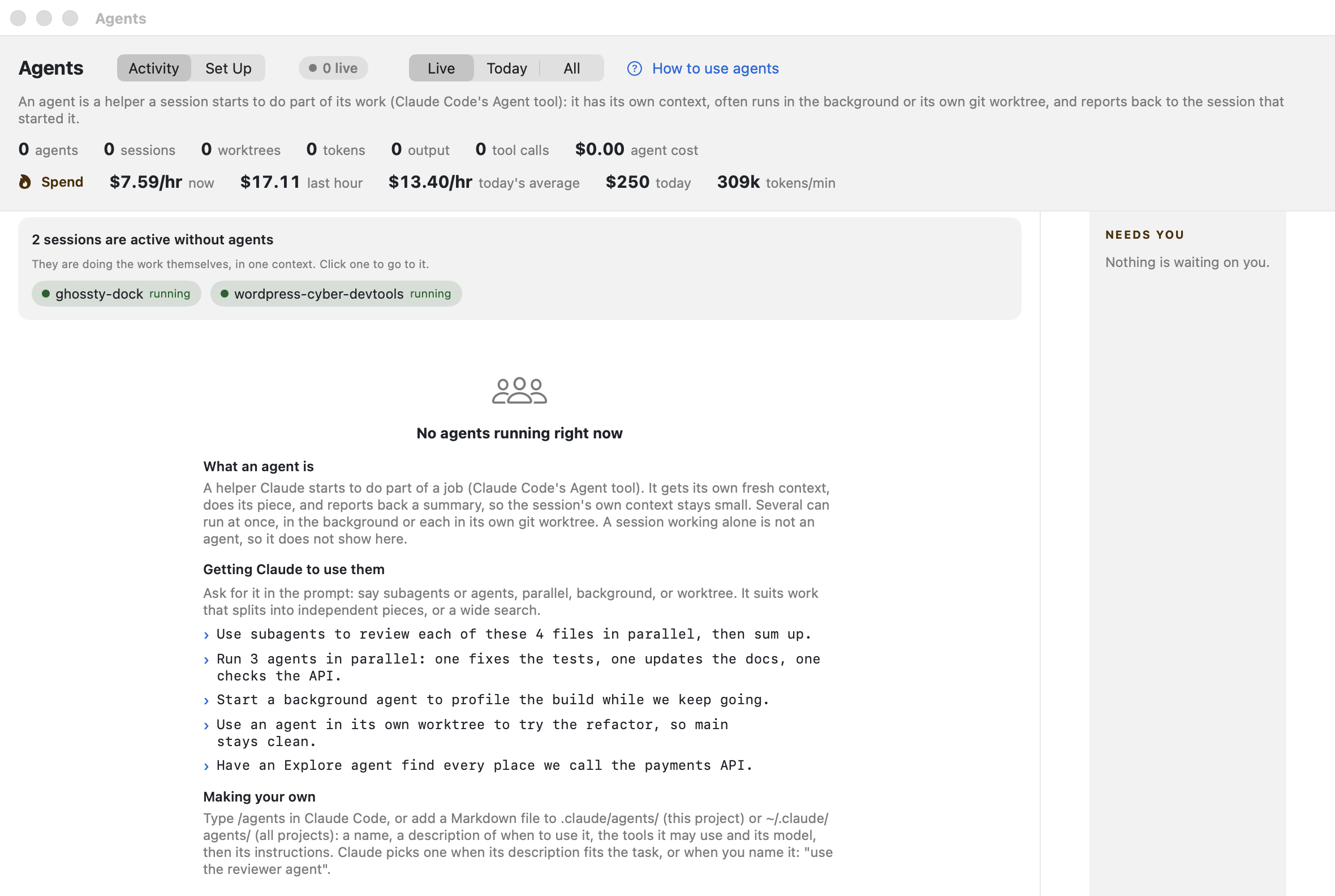
The Agents window (⌘⇧A) shows every live subagent across every session: which session started it, its tokens, tool calls and cost. The line I watch is Spend: dollars per hour over the last ten minutes, the last hour, today’s average rate, today’s total, and tokens per minute. That is a speedometer for your AI bill. A session that has gone into a loop shows up here within minutes, not at the end of the month.
When no agents are running, it says so and explains why: here, two sessions were active but doing all their work in one context. It then shows how to prompt Claude to use agents (“Run 3 agents in parallel: one fixes the tests, one updates the docs, one checks the API”). The Set Up tab lists every agent definition on the Mac (your own in ~/.claude/agents, each project’s .claude/agents, plugin agents and the built in ones) and lets you edit the description, model, colour, tools and instructions in place.
2. Claude Burst: The Control Plane Underneath
The sidebar tells you a session is at 251k tokens of context. Claude Burst is what does something about it. It is a local gateway that sits between Claude Code and Anthropic: Claude Code talks to it exactly as it talks to Anthropic, and one click on its dashboard takes it out of the path. I wrote about it in detail in Claude Code Pauseless Context Compaction; here is the short version and how it connects to the Dock.
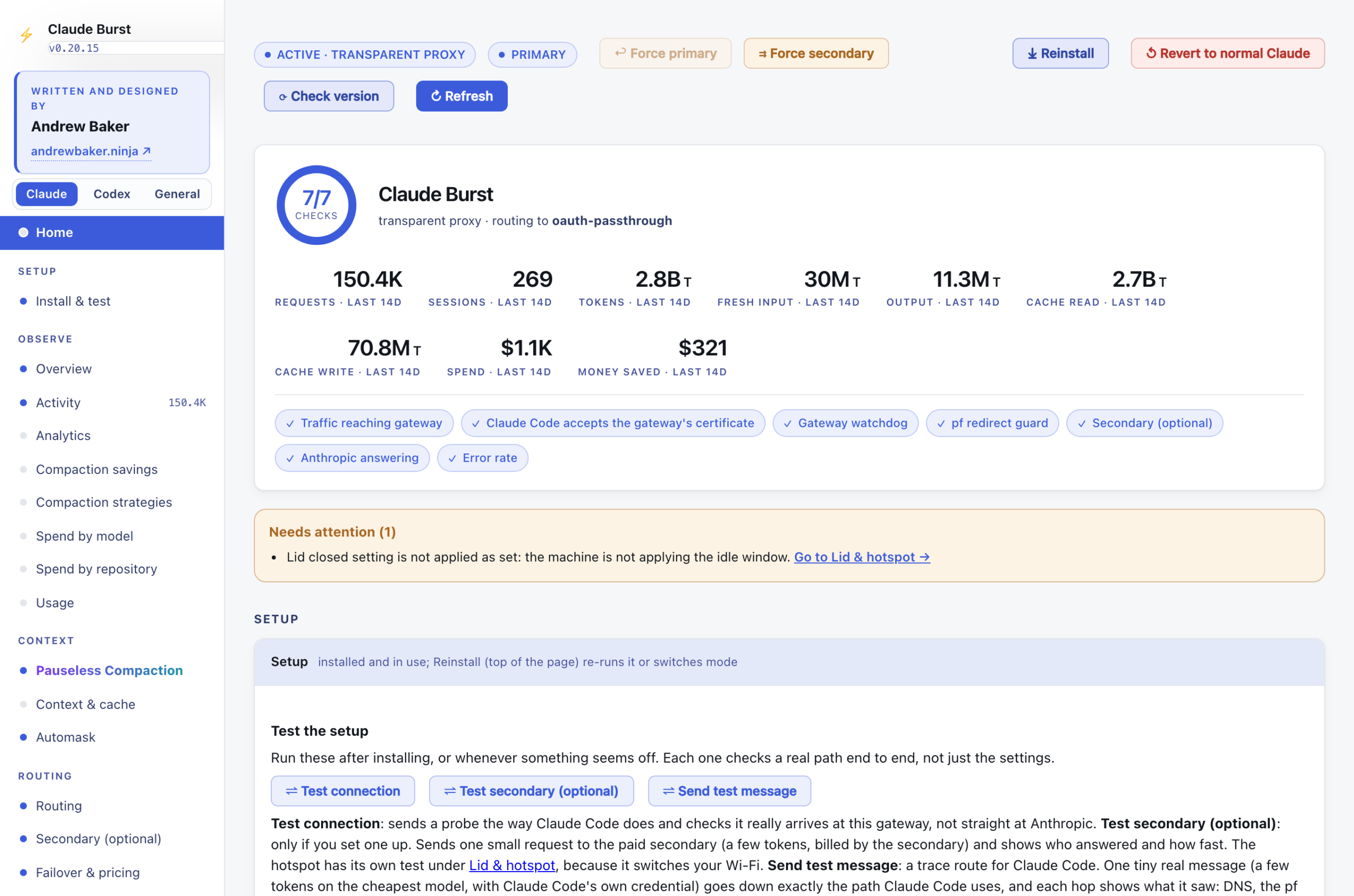
2.1 Pauseless compaction
Every turn in Claude Code re-sends the whole conversation. A turn at 400k tokens costs about four times one at 100k and uses up your plan’s limits four times as fast, and Claude Code only compacts near the end of its 1M window. Its own /compact makes you stop and wait while it summarises.
Burst writes the summary in the background while you keep working, then swaps it in with your next prompt. No pause, no lost place, nothing to type. Its Intelligent mode learns the right point to compact for each repository from that repository’s last 14 days.
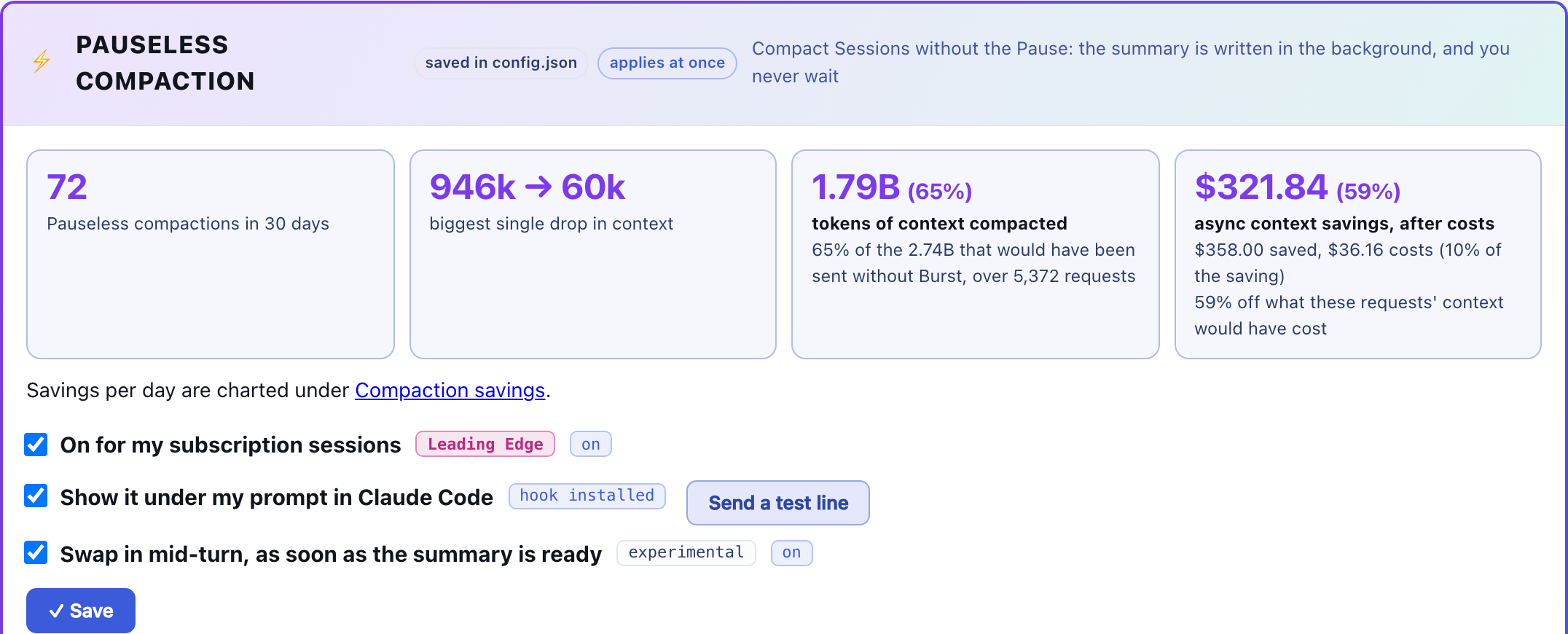
Ghostty Dock has a Compact button (⤡) on every row. It types /compact-async into the session, so Burst summarises it in the background. It only does this while the session is sitting at its prompt, so it never answers a question by accident or queues up behind a running turn.
2.2 Session coordination
Seven sessions on one Mac means sessions in the same repository, editing the same files. Burst’s coordination makes the first session to edit a file its master, which is responsible for committing it. Other sessions can still edit it, but they cannot sweep it into their own commits with git add -A, cannot overwrite it with a whole file write, and cannot deploy someone else’s uncommitted work. Nobody waits. I covered the details in How to Run Multiple Claude Code Sessions in the Same Repo Without Conflicts.
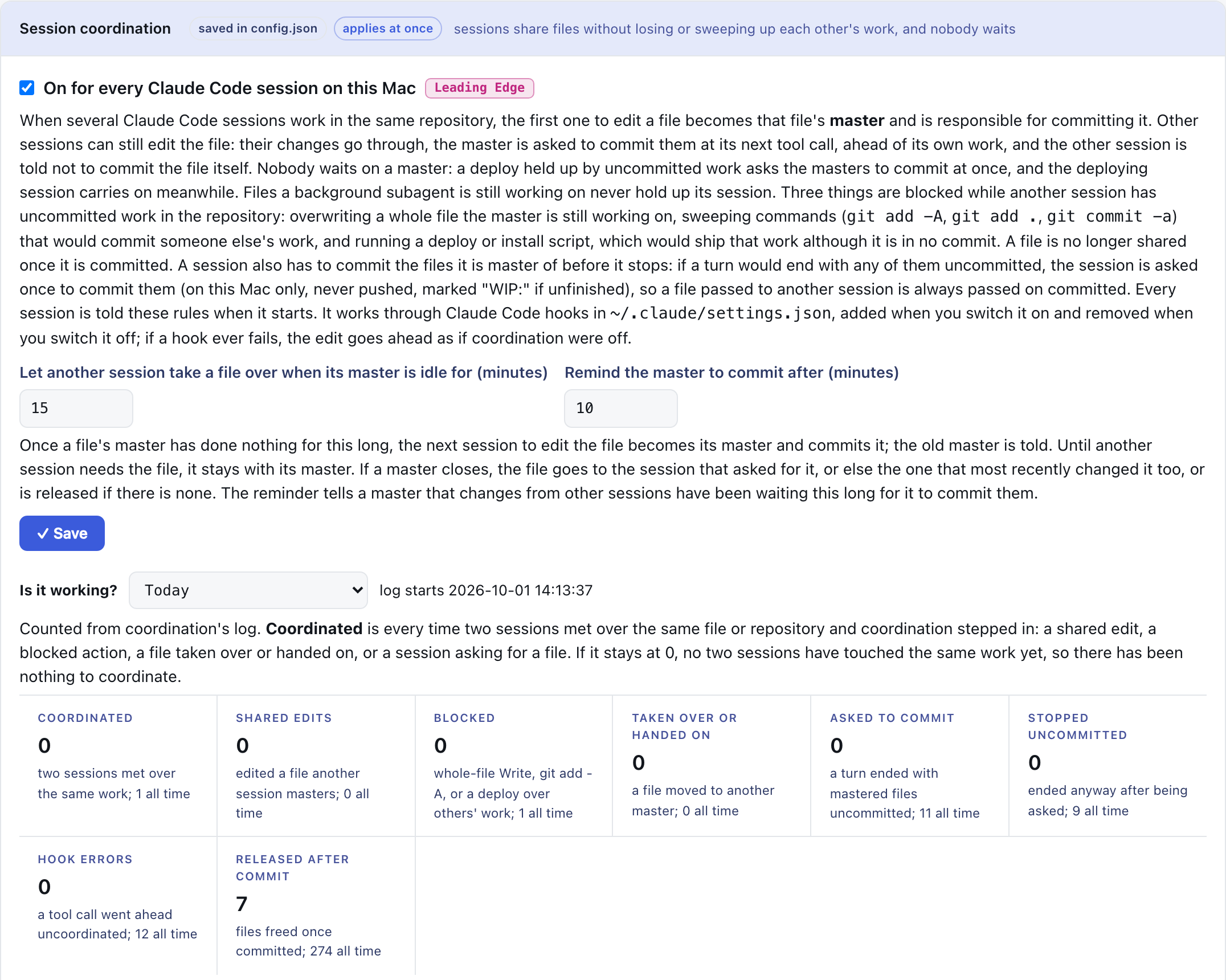
Ghostty Dock is what makes this usable day to day. Coordination stops sessions damaging each other’s work, and the sidebar shows you which session to go and look at when one of them is told to wait for a commit.
3. The Cost Panel: The Meter Next to the Work
The panel on the right of the first screenshot is the Claude Code Cost Sidebar, a mod that Claude Code itself draws beside the transcript. I introduced it in AI Coding Costs Are Guesswork Without This. The idea is simple: you should see what a coding agent costs while you are working, not on an invoice weeks later.
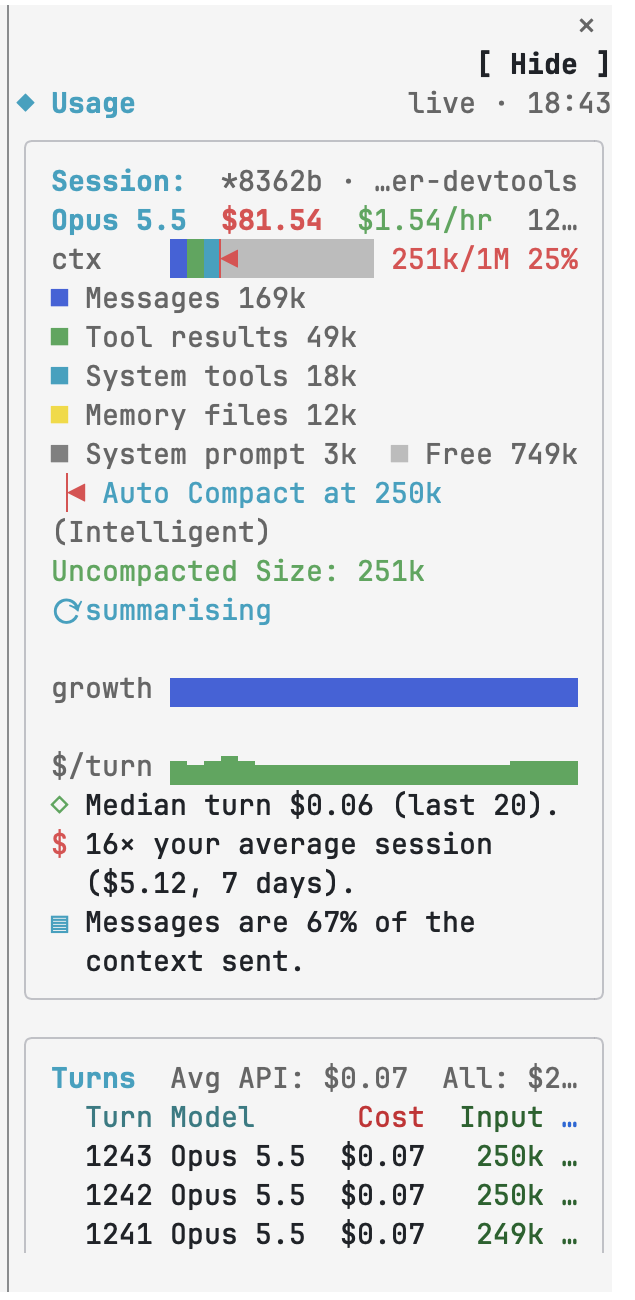
This is a real session from today. At a glance:
- This session: $81.54 so far, $1.54 an hour, and 16 times my average session. That last line is the one that makes you stop and ask why.
- Context by part: 169k of messages, 49k of tool results, 18k of system tools, 12k of memory files, with a red marker where compaction kicks in at 250k. The session has just crossed it, and Burst’s summary is already running (“summarising”). Nothing paused.
- Graphs per turn of context growth and dollars per turn, with the median turn cost.
With Claude Burst installed it also shows how much of the plan’s 5 hour and weekly limits is used, what used them, and when you will run out at the current pace, plus every pauseless compaction as Started and Finished rows in the turn table:
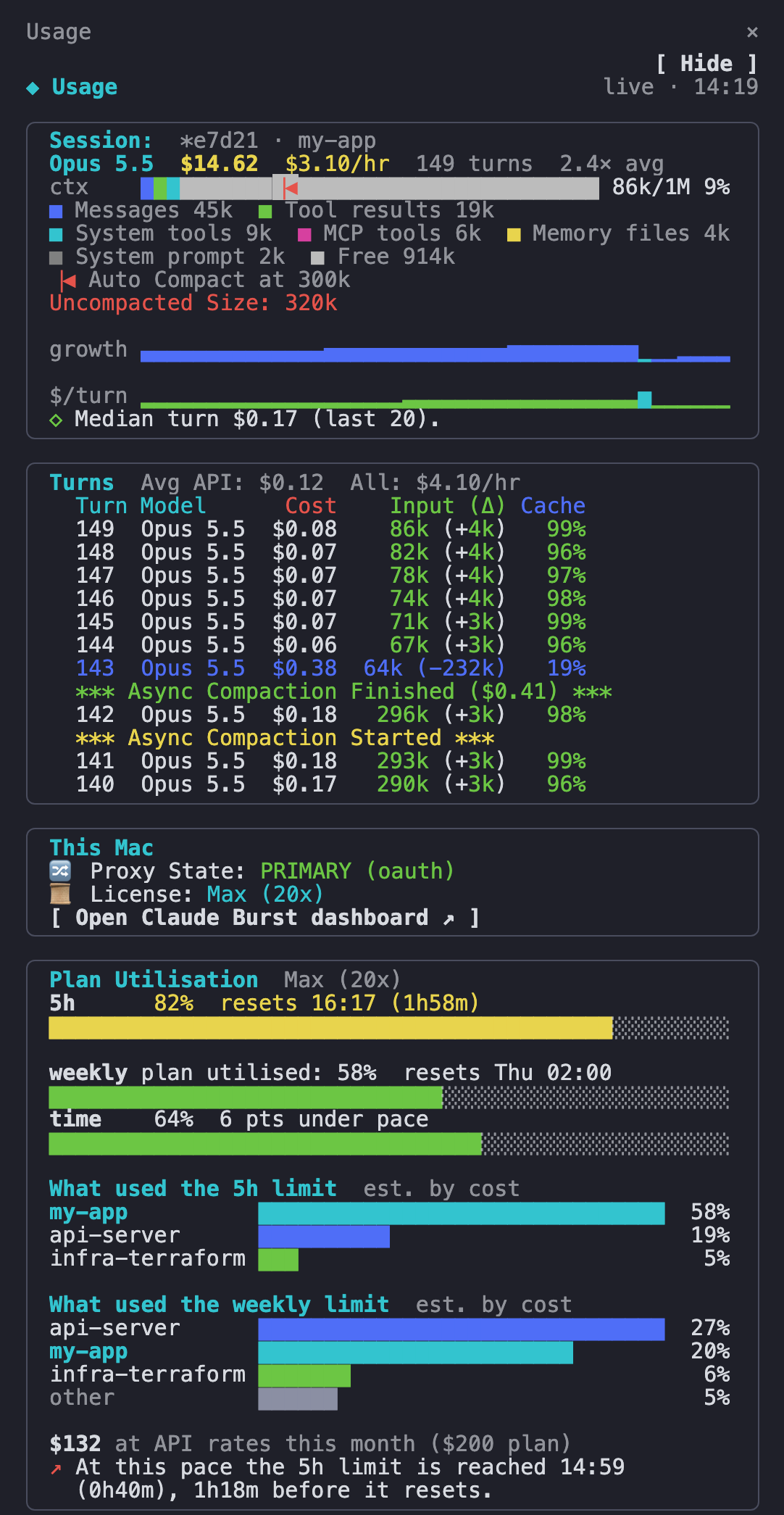
The numbers in this second screenshot are made up: it is drawn by the panel’s own code from invented data.
4. Why the Combination Is the Point
Each tool answers a question at a different scale:
| Question | Where the answer is |
|---|---|
| Which of my seven sessions needs me right now? | Ghostty Dock sidebar, Ctrl-Opt-J, the raise banner |
| What is each session costing, and which is near its context limit? | Ghostty Dock rows (cost and ctx) |
| How fast am I spending across everything? | Ghostty Dock Agents window, Spend line |
| Why is this one session expensive? | Cost panel: context by part, cost per turn |
| How do I make it cheaper without stopping? | Claude Burst: pauseless compaction, the Dock’s Compact button |
| How do I stop sessions trampling each other? | Claude Burst: session coordination |
| Am I going to hit my plan’s limit before it resets? | Cost panel with Burst: Plan Utilisation |
What makes it more than three dashboards is that they feed each other. The Dock reads the same transcripts the panel does, so the cost on a row and the cost in the panel agree. The Dock’s Compact button drives Burst. The panel marks Burst’s compactions as they happen. Burst’s coordination messages reach the sessions the Dock is showing you.
The effect is that running many sessions stops feeling like juggling. You give a session a task, move on, and the Mac tells you when that session needs you, what it cost, and whether anything is going wrong. That is the difference between using AI coding agents and managing a team of them.
5. Try It
All three are free, open source on GitHub, macOS only, and young, so try them on a non critical setup first.
Ghostty Dock builds Ghostty from source with the patch applied (it needs Xcode; the build fetches Zig itself), installs the Claude Code hook that reports each session’s state, and puts ~/Applications/Ghostty Dock.app alongside any Ghostty you already have:
git clone https://github.com/andrewbakercloudscale/ghossty-dock.git
cd ghossty-dock
./install.sh
Sessions already running in separate Ghostty windows can be moved in as tabs with ghostty-dock-move --detach.
Claude Burst and the Cost Sidebar each have a one line setup that lets Claude Code install them and tell you what it changed: see the top of each README at claude-burst and claude-code-cost-sidebar.
Ghostty Dock was built almost entirely by Claude Code, running inside Ghostty Dock, coordinated by Claude Burst, with its cost on the panel beside it. The window in the first screenshot is the session that wrote this post.