
Claude Code Pauseless Compaction: Background Context Compaction, Automatic Handoffs and Working With the Lid Closed

Claude Code Pauseless Context Compaction: Asynchronous Background Compaction, Session Coordination, Automatic Handoffs and Working With the Lid Closed

👁43views

Claude Code does not ship a native pauseless compaction mode. Claude Burst, an open source local gateway, adds one. When a session passes a threshold, defaulting to 400k tokens, it summarises older history in a background request, then swaps the summary in on your next prompt, so you never wait.

Article Summary
  • 1.
    What it is
    Claude Code pauseless compaction is not a native feature, but Claude Burst, an open source local gateway for Mac, adds it. The article explains how it summarises context in the background, how the swap is made safe for tool use, and what it saved on first real use.
  • 2.
    Why it matters
    Long sessions resend the whole conversation every turn, so cost and usage limit drain grow with context size. Compacting early in the background avoids both the waiting and the late, expensive automatic compaction.
  • 3.
    Key takeaway
    A background summary that reads from the prompt cache cut the cost of a summary from over two dollars to about twenty cents while you keep working.
~29 min read
Listen to this article0 plays

GitHub: github.com/andrewbakercloudscale/claude-burst (MIT licensed, macOS). Clone it, run ./install.sh, open the dashboard at http://127.0.0.1:7788.

Claude Code has no native pauseless compaction mode: its own /compact, and the automatic compaction it runs as a conversation approaches the end of the context window, both stop the session while the summary is written. Pauseless context compaction is an open source feature of Claude Burst, a local gateway that sits between Claude Code and Anthropic on your Mac, which makes compaction asynchronous: the summary is written in a separate background request while you carry on working, instead of synchronously with your session waiting on it.

This post covers how it works, what it cannot do, what it saved in its first days of real use and what a full month looks like, the analytics dashboard that measures it, and three supporting features that make long and parallel sessions practical: session coordination, so several Claude Code sessions can work in one repository without wrecking each other’s uncommitted work; automatic session handoffs; and keeping Claude Code running with the laptop lid closed, including joining your phone’s hotspot when the Mac goes offline.

  • Pauseless compaction: compacts at 400k instead of near 1M, in the background, with no pause. Example month: about $643 net saved (API equivalent).
  • Session coordination: the first session to edit a file commits it; other sessions can still edit it, and nobody waits.
  • Lid closed: the Mac stays awake with the lid shut, turns the screen off, and joins your hotspot when Wi-Fi drops.
  • Handoffs: HANDOFF.md written when a session closes and read when the next one starts.

1. Why long sessions are worth compacting early

Every turn in a Claude Code session resends the whole conversation to the model. Prompt caching turns most of that resend into cache reads, which are billed at a fraction of the normal input rate, but the cache read component still scales with the size of the context: at the same rate, 400k cached tokens cost four times what 100k cached tokens cost. Output tokens, uncached input and cache writes also contribute to each request, so this does not mean a whole request at 400k costs four times one at 100k, and on a Pro or Max subscription the effect on how long your usage allowance lasts has not been measured directly. What is clear is that a large context makes every turn process far more tokens than a small one, for as long as the session stays large.

Claude Code’s built in compaction tends to run late, near the end of the window, which means a long session spends many turns carrying a very large context before anything reduces it, and when compaction does run, you wait for it. The pattern that would help is to compact earlier, while the context is still a manageable size, and to do it somewhere you never have to wait.

2. What pauseless context compaction does: asynchronous summaries

Because every request Claude Code sends to Anthropic passes through the Burst gateway, the gateway can see how large each session’s context has become and can change what is sent upstream without Claude Code knowing.

When a session’s context passes a threshold, 400k tokens by default, Burst sends one asynchronous background request on your subscription, using that session’s own login, asking the same model to summarise everything before your latest prompt. That request takes about forty seconds, and because it runs asynchronously, alongside your session rather than in front of it, nothing in your session is blocked while it runs. From your next prompt onwards, Burst sends the summary upstream in place of the older messages it covers. Claude Code keeps its complete local transcript and behaves exactly as before; the model sees a much shorter history.

You can see this happen in Claude Code’s own window. A UserPromptSubmit hook shows a line under the prompt you send when a summary starts, when it is ready, when it has cut the context, and when it fails or no longer fits, for example Claude Burst, pauseless compaction: done. Context down 88%, 666k → 78k. The line is shown to you and is not added to the model’s context, so it costs nothing.
You can also compact on demand. /compact-async, which the dashboard installs into Claude Code’s / menu beside /compact while pauseless compaction is on, is /compact without the pause: it ignores the threshold and the sixty minute window, starts the background summary straight away, and the summary swaps in on your first prompt after it is ready, typically about forty seconds later.

/compact (Claude Code)/compact-async (Burst)
While the summary is writtensession stops, you waityou keep working
When it takes effectwhen it finishesyour next prompt after it is ready
What Claude Code keepsthe summary onlyits full local history; only what is sent is shortened
Typical costone summary turnone cached summary request, about $0.20 API equivalent

3. What it cannot do

There are two limits worth understanding before you rely on it. The first used to matter most for unattended work, and now has an experimental fix.

By default, a finished summary is first applied on a request that ends in a plain prompt from you, never partway through a round of tool calls. The consequence is that during a long autonomous tool loop, where the agent keeps working without you typing anything, the summary can be ready but unused until you next speak, and the session keeps growing past the threshold: on 30 September 2026 sessions carried on to 402k, 778k and 798k tokens before their next prompt.

Mid-turn swaps (experimental, a tick box in the dashboard’s Pauseless Compaction section) remove that wait. With it on, a ready summary goes in on the very next request, even inside a turn. The swap point is the prompt that started the running turn, so that turn is sent exactly as it was, thinking included, and only what came before it is replaced by the summary. No tool call is separated from its result, and compaction lands within about a minute of the session reaching the threshold. Anthropic does not document whether it accepts a running turn’s thinking after the history before it has changed, so Burst treats each mid-turn swap as unproven until the API answers it normally. If the API refuses it with a 400, Burst undoes the swap, resends the request as Claude Code sent it, so Claude Code sees only a slower reply and never an error, and turns mid-turn swaps off until the settings are saved again. The gateway log records mid-turn accepted or mid-turn REJECTED with Anthropic’s reason. In use so far every mid-turn swap has been accepted, including one that replaced 1,345 messages with a summary.

The second limit follows from Claude Code never learning that Burst shortened the history, so its own copy of the conversation keeps growing. If Burst’s summary later stops fitting, for instance after a rewind, and Claude Code’s full copy has by then passed the context window, the full history is too big to send: Anthropic refuses it and Claude Code falls back to its own compaction, with the usual pause. The gateway log records which message changed, so the cause can be traced.

4. How it works under the hood

The design follows Anthropic’s documented keep tail pattern, in which an early portion of the conversation is replaced by a summary and the recent portion is kept as it was. The summary always ends at a plain user prompt, never at a tool result, so no tool call is summarised away from its own result. The swap is introduced either at your next prompt or, with mid-turn swaps on, at the prompt that started the running turn, as described above.

The summary request resends the history exactly as Claude Code last sent it. That makes a cache hit possible rather than guaranteed: it depends on the cached prefix still being live, since Anthropic’s prompt cache has a limited lifetime, and on nothing earlier in the prompt having changed. In practice it made a large difference, because the first two summaries did not read the session from cache and the third, after the fix, did.

Two kinds of content are handled separately. The system reminder blocks at the start of the conversation, which carry your CLAUDE.md, skills and environment details, are carried across word for word, because a summary might paraphrase or drop an instruction that matters. Thinking blocks from turns before the swap are dropped. That is an implementation choice in Burst: those blocks were produced against a history that no longer exists, and because Anthropic’s handling of earlier thinking blocks varies by model, removing them is the conservative option. Turns produced after the swap keep their thinking as normal.

The gateway also knows when to step aside. If you run /clear or /compact, or rewind, the summary no longer matches the history Claude Code is sending, so Burst drops it and passes requests through untouched, and a dropped summary reopens the compaction window straight away. Otherwise a session is compacted at most once per window, sixty minutes by default, a failed summary is retried after five minutes, a warning is logged at a lower threshold of 300k tokens, and the state survives a restart of the gateway.

5. What it saved: the first day, and a full month

The first real test was one long Opus 5.5 session that ran from 29 to 30 September 2026, over 306 requests. Burst produced three summaries, the largest taking the context from 611k tokens to 49k, and the model’s recall of earlier work held up in the rest of the session.

ItemAPI equivalent
Context not resent$30.57
Less: three summaries$5.27
Less: extra cache writes$0.19
Net estimated saving$25.11

The components are rounded; the dashboard, which calculates from unrounded values, shows $25.12. The summaries themselves cost $2.10, $2.96 and $0.21, the drop in the third being the cache fix described in section 4.

This is one session on one day, so it shows the mechanism and the order of magnitude rather than serving as a benchmark. Every figure is an API equivalent estimate: on a subscription nobody is billed these amounts, and the practical benefit is reduced context processing, whose effect on how long your allowance lasts would need to be measured separately.

The saving is an estimate under stated assumptions, not a guaranteed lower bound. A compacted request does not record what it would have sent without Burst, so the dashboard replays each session alongside a “without Burst” twin whose context grows exactly as the real session’s does, except that it never takes Burst’s reductions. The twin is compacted when it reaches 950k tokens, standing in for Claude Code’s own compaction near the end of its 1M window, since Claude Code does not publish its exact threshold, and requests just after that point count against Burst. The saving per request is the difference between twin and real context at the model’s cache read rate, and the net figure subtracts every summary and every extra cache write. Two assumptions pull in opposite directions. Not crediting back the cost of the twin’s own compactions makes that part of the estimate conservative. Assuming the twin grows all the way to 950k could overstate the saving, however, if Claude Code’s native context management, which Anthropic documents as clearing older tool outputs before it summarises, keeps a real session smaller than the twin assumes; the twin does not currently model that.

After the first week, with mid-turn swaps switched on, the dashboard’s 7 day figures stand at 22 pauseless compactions, a biggest single drop of 945k tokens to 66k, and 608.6M tokens of context compacted: 66% of the 925.6M tokens that would have been sent without Burst, over 1,673 requests.

5.1 A full month of example figures

One day is a small sample, so the dashboard can show what a month looks like at the observed rate. The charts below are an example month, not a measured one: the real daily figures from the first days of pauseless compaction (one person, long Opus 5.5 sessions in Claude Code, 29 September to 1 October 2026) spread over 30 days, with each weekday varying by a fixed pattern around the real daily average and weekends running at 35%.

Savings per day chart: savings from pauseless compaction above the line, its cost below, net $643.32 over 30 days
Savings per day: what compaction saved above the line, what the summaries and cache rewrites cost below it. Example month scaled from real data.
Real, per active dayExample month (22 weekdays, 8 weekend days)
Savings: context compacted$30.19$749.87
Cost: summaries-$3.42-$84.95
Cost: cache rewrites-$0.87-$21.61
Net saved$25.90$643.32
Compactions6150
  • The cost comes to about 14% of the savings, so roughly 86 cents of every dollar of context compacted is kept.
  • These are API equivalent dollars. On a Max or Enterprise subscription the bill does not change; the saving is your usage limits lasting longer, because each turn rereads a shorter context.
  • Your figure depends on how long your sessions run. A session that never passes the 400k threshold is never compacted and saves nothing; the savings come from long sessions and grow with them.
Daily activity, Saved view: tokens removed by pauseless compaction and by pruning per day over 30 days
Daily activity, Saved view: about 195M tokens of context removed per active day, almost all of it by pauseless compaction. Example month scaled from real data.

The Saved view counts tokens rather than dollars: purple is context that pauseless compaction stopped being resent, green is what overflow pruning removed from requests sent to the paid secondary, and orange is what was sent to the secondary at all. On the real data that is about 195 million tokens of context not resent per active day.

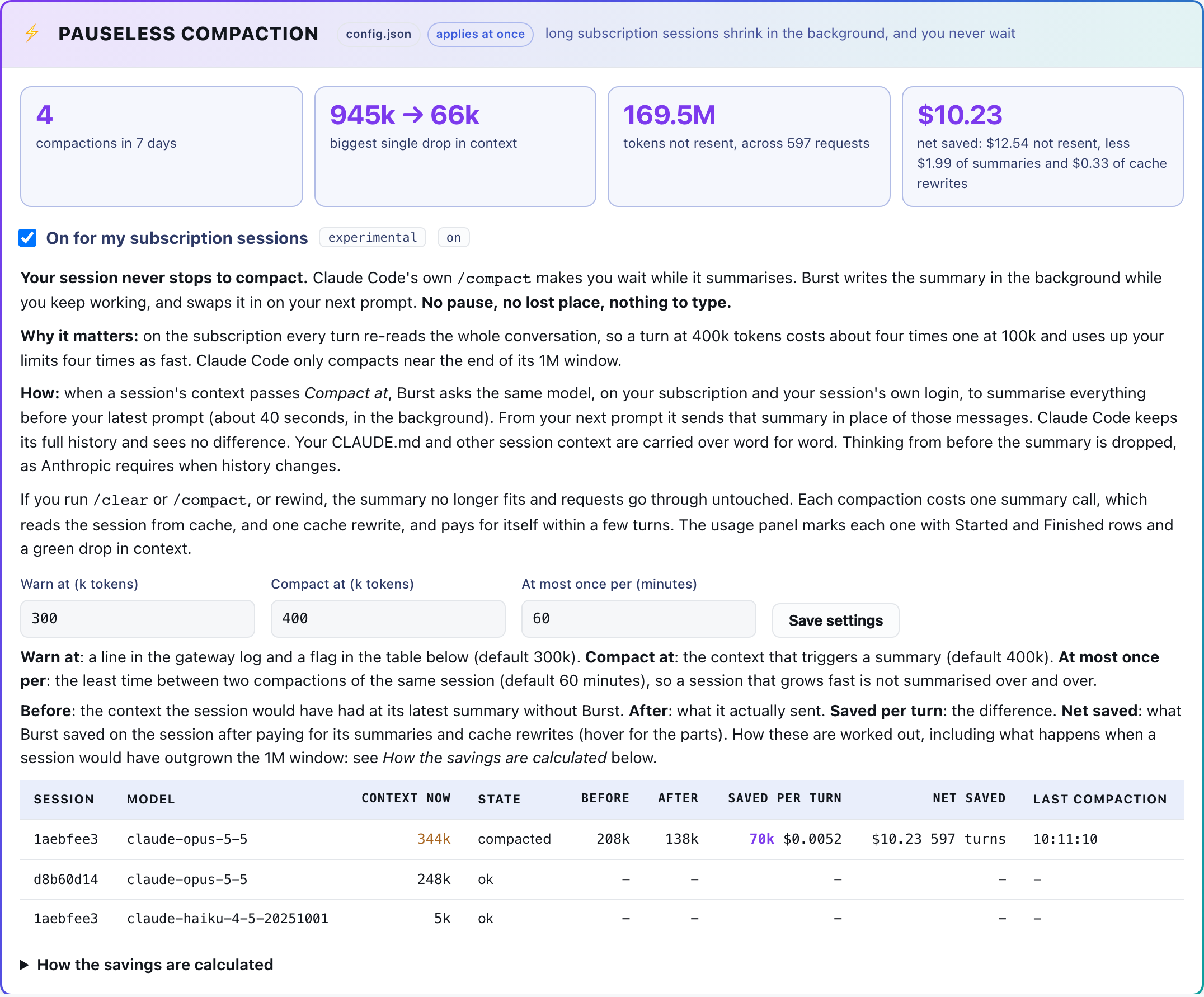
The Pauseless Compaction section of the Burst dashboard, showing each session's context before and after its latest summary
The Pauseless Compaction section: the switch and thresholds, headline results for the last 7 days, and each session’s context before and after its latest summary, with the saving per turn.

6. The analytics dashboard

Every request passes through the gateway, so Burst can measure what Claude Code’s own tooling does not show: latency, errors, where the tokens and the spend go, and what compaction and pruning removed. It all lives on a local dashboard at http://127.0.0.1:7788, bound to loopback only, beside the gateway. The screenshots are of a real dashboard with session ids, repository names and dollar figures replaced.

Burst dashboard overview: health checks, routing, requests, sessions, tokens and spend, and daily activity
Overview: health checks, which route each model is on, requests, sessions, tokens and spend, and daily activity.

The overview answers “is everything working?” at a glance. A Needs attention list above it collects anything not doing what it is set to do, each item linking to its section: a guard not running, handover hooks half installed, the lid setting not applied as set, another program keeping the Mac awake, or a model served without a price.

Analytics: median and p95 latency, error rate, busiest day, net saved, then spend by model and spend by repository
Analytics: latency, error rate, busiest day and net saving, then spend by model and spend by repository.
  • Latency and errors: median and 95th percentile latency for successful requests, and the share of requests that came back 4xx or 5xx.
  • Saved, net: what pauseless compaction and pruning saved after the cost of the summaries and cache rewrites.
  • Spend by model: which models the spend went to, primary (your subscription) or secondary (the paid overflow). Prices differ by an order of magnitude between models, so this is where surprises show up.
  • Spend by repository: each session filed under the repository its Claude Code transcript says it ran in, so you can see which projects consume the most.
  • Unpriced requests: a model with no price makes the spend a lower bound, and the dashboard says so rather than quietly undercounting.

All dollar figures are API equivalent: what the same token mix would have cost at public API prices, with cache reads, cache writes, uncached input and output priced separately. On a subscription they measure how hard you are using your allowance, not what you are billed.

7. Session coordination: several sessions, one working tree

Running several Claude Code sessions in one repository is the fastest way to get a lot done, and also the fastest way to lose work. One session rewrites a file over another’s uncommitted change, one commits with git add -A and ships the other’s half done work, or one stashes or resets under the other. Session coordination prevents those. It is off by default and switched on in the dashboard under Session coordination.

The design rule is that nobody waits on anybody. There are no locks on files: edits always go through. Instead, commits are accelerated: a session holding uncommitted work that another session needs is told to commit it now, ahead of its own work, as “WIP:” if its part is unfinished. A small early commit is cheap; a session sitting idle behind a lock is not.

  • The first session to edit a file is its master, and commits it. That is the only session that commits it.
  • Another session can still edit it, with no wait. Claude Code’s Edit replaces an exact piece of text and refuses if the file changed since it was read, so two sessions’ edits cannot overwrite each other. The master is told what changed and asked to commit the file at its very next tool call.
  • What is refused: a whole file Write over another master’s uncommitted work, staging or committing a file someone else masters, git add -A, git add . or git commit -a while another session has uncommitted work in the repository, and running a deploy or install script that would ship that work in no commit.
  • A session commits before it stops. A turn that would end with mastered files uncommitted is held once with the instruction to commit them locally, never pushed.
  • Idle masters hand on. A master idle for 15 minutes keeps its files until another session needs one; that session’s edit makes it the new master.
  • Subagents are recognised. A background subagent’s files are left alone at the end of its parent’s turn while the agent is still writing them.
  • It fails open. If anything in coordination breaks, the tool call goes ahead as if coordination were off.

It is built entirely from Claude Code hooks (SessionStart, PreToolUse, PostToolUse, UserPromptSubmit, Stop, SubagentStop and SessionEnd), so every session on the Mac takes part without being asked, and each is briefed at start with the rules and which other sessions are active, in which folders, mastering which files. Every hook call goes through the coordinator the same way:

sequenceDiagram
    autonumber
    participant CC as Claude Code session (or a subagent)
    participant H as claude-burst coord hook
    participant G as git
    participant S as state.json + state.lock
    participant L as coord.log
    CC->>H: hook JSON: session_id, cwd, tool, input
    H->>S: read state.json without the lock
    H->>G: git status of every tracked file, 8 in parallel
    H->>S: take the lock (wait at most 3 s)
    alt lock taken
        H->>H: apply the rules
        H->>S: write state.json (temp file, then rename), release the lock
        H->>L: one line per event (share, refuse, hold, free)
        H-->>CC: allow, deny with a reason, or PRIORITY messages
    else lock busy for 3 s, or anything fails
        H->>L: ERROR in hook (shown as an Issue on the dashboard)
        H-->>CC: nothing: the call goes ahead as if coordination were off
    end

And this is what happens when two sessions edit the same file. The second edit goes through, and the master commits it first:

sequenceDiagram
    autonumber
    participant A as Session A
    participant C as Coordinator (hooks)
    participant B as Session B
    A->>C: Edit x.go (PreToolUse)
    C-->>A: first editor: you are the master of x.go
    B->>C: Edit x.go (PreToolUse)
    alt a whole-file Write
        C-->>B: refused: it would wipe A's uncommitted work, use Edit
    else an Edit
        C-->>B: goes through. Shared: do not stage or commit x.go, A will
        C->>C: queue for A: PRIORITY commit x.go now
    end
    A->>C: any next tool call (PostToolUse)
    C-->>A: PRIORITY: B changed x.go. Commit it now (WIP: if unfinished)
    A->>A: git add x.go and git commit
    A->>C: PostToolUse after the commit
    C->>C: x.go clean: free x.go (committed)
    Note over A,B: A idle 15 minutes: B's next Edit makes B the master

Sessions can also message each other (claude-burst coord send <session> "message"), and a session can ask a busy master for a file with claude-burst coord take <path>; it becomes theirs when the master commits, releases or closes.

7.1 Is it working? Metrics and Issues

Everything the coordinator does is one line in a local log, and the dashboard counts those lines over Today, 7 days or 14 days: shared edits, blocked actions, files taken over or handed on, sessions asked to commit, sessions that stopped with uncommitted work anyway, hook errors, and files released after a commit. Anything that went wrong is listed under Issues, and each issue resolves itself once git shows its files committed.

The coordination Issues table: four sessions that stopped with uncommitted work, all resolved
Issues: four stops with uncommitted work, all resolved once the files were committed.

The example above is a real pattern from the day it was built. One session ran several background agents, each in its own worktree; their edits carried the parent session’s id, so when the parent’s turn ended it was asked to commit files the agents were still writing. It rightly left them, and each stop became an Issue. All resolved once the agents committed and their worktrees were merged, and the fix, recognising subagents, means that pattern no longer produces Issues.

7.2 Coordination versus worktrees

The other common answer to parallel agents is isolation. Tools such as Superset, or Worktrunk, a CLI that makes git worktrees simpler to manage for parallel agents, give every agent its own worktree and branch, so agents never touch each other’s files until their branches are merged. Burst’s coordination takes the opposite approach: every session works in one shared tree, and the rules decide who commits what. They solve the same problem in opposite ways.

Worktree tools (for example Superset)Burst session coordination
ApproachIsolate: each agent gets its own worktree and branchShare: every session works in one working tree, with rules on who commits what
When conflicts show upLater, at merge timeStraight away, at edit time: the first session to edit a file masters it, and anyone else’s edit triggers an immediate commit request to that master
Setup costA dependency install and build per worktree, usually through a setup scriptNone: one tree, one build
Seeing each other’s workNot until mergedInstantly, because it is the same files
DeploysClean: each branch builds only its own committed workGuarded: a deploy is refused while another session has uncommitted work in the tree, or --only-committed builds exactly HEAD
Best forLarge, independent pieces of work that can live on their own branch for a whileMany small, related changes to one codebase, where waiting for a merge would be slower than the change

There is also a third approach, and it is probably the most common one. As one reader put it after the first version of this post, worktrees are easier with the right tool, but often you just take a chance, hope the agents play nicely together in one tree, and end up reviewing everything afterwards to find out whether they did. That is the gap coordination is aimed at: it keeps the convenience of one shared tree, but replaces the hope with rules that are enforced at edit and commit time, and with a record of what each session did, so the review is of the work rather than of whether one agent quietly overwrote, committed or shipped another’s.

They are not mutually exclusive. Worktrees suit big, independent features; coordination suits the shared tree where several sessions are making related changes and need to see each other’s work immediately. Coordination already recognises subagents that run in their own worktrees, so the two can run side by side on the same Mac.

What it cannot do: stop an edit made through a shell command (sessions are told not to, and Claude Code follows that), or stop sessions sharing a working tree from seeing each other’s uncommitted changes. For large parallel pieces of work, claude --worktree gives each session its own copy; coordination covers the shared tree case.

8. Automatic handoffs: HANDOFF.md written at close, read at start

Pauseless context compaction keeps a single session lean, but sessions still end. Session handover carries the working state from one session into the next without you writing a note to yourself. It is built from two Claude Code hooks that Burst installs from its dashboard, and it is opt in per repository: the hooks only act where the git root contains a HANDOFF.md file, so creating that file, even empty, switches a repository on.

When a session ends through /exit, Ctrl D, /clear or closing the Ghostty window, the SessionEnd hook launches a detached job in its own process session, so the window closing cannot kill it, and returns straight away rather than doing the slow work inside the hook’s limited execution time. That job resumes a fork of the finished session with a writer model you choose, has it prepend a dated section to HANDOFF.md covering the current state, what was done, what is open and what will bite the next person, and commits that one file locally. It never pushes. Sessions with fewer typed prompts than a configurable minimum are skipped, and a macOS notification says when the handoff is written.

When a new session starts, or after /clear, the SessionStart hook briefs Claude with the newest handoff section, the commits since HANDOFF.md last changed, git status and the repository layout, and tells it to skim the code the handoff names before answering.

Two timing details matter. First, the start hook does not wait for a writer that is still running, and writing takes around a minute, so after /clear the new session is briefed from the previous handoff rather than the one being written for the session you just cleared; that handoff lands in HANDOFF.md shortly afterwards, and concurrent writers in the same repository queue behind a lock rather than overwriting each other. Second, the handoff depends on the hook running: a normal exit or a closed window triggers it, but a crash or a forced kill of Claude Code may end the session without the hook ever launching the writer, in which case no handoff is written for that session.

The cost is roughly one extra turn of the session, because the writer rereads it once, and a cheaper writer model reduces that. Because handoffs are ordinary markdown committed to git, they also form a reviewable history of how the work progressed.

9. Working with the lid closed, and keeping Remote Control

This Mac section of the dashboard: keep working with the lid closed (off, plugged in only, or also on battery), join a hotspot when offline, and notifications
This Mac: lid closed mode, joining a hotspot when offline, and notifications.

Closing a MacBook’s lid normally puts it to sleep, which suspends a running Claude Code session. Burst’s lid closed mode keeps a session in Ghostty running after the lid is shut. It is off by default and has two power modes: ac, the default, stays awake with the lid shut only while plugged in, and always also stays awake on battery, which the dashboard asks you to confirm because a closed laptop in a bag that never sleeps runs hot and drains its battery. Either mode can be limited to a set time after the Mac was last used, so a session you walked away from does not keep a closed laptop awake all night.

Only while in use. Either mode can be limited to a set time after you last used the Mac, from 30 minutes to 8 hours. “Used” means a Claude Code turn, from the Mac or from your phone through Remote Control, or the lid being open. Once the time passes, closing the lid sleeps the Mac as usual; opening it wakes the Mac and starts the time again. The dashboard shows until when the Mac stays awake.

Most of the obvious approaches do not work. caffeinate and pmset sleep 0 stop idle sleep but not clamshell sleep; the switch that does is pmset -a disablesleep 1, which needs root, and because it is one global value, the ac mode installs a small root LaunchDaemon that turns it on when you plug in and off when you unplug. Burst also disables App Nap for Ghostty, since with the lid shut every window is hidden, which is exactly when macOS throttles an app. The previous setting is restored on removal or uninstall, and claude-burst status reports any drift between what is configured and what the machine is doing.

The screen goes off behind the lid. Keeping the Mac awake also kept the built in screen lit behind the shut lid, using power and warming it for nobody. Within about five seconds of the lid shutting, the root daemon now turns the display off (display sleep only; Claude Code keeps running), and again if anything wakes it. It leaves the screen alone while an external monitor is connected, since that is clamshell mode with someone at the monitor. The dashboard also lists other programs keeping this Mac awake, such as a stray caffeinate -s, which would keep a closed laptop awake on battery whatever this setting says.

Steering that session from your phone uses Claude Code’s Remote Control, and here the installation mode matters. Claude Code disables Remote Control whenever ANTHROPIC_BASE_URL names a host other than api.anthropic.com, and Burst’s default base-url mode sets exactly that variable, so in the default mode Remote Control does not work. To keep it, you need Burst’s transparent intercept mode, which leaves ANTHROPIC_BASE_URL unset and instead points api.anthropic.com at the gateway through /etc/hosts, terminating TLS with a locally generated certificate authority. Claude Code believes it is talking to Anthropic directly, so Remote Control keeps working. The trade is real: transparent mode needs root once, adds a local certificate authority, and affects every process on the Mac that talks to that hostname, so if the gateway is down, Anthropic is unreachable machine wide until it recovers or the mode is removed. The project recommends transparent mode for this reason, and ships watchdogs to repair the gateway and the redirect.

9.1 Joining a hotspot when offline

A closed laptop that leaves the house also loses home Wi-Fi, and macOS will not join a phone’s hotspot on its own while nobody is at the Mac: Instant Hotspot is driven from the Wi-Fi menu. Burst does it for you:

  • Pick the network from the networks this Mac has joined before, and store its password in the login Keychain. Without the password macOS refuses a join made by a background process, even for a network it knows.
  • Offline means unreachable: a TCP connect to 1.1.1.1:443 and 8.8.8.8:443 every 5 seconds. Two failed checks, about 10 seconds, and it joins the hotspot.
  • It keeps trying every 60 seconds for up to 30 minutes, and the last try that fits turns Wi-Fi off and on. All of these timings are adjustable on the dashboard, which adds them up in words as you type.
  • Opening the lid with no network tries the hotspot at once, even after the watcher has given up.
  • It will not knock itself off the phone: if the phone’s mobile data drops while the Mac is still on its hotspot, the watcher waits rather than rejoining.
  • Test: join it now runs up to three attempts and reports each step, with what to do if one fails (not found means the phone is not broadcasting; error -3900 usually means a wrong password). On an iPhone, turn on Allow Others to Join.

Notifications. macOS notifications, each switched on separately, tell you when requests fail over to the paid secondary and come back, when pauseless compaction swaps a session onto its summary, and when a guard repairs something.

10. How the pieces fit together

With transparent mode, lid closed mode and pauseless context compaction all on, you can start a long piece of work, close the lid and leave, and follow and steer the session from your phone through Remote Control. When you leave home Wi-Fi, the Mac joins your hotspot, and the screen stays off behind the lid. Each time you send a prompt from your phone, any finished summary is swapped in, so the session stays lean without stopping to compact. If you run several sessions in the same repository, coordination keeps each one’s uncommitted work safe from the others and gets it committed before anyone stops. When a session ends, a handoff is written and committed for the next one.

Around all of this sits Burst’s original job, which is overflow: when Anthropic’s own rate limit headers say a model’s subscription allowance is exhausted, it routes that model’s requests to a paid secondary such as Together AI or Amazon Bedrock, and returns to the subscription when the limit resets.

11. Getting started

Claude Burst is on GitHub, MIT licensed, and runs on macOS, on Apple Silicon or Intel. You need Go 1.23 or later to build it, and Claude Code logged in to a Pro or Max subscription; a metered Anthropic API key can be used as the primary route instead.

git clone https://github.com/andrewbakercloudscale/claude-burst.git
cd claude-burst
./install.sh
open http://127.0.0.1:7788

The installer builds the binary locally and starts the gateway in the default base-url mode, which needs no root and is the simplest to try, but which disables Remote Control. If you want to steer sessions from your phone, switch to transparent mode:

claude-burst configure --intercept-mode transparent
claude-burst enable                        # generates and trusts the local CA
sudo scripts/transparent-root.sh install   # the one root step

Pauseless context compaction, session coordination, session handover and the hotspot are switched on from their sections of the dashboard. Lid closed mode can be switched on there or from the command line:

claude-burst configure --keep-awake-lid-closed true   # plugged in only (mode ac)
claude-burst status                                    # confirm what is live

Every change has an undo, including sudo scripts/transparent-root.sh remove and ./install.sh uninstall, which restores the previous sleep setting. The project describes itself as an experimental MVP, so try it on a non critical development account first. If you are considering it for a team, note that transparent mode and lid closed mode both change machine wide settings, and that a consumer subscription is not contractually equivalent to Claude for Work, the Claude API or Bedrock.

12. Frequently asked questions

12.1 Does Claude Code have pauseless context compaction built in?

No. Claude Code’s own compaction is synchronous: it pauses the session while the summary is written. Claude Burst adds asynchronous, pauseless context compaction as a local gateway feature, summarising in the background and swapping the summary in on your next prompt.

12.2 Does asynchronous compaction help during a long autonomous tool loop?

Yes, with mid-turn swaps on. By default the summary is written without blocking but first applied when you next send a prompt, so a long stretch of agent work with no input from you keeps growing. With the experimental mid-turn option ticked, the summary swaps in on the next request, inside the running turn, and if the API ever refuses that, Burst undoes it silently and falls back to waiting for your next prompt.

12.3 Does it change my local Claude Code transcript?

No. Claude Code keeps its full local history; only the request sent to Anthropic carries the summary. If you run /compact, /clear or rewind, Burst drops its summary and steps aside.

12.4 How do automatic Claude Code handoffs work?

Add a HANDOFF.md file to a repository’s git root. When a session ends normally, a hook has a model prepend a dated handoff section and commits it locally without pushing, and the next session is briefed from it. A crash or forced kill can skip the handoff.

12.5 Can I use Remote Control with Claude Code while the lid is closed?

Yes, with two settings: lid closed mode, which keeps the Mac awake with the lid shut, by default only while plugged in, and Burst’s transparent intercept mode, because Claude Code disables Remote Control whenever ANTHROPIC_BASE_URL points anywhere other than Anthropic, which the default mode does.

12.6 Can two Claude Code sessions work in the same repository safely?

Yes, with session coordination on. The first session to edit a file is its master and commits it. Other sessions can still edit the file without waiting, and the master is asked to commit their change straight away. Whole file overwrites of another session’s uncommitted work, git add -A over it, and deploys that would ship it are refused.

12.7 Is there a pauseless version of /compact?

Yes: /compact-async, installed by the dashboard while pauseless compaction is on. It starts the summary in the background and swaps it in on your next prompt once it is ready.

13. Sources

  1. Claude Burst on GitHub
  2. Claude Code Remote Control documentation
  3. Claude Code LLM gateway documentation
  4. Using Claude Code with your Pro or Max plan
  5. Two Prices for the Same Model: Building Claude Burst
  6. Claude Burst README: full documentation, configuration and limitations

Leave a comment

Your email address will not be published. Your first comment is held for approval.