Category: Open Source + Macbooks
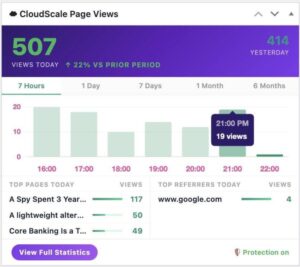
CloudScale PageViews: Fix WordPress Analytics Behind Cloudflare
If you run a WordPress site behind Cloudflare, your page view numbers are lying to you. Jetpack Stats, WP Statistics, Post Views Counter and nearly every other WordPress analytics plugin share the same fatal flaw: they count views on the server. When Cloudflare serves a cached HTML page (which is the entire point of using […]
Read more →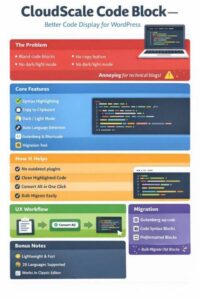
CloudScale Code Block Plugin: Syntax Highlighting for WordPress
If you run a technical blog on WordPress, you know the pain. You paste a markdown article with fenced code blocks, Gutenberg creates bland core/code blocks with no syntax highlighting, no copy button, no dark mode. You end up wrestling with third party plugins that haven’t been updated in years or manually formatting every code […]
Read more →
WordPress Database & Media Cleanup Plugin: Free Guide
If you run a WordPress site for any length of time, the database quietly fills with junk. Post revisions stack up every time you hit Save. Drafts you abandoned years ago sit there. Spam comments accumulate. Transients expire but never get deleted. Orphaned metadata from plugins you uninstalled months ago quietly occupies table rows nobody […]
Read more →What Is Minification and How to Test If It Works
1. What is Minification Minification is the process of removing everything from source code that a browser does not need to execute it. This includes whitespace, line breaks, comments, and long variable names. The resulting file is functionally identical to the original but significantly smaller. A CSS file written for human readability might look like […]
Read more →
CloudScale Free WordPress Backup & Restore Plugin Guide
I’ve been running this blog on WordPress for years, and the backup situation has always quietly bothered me. The popular backup plugins either charge a monthly fee, cap you on storage, phone home to an external service, or do all three. I wanted something simple: a plugin that makes a zip file of my site, […]
Read more →
Apache Kafka 4.x: What KRaft and ZooKeeper Removal Mean
There is a version of the Apache Kafka story that gets told as a series of press releases. ZooKeeper removed. KRaft promoted. Share groups landed. Iceberg everywhere. Each headline lands cleanly, and then platform teams go back to their actual clusters and wonder what any of it means for them. This post is the other […]
Read more →
Java’s NullPointerException Problem: Causes and Fixes
Every Java developer has seen it. The stack trace that ends conversations. The production incident that ruins a Friday afternoon. The crash that leads to the post-mortem nobody wants to write. NullPointerException. Three words that have probably cost the industry more money, time, and credibility than any other single class of bug in software history. […]
Read more →
macOS Screenshots to Clipboard: 4 Steps to Fix Your Workflow
If you’re like me, you probably take dozens of screenshots daily for documentation, bug reports, or quick sharing with colleagues. The default MacOSX behavior of saving screenshots as files to your desktop can create clutter and add an extra step to your workflow. There’s a better way. 1. The Quick Solution Instead of using Cmd […]
Read more →
Why TOGAF Fails Modern Enterprise Architecture
You can survive on it for a while. You definitely should not build a mission around it. 1. The analogy nobody asked for, but everyone deserves Potatoes are incredible. They are calorie dense, resilient, cheap, and historically important. They are also completely useless for space travel. No propulsion, no navigation, no life support, no guidance […]
Read more →
WordPress XMLRPC.PHP Brute Force Testing Guide for macOS
A Comprehensive Security Testing Guide for Mac Users 1. Introduction WordPress xmlrpc.php is a legacy XML-RPC interface that enables remote connections to your WordPress site. While designed for legitimate integrations, this endpoint has become a major security concern due to its susceptibility to brute force attacks and amplification attacks. Understanding how to test your WordPress […]
Read more →