
AWS CLI: ZSP: Keeping AWS Keys Out of Plaintext on Your Mac
Zero Standing Permissions for AWS keys on a Mac means no readable long lived key sits in ~/.aws. Tools like aws cli zsp seal each key with the Secure Enclave, require Touch ID, and give the AWS CLI only an STS session that expires on its own, by default after one hour.
AWS CLI: ZSP: Keeping AWS Keys Out of Plaintext on Your MacAndrew Baker's Technology Blog Posts, 20/Oct/2026
https://andrewbaker.ninja/2026/10/20/aws-cli-zsp-keeping-aws-keys-out-of-plaintext-on-your-mac/
A free, open source macOS tool that takes long lived AWS keys out of ~/.aws, seals them with the Secure Enclave, and asks for Touch ID before any of them is used.
Open a terminal on almost any developer’s Mac and type cat ~/.aws/credentials. Mine printed three AWS access keys and secrets in plain text. Anything running as me could read that file: a compromised npm package, a VS Code extension, an AI coding agent, a backup that ends up somewhere it should not, or a screenshot in a support ticket. None of those programs needs to ask first, and nothing tells me afterwards.
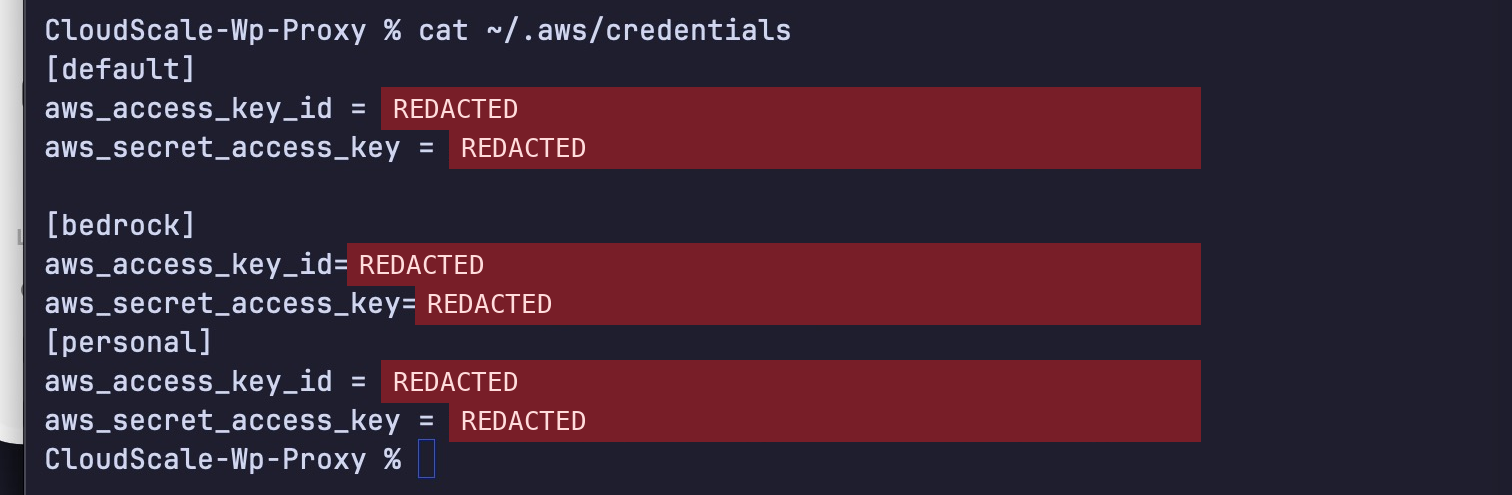
I built aws-cli-zsp (“AWS CLI: ZSP”, for Zero Standing Permissions, with the caveat explained in section 1) to change that without changing how I work. After it runs, ~/.aws/credentials holds no keys, the AWS CLI and every SDK work as before, and the first command each hour asks for Touch ID. It is MIT licensed, written in Swift, and the source is at andrewbakercloudscale/aws-cli-zsp.
This article covers what the tool does, how it works, and, more importantly, what it does not protect against.
1. What “Zero Standing” Means Here
Strictly speaking, this tool does not remove standing IAM permissions. The IAM user still exists, its access key still exists, and its permissions are still attached. Removing those entitlements is a different job, usually done with SSO, just-in-time roles and short lived credentials.
What aws-cli-zsp removes is the ability of ordinary software on your Mac to use a long lived key at any time without anyone noticing. Three things change:
- The key is sealed by the Mac’s Secure Enclave. Opening it needs Touch ID, whichever program asks.
- The AWS CLI and SDKs never receive the long lived key. They receive an STS session that lasts an hour by default (15 minutes to 12 hours, per profile), and one Touch ID covers that hour.
- Every key write, session, use and refusal is recorded in an audit trail that names the program that asked.
The session is time limited, not privilege limited. A GetSessionToken session carries the same permissions as the IAM user it came from, and it can call AssumeRole if that user’s trust relationships allow it. If your IAM user has broad permissions, a stolen session has broad permissions until it expires. Keep the access keys you use narrow, and use short sessions.
2. What It Looks Like
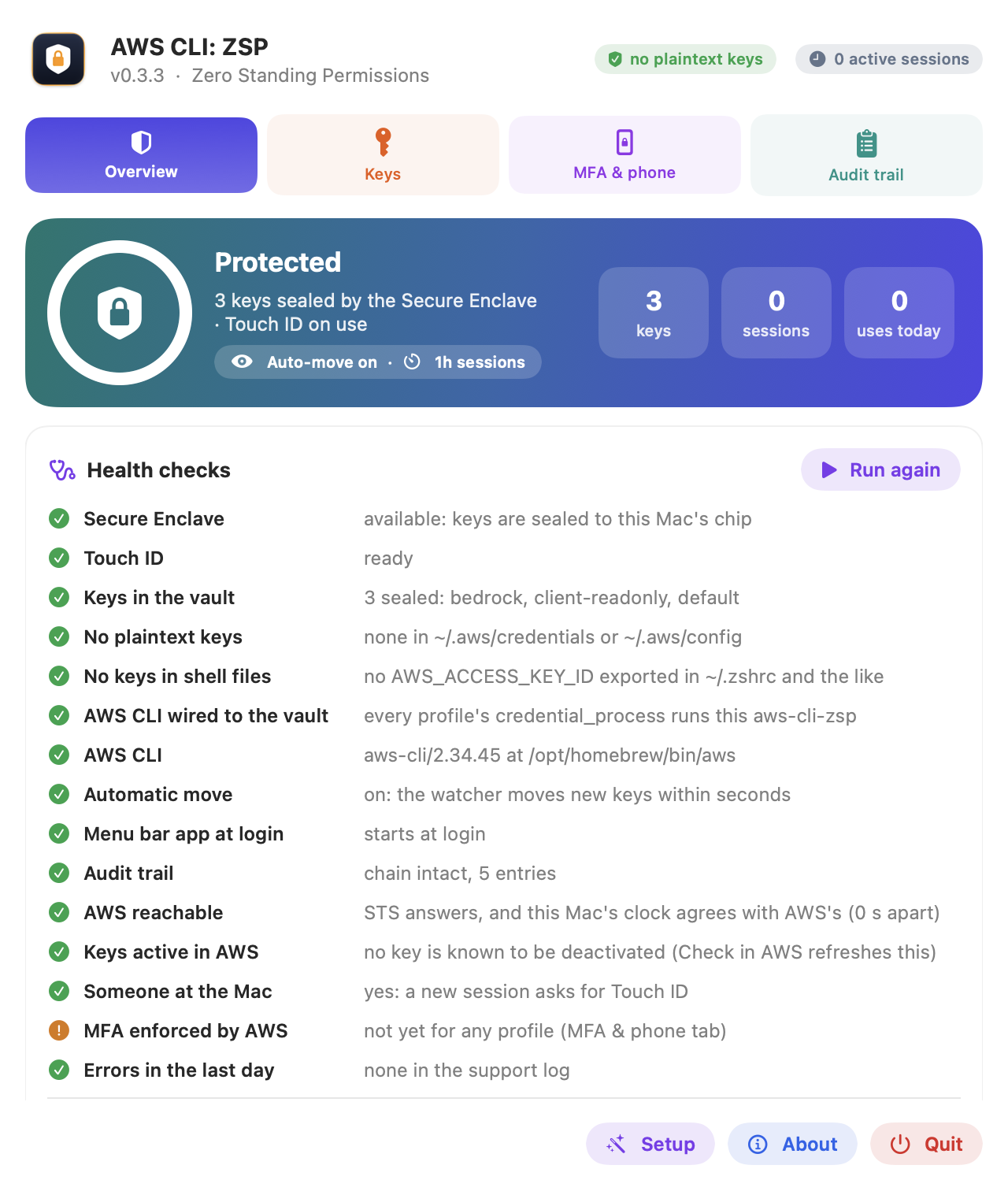
The tool lives in the menu bar as a shield.
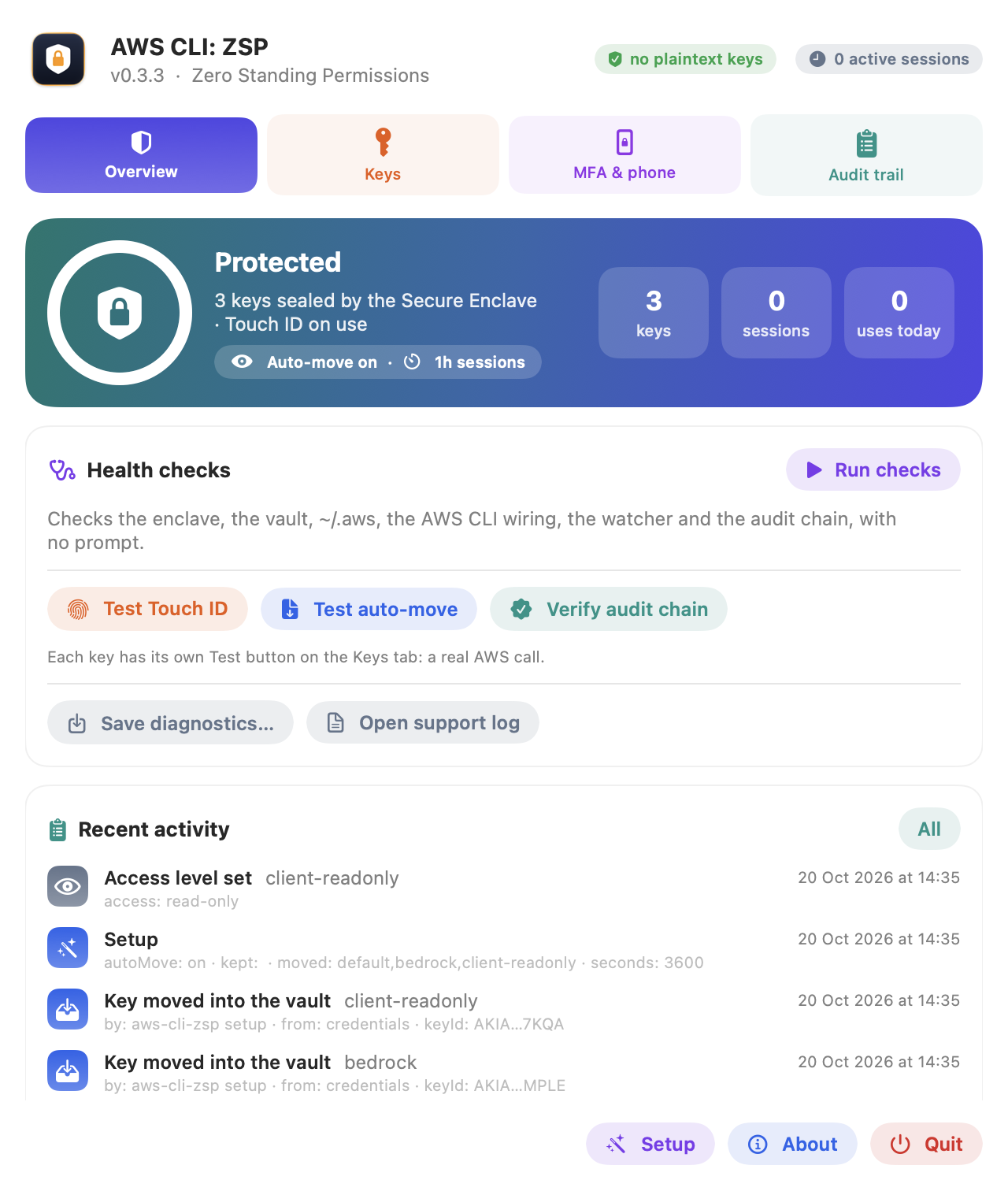
The Overview tab says whether the keys are protected, how many are in the vault, which sessions are live, and what was used today. Health checks exercise each moving part without touching your keys: Test Touch ID, Test auto-move, Verify audit chain.
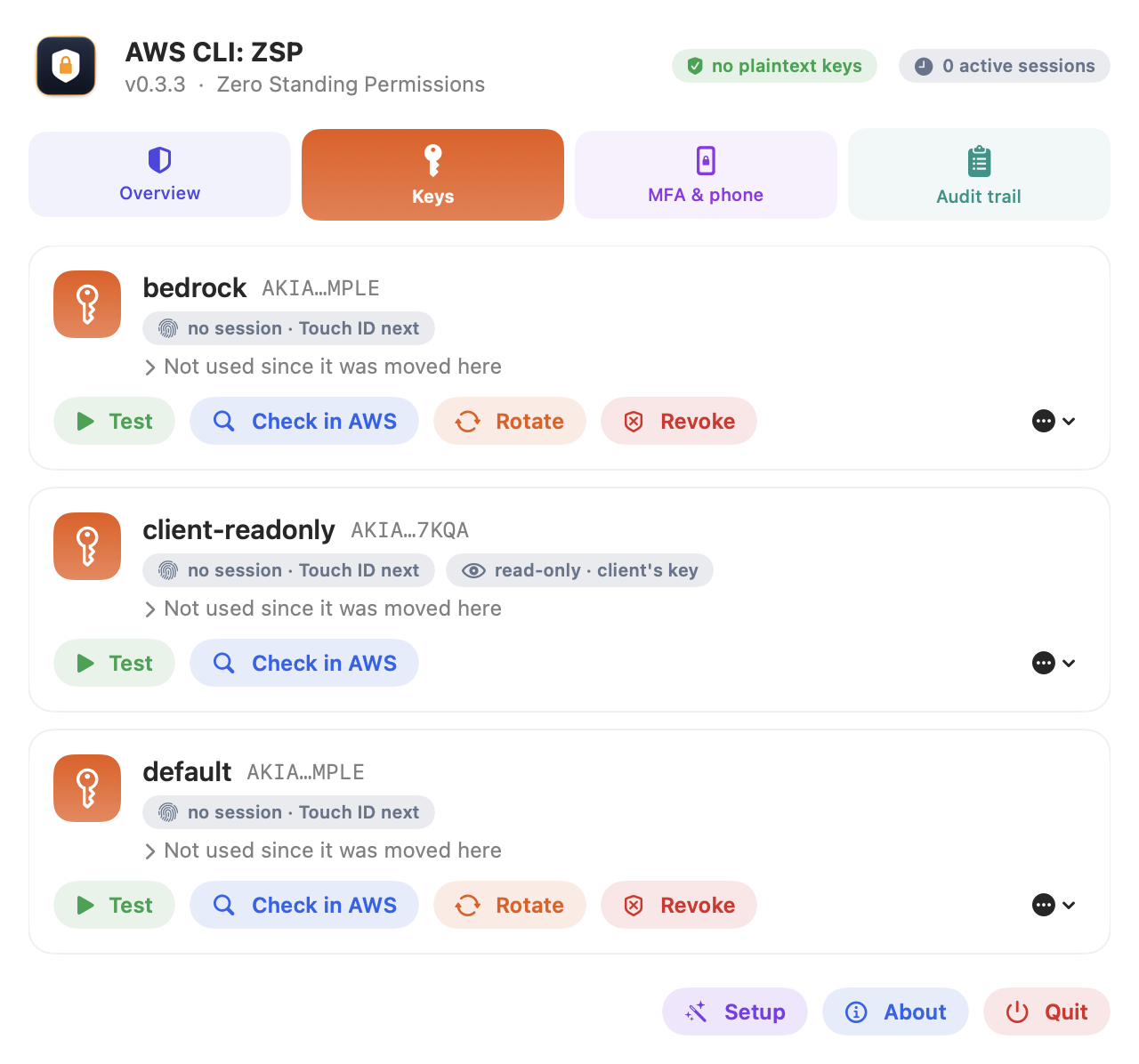
The Keys tab has one card per key, showing its session state, last use and the command that used it. Test makes a real AWS call. Check in AWS asks IAM who the key belongs to and when AWS last saw that user’s keys used. Rotate creates a new key, verifies it, swaps it into the vault, and only then deletes the old one. Revoke kills every session already issued for the key.
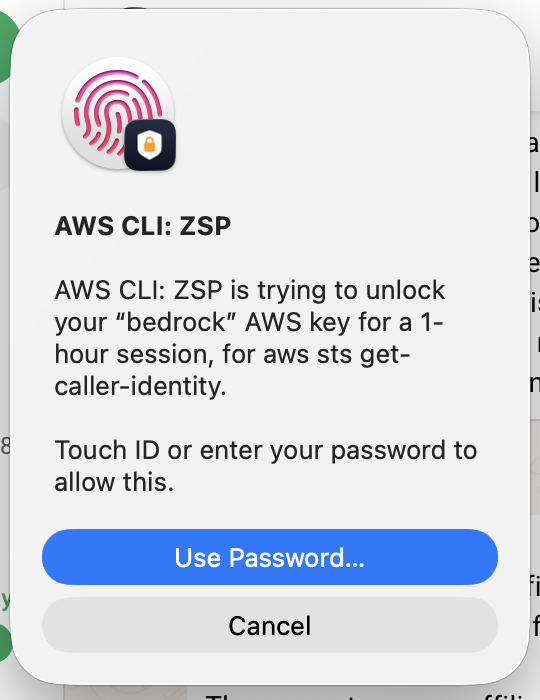
The first command each hour shows a Touch ID prompt that names the key, the session length and the command that asked. That detail matters. A prompt that says “something wants your AWS key” trains you to click yes. A prompt that says “aws s3 rm wants your production key” when you did not type aws s3 rm is one you will refuse.
3. How It Works
3.1 Catching keys written to ~/.aws
A launchd agent watches both AWS files and runs the importer when either changes, with a sweep every five minutes in case a change was missed. The importer seals the key, reads the sealed copy back and compares it, and only then removes the key from the file and points the profile at the tool’s credential_process.
sequenceDiagram
    participant You as aws configure
    participant File as ~/.aws/credentials
    participant LD as launchd
    participant Z as aws-cli-zsp
    participant SE as Secure Enclave vault
    You->>File: writes access key and secret
    File-->>LD: file changed
    LD->>Z: import --auto
    Z->>SE: seal the key (public key only, no prompt)
    Z->>SE: read it back and compare
    SE-->>Z: matches
    Z->>File: remove the key
    Z->>File: profile gets credential_process = aws-cli-zsp
    Z->>Z: audit: key moved into the vault
This is detection and automatic remediation, not prevention. A key written to disk exists in plaintext from the moment it is written until the watcher removes it, which is usually seconds. Malware running as your user could read it in that window. What the watcher does is stop the key persisting: nothing is left on disk after that short window, and every move is logged.
3.2 Where the keys live
Each access key is encrypted (P-256 ECDH, HKDF-SHA256, AES-GCM, bound to its profile name) to a Secure Enclave key created with user presence required. The enclave will not perform the decryption until you approve with Touch ID, and the enclave key cannot leave the chip. Copy the vault folder to another Mac and you have copied ciphertext.
Sessions and the audit anchor use a second enclave key that needs no prompt, so an hour’s commands do not ask again. The long lived keys need Touch ID every time they are opened.
I first tried ordinary Keychain items and dropped them. macOS binds a Keychain item made by an app without an Apple Team ID to that build’s exact code hash, so every update triggered a login password dialog for the app’s own keys. The Secure Enclave avoids that and enforces the check in hardware rather than in a dialog.
3.3 How the AWS CLI gets credentials
The AWS CLI and every AWS SDK support credential_process, a command that returns JSON credentials. aws-cli-zsp is that command. There is no wrapper to remember, and Terraform, boto3, the Java SDK and anything else reading the standard config work unchanged.
flowchart TD
    A["aws s3 ls --profile bedrock"] --> B["credential_process: aws-cli-zsp"]
    B --> C{"Session cached and not expired?"}
    C -->|yes| D["Return it, no prompt"]
    C -->|no| E{"Someone at the Mac?"}
    E -->|yes| F["Touch ID opens the key"]
    E -->|"no: locked or idle"| X["Fail at once: ask for a phone code"]
    F --> G["STS GetSessionToken"]
    G --> H["Check the account pin"]
    H --> I["Cache the session, drop the key"]
    I --> D
The key is open only for the one STS call. Everything after that runs on a session that expires.
Revoke works by attaching an IAM policy that denies any token issued before the revoke time (aws:TokenIssueTime). It stops sessions already issued, including any a thief is holding, but only where that policy can be attached. Key owners who cannot modify IAM will see Revoke replaced by a read-only notice.
4. Making AWS Itself Require MFA
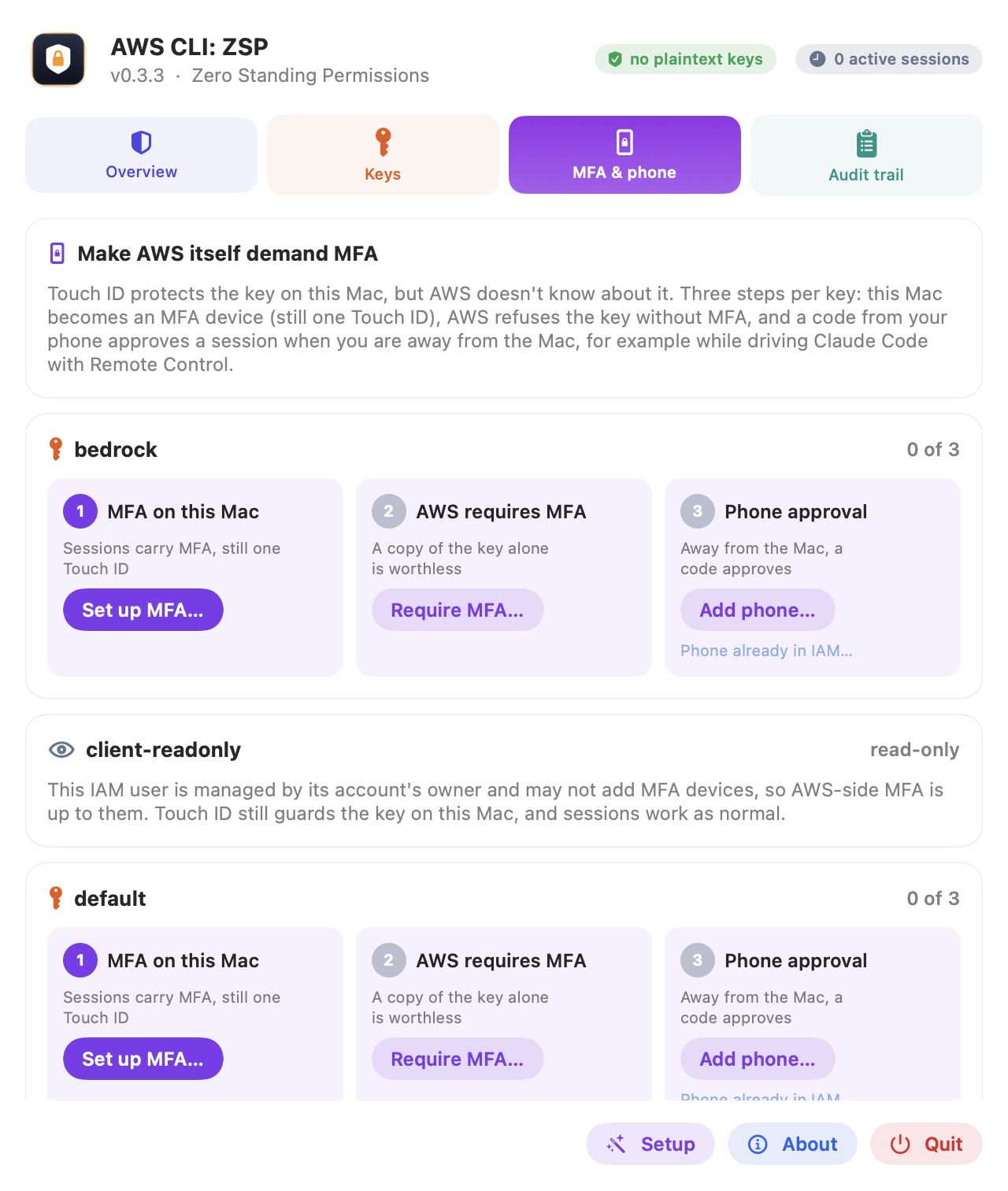
Touch ID protects the key on this Mac. AWS has no idea Touch ID exists, so a copy of the key that escapes some other way is still honoured. The MFA & phone tab closes that gap in three steps per key, each with an undo option.
- MFA on this Mac. The Mac becomes a virtual MFA device for the key’s IAM user. Its seed is sealed in the vault with the key, so every session carries MFA and still costs one Touch ID.
- AWS requires MFA. An inline policy denies the key’s actions unless MFA is present, apart from getting a session. A bare copy of the key is then refused by AWS. A second statement requires MFA from the last five minutes for creating keys, MFA devices or policies, so a leaked hour-long session cannot mint something permanent. aws-cli-zsp refuses to apply this until an MFA session from the Mac has worked, so it cannot lock you out.
- Phone approval. Covered in section 5, with its own threat model.
Two details of this policy need care. AWS documents a difference between Bool and BoolIfExists for aws:MultiFactorAuthPresent, and the wrong operator can let requests signed with long lived credentials through. The policy must also stop its own user from weakening it: a user with IAM permissions who holds the key should not be able to delete the MFA statement with that same key. The exact policy JSON is in the repository at docs/mfa-policy.json, and the tests check both points. [Link to the file once published.]
Keys a client gives you often belong to an IAM user that may read the account but not change itself. aws-cli-zsp handles these without changing anything in the client’s account. Sessions need no IAM permission, so every command works. Check in AWS asks IAM what the user may do, and anything it may not do (rotate, revoke, MFA) is not offered. The card reads read-only · client’s key.
5. Approving From Your Phone
I drive Claude Code from my phone, and that breaks the Touch ID model. The AWS command runs on the Mac, the prompt appears on the Mac, and I am not there. A prompt nobody can see just hangs.
So when the screen is locked, or nobody has touched the keyboard or trackpad for five minutes, a new session fails at once with a message telling the caller what to do. With phone approval enabled, the fix is a six digit code from any authenticator app.
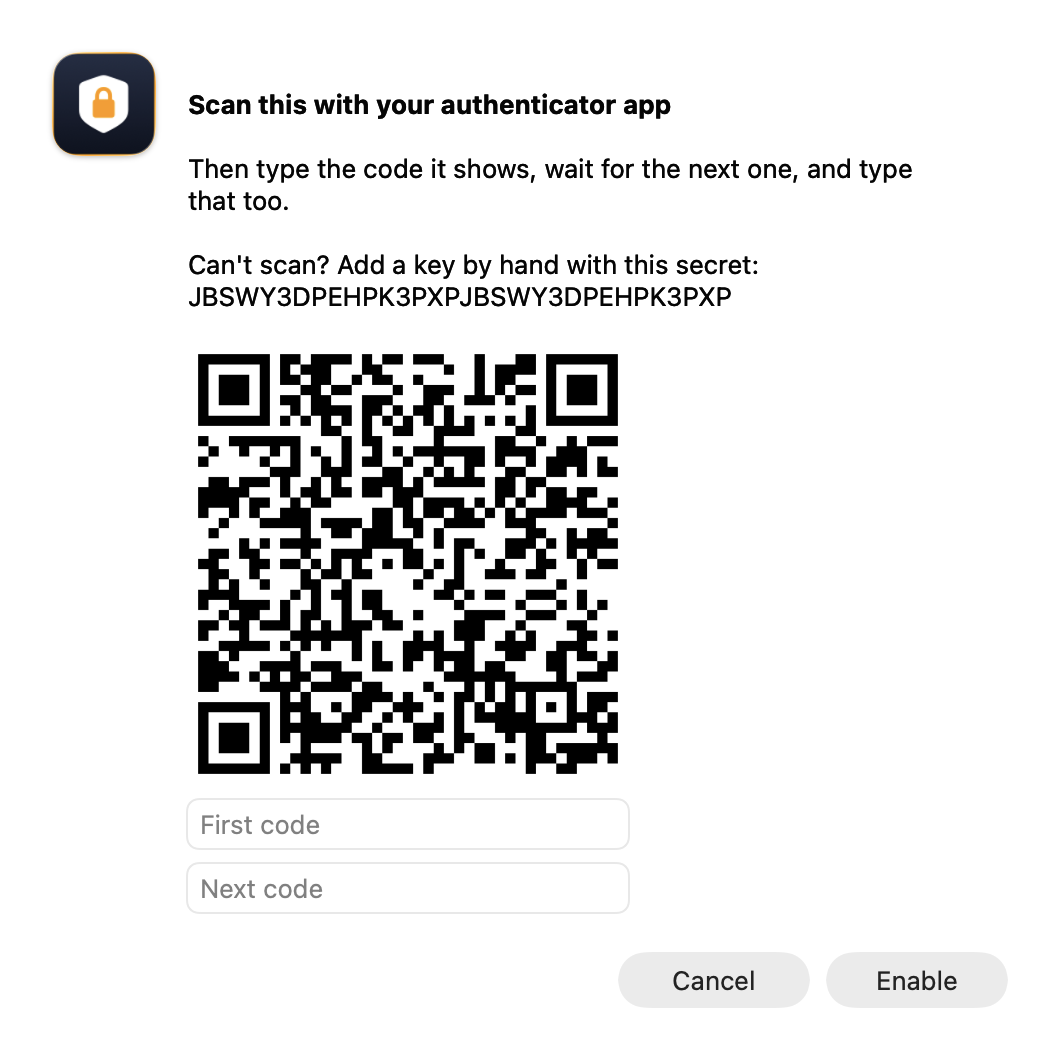
sequenceDiagram
    participant P as You, on your phone
    participant CC as Claude Code on the Mac
    participant Z as aws-cli-zsp
    participant STS as AWS STS
    P->>CC: deploy the stack to staging
    CC->>Z: aws ... (credential_process)
    Z-->>CC: nobody at the Mac: ask for a code
    CC->>P: I need the 6 digit code for bedrock
    P->>CC: 123456
    CC->>Z: aws-cli-zsp approve --profile bedrock 123456
    Z->>STS: GetSessionToken with the MFA code
    STS-->>Z: 1 hour session
    Z-->>CC: approved
    CC->>Z: aws ... (cached session, no prompt)
This is a weaker boundary than Touch ID, and it should be described that way. Approving by code needs a copy of the key that opens without Touch ID. That copy is still sealed to the Mac’s chip and carries no MFA seed, and aws-cli-zsp refuses to create it until the AWS MFA policy in section 4 is in place. A program that reads that copy gets a key AWS refuses without a current code. AWS checks the code, not aws-cli-zsp, and each code is good for 30 seconds and rejected on reuse. AWS IAM MFA supports codes only, so there is no push approval.
Three limits follow. First, the approval covers the profile, not the command. One code buys an hour of access for that profile, and any command that runs during that hour can use it. Second, the code passes through whatever asked for it. If that is an AI agent, the code sits in its context and possibly its logs, so an agent that is compromised or confused could spend your code on something you did not intend. Third, the approval does not show you what you are approving. A future version should show the AWS account, profile, requesting process and duration on a separate screen that the agent cannot read, and take the code there instead.
Until then, I use phone approval for profiles where a one-hour session on that account is acceptable, and I turn it off for production.
6. The Audit Trail
Every key moved in, session issued, session used, rotation, revocation, MFA change and refusal is written to audit.jsonl, with the command that asked. Each entry includes the hash of the one before it, and the newest hash is sealed in the vault. Editing, deleting or truncating the file makes Verify chain fail.
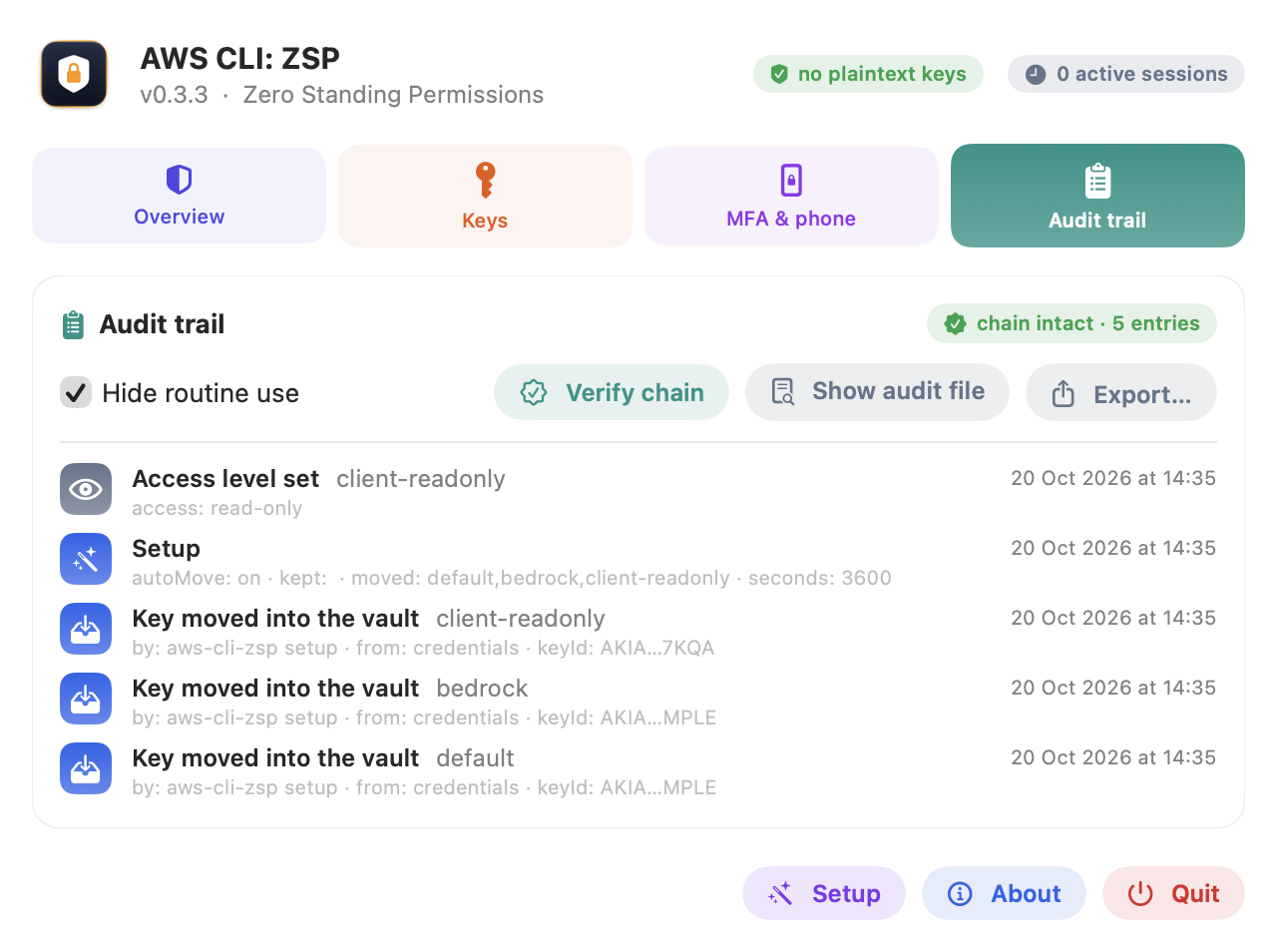
The audit trail is tamper evident, not tamper proof. Malware running as your user can rewrite the local file and the vault anchor is also under that user’s control. The record it cannot touch is CloudTrail, so the audit trail is the local view and CloudTrail is the authoritative one.
Export… writes a redacted report for support: the audit trail, the support log’s errors, the health checks, the profiles and the credential_process wiring. Secrets, session tokens and MFA seeds are removed, key ids are masked, and account ids keep only their last four digits.
The health checks look for the problems people actually hit: an export AWS_ACCESS_KEY_ID=… in ~/.zshrc (the AWS CLI prefers it to any profile, so the vault is silently bypassed), a credential_process line pointing at an old copy of the app, a Mac clock more than four minutes off (AWS rejects signed requests beyond five), AWS CLI version 1, a closed lid with no Touch ID, and a key someone deactivated in the IAM console. Problems a single command can fix have a Repair button.
7. What It Does Not Protect Against
| Threat | Protected? |
|---|---|
Stolen laptop, backup, or a copy of ~/.aws or the vault folder | Yes. Nothing in them works off this Mac’s chip. |
A script, package or tool that reads ~/.aws/credentials | Yes. The file holds no keys. |
| A program that wants your long lived key | Yes. Only the Secure Enclave can unseal it, and only after Touch ID. |
| A key copied off the Mac some other way | Yes, with MFA enforced. AWS refuses it without a code. |
| Malware running as you swapping your key for its own | Refused. Each profile is pinned to its AWS account and IAM user. |
| Malware running as you, while a session is cached | No. It can use that session until it expires. |
| Malware running as you, using a session from a phone approval | No. It can use that session for its full duration. |
Malware running as you rewriting ~/.aws/config | Not prevented. The health checks will show it. |
| Malware running as you rewriting the local audit trail | Not prevented. CloudTrail is the record it cannot touch. |
The rows marked “no” come from one fact: malware running under your macOS user can do anything you can do without Touch ID. A cached session is usable without a prompt by design, so anything running as you can use it until it expires. That is the same trade-off aws-vault makes. A shorter session, Clear sessions or Revoke narrows the window. What malware never gets is the long lived key.
The account pin is a separate protection. Sealing a key needs only the enclave’s public key, so malware could store a key for its own AWS account under your profile’s name, and your next aws s3 cp backup.zip s3://… would upload to the attacker’s bucket. The first session for each profile records its account and IAM user in the login Keychain, which only aws-cli-zsp can change without a macOS prompt. Every later session is checked against that record. A mismatch gets no credentials and a red entry in the audit trail.
8. Should You Use Long Lived Keys At All?
For new workforce access to AWS, use IAM Identity Center. Federate your identity provider, issue short lived role credentials, and do not create IAM users for people. That removes the long lived key entirely, and it is the better starting point for any organisation.
aws-cli-zsp is for the cases where IAM access keys remain necessary: some third-party accounts, customer-managed IAM users, legacy automation that cannot assume a role, and keys a client has issued you. In those cases the key exists whether or not you like it, and the question is where it lives. ZSP keeps it out of plaintext, gates each use with Touch ID, limits sessions to an hour by default, and records what happened.
9. Installing It
You need macOS 14 (Sonoma) or later, a Mac with a Secure Enclave (any Apple silicon Mac, or an Intel Mac with a T2 chip), and the Xcode command line tools (xcode-select --install). It builds from source:
git clone https://github.com/andrewbakercloudscale/aws-cli-zsp.git
cd aws-cli-zsp
bash scripts/build-app.sh --install
That runs the test suite, builds and signs the app, copies it to ~/Applications, and runs aws-cli-zsp install, which links the command, loads the watcher and starts the menu bar app at login. Nothing in ~/.aws changes until you say so. The first launch opens Setup, which lists the keys it found. You choose which to move, whether keys written later move automatically, and the session length. Unselected keys stay in plain text and are never moved automatically.
Then aws --profile bedrock s3 ls works as before, and the first command each hour asks for Touch ID. Without the UI:
aws-cli-zsp setup --move default,bedrock --keep personal --auto on --duration 1h
aws-cli-zsp doctor
aws-cli-zsp uninstall --restore-plaintext puts everything back as it was.
10. Try It, and Tell Me What Breaks
aws-cli-zsp is free and MIT licensed. If you have ever typed cat ~/.aws/credentials and winced, give it an afternoon. If it gets something wrong, or you find a way to lose a key that it does not catch, open an issue on GitHub. Pull requests are welcome.