Banking Malware on Android: How to Spot It and Stay Safe
Published by Andrew Baker and the Capitec App Security Team | March 2026
For media enquiries and quotable statistics from this article, see the Press Summary at the end.
Every day, approximately 15 million South Africans open the Capitec app to check their balance, pay a bill, or send money to a loved one. It is fast, it is convenient, and in the wrong hands, that convenience is exactly what sophisticated fraudsters are trying to exploit. Banking malware is not an abstract threat or a distant possibility. It is the fastest growing category of mobile cybercrime on the planet, and South Africa is squarely in its crosshairs. According to SABRIC’s 2024 Annual Crime Statistics, digital banking fraud in South Africa surged 86% in 2024, rising from 52,000 reported incidents to nearly 98,000, with losses reaching a record R1.888 billion in a single year. Banking apps specifically accounted for 65% of all digital fraud cases, with losses exceeding R1.2 billion. These are not statistics about other people. They are about ordinary South Africans going about their lives, who were targeted, deceived, and robbed.
It is tempting, when faced with numbers like these, to reach for comfortable but ultimately false explanations. That fraud is a kind of natural selection and that whatever you do, some people just can’t be saved from fraud losses. That it is fundamentally a client education problem. That when someone is defrauded, it is, at its core, always their own fault. None of these framings are true, and more importantly, none of them lead to solutions. Fraud is a complex engineering challenge, and it deserves to be treated as one. The answer is not to generate millions of false positives that erode client trust and flood operations teams with noise. It is to build targeted, meaningful interventions that make the client feel genuinely safe, not surveilled, not suspected, and not blamed. That kind of precision does not come for free. It requires serious effort and a modern architecture built from the ground up for the threat landscape of today, not the assumptions of a decade ago.
This article explains exactly what malware is, how it spreads, what it does to your phone, and most importantly, what Capitec is doing to stop it before it ever reaches you.
1. What is malware, and why should you care?
Malware is software that is designed to do something harmful. The word is short for malicious software, and it covers everything from viruses and spyware to the highly sophisticated banking trojans that target your financial apps. Banking malware is a specific and particularly dangerous type. Think of your banking app as a locked safe that you carry around in your pocket. Only you should have the key. Banking malware is designed to quietly make a copy of that key and hand it to a stranger, without you ever noticing. Once installed, it can give a fraudster complete, real time control of your phone. Everything you see, everything you type, and every app you open can become visible to them.
The question most people ask first is whether this is an Android problem or an Apple problem, and the honest answer is that both platforms carry risk, though in very different ways. The malware described in this article primarily targets Android devices. This is because Android was built on a philosophy of openness, allowing users to install apps from outside the official Google Play Store, a practice known as sideloading. That flexibility was one of Android’s great selling points, enabling innovation and choice. But it also created an attack surface that criminals have exploited relentlessly. According to Kaspersky’s Mobile Malware Threat Report, banking trojan attacks on Android smartphones surged 196% in 2024, rising from 420,000 to over 1.24 million incidents globally. That momentum has only continued: Kaspersky’s 2025 data shows a further 56% increase in trojan banker attacks year on year, and in the first half of 2025 alone, more than 22 million attacks were recorded against Android users globally.
Apple’s iOS devices are more restrictive by design, making this specific type of malware significantly harder to deploy on iPhones. However, iOS users are not immune. Phishing scams, fake websites, and social engineering attacks target Apple users just as aggressively, and in 2024 Kaspersky researchers discovered the first known image scanning malware, designed to steal cryptocurrency recovery phrases, that successfully infiltrated the Apple App Store itself. Apple removed the infected apps in early 2025. The platform does not determine your safety. Your vigilance does.
2. The scale of the global threat
To understand why this problem is so serious, the numbers speak plainly. Kaspersky alone blocked 33.3 million mobile malware attacks globally in 2024, an average of 2.8 million every single month, and identified over 1.1 million malicious app installation packages, nearly 69,000 of which were banking trojans. New Android malware variants were emerging at a rate of 4,000 new variants per day at peak periods in 2024. The global cost of cybercrime, including malware, is projected to reach $10.5 trillion in 2025. Closer to home, while SABRIC reports that overall financial crime losses in South Africa dropped 18% in 2024, a positive result attributed to stronger bank side defences, digital fraud cases nearly doubled and criminals are rapidly adopting AI tools to maintain their edge. The battle is not over. It is escalating.
3. This is what it looks like in real life
The statistics are striking, but nothing makes this threat more real than understanding what it looks like when it happens to an ordinary person. MyBroadband reported on a case shared by Capitec that illustrates exactly how these attacks unfold. A woman received a WhatsApp message from a neighbour about an advert on social media offering free satellite TV channels. She clicked on it, filled out a form, and received a call from a consultant who guided her through downloading an app to access the channels. The app was malicious. The moment she opened it, her phone froze and shut down. By the time it restarted, fraudsters had already cleaned out her bank account, having used her face to access the banking app while the screen was frozen and she could see nothing. Her phone had tried to warn her. She proceeded anyway, coached by the consultant on the other end of the line.
This is not an unusual story. It is precisely the playbook that Capitec’s security team has documented, studied, and built defences around. Criminals use fake ads and live consultants to walk victims through every step of the installation, overriding their instincts and their phone’s own warnings at each turn.
4. How do you get infected?
Malware does not arrive uninvited. There is almost always a human interaction that makes it possible, and fraudsters are experts at manufacturing that moment. It usually starts with an advertisement on Instagram or Facebook, a deal that looks almost too good to be true. A heavily discounted airline ticket, a voucher of significant value, a limited time offer from a brand you recognise and trust. These ads are deliberately targeted. Fraudsters study browsing behaviour and serve tailored offers to the people most likely to engage. The brands being impersonated are household names, chosen precisely because familiarity lowers your guard. Among those currently being used against South African clients are South African Airways, Woolworths, Qatar Airways, DSTv, Emirates, FlySafair, Takealot, Makro, SARS Mobile eFiling, Booking.com, Ethiopian Airlines, and My SAPS.
Once you engage with the ad, you are directed to communicate with a supposed representative of that brand, almost always via WhatsApp or Telegram. The conversation feels professional and legitimate, and in many cases the fraudster will call you directly, building trust and urgency in real time. Research from Kaspersky confirms that cybercriminals most commonly distribute banking trojans by spreading links via SMS and messaging apps, and through malicious attachments sent through messenger platforms. It is also worth knowing that email and SMS are just as capable of delivering malware as social media. You may receive a phishing email with a link to a fake website, or an SMS claiming your account has been suspended and urging you to click immediately. Kaspersky documented one such case in 2024 where victims received what appeared to be a shipment tracking notification and clicked through to malware. Malwarebytes has similarly noted that malicious apps are increasingly distributed through Telegram, Discord, and other unregulated channels, masquerading as modified versions of legitimate apps. The delivery method evolves constantly. The goal never changes: to get you to download something you should not.
5. What the installation process actually looks like
Understanding how malware gets onto your phone is your single most powerful defence, because the process is not invisible — your phone actually tries to stop it at every step. The problem is that by the time most people realise something is wrong, they have already been coached past every one of those warnings.
It almost always begins on social media. A fraudster places a targeted advertisement on Instagram or Facebook, typically impersonating a household brand to exploit the familiarity and trust those names carry. The offers are deliberately compelling: deeply discounted airline tickets, high-value vouchers, limited-time deals from companies you recognise and buy from regularly. These are not random choices, the brands are selected precisely because you are more likely to click on something that looks like it comes from a name you already trust.
Engaging with the ad takes you into a conversation with a supposed representative of that brand, almost always via WhatsApp or Telegram. In many cases, the fraudster will also call you directly. This is deliberate. A live voice on the other end of the line creates a sense of legitimacy and urgency that a text message alone cannot, and it allows the fraudster to guide you through each step in real time, talking over your instincts and your phone’s own warnings as they arise.
The fraudster then sends you a link to a website that looks convincingly real, complete with the brand’s logo, colours, and language. That site offers a download link for what it presents as the brand’s official app. This is the malware.
The moment you try to download it, your Android device displays its first security warning: “For your security, your phone is not allowed to install unknown apps from this source.” This is your phone fighting for you. At this exact moment, the fraudster on the other end of the line will calmly instruct you to dismiss the warning and grant your browser permission to install apps from unknown sources. This is the moment to stop and hang up.
If you continue, a second warning appears as the file downloads: “This type of file can harm your device. Do you want to keep it anyway?” Once you have downloaded the file, Android presents one final prompt asking whether you want to install the application, sometimes listing the permissions it is requesting. Each of these warnings is a genuine opportunity to walk away.
If you proceed through all of them and launch the app, the fraudster gains full, real-time control of your device. It is the digital equivalent of handing a stranger your unlocked phone, your banking app open, and walking away. Everything you see, everything you type, and every app you open is now visible to them — and as the real-life case described in Section 3 shows, they can move faster than you can react.
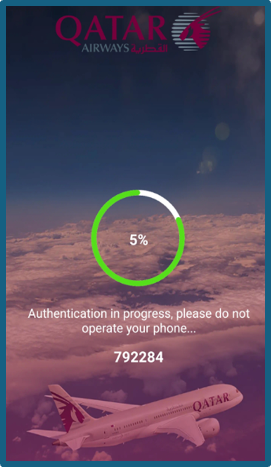
The figures below illustrate each stage of this process, from the first WhatsApp conversation (Figure 1) through the fake website (Figure 2), the two Android system warnings (Figures 3 and 4), the installation step (Figure 5), and the full-screen image the malware uses to hide the fraudster’s activity once control has been established (Figures 6 and 7).
Figure 1 Client: Fraudster on WhatsApp
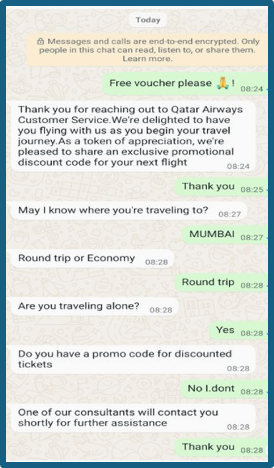
Figure 2: Fake Website
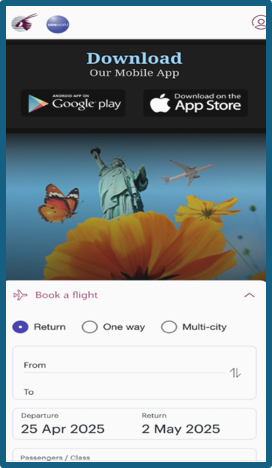
Figure 3: Android System Warning 1
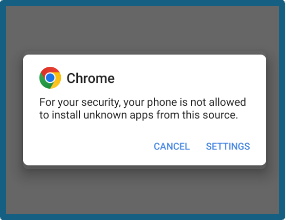
Figure 4: Android System Warning 2
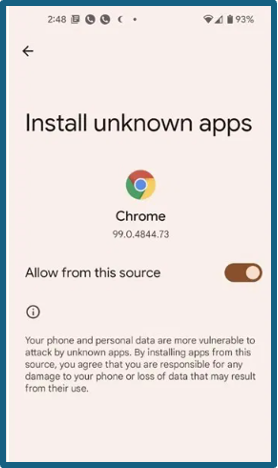
Figure 5: Installing the Malware
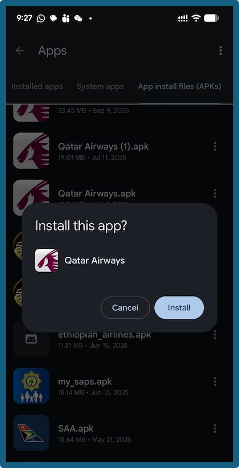
Figure 6: Malware Full-Screen Image 1
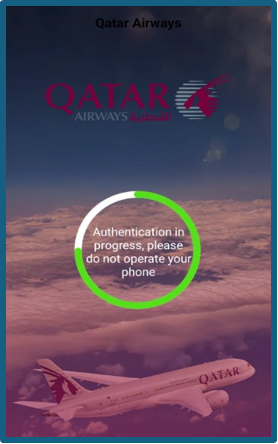
Figure 7: Malware Full-Screen Image 2
6. What happens once it is installed
Once the malware is running, the fraudster moves quickly. They take complete remote control of your device, exactly as if it were sitting in their hands. They display a full screen image over everything on your screen, hiding their activity from you entirely while they work. From there, they can install additional and more dangerous malware that embeds itself even deeper into the Android operating system, intercept communications between apps at a system level, delete apps including your Google Play Store or Huawei AppGallery to prevent you from recovering, and block your banking app from detecting that anything is wrong. At other banks that still rely on one time passwords, the malware can intercept those too, handing the fraudster everything they need to drain an account. According to Malwarebytes, modern banking trojans use live screen streaming and on device fraud techniques to conduct transactions inside a victim’s own banking session, an approach specifically engineered to sidestep device fingerprinting and many forms of multi factor authentication. This malware does not sit on the surface of your phone. It buries itself deep within the Android operating system, which is why, in serious cases, a full factory reset is the only guaranteed way to remove it.
7. Why solving Android malware is genuinely hard
It would be easy to say: just do not install suspicious apps. But the problem runs far deeper than individual choices, and understanding why matters.
Android was designed to be open. That openness, the ability to install apps from any source and not just an official store, gave Android its flexibility and drove its global adoption. But Google’s own analysis found that sideloaded apps contain over 50 times more malware than apps distributed through the Play Store. The anonymity that sideloading allows means criminals can create, distribute, and replace malicious apps faster than any security team can respond. As Bitdefender explains, sideloaded apps do not go through the rigorous checks of official app stores, and when something goes wrong, there is often nobody accountable.
The second major challenge is fragmentation. Unlike Apple, which controls updates across a limited device range, Android runs across hundreds of manufacturers, carriers, and models, and the update rollout process is often slow, particularly for budget and older phones. This leaves enormous numbers of users on versions of Android that can no longer receive security patches. Experts estimate that more than a billion users globally may be on unsupported Android versions, exposed to threats with no way to fix their phones.
Then there is the malware itself. It is professionally maintained, constantly updated, and in many cases sold as a service. Kaspersky’s research into the Mamont banking trojan found that it operates as a Malware as a Service product, enabling unrelated criminals to purchase customised variants on demand, making detection far harder. And most disturbingly, Kaspersky researchers discovered in 2025 that some malware is now being preinstalled on Android devices during the manufacturing process itself, meaning a brand new phone can arrive already infected, with no action required from the user at all.
Google is responding. Starting in 2026, Android will require all apps on certified devices to come from verified developers, and Android 15 restricts the permissions that sideloaded apps can access in ways that directly target the most dangerous attack vectors. These are meaningful steps. But they will take years to reach the full global user base, and they offer little protection to the hundreds of millions on older, unsupported devices. Banks cannot wait for the platform to catch up. They must build their own defences, and that is exactly what Capitec has done.
8. How Capitec protects you, and why it is different
Capitec’s approach to malware protection stands apart not just within South Africa but by global standards, and it begins with a decision made years ago that most banks still have not followed. Many institutions still rely on one-time passwords as a core security layer. Research consistently shows that OTP interception is now industrialised, with the capability to steal one-time passcodes no longer experimental but deployed in fraud campaigns at scale. Capitec identified OTPs as a structural vulnerability early and removed them from our security architecture entirely, long before this became widely understood. In doing so, we closed a whole category of attack that continues to devastate clients at other institutions today.
Beyond that architectural decision, the Capitec App Security team operates on the principle that the best way to defend against a threat is to understand it completely. That means obtaining the actual malware being used against South African clients, reverse engineering it line by line, and studying exactly how it works in a controlled, isolated lab environment using real Android devices. It is painstaking work, reversing thousands of lines of code and simulating the precise conditions under which the malware is designed to strike, but it means our defences are built around the real threat, not a theoretical version of it.
We operate on two core security principles: defence in depth and assumed compromise. In plain terms, this means we do not rely on a single line of defence, and we plan for the possibility that any one layer could be challenged. The first layer is the app itself: if malware is detected on your device, the Capitec app blocks access entirely, preventing fraudsters from reaching your money even if they already have full control of your phone. But we do not stop there. We have trained AI models specifically to protect clients in the event that new malware variants evolve in ways that make the detection less deterministic. These models have delivered results we are particularly proud of across a wide range of fraud types and malware variants.
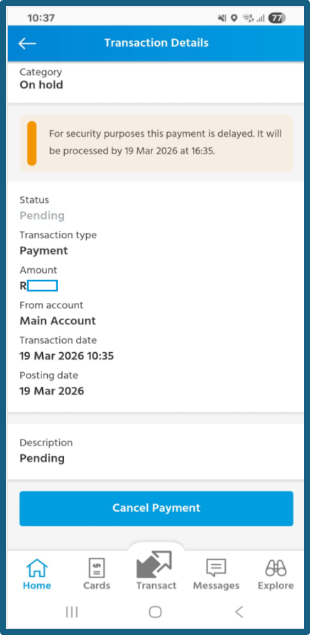
These models operate in two modes. When our systems suspect something is wrong, based on a combination of signals or unusual activity following a new app installation, certain payment channels can be temporarily restricted, limits reduced, or payments automatically delayed, giving us time to assess risk before any money leaves your account. When our models have positively identified malware, the response is more decisive: all of a client’s accounts are automatically locked, stopping fraud before a single rand is lost. To illustrate just how effective this has become, on a single day after a new malware variant was launched, Capitec automatically blocked nearly a thousand accounts, and not one cent was lost.
The results of this investment speak clearly. As reported by MyBroadband, citing SABRIC data, Capitec’s anti-fraud measures have helped reduce client losses by 66% more than the rest of the industry. Our AI powered warnings alone have prevented more than 23,000 scam payments. The prosecution of crime syndicates enabled by our fraud intelligence has resulted in the blocking of more than 70,000 mule accounts. Across all of these interventions together, Capitec clients have been protected against more than R200 million in unauthorised transactions.
Behind these numbers is a dedicated fraud task force of over 400 specialists, supported by extensive graph databases that map connections between fraudsters, identify syndicate structures, and surface vulnerabilities before they can be exploited at scale. There are sensors inside our AWS environment detecting a multitude of signals flowing from close to 15 million devices in real-time! This is not a reactive team, this is engineering excellence built into the core of what we do that works around the clock 24/7 * 365.
The technology investment goes further still. Feature Lock gives clients proactive protection against illicit transactions. Our in app real time call identification means you can verify whether you are genuinely speaking to Capitec before sharing any information or taking any action. Our generative AI features save clients more than R95 million per year, and our in app calling feature has saved clients approximately R5 million in airtime by removing the need to dial external numbers. These are not merely convenience features. Each one closes a surface that fraudsters have historically exploited.
Figures 8 and 9 show the security alerts a client sees when the app detects malware on their device. Figures 10 and 11 illustrate what a delayed payment looks like when our models flag a transaction as risky.
Figure 8 : Capitec App Security Alert 1
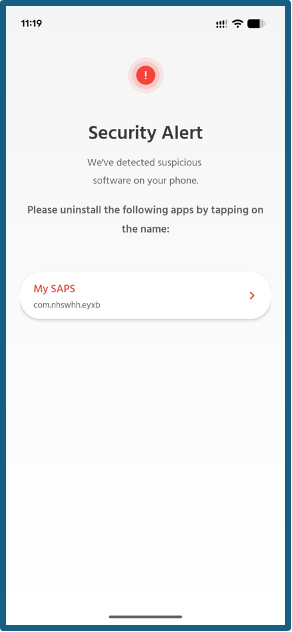
Figure 9 : Capitec App Security Alert 2
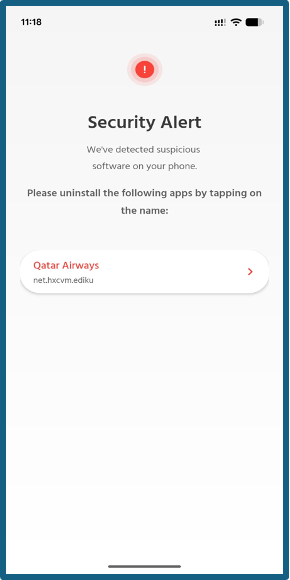
Figure 10 : Delayed Payment Notice
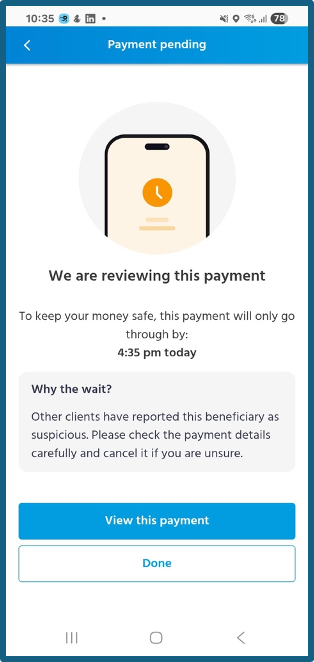
Figure 11 : Delayed Payment Transaction Details
8.2 Re-engineering the Foundation
Two years ago, Capitec made a decision that most banks would consider too complex, too disruptive, and too expensive to attempt. We looked at fraud holistically and concluded that the only way to stay ahead of it was to re-engineer the entire bank’s channel payment rails from the ground up. Not patch them. Not layer controls on top of them. Not try to inject piecemeal vendor solutions that don’t talk to each other. But rather, rebuild them with fraud prevention as a job zero principle.
The result is a fraud infrastructure that operates at a scale and speed that would have been impossible on our previous architecture. Our AI models now have access, in real time, to every single beneficiary payment made by every single Capitec client. Every rand moving from any account to any other account is continuously reviewed. The models run without pause, evaluating the full picture of who is sending, who is receiving, and whether the pattern of that movement looks legitimate.
The practical capabilities this unlocks go well beyond what most people would expect from a banking app. When our call centre agents receive intelligence from a client mid call, we can intercept and delay a payment while that conversation is still happening, acting on human intelligence in real time before money moves. We can trace funds across inter account payments as they happen, following a chain of transfers instantly rather than reconstructing it after the fact. We can stop an account before a suspicious payment even lands in it, not just after the damage is done.
We also collect and analyse device telemetry and metadata in real time, building a continuously updated picture of normal behaviour that makes anomalies easier to detect. Clients who want an additional layer of control can lock products they do not use, removing them as a potential attack surface entirely. And the pipeline of new fraud controls does not stand still. Simple, high impact innovations are shipped on a monthly basis, each one informed by what we are seeing in the fraud landscape right now.
This is what it looks like when a bank treats fraud infrastructure as a strategic asset rather than a compliance obligation.
9. Keep your app updated, always
One of the most important things you can do as a Capitec client is also one of the simplest: keep your app updated. Given that new Android malware variants were emerging at 4,000 per day at peak periods, and banking trojan attacks grew 56% in 2025 alone, the threat landscape that existed six months ago looks very different from the one today. Every update to the Capitec app carries new detection capabilities, new defences, and new responses to emerging threats. An outdated app is a less protected one. Turn on automatic updates, check the Play Store, AppGallery, or App Store regularly, and never dismiss an update prompt from the Capitec app. Every update is a new layer of armour. Do not leave it sitting in your notifications.
10. How to check if you have malware and what to do about it
If something about your phone feels wrong, trust that instinct. Look out for apps you do not recognise, a phone that is behaving strangely or acting without your input, a missing Google Play Store or Huawei AppGallery, security alerts from your banking app, or the memory of having recently downloaded an app from a link sent via WhatsApp, Telegram, SMS, or email rather than from an official app store. As Capitec has advised, never install apps from links in messages on social media, WhatsApp, or SMS, and stop immediately if your device displays any warning about a harmful or blocked app. If any of these warning signs apply, act immediately. Start by restarting your phone. If it is unresponsive, hold the power button until it reboots. Look for any app you do not recognise and uninstall it. Then check whether the Google Play Store or Huawei AppGallery is still installed, because malware sometimes removes these to make self recovery harder. If they are gone, the most reliable path is a full factory reset of your device, which will remove the malware completely. Back up your photos and important files regularly so you are never caught unprepared. And if you believe your Capitec account may have been accessed without your authorisation, contact us immediately.
11. Our commitment to you
The people behind banking malware are professionals who continuously refine their tools, test new delivery methods, and adapt when defences improve. That is precisely why our work is never finished. The Capitec App Security team is committed to monitoring for new and emerging threats, staying ahead of the techniques attackers use so that our defences evolve faster than the threats do, and educating clients so they can recognise the warning signs and make informed decisions about their safety. Your security is not just a technical problem to be solved. It is a promise we take seriously every single day.
Press Summary for Journalists
| Fact | Detail | Source |
|---|---|---|
| Capitec daily active users | ~16 million clients use the Capitec app daily | Capitec |
| SA digital banking fraud surge | 86% increase in reported incidents in 2024 | SABRIC 2024 |
| SA digital fraud losses | Record R1.888 billion in 2024 | SABRIC 2024 |
| Banking app fraud share | 65% of all SA digital fraud cases via banking apps | SABRIC 2024 |
| Capitec vs industry fraud losses | Capitec reduced client losses by 66% more than the rest of the industry | MyBroadband |
| Scam payments prevented | AI powered warnings prevented more than 23,000 scam payments | MyBroadband |
| Mule accounts blocked | More than 70,000 mule accounts blocked through syndicate prosecutions | MyBroadband |
| Client savings | More than R200 million saved through unauthorised transaction protection | MyBroadband |
| Fraud task force | Over 400 fraud specialists supported by graph database intelligence | MyBroadband |
| Generative AI savings | Generative AI features save clients more than R95 million per year | MyBroadband |
| In app calling savings | In app calling has saved clients approximately R5 million in airtime | MyBroadband |
| Global banking trojan growth | 196% surge in Android banking trojan attacks in 2024 | Kaspersky 2025 |
| 2025 trojan banker growth | Further 56% increase year on year | Kaspersky 2026 |
| Sideloaded app malware risk | 50x more malware in sideloaded apps vs Play Store | Google via Tom’s Guide |
| Primary malware platform | Android, due to sideloading capability | Capitec / Kaspersky |
| Most common SA delivery channels | Instagram and Facebook ads leading to WhatsApp and Telegram | Capitec |
| Brands most commonly impersonated | SAA, Woolworths, Qatar Airways, DSTv, Emirates, FlySafair, Takealot, SARS, Booking.com and others | Capitec |
| Capitec’s OTP decision | OTPs removed proactively, before malware exploitation became widespread | Capitec |
Suggested pull quotes for media use:
“Modern banking malware is not crude or obvious. It is engineered to be invisible, patient, and precise.”
“We tested the attack so that we could stop it, before fraudsters can get to your money.”
“Your security is not just a technical problem to be solved. It is a promise we take seriously every single day.”
“Capitec removed OTPs long before most banks recognised the risk, and that decision continues to protect our clients every day.”
© Capitec Bank App Security Team, March 2026. For media enquiries, please contact the Capitec communications team.
Sources: MyBroadband — Warning to people who bank on apps in South Africa | Kaspersky Mobile Malware Report 2024 | Kaspersky Securelist 2024 | Kaspersky H1 2025 | Kaspersky 2025 Full Year | Kaspersky Q1 2025 | Malwarebytes Android 2025 | Promon App Threat Report Q2 2025 | Comparitech Android Stats 2025 | SABRIC 2024 via TechAfrica | SABRIC 2024 via iAfrica | Fintech Global SA Fraud | Google Sideloading via Tom’s Guide | Android Authority Sideloading | Bitdefender Sideloading Risks | People Daily Android Fragmentation | Gadget Hacks Sideloading Crackdown | Security MEA 2025 Trojan Surge