Category: Networking


macOS: Find Which Process Is Using a Specific Port
Below is a useful script when you want to see which processes are using a specific port.
Read more →Monitor Critical DNS Records for Changes Using Batch Script
If you have tier 1 services that are dependant on a few DNS records, then you may want a simple batch job to monitor these dns records for changes or deletion. The script below contains an example list of DNS entries (replace these records for the ones you want to monitor).
Read more →Mac Routing Table: Redirect Website Traffic to en0
This was a hard article to figure out the title for! Put simply, your mac book has a route table and if you want to move a specific IP address or dns from one interface to another, then follow the steps below: First find the IP address of the website that you want to re-route […]
Read more →gping Over Zero Trust Networks on macOS: Interface Guide
Once you start using a zero trust network, the first causality is normally the Ping command. The gping (Graphical Ping) command line displays a color coded realtime graph of continuous pings to a specified host and it supports specifying alternate interfaces/gateways. First lets find which interface to use. The “arp -a” command is used to display […]
Read more →Mac OS X: Find Which Network Interface Routes Traffic
If you have multiple connections on your device (and maybe you have a zero trust client installed); how do you find out which network interface on your device will be used to route the traffic? Below is a route get request for googles DNS service: If you have multiple interfaces enabled, then the first item […]
Read more →How to Find and Set the MTU on Windows (Step-by-Step)
If you have just changed ISPs or moved house and your internet suddenly starts misbehaving the likelihood is your Maximum Transmission Unit (MTU) is set too high for your ISP. The default internet facing MTU is 1500 bytes, BUT depending on your setup, this often needs to be set much lower. Step 1: First check […]
Read more →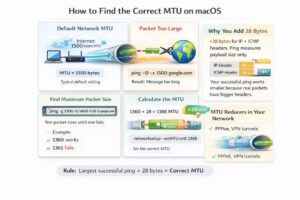
How to Find and Set the Optimal MTU on Mac/macOS
If you have just changed ISPs or moved house and your internet suddenly starts misbehaving the likelihood is your Maximum Transmission Unit (MTU) is set too high for your ISP. The default internet facing MTU is 1500 bytes, BUT depending on your setup, this often needs to be set much lower. Step 1: First check […]
Read more →Check SPF, DKIM and DMARC Email Security DNS Records
There are three basic ways to secure email, these are: Sender Policy Framework (SPF), Domain Keys Identified Mail (DKIM), Domain-based Message Authentication, Reporting & Conformance (DMARC) definitions. Lets quickly discuss these before we talk about how to check if they have been setup: SPF helps prevent spoofing by verifying the sender’s IP address SPF (Sender […]
Read more →host Command DNS Queries on macOS: 9 Examples
1. Find a list of IP addresses linked to a domain To find the IP address for a particular domain, simply pass the target domain name as an argument after the host command. For a comprehensive lookup using the verbose mode, use -a or -v flag option. The -a option is used to find all Domain records and Zone […]
Read more →Scan Your Local Network With Nikto and Nmap on macOS
Nikto is becoming one of my favourite tools. I like it because of its wide ranging use cases and its simplicity. So whats an example use case for Nikto? When I am bored right now and so I am going to hunt around my local network and see what I can find… Now lets pop […]
Read more →