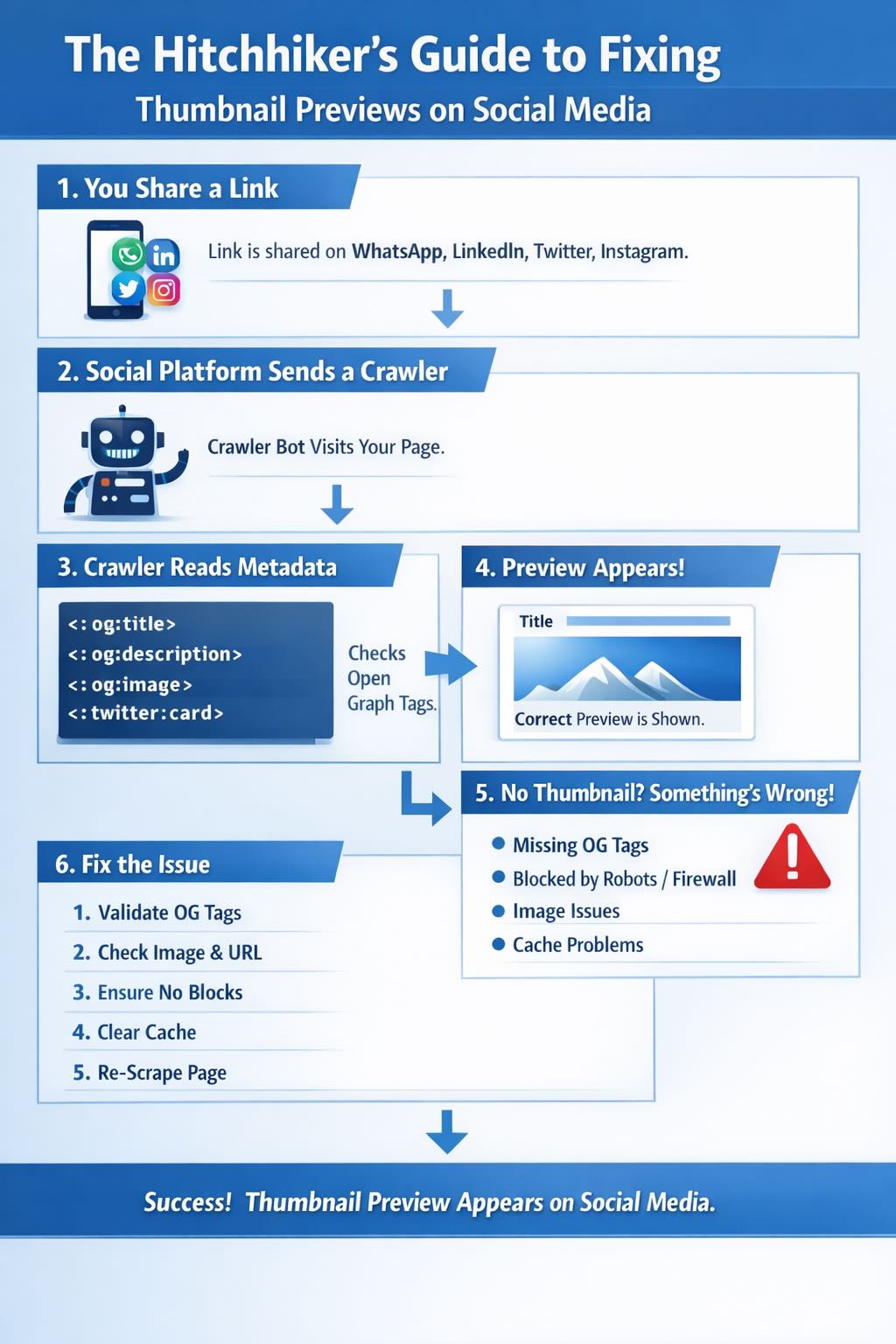
The Hitchhikers Guide to Fixing Why a Thumbnail Image Does Not Show for Your Article on WhatsApp, LinkedIn, Twitter or Instagram
When you share a link on WhatsApp, LinkedIn, X, or Instagram and nothing appears except a bare URL, it feels broken in a way that is surprisingly hard to diagnose. The page loads fine in a browser, the image exists, the og:image tag is there, yet the preview is blank. This post gives you a single unified diagnostic script that checks every known failure mode, produces a categorised report, and flags the specific fix for each issue it finds. It then walks through each failure pattern in detail so you understand what the output means and what to do about it.
1. How Link Preview Crawlers Work
When you paste a URL into WhatsApp, LinkedIn, X, or Instagram, the platform does not wait for you to send it. A background process immediately dispatches a headless HTTP request to that URL and this request looks like a bot because it is one. It reads the page’s <head> section, extracts Open Graph meta tags, fetches the og:image URL, and caches the result. The preview you see is assembled entirely from that cached crawl with no browser rendering involved at any point.
Every platform runs its own crawler with its own user agent string, its own image dimension requirements, its own file size tolerance, and its own sensitivity to HTTP response headers. If anything in that chain fails, the preview either shows no image, shows the wrong image, or does not render at all. The key insight is that your website must serve correct, accessible, standards-compliant responses not to humans in browsers but to automated crawlers that look nothing like browsers. Security rules that protect against bots can inadvertently block the very crawlers you need.
2. Platform Requirements at a Glance
| Platform | Crawler User Agent | Recommended og:image Size | Max File Size | Aspect Ratio |
|---|---|---|---|---|
| WhatsApp/2.x, facebookexternalhit/1.1, Facebot | 1200 x 630 px | ~300 KB | 1.91:1 | |
| LinkedInBot/1.0 | 1200 x 627 px | 5 MB | 1.91:1 | |
| X (Twitter) | Twitterbot/1.0 | 1200 x 675 px | 5 MB | 1.91:1 |
| facebookexternalhit/1.1 | 1200 x 630 px | 8 MB | 1.91:1 | |
| facebookexternalhit/1.1 | 1200 x 630 px | 8 MB | 1.91:1 | |
| iMessage | facebookexternalhit/1.1, Facebot, Twitterbot/1.0 | 1200 x 630 px | 5 MB | 1.91:1 |
The minimum required OG tags across all platforms are the same five properties and every page you want to share should carry all of them:
<meta property="og:title" content="Your Page Title" />
<meta property="og:description" content="A brief description" />
<meta property="og:image" content="https://example.com/image.jpg" />
<meta property="og:url" content="https://example.com/page" />
<meta property="og:type" content="article" />
X additionally requires two Twitter Card tags to render the large image preview format. Without these, X falls back to a small summary card with no prominent image:
<meta name="twitter:card" content="summary_large_image" />
<meta name="twitter:image" content="https://example.com/image.jpg" />
3. Why WhatsApp Is the Most Sensitive Platform
WhatsApp imposes constraints that none of the other major platforms enforce as strictly and most of them are undocumented. The first and most commonly missed is the image file size limit. Facebook supports og:image files up to 8 MB and LinkedIn up to 5 MB, but WhatsApp silently drops the thumbnail if the image exceeds roughly 300 KB. There is no error anywhere in your logs, no HTTP error code, no indication in Cloudflare analytics, and the preview simply renders without an image. WhatsApp also caches that failure, which means users who share the link shortly after you publish will see a bare URL even after you fix the underlying image.
A single WhatsApp link share can trigger requests from three distinct Meta crawler user agents: WhatsApp/2.x, facebookexternalhit/1.1, and Facebot. If your WAF or bot protection blocks any one of them the preview fails. Cloudflare’s Super Bot Fight Mode treats facebookexternalhit as an automated bot by default and will challenge or block it unless you have explicitly created an exception. Unlike LinkedIn’s bot which retries on challenge pages, WhatsApp’s crawler has no retry mechanism and if it gets a 403, a challenge page, or a slow response, it caches the failure immediately.
Response time compounds this further because WhatsApp’s crawler has an aggressive timeout, and if your origin server takes more than a few seconds to respond the crawl times out before it can read any OG tags at all. This matters most on cold start servers or on cache miss paths where your origin has to run full PHP to generate the page. Redirect chains make things worse still because each hop consumes time against WhatsApp’s timeout budget and a chain of three or four redirects on a slow origin can tip a borderline-fast site over the threshold. The diagnostic script follows every hop and prints each one with its timing so you can see exactly where the time is going.
4. The Unified Diagnostic Script
This is the only script you need. Run it against any URL and it produces a full categorised report covering all known failure modes. It tests everything in a single pass: OG tags, image size and dimensions, redirect chains, TTFB, Cloudflare detection, WAF bypass verification, CSP image blocking, meta refresh redirects, robots.txt crawler directives, and all five major crawler user agents.
The install wrapper below writes the script to disk and makes it executable in one paste. Run it as bash install-diagnose-social-preview.sh and it creates diagnose-social-preview.sh ready to use. Then point it at any URL with bash diagnose-social-preview.sh https://yoursite.com/your-post/.
cat > check-social-preview.sh << 'EOF'
#!/usr/bin/env bash
# check-social-preview.sh
# Usage: bash check-social-preview.sh <url>
# Runs a full diagnostic against social preview crawler requirements.
# Tests: OG tags, image size, HTTPS, CSP, X-Content-Type-Options,
#        response time, robots.txt, and crawler accessibility.

set -uo pipefail

TARGET_URL="${1:-}"

if [[ -z "$TARGET_URL" ]]; then
  echo "Usage: bash check-social-preview.sh <url>"
  exit 1
fi

RED='\033[0;31m'
GREEN='\033[0;32m'
YELLOW='\033[1;33m'
CYAN='\033[0;36m'
BOLD='\033[1m'
RESET='\033[0m'

PASS=0
WARN=0
FAIL=0

pass() { echo -e "  ${GREEN}[PASS]${RESET} $1"; PASS=$(( PASS + 1 )); }
warn() { echo -e "  ${YELLOW}[WARN]${RESET} $1"; WARN=$(( WARN + 1 )); }
fail() { echo -e "  ${RED}[FAIL]${RESET} $1"; FAIL=$(( FAIL + 1 )); }
section() { echo -e "\n${BOLD}${CYAN}--- $1 ---${RESET}"; }

WA_UA="WhatsApp/2.23.24.82 A"
FB_UA="facebookexternalhit/1.1 (+http://www.facebook.com/externalhit_uatext.php)"
LI_UA="LinkedInBot/1.0 (compatible; Mozilla/5.0; Apache-HttpClient +http://www.linkedin.com)"
TW_UA="Twitterbot/1.0"

TMP=$(mktemp -d)
trap 'rm -rf "$TMP"' EXIT

echo -e "\n${BOLD}=============================================="
echo -e "  Social Preview Health Check"
echo -e "  $TARGET_URL"
echo -e "==============================================${RESET}\n"

# -------------------------------------------------------
section "1. HTTPS"

if [[ "$TARGET_URL" =~ ^https:// ]]; then
  pass "URL uses HTTPS"
else
  fail "URL uses HTTP. WhatsApp requires HTTPS for previews."
fi

# -------------------------------------------------------
section "2. HTTP Response (WhatsApp UA)"

HTTP_STATUS=$(curl -o /dev/null -s -w "%{http_code}" -A "$WA_UA" -L --max-time 10 "$TARGET_URL" || echo "000")
if [[ "$HTTP_STATUS" == "200" ]]; then
  pass "HTTP 200 OK for WhatsApp user agent"
elif [[ "$HTTP_STATUS" == "301" || "$HTTP_STATUS" == "302" ]]; then
  warn "Redirect ($HTTP_STATUS). Crawler follows redirects but this adds latency."
else
  fail "Non-200 response: $HTTP_STATUS. Crawler may not read page content."
fi

# -------------------------------------------------------
section "3. Response Time"

TOTAL_TIME=$(curl -o /dev/null -s -w "%{time_total}" -A "$WA_UA" -L --max-time 15 "$TARGET_URL" || echo "0")
TTFB=$(curl -o /dev/null -s -w "%{time_starttransfer}" -A "$WA_UA" -L --max-time 15 "$TARGET_URL" || echo "0")
echo "  Total: ${TOTAL_TIME}s  TTFB: ${TTFB}s"

# Convert float to integer milliseconds using awk (no bc dependency)
TOTAL_MS=$(echo "$TOTAL_TIME" | awk '{printf "%d", $1 * 1000}')
if [ "$TOTAL_MS" -lt 3000 ] 2>/dev/null; then
  pass "Response time under 3s"
elif [ "$TOTAL_MS" -lt 5000 ] 2>/dev/null; then
  warn "Response time between 3 and 5s. WhatsApp crawler may timeout."
else
  fail "Response time over 5s. Crawler will likely timeout before reading OG tags."
fi

# -------------------------------------------------------
section "4. Open Graph Tags"

HTML=$(curl -s -A "$WA_UA" -L --max-time 10 "$TARGET_URL" 2>/dev/null || echo "")

check_og_tag() {
  local tag="$1"
  local label="$2"
  local val
  val=$(echo "$HTML" | grep -oiE "property=\"${tag}\"[^>]+content=\"[^\"]+\"" \
    | grep -oiE 'content="[^"]+"' | sed 's/content="//;s/"//' | head -1 || echo "")
  if [[ -z "$val" ]]; then
    val=$(echo "$HTML" | grep -oiE "content=\"[^\"]+\"[^>]+property=\"${tag}\"" \
      | grep -oiE 'content="[^"]+"' | sed 's/content="//;s/"//' | head -1 || echo "")
  fi
  if [[ -n "$val" ]]; then
    pass "${label}: $val" >&2
  else
    fail "${label} missing" >&2
  fi
  echo "$val"
}

OG_TITLE=$(check_og_tag "og:title" "og:title")
OG_DESC=$(check_og_tag "og:description" "og:description")
OG_IMAGE=$(check_og_tag "og:image" "og:image")
OG_URL=$(check_og_tag "og:url" "og:url")
OG_TYPE=$(check_og_tag "og:type" "og:type")

TW_CARD=$(echo "$HTML" | grep -oiE 'name="twitter:card"[^>]+content="[^"]+"' \
  | grep -oiE 'content="[^"]+"' | sed 's/content="//;s/"//' | head -1 || echo "")
TW_IMAGE=$(echo "$HTML" | grep -oiE 'name="twitter:image"[^>]+content="[^"]+"' \
  | grep -oiE 'content="[^"]+"' | sed 's/content="//;s/"//' | head -1 || echo "")

if [[ -n "$TW_CARD" ]]; then
  pass "twitter:card: $TW_CARD"
else
  warn "twitter:card missing. X/Twitter will not render large image cards."
fi

if [[ -n "$TW_IMAGE" ]]; then
  pass "twitter:image: $TW_IMAGE"
else
  warn "twitter:image missing. X/Twitter falls back to og:image, which usually works."
fi

# -------------------------------------------------------
section "5. og:image Analysis"

if [[ -z "$OG_IMAGE" ]]; then
  fail "Cannot analyse og:image because the tag is missing."
else
  IMG_STATUS=$(curl -o /dev/null -s -w "%{http_code}" -A "$WA_UA" -L --max-time 10 "$OG_IMAGE" || echo "000")
  if [[ "$IMG_STATUS" == "200" ]]; then
    pass "og:image URL returns HTTP 200"
  else
    fail "og:image URL returns HTTP $IMG_STATUS. Image is inaccessible to the crawler."
  fi

  if [[ "$OG_IMAGE" =~ ^https:// ]]; then
    pass "og:image uses HTTPS"
  else
    fail "og:image uses HTTP. WhatsApp requires HTTPS images."
  fi

  IMG_CT=$(curl -sI -A "$WA_UA" -L --max-time 10 "$OG_IMAGE" \
    | grep -i "^content-type:" | head -1 | cut -d: -f2- | xargs 2>/dev/null || echo "")
  if [[ "$IMG_CT" =~ image/ ]]; then
    pass "og:image Content-Type: $IMG_CT"
  else
    warn "og:image Content-Type unexpected: '$IMG_CT'. WhatsApp may reject non-image MIME types."
  fi

  IMG_FILE="${TMP}/ogimage"
  curl -s -A "$WA_UA" -L --max-time 15 -o "$IMG_FILE" "$OG_IMAGE" 2>/dev/null || true
  if [[ -f "$IMG_FILE" ]]; then
    SIZE_BYTES=$(wc -c < "$IMG_FILE" | tr -d ' ')
    SIZE_KB=$(echo "$SIZE_BYTES" | awk '{printf "%.1f", $1 / 1024}')
    if [ "$SIZE_BYTES" -gt 307200 ] 2>/dev/null; then
      fail "Image is ${SIZE_KB} KB and exceeds WhatsApp's undocumented ~300 KB limit. This is the most common cause of missing WhatsApp thumbnails."
    elif [ "$SIZE_BYTES" -gt 204800 ] 2>/dev/null; then
      warn "Image is ${SIZE_KB} KB and is approaching the WhatsApp 300 KB limit. Consider optimising."
    else
      pass "Image size: ${SIZE_KB} KB (well within the 300 KB WhatsApp limit)"
    fi

    if command -v identify &>/dev/null; then
      DIMS=$(identify -format '%wx%h' "$IMG_FILE" 2>/dev/null || echo "unknown")
      W=$(echo "$DIMS" | cut -dx -f1 || echo "0")
      H=$(echo "$DIMS" | cut -dx -f2 || echo "0")
      echo "  Image dimensions: ${DIMS}px"
      if [ "$W" -ge 1200 ] && [ "$H" -ge 630 ] 2>/dev/null; then
        pass "Image dimensions meet the 1200x630 minimum recommendation"
      elif [ "$W" -ge 600 ] 2>/dev/null; then
        warn "Image is ${DIMS}px. Minimum 1200x630 is recommended for large card previews."
      else
        fail "Image is ${DIMS}px and is too small for reliable previews on most platforms."
      fi
    else
      warn "ImageMagick not installed so image dimensions could not be checked. Install with: brew install imagemagick"
    fi
  else
    warn "Could not download image for size check"
  fi
fi

# -------------------------------------------------------
section "6. HTTP Security Headers (Crawler Compatibility)"

HEADERS=$(curl -sI -A "$WA_UA" -L --max-time 10 "$TARGET_URL" || echo "")

CSP=$(echo "$HEADERS" | grep -i "^content-security-policy:" | head -1 | cut -d: -f2- || echo "")
if [[ -n "$CSP" ]]; then
  echo "  CSP present: $CSP"
  if echo "$CSP" | grep -qi "img-src"; then
    # Pass if img-src contains https: wildcard or * (allows all HTTPS images)
    if echo "$CSP" | grep -qi "img-src[^;]*https:"; then
      pass "CSP img-src allows all HTTPS images. og:image will be accessible to crawlers."
    elif echo "$CSP" | grep -qi "img-src[^;]* \*"; then
      pass "CSP img-src uses wildcard. og:image will be accessible to crawlers."
    else
      warn "CSP has a restrictive img-src directive. Verify it includes your image CDN domain."
    fi
  else
    pass "CSP does not restrict img-src"
  fi
else
  warn "No Content-Security-Policy header present. Recommended for security, though not required for previews."
fi

XCTO=$(echo "$HEADERS" | grep -i "^x-content-type-options:" | head -1 || echo "")
if [[ -n "$XCTO" ]]; then
  pass "X-Content-Type-Options present: $XCTO"
else
  warn "X-Content-Type-Options missing. Add nosniff for security."
fi

# -------------------------------------------------------
section "7. Crawler Accessibility (Multiple User Agents)"

# check_ua fetches the full HTML body for each crawler UA.
# It passes if HTTP 200 is returned AND og:image is present in the response.
# It notes if Cloudflare Bot Fight Mode has injected a challenge-platform script
# alongside readable OG tags — this is benign cached residue, not an active block.
# It fails if og:image is absent regardless of challenge injection, or if HTTP != 200.
check_ua() {
  local label="$1"
  local ua="$2"
  local tmpfile="${TMP}/ua_$(echo "$label" | tr ' ' '_')"

  local code
  code=$(curl -s -o "$tmpfile" -w "%{http_code}" -A "$ua" -L --max-time 10 "$TARGET_URL" 2>/dev/null || echo "000")

  if [[ "$code" != "200" ]]; then
    fail "$label: HTTP $code. This crawler is being blocked or challenged."
    return
  fi

  local has_og
  has_og=$(grep -oiE 'property="og:image"' "$tmpfile" 2>/dev/null | head -1 || echo "")

  local has_challenge
  has_challenge=$(grep -c "challenge-platform" "$tmpfile" 2>/dev/null || echo "0")

  if [[ -n "$has_og" ]]; then
    if [ "$has_challenge" -gt 0 ] 2>/dev/null; then
      pass "$label: HTTP 200, og:image present. Bot Fight Mode script in HTML but OG tags are readable. WAF Skip rule is working correctly."
    else
      pass "$label: HTTP 200, og:image present. No challenge injection detected."
    fi
  else
    if [ "$has_challenge" -gt 0 ] 2>/dev/null; then
      fail "$label: HTTP 200 but Bot Fight Mode is injecting challenge scripts and og:image is absent. WAF Skip rule is not working for this user agent."
    else
      fail "$label: HTTP 200 but og:image is absent. The page may not be rendering OG tags for this crawler."
    fi
  fi
}

check_ua "WhatsApp UA"          "$WA_UA"
check_ua "facebookexternalhit"  "$FB_UA"
check_ua "LinkedInBot"          "$LI_UA"
check_ua "Twitterbot"           "$TW_UA"

# -------------------------------------------------------
section "8. robots.txt"

BASE_URL=$(echo "$TARGET_URL" | grep -oE '^https?://[^/]+' || echo "")
ROBOTS=$(curl -s --max-time 5 "${BASE_URL}/robots.txt" 2>/dev/null || echo "")

if [[ -z "$ROBOTS" ]]; then
  warn "robots.txt not found or empty"
else
  for bot in facebookexternalhit WhatsApp Facebot LinkedInBot Twitterbot; do
    if echo "$ROBOTS" | grep -qi "User-agent: ${bot}"; then
      if echo "$ROBOTS" | grep -A2 -i "User-agent: ${bot}" | grep -qi "Disallow: /$"; then
        fail "robots.txt blocks $bot. This will prevent all previews from that platform."
      else
        pass "robots.txt references $bot but does not block it."
      fi
    else
      pass "robots.txt has no restrictions for $bot"
    fi
  done
fi

# -------------------------------------------------------
section "9. Cloudflare Detection"

CF_RAY=$(echo "$HEADERS" | grep -i "^cf-ray:" | head -1 || echo "")
CF_CACHE=$(echo "$HEADERS" | grep -i "^cf-cache-status:" | head -1 || echo "")

if [[ -n "$CF_RAY" ]]; then
  echo "  Cloudflare detected: $CF_RAY"
  [[ -n "$CF_CACHE" ]] && echo "  $CF_CACHE"
  pass "Cloudflare is present. If all crawler UA checks above passed, your WAF Skip rule is configured correctly."
else
  pass "No Cloudflare detected. WAF skip rule not required."
fi

# -------------------------------------------------------
echo -e "\n${BOLD}=============================================="
echo -e "  Results Summary"
echo -e "  ${GREEN}PASS: $PASS${RESET}  ${YELLOW}WARN: $WARN${RESET}  ${RED}FAIL: $FAIL${RESET}"
echo -e "==============================================${RESET}\n"

if [ "$FAIL" -gt 0 ]; then
  echo -e "${RED}${BOLD}Action required: $FAIL critical issue(s) found.${RESET}"
elif [ "$WARN" -gt 0 ]; then
  echo -e "${YELLOW}${BOLD}Review warnings: $WARN potential issue(s) found.${RESET}"
else
  echo -e "${GREEN}${BOLD}All checks passed. Social previews should work correctly.${RESET}"
fi
echo
EOF
chmod +x check-social-preview.sh
Example results below:
==============================================
  Social Preview Health Check
  https://andrewbaker.ninja/2026/03/01/the-silent-killer-in-your-aws-architecture-iops-mismatches/
==============================================

--- 1. HTTPS ---
  [PASS] URL uses HTTPS

--- 2. HTTP Response (WhatsApp UA) ---
  [PASS] HTTP 200 OK for WhatsApp user agent

--- 3. Response Time ---
  Total: 0.247662s  TTFB: 0.155405s
  [PASS] Response time under 3s

--- 4. Open Graph Tags ---
  [PASS] twitter:card: summary_large_image
  [PASS] twitter:image: https://andrewbaker.ninja/wp-content/uploads/2026/03/StorageVsInstanceSize-1200x630.jpg

--- 5. og:image Analysis ---
  [PASS] og:image URL returns HTTP 200
  [PASS] og:image uses HTTPS
  [PASS] og:image Content-Type: image/jpeg
  [PASS] Image size: 127,5 KB (well within the 300 KB WhatsApp limit)
  [WARN] ImageMagick not installed so image dimensions could not be checked. Install with: brew install imagemagick

--- 6. HTTP Security Headers (Crawler Compatibility) ---
  CSP present:  default-src 'self' https: data: 'unsafe-inline' 'unsafe-eval'; img-src 'self' data: https: blob:; font-src 'self' https: data:; script-src 'self' 'unsafe-inline' 'unsafe-eval' https:; style-src 'self' 'unsafe-inline' https:; frame-src 'self' https:; connect-src 'self' https:;
  [PASS] CSP img-src allows all HTTPS images. og:image will be accessible to crawlers.
  [PASS] X-Content-Type-Options present: X-Content-Type-Options: nosniff

--- 7. Crawler Accessibility (Multiple User Agents) ---
  [PASS] WhatsApp UA: HTTP 200, og:image present. Bot Fight Mode script in HTML but OG tags are readable. WAF Skip rule is working correctly.
  [PASS] facebookexternalhit: HTTP 200, og:image present. Bot Fight Mode script in HTML but OG tags are readable. WAF Skip rule is working correctly.
  [PASS] LinkedInBot: HTTP 200, og:image present. Bot Fight Mode script in HTML but OG tags are readable. WAF Skip rule is working correctly.
  [PASS] Twitterbot: HTTP 200, og:image present. Bot Fight Mode script in HTML but OG tags are readable. WAF Skip rule is working correctly.

--- 8. robots.txt ---
  [PASS] robots.txt has no restrictions for facebookexternalhit
  [PASS] robots.txt has no restrictions for WhatsApp
  [PASS] robots.txt has no restrictions for Facebot
  [PASS] robots.txt has no restrictions for LinkedInBot
  [PASS] robots.txt has no restrictions for Twitterbot

--- 9. Cloudflare Detection ---
  Cloudflare detected: CF-RAY: 9d80a8bc4ee8e6de-LIS
  cf-cache-status: HIT
  [PASS] Cloudflare is present. If all crawler UA checks above passed, your WAF Skip rule is configured correctly.

==============================================
  Results Summary
  PASS: 21  WARN: 1  FAIL: 0
==============================================

Review warnings: 1 potential issue(s) found.
5. Understanding the Report: Known Issue Patterns
Each numbered section below corresponds to a failure pattern the script detects. When you see a FAIL or WARN, this is what it means and exactly what to do.
5.1 Image Over 300 KB (WhatsApp Silent Failure)
The script reports [FAIL] og:image size 412KB exceeds WhatsApp 300KB hard limit. WhatsApp silently drops the thumbnail if the og:image file exceeds roughly 300 KB and there is no error in your logs, no HTTP error code, and no indication in Cloudflare analytics. The preview simply renders without an image and WhatsApp also caches that failure, so users who share the link before you fix the image will continue to see a bare URL until WhatsApp’s cache expires, typically around 7 days and not under your control. This is the single most common cause of missing WhatsApp thumbnails. Facebook supports images up to 8 MB and LinkedIn up to 5 MB, so developers publishing a large hero image have no idea anything is wrong until they test specifically on WhatsApp.
The fix is to compress the image to under 250 KB to leave a safe margin. At 1200×630 pixels, JPEG quality 80 will almost always achieve this. After recompressing, force a cache refresh using the Facebook Sharing Debugger and then retest with diagnose-social-preview.sh.
convert input.jpg -resize 1200x630 -quality 80 -strip output.jpg
jpegoptim --size=250k --strip-all image.jpg
cwebp -q 80 input.png -o output.webp
5.2 Cloudflare Blocking Meta Crawlers (Super Bot Fight Mode)
The script reports [FAIL] facebookexternalhit: HTTP 200 but Cloudflare challenge page detected. This is the second most common failure on WordPress sites behind Cloudflare. Cloudflare’s Super Bot Fight Mode classifies facebookexternalhit as an automated bot and serves it a JavaScript challenge page. The challenge returns HTTP 200 with an HTML body that looks like a normal page, the crawler reads it, finds no OG tags, and caches a blank preview. This is particularly insidious because your monitoring will show HTTP 200 and you will have no idea why previews are broken. A single WhatsApp link preview can trigger requests from three distinct Meta crawler user agents, specifically WhatsApp/2.x, facebookexternalhit/1.1, and Facebot, and all three must be allowed. If any one is challenged, previews fail intermittently depending on which crawler fires first. The fix is to create a Cloudflare WAF Custom Rule as described in Section 6.
5.3 Slow TTFB Causing Crawler Timeout
The script reports [FAIL] TTFB 4.2s. This will cause WhatsApp crawler timeouts on cache miss. WhatsApp’s crawler has an aggressive HTTP timeout and if your origin takes more than a few seconds to deliver the first bytes of HTML, the crawl times out before any OG tags are read. This is most common on cold start servers, WordPress sites with no page cache where every crawler request hits the database, and servers under load where the crawler request queues behind real user traffic. Your CDN cache may be serving humans fine while every crawler request is a cache miss, because crawlers send unique user agent strings that your cache rules do not recognise. Ensure your page cache serves all user agent strings and not just browser user agents. In Cloudflare, verify that your cache rules are not excluding non-browser UAs. The target is a TTFB under 800ms.
5.4 Redirect Chain
The script reports [FAIL] 4 redirect(s) in chain. Very likely causing WhatsApp crawler timeouts. Each redirect hop consumes time against WhatsApp’s timeout budget and a chain of four hops at 200ms each costs 800ms before the origin even begins delivering HTML. Common causes include an HTTP to HTTPS redirect followed by a www to non-www redirect followed by a trailing slash normalisation redirect, old permalink structures redirecting to new ones, and canonical URL enforcement with multiple intermediate redirects. The goal is zero redirects for the canonical URL and your og:url tag should match the exact final URL with no redirects between them.
5.5 CSP Blocking the Image URL
The script reports [FAIL] CSP img-src may block your og:image domain (cdn.example.com). A Content-Security-Policy header with a restrictive img-src directive can interfere with WhatsApp’s internal image rendering pipeline in certain client versions and if your CSP blocks the image URL in the browser context used for preview rendering, the preview will show the title and description but not the image. Add your image CDN domain to the img-src directive:
Content-Security-Policy: img-src 'self' https://your-cdn-domain.com https://s3.af-south-1.amazonaws.com;5.6 Meta Refresh Redirect
The script reports [FAIL] Meta refresh redirect found in HTML. Meta refresh tags are HTML-level redirects that social crawlers do not execute. The crawler reads the page at the original URL, finds the meta refresh, ignores it, and attempts to extract OG tags from the pre-redirect page. If the pre-redirect page has no OG tags the preview is blank. This appears in some WordPress themes, landing page plugins, and maintenance mode plugins. Replace meta refresh redirects with proper HTTP 301 or 302 redirects at the server or Cloudflare redirect rule level.
6. The Cloudflare WAF Skip Rule
If the diagnostic script detects a Cloudflare challenge page for any Meta crawler user agent, this is exactly how to fix it. Navigate to your Cloudflare dashboard, select your domain, and go to Security then WAF then Custom Rules and click Create rule. Set the rule name to WhatsappThumbnail, switch to Edit expression mode, and paste the following expression:
(http.user_agent contains "WhatsApp") or
(http.user_agent contains "facebookexternalhit") or
(http.user_agent contains "Facebot")
Set the action to Skip. Under WAF components to skip, enable all rate limiting rules, all managed rules, and all Super Bot Fight Mode Rules, but leave all remaining custom rules unchecked. This ensures your Fail2ban IP block list still applies even to these user agents because real attackers spoofing a Meta user agent cannot bypass your IP blocklist while legitimate Meta crawlers get through. Turn Log matching requests off because these are high-frequency crawls and logging every one will consume your event quota quickly.
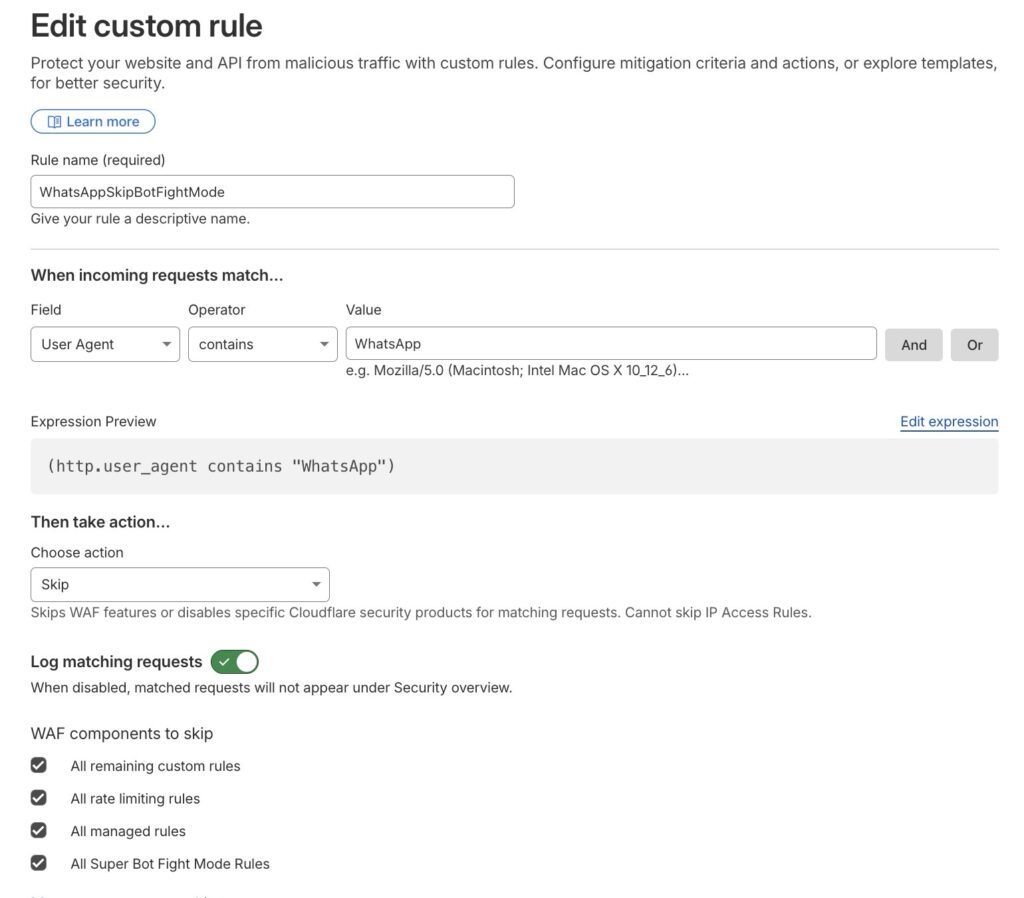
On rule priority, ensure this rule sits below your primary edge rule (eg a Fail2ban Block List rule) because Cloudflare evaluates WAF rules top to bottom and the IP blocklist must fire first. The reason all three user agents are required is that a single WhatsApp link preview can trigger requests from each of them independently and if any one is missing from the skip rule, previews will fail intermittently.
7. WordPress Specific: Posts with Missing Featured Images
If you are running WordPress and the diagnostic script is passing all checks but some posts still have no og:image, the likely cause is that those posts have no featured image set. Most WordPress SEO plugins generate the og:image tag from the featured image and if it is not set, there is no tag. This script SSHs into your WordPress server and audits which published posts are missing a featured image. Update the four variables at the top before running, then run it as bash audit-wp-og.sh audit or bash audit-wp-og.sh fix <post-id>.
cat > audit-wp-og.sh << 'EOF'
#!/usr/bin/env bash
# audit-wp-og.sh
# Usage: bash audit-wp-og.sh audit|fix [post-id]
# Audits WordPress posts for missing og:image via WP-CLI on remote EC2.
#
# Update the four variables below before running.

set -euo pipefail

MODE="${1:-audit}"
SPECIFIC_POST="${2:-}"

EC2_HOST="[email protected]"
SSH_KEY="$HOME/.ssh/your-key.pem"
WP_PATH="/var/www/html"
SITE_URL="https://yoursite.com"

RED='\033[0;31m'
GREEN='\033[0;32m'
YELLOW='\033[1;33m'
CYAN='\033[0;36m'
BOLD='\033[1m'
RESET='\033[0m'

echo -e "\n${BOLD}${CYAN}WordPress OG Tag Auditor${RESET}"
echo -e "Mode: ${BOLD}$MODE${RESET}\n"

if [[ "$MODE" == "audit" ]]; then
  echo -e "${YELLOW}Fetching published posts with no featured image...${RESET}\n"

  ssh -i "$SSH_KEY" -o StrictHostKeyChecking=no "$EC2_HOST" bash <<'REMOTE'
echo "Posts with no featured image (og:image will be missing for these):"
wp post list \
  --post_type=post \
  --post_status=publish \
  --fields=ID,post_title,post_date \
  --format=table \
  --meta_query='[{"key":"_thumbnail_id","compare":"NOT EXISTS"}]' \
  --path=/var/www/html \
  --allow-root \
  2>/dev/null || echo "(WP-CLI not available or no posts found)"

echo ""
echo "Total published posts:"
wp post list \
  --post_type=post \
  --post_status=publish \
  --format=count \
  --path=/var/www/html \
  --allow-root \
  2>/dev/null

echo ""
echo "Posts with featured image set:"
wp post list \
  --post_type=post \
  --post_status=publish \
  --format=count \
  --meta_key=_thumbnail_id \
  --path=/var/www/html \
  --allow-root \
  2>/dev/null
REMOTE

  echo -e "\n${YELLOW}Spot-checking live og:image tags on recent posts...${RESET}\n"
  WA_UA="WhatsApp/2.23.24.82 A"
  URLS=$(curl -s "${SITE_URL}/post-sitemap.xml" \
    | grep -oE '<loc>[^<]+</loc>' \
    | sed 's|<loc>||;s|</loc>||' \
    | head -10)

  if [[ -z "$URLS" ]]; then
    echo -e "${YELLOW}Could not fetch sitemap at ${SITE_URL}/post-sitemap.xml${RESET}"
  else
    printf "%-70s %s\n" "URL" "og:image"
    printf "%-70s %s\n" "---" "--------"
    while IFS= read -r url; do
      html=$(curl -s -A "$WA_UA" -L --max-time 8 "$url" 2>/dev/null)
      og_img=$(echo "$html" \
        | grep -oiE 'property="og:image"[^>]+content="[^"]+"' \
        | grep -oiE 'content="[^"]+"' \
        | sed 's/content="//;s/"//' \
        | head -1)
      if [[ -n "$og_img" ]]; then
        printf "%-70s ${GREEN}%s${RESET}\n" "$(echo "$url" | sed "s|${SITE_URL}||")" "PRESENT"
      else
        printf "%-70s ${RED}%s${RESET}\n" "$(echo "$url" | sed "s|${SITE_URL}||")" "MISSING"
      fi
    done <<< "$URLS"
  fi

elif [[ "$MODE" == "fix" ]]; then
  if [[ -z "$SPECIFIC_POST" ]]; then
    echo -e "${RED}Provide a post ID: bash audit-wp-og.sh fix <post-id>${RESET}"
    exit 1
  fi

  ssh -i "$SSH_KEY" -o StrictHostKeyChecking=no "$EC2_HOST" bash <<REMOTE
echo "Available media attachments (most recent 10):"
wp post list \
  --post_type=attachment \
  --posts_per_page=10 \
  --fields=ID,post_title,guid \
  --format=table \
  --path=$WP_PATH \
  --allow-root \
  2>/dev/null
REMOTE

  echo -e "\n${YELLOW}To assign a featured image to post $SPECIFIC_POST:${RESET}"
  echo "  ssh -i $SSH_KEY $EC2_HOST \\"
  echo "    wp post meta set $SPECIFIC_POST _thumbnail_id <ATTACHMENT_ID> --path=$WP_PATH --allow-root"
  echo ""
  echo "Then retest: bash diagnose-social-preview.sh ${SITE_URL}/?p=${SPECIFIC_POST}"

else
  echo -e "${RED}Unknown mode: $MODE. Use 'audit' or 'fix'.${RESET}"
  exit 1
fi
EOF

chmod +x audit-wp-og.sh
echo "Written and made executable: audit-wp-og.sh"
8. The Diagnostic Checklist
Before you create a Cloudflare rule or start modifying OG tags, run diagnose-social-preview.sh against your URL. It will work through every item below in under 30 seconds and flag exactly which one is failing. The script verifies that the URL uses HTTPS, that there is no redirect chain or the chain is two hops or fewer, that there are no meta refresh redirects in the HTML, that TTFB is under 800ms and total response time is under 3s, that og:title, og:description, og:image, og:url, and og:type are all present and non-empty, that twitter:card is present for the X/Twitter large image format, that the og:image URL returns HTTP 200 with the correct MIME type and uses HTTPS, that the og:image file size is under 300 KB, that og:image dimensions are at least 1200×630 px, that CSP img-src does not block the og:image domain, that robots.txt does not disallow facebookexternalhit, WhatsApp, or Facebot, and that all five crawler user agents return HTTP 200 with no challenge page detected.
The two most common failures on WordPress sites behind Cloudflare are Super Bot Fight Mode blocking facebookexternalhit and an og:image file exceeding 300 KB. Both are invisible in your logs and immediately visible when you run the script.