Model Context Protocol: A Comprehensive Guide for Enterprise Implementation
The Model Context Protocol (MCP) represents a fundamental shift in how we integrate Large Language Models (LLMs) with external data sources and tools. As enterprises increasingly adopt AI powered applications, understanding MCP’s architecture, operational characteristics, and practical implementation becomes critical for technical leaders building production systems.
1. What is Model Context Protocol?
Model Context Protocol is an open standard developed by Anthropic that enables secure, structured communication between LLM applications and external data sources. Unlike traditional API integrations where each connection requires custom code, MCP provides a standardized interface for LLMs to interact with databases, file systems, business applications, and specialized tools.
At its core, MCP defines three primary components.
The Three Primary Components Explained
MCP Hosts
What they are: The outer application shell, the thing the user actually interacts with. Think of it as the “container” that wants to give an LLM access to external capabilities.
Examples:
- Claude Desktop (the application itself)
- VS Code with an AI extension like Cursor or Continue
- Your custom enterprise chatbot built with Anthropic’s API
- An IDE with Copilot style features
The MCP Host doesn’t directly speak the MCP protocol, it delegates that responsibility to its internal MCP Client.
MCP Clients
What they are: A library or component that lives inside the MCP Host and handles all the MCP protocol plumbing. This is where the actual protocol implementation resides.
What they do:
- Manage connections to one or more MCP Servers (connection pooling, lifecycle management)
- Handle JSON RPC serialization/deserialization
- Perform capability discovery (asking MCP Servers “what can you do?”)
- Route tool calls from the LLM to the appropriate MCP Server
- Manage authentication tokens
Key insight: A single MCP Host contains one MCP Client, but that MCP Client can maintain connections to many MCP Servers simultaneously. When Claude Desktop connects to your filesystem server AND a Postgres server AND a Slack server, the single MCP Client inside Claude Desktop manages all three connections.
MCP Servers
What they are: Lightweight adapters that expose specific capabilities through the MCP protocol. Each MCP Server is essentially a translator between MCP’s standardised interface and some underlying system.
What they do:
- Advertise their capabilities (tools, resources, prompts) via the
tools/list,resources/listmethods - Accept standardised JSON RPC calls and translate them into actual operations
- Return results in MCP’s expected format
Examples:
- A filesystem MCP Server that exposes
read_file,list_directory,search_files - A Postgres MCP Server that exposes
query,list_tables,describe_schema - A Slack MCP Server that exposes
send_message,list_channels,search_messages
The Relationship Visualised
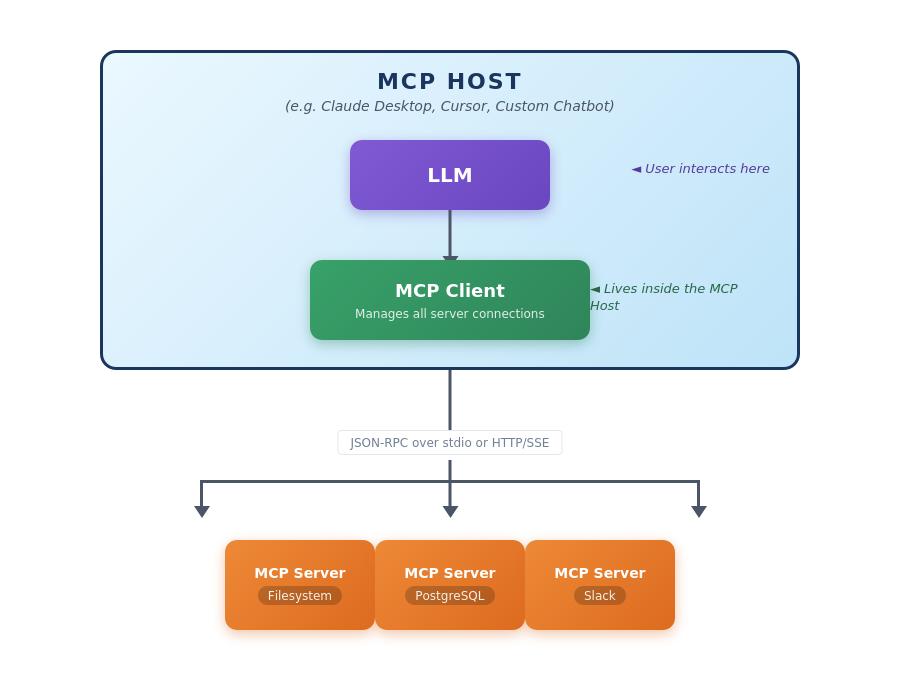
The MCP Client is the “phone system” inside the MCP Host that knows how to dial and communicate with external MCP Servers. The MCP Host itself is just the building where everything lives.
The protocol itself operates over JSON-RPC 2.0, supporting both stdio and HTTP with Server-Sent Events (SSE) as transport layers. Note: SSE has been recently replaced with Streamable HTTP. This architecture enables both local integrations running as separate processes and remote integrations accessed over HTTP.
2. Problems MCP Solves
Traditional LLM integrations face several architectural challenges that MCP directly addresses.
2.1 Context Fragmentation and Custom Integration Overhead
Before MCP, every LLM application requiring access to enterprise data sources needed custom integration code. A chatbot accessing customer data from Salesforce, product information from a PostgreSQL database, and documentation from Confluence would require three separate integration implementations. Each integration would need its own authentication logic, error handling, rate limiting, and data transformation code.
MCP eliminates this fragmentation by providing a single protocol that works uniformly across all data sources. Once an MCP server exists for Salesforce, PostgreSQL, or Confluence, any MCP compatible host can immediately leverage it without writing integration-specific code. This dramatically reduces the engineering effort required to connect LLMs to existing enterprise systems.
2.2 Dynamic Capability Discovery
Traditional integrations require hardcoded knowledge of available tools and data sources within the application code. If a new database table becomes available or a new API endpoint is added, the application code must be updated, tested, and redeployed.
MCP servers expose their capabilities through standardized discovery mechanisms. When an MCP client connects to a server, it can dynamically query available resources, tools, and prompts. This enables applications to adapt to changing backend capabilities without code changes, supporting more flexible and maintainable architectures.
2.3 Security and Access Control Complexity
Managing security across multiple custom integrations creates significant operational overhead. Each integration might implement authentication differently, use various credential storage mechanisms, and enforce access controls inconsistently.
MCP standardizes authentication and authorization patterns. MCP servers can implement consistent OAuth flows, API key management, or integration with enterprise identity providers. Access controls can be enforced uniformly at the MCP server level, ensuring that users can only access resources they’re authorized to use regardless of which host application initiates the request.
2.4 Resource Efficiency and Connection Multiplexing
LLM applications often need to gather context from multiple sources to respond to a single query. Traditional approaches might open separate connections to each backend system, creating connection overhead and making it difficult to coordinate transactions or maintain consistency.
MCP enables efficient multiplexing where a single host can maintain persistent connections to multiple MCP servers, reusing connections across multiple LLM requests. This reduces connection overhead and enables more sophisticated coordination patterns like distributed transactions or cross system queries.
3. When APIs Are Better Than MCPs
While MCP provides significant advantages for LLM integrations, traditional REST or gRPC APIs remain the superior choice in several scenarios.
3.1 High Throughput, Low-Latency Services
APIs excel in scenarios requiring extreme performance characteristics. A payment processing system handling thousands of transactions per second with sub 10ms latency requirements should use direct API calls rather than the additional protocol overhead of MCP. The JSON RPC serialization, protocol negotiation, and capability discovery mechanisms in MCP introduce latency that’s acceptable for human interactive AI applications but unacceptable for high frequency trading systems or realtime fraud detection engines.
3.2 Machine to Machine Communication Without AI
When building traditional microservices architectures where services communicate directly without AI intermediaries, standard APIs provide simpler, more battle tested solutions. A REST API between your authentication service and user management service doesn’t benefit from MCP’s LLM centric features like prompt templates or context window management.
3.3 Standardized Industry Protocols
Many industries have established API standards that provide interoperability across vendors. Healthcare’s FHIR protocol, financial services’ FIX protocol, or telecommunications’ TMF APIs represent decades of industry collaboration. Wrapping these in MCP adds unnecessary complexity when the underlying APIs already provide well-understood interfaces with extensive tooling and community support.
3.4 Client Applications Without LLM Integration
Mobile apps, web frontends, or IoT devices that don’t incorporate LLM functionality should communicate via standard APIs. MCP’s value proposition centers on making it easier for AI applications to access context and tools. A React dashboard displaying analytics doesn’t need MCP’s capability discovery or prompt templates; it needs predictable, well documented API endpoints.
3.5 Legacy System Integration
Organizations with heavily invested API management infrastructure (API gateways, rate limiting, analytics, monetization) should leverage those existing capabilities rather than introducing MCP as an additional layer. If you’ve already built comprehensive API governance with tools like Apigee, Kong, or AWS API Gateway, adding MCP creates operational complexity without corresponding benefit unless you’re specifically building LLM applications.
4. Strategies and Tools for Managing MCPs at Scale
Operating MCP infrastructure in production environments requires thoughtful approaches to server management, observability, and lifecycle management.
4.1 Centralized MCP Server Registry
Large organizations should implement a centralized registry cataloging all available MCP servers, their capabilities, ownership teams, and SLA commitments. This registry serves as the source of truth for discovery, enabling development teams to find existing MCP servers before building new ones and preventing capability duplication.
A reference implementation might use a PostgreSQL database with tables for servers, capabilities, and access policies:
CREATE TABLE mcp_servers (
    server_id UUID PRIMARY KEY,
    name VARCHAR(255) NOT NULL,
    description TEXT,
    transport_type VARCHAR(50), -- 'stdio' or 'sse'
    endpoint_url TEXT,
    owner_team VARCHAR(255),
    status VARCHAR(50), -- 'active', 'deprecated', 'sunset'
    created_at TIMESTAMP DEFAULT CURRENT_TIMESTAMP
);

CREATE TABLE mcp_capabilities (
    capability_id UUID PRIMARY KEY,
    server_id UUID REFERENCES mcp_servers(server_id),
    capability_type VARCHAR(50), -- 'resource', 'tool', 'prompt'
    name VARCHAR(255),
    description TEXT,
    schema JSONB
);
This registry can expose its own MCP server, enabling AI assistants to help developers discover and connect to appropriate servers through natural language queries.
4.2 MCP Gateway Pattern
For enterprise deployments, implementing an MCP gateway that sits between host applications and backend MCP servers provides several operational advantages:
Authentication and Authorization Consolidation: The gateway can implement centralized authentication, validating JWT tokens or API keys once rather than requiring each MCP server to implement authentication independently. This enables consistent security policies across all MCP integrations.
Rate Limiting and Throttling: The gateway can enforce organization-wide rate limits preventing any single client from overwhelming backend systems. This is particularly important for expensive operations like database queries or API calls to external services with usage based pricing.
Observability and Auditing: The gateway provides a single point to collect telemetry on MCP usage patterns, including which servers are accessed most frequently, which capabilities are used, error rates, and latency distributions. This data informs capacity planning and helps identify problematic integrations.
Protocol Translation: The gateway can translate between transport types, allowing stdio-based MCP servers to be accessed over HTTP/SSE by remote clients, or vice versa. This flexibility enables optimal transport selection based on deployment architecture.
A simplified gateway implementation in Java might look like:
public class MCPGateway {
    private final Map<String, MCPServerConnection> serverPool;
    private final MetricsCollector metrics;
    private final AuthenticationService auth;

    public CompletableFuture<MCPResponse> routeRequest(
            MCPRequest request,
            String authToken) {

        // Authenticate
        User user = auth.validateToken(authToken);

        // Find appropriate server
        MCPServerConnection server = serverPool.get(request.getServerId());

        // Check authorization
        if (!user.canAccess(server)) {
            return CompletableFuture.failedFuture(
                new UnauthorizedException("Access denied"));
        }

        // Apply rate limiting
        if (!rateLimiter.tryAcquire(user.getId(), server.getId())) {
            return CompletableFuture.failedFuture(
                new RateLimitException("Rate limit exceeded"));
        }

        // Record metrics
        metrics.recordRequest(server.getId(), request.getMethod());

        // Forward request
        return server.sendRequest(request)
            .whenComplete((response, error) -> {
                if (error != null) {
                    metrics.recordError(server.getId(), error);
                } else {
                    metrics.recordSuccess(server.getId(),
                        response.getLatencyMs());
                }
            });
    }
}
4.3 Configuration Management
MCP server configurations should be managed through infrastructure as code approaches. Using tools like Kubernetes ConfigMaps, AWS Parameter Store, or HashiCorp Vault, organizations can version control server configurations, implement environment specific settings, and enable automated deployments.
A typical configuration structure might include:
mcp:
  servers:
    - name: postgres-analytics
      transport: stdio
      command: /usr/local/bin/mcp-postgres
      args:
        - --database=analytics
        - --host=${DB_HOST}
        - --port=${DB_PORT}
      env:
        DB_PASSWORD_SECRET: aws:secretsmanager:prod/postgres/analytics
      resources:
        limits:
          memory: 512Mi
          cpu: 500m

    - name: salesforce-integration
      transport: sse
      url: https://mcp.salesforce.internal/api/v1
      auth:
        type: oauth2
        client_id: ${SALESFORCE_CLIENT_ID}
        client_secret_secret: aws:secretsmanager:prod/salesforce/oauth
This declarative approach enables GitOps workflows where changes to MCP infrastructure are reviewed, approved, and automatically deployed through CI/CD pipelines.
4.4 Health Monitoring and Circuit Breaking
MCP servers must implement comprehensive health checks and circuit breaker patterns to prevent cascading failures. Each server should expose a health endpoint indicating its operational status and the health of its dependencies.
Implementing circuit breakers prevents scenarios where a failing backend system causes request queuing and resource exhaustion across the entire MCP infrastructure:
public class CircuitBreakerMCPServer {
    private final MCPServer delegate;
    private final CircuitBreaker circuitBreaker;

    public CircuitBreakerMCPServer(MCPServer delegate) {
        this.delegate = delegate;
        this.circuitBreaker = CircuitBreaker.builder()
            .failureRateThreshold(50)
            .waitDurationInOpenState(Duration.ofSeconds(30))
            .permittedNumberOfCallsInHalfOpenState(5)
            .slidingWindowSize(100)
            .build();
    }

    public CompletableFuture<Response> handleRequest(Request req) {
        return circuitBreaker.executeSupplier(() ->
            delegate.handleRequest(req));
    }
}
When the circuit opens due to repeated failures, requests fail fast rather than waiting for timeouts, improving overall system responsiveness and preventing resource exhaustion.
4.5 Version Management and Backward Compatibility
As MCP servers evolve, managing versions and ensuring backward compatibility becomes critical. Organizations should adopt semantic versioning for MCP servers and implement content negotiation mechanisms allowing clients to request specific capability versions.
Servers should maintain compatibility matrices indicating which host versions work with which server versions, and deprecation policies should provide clear timelines for sunsetting old capabilities:
{
  "server": "postgres-analytics",
  "version": "2.1.0",
  "compatibleClients": [">=1.0.0 <3.0.0"],
  "deprecations": [
    {
      "capability": "legacy_query_tool",
      "deprecatedIn": "2.0.0",
      "sunsetDate": "2025-06-01",
      "replacement": "parameterized_query_tool"
    }
  ]
}
5. Operational Challenges of MCPs
Deploying MCP infrastructure at scale introduces operational complexities that require careful consideration.
5.1 Process Management and Resource Isolation
Stdio based MCP servers run as separate processes spawned by the host application. In high concurrency scenarios, process proliferation can exhaust system resources. A server handling 1000 concurrent users might spawn hundreds of MCP server processes, each consuming memory and file descriptors.
Container orchestration platforms like Kubernetes can help manage these challenges by treating each MCP server as a microservice with resource limits, but this introduces complexity for stdio-based servers that were designed to run as local processes. Organizations must choose between:
Process pooling: Maintain a pool of reusable server processes, multiplexing multiple client connections across fewer processes. This improves resource efficiency but requires careful session management.
HTTP/SSE migration: Convert stdio based servers to HTTP/SSE transport, enabling them to run as traditional web services with well understood scaling characteristics. This requires significant refactoring but provides better operational characteristics.
Serverless architectures: Deploy MCP servers as AWS Lambda functions or similar FaaS offerings. This eliminates process management overhead but introduces cold start latencies and requires servers to be stateless.
5.2 State Management and Transaction Coordination
MCP servers are generally stateless, with each request processed independently. This creates challenges for operations requiring transaction semantics across multiple requests. Consider a workflow where an LLM needs to query customer data, calculate risk scores, and update a fraud detection system. Each operation might target a different MCP server, but they should succeed or fail atomically.
Traditional distributed transaction protocols (2PC, Saga) don’t integrate natively with MCP. Organizations must implement coordination logic either:
Within the host application: The host implements transaction coordination, tracking which servers were involved in a workflow and initiating compensating transactions on failure. This places significant complexity on the host.
Through a dedicated orchestration layer: A separate service manages multi-server workflows, similar to AWS Step Functions or temporal.io. MCP requests become steps in a workflow definition, with the orchestrator handling retries, compensation, and state management.
Via database backed state: MCP servers store intermediate state in a shared database, enabling subsequent requests to access previous results. This requires careful cache invalidation and consistency management.
5.3 Observability and Debugging
When an MCP based application fails, debugging requires tracing requests across multiple server boundaries. Traditional APM tools designed for HTTP based microservices may not provide adequate visibility into MCP request flows, particularly for stdio-based servers.
Organizations need comprehensive logging strategies capturing:
Request traces: Unique identifiers propagated through each MCP request, enabling correlation of log entries across servers.
Protocol level telemetry: Detailed logging of JSON RPC messages, including request timing, payload sizes, and serialization overhead.
Capability usage patterns: Analytics on which tools, resources, and prompts are accessed most frequently, informing capacity planning and server optimization.
Error categorization: Structured error logging distinguishing between client errors (invalid requests), server errors (backend failures), and protocol errors (serialization issues).
Implementing OpenTelemetry instrumentation for MCP servers provides standardized observability:
public class ObservableMCPServer {
    private final Tracer tracer;

    public CompletableFuture<Response> handleRequest(Request req) {
        Span span = tracer.spanBuilder("mcp.request")
            .setAttribute("mcp.method", req.getMethod())
            .setAttribute("mcp.server", this.getServerId())
            .startSpan();

        try (Scope scope = span.makeCurrent()) {
            return processRequest(req)
                .whenComplete((response, error) -> {
                    if (error != null) {
                        span.recordException(error);
                        span.setStatus(StatusCode.ERROR);
                    } else {
                        span.setAttribute("mcp.response.size",
                            response.getSerializedSize());
                        span.setStatus(StatusCode.OK);
                    }
                    span.end();
                });
        }
    }
}
5.4 Security and Secret Management
MCP servers frequently require credentials to access backend systems. Storing these credentials securely while making them available to server processes introduces operational complexity.
Environment variables are commonly used but have security limitations. They’re visible in process listings and container metadata, creating information disclosure risks.
Secret management services like AWS Secrets Manager, HashiCorp Vault, or Kubernetes Secrets provide better security but require additional operational infrastructure and credential rotation strategies.
Workload identity approaches where MCP servers assume IAM roles or service accounts eliminate credential storage entirely but require sophisticated identity federation infrastructure.
Organizations must implement credential rotation without service interruption, requiring either:
Graceful restarts: When credentials change, spawn new server instances with updated credentials, wait for in flight requests to complete, then terminate old instances.
Dynamic credential reloading: Servers periodically check for updated credentials and reload them without restarting, requiring careful synchronization to avoid mid-request credential changes.
5.5 Protocol Versioning and Compatibility
The MCP specification itself evolves over time. As new protocol versions are released, organizations must manage compatibility between hosts using different MCP client versions and servers implementing various protocol versions.
This requires extensive integration testing across version combinations and careful deployment orchestration to prevent breaking changes. Organizations typically establish testing matrices ensuring critical host/server combinations remain functional:
Host Version 1.0 + Server Version 1.x: SUPPORTED
Host Version 1.0 + Server Version 2.x: DEGRADED (missing features)
Host Version 2.0 + Server Version 1.x: SUPPORTED (backward compatible)
Host Version 2.0 + Server Version 2.x: FULLY SUPPORTED
6. MCP Security Concerns and Mitigation Strategies
Security in MCP deployments requires defense in depth approaches addressing authentication, authorization, data protection, and operational security. MCP’s flexibility in connecting LLMs to enterprise systems creates significant attack surface that must be carefully managed.
6.1 Authentication and Identity Management
Concern: MCP servers must authenticate clients to prevent unauthorized access to enterprise resources. Without proper authentication, malicious actors could impersonate legitimate clients and access sensitive data or execute privileged operations.
Mitigation Strategies:
Token-Based Authentication: Implement JWT-based authentication where clients present signed tokens containing identity claims and authorization scopes. Tokens should have short expiration times (15-60 minutes) and be issued by a trusted identity provider:
public class JWTAuthenticatedMCPServer {
    private final JWTVerifier verifier;

    public CompletableFuture<Response> handleRequest(
            Request req,
            String authHeader) {

        if (authHeader == null || !authHeader.startsWith("Bearer ")) {
            return CompletableFuture.failedFuture(
                new UnauthorizedException("Missing authentication token"));
        }

        try {
            DecodedJWT jwt = verifier.verify(
                authHeader.substring(7));

            String userId = jwt.getSubject();
            List<String> scopes = jwt.getClaim("scopes")
                .asList(String.class);

            AuthContext context = new AuthContext(userId, scopes);
            return processAuthenticatedRequest(req, context);

        } catch (JWTVerificationException e) {
            return CompletableFuture.failedFuture(
                new UnauthorizedException("Invalid token: " +
                    e.getMessage()));
        }
    }
}
Mutual TLS (mTLS): For HTTP/SSE transport, implement mutual TLS authentication where both client and server present certificates. This provides cryptographic assurance of identity and encrypts all traffic:
server:
  ssl:
    enabled: true
    client-auth: need
    key-store: classpath:server-keystore.p12
    key-store-password: ${KEYSTORE_PASSWORD}
    trust-store: classpath:client-truststore.p12
    trust-store-password: ${TRUSTSTORE_PASSWORD}
OAuth 2.0 Integration: Integrate with enterprise OAuth providers (Okta, Auth0, Azure AD) enabling single sign on and centralized access control. Use the authorization code flow for interactive applications and client credentials flow for service accounts.
6.2 Authorization and Access Control
Concern: Authentication verifies identity but doesn’t determine what resources a user can access. Fine grained authorization ensures users can only interact with data and tools appropriate to their role.
Mitigation Strategies:
Role-Based Access Control (RBAC): Define roles with specific permissions and assign users to roles. MCP servers check role membership before executing operations:
public class RBACMCPServer {
    private final PermissionChecker permissions;

    public CompletableFuture<Response> executeToolCall(
            String toolName,
            Map<String, Object> args,
            AuthContext context) {

        Permission required = Permission.forTool(toolName);

        if (!permissions.userHasPermission(context.userId(), required)) {
            return CompletableFuture.failedFuture(
                new ForbiddenException(
                    "User lacks permission: " + required));
        }

        return executeTool(toolName, args);
    }
}
Attribute Based Access Control (ABAC): Implement policy based authorization evaluating user attributes, resource properties, and environmental context. Use policy engines like Open Policy Agent (OPA):
package mcp.authorization

default allow = false

allow {
    input.user.department == "engineering"
    input.resource.classification == "internal"
    input.action == "read"
}

allow {
    input.user.role == "admin"
}

allow {
    input.user.id == input.resource.owner
    input.action in ["read", "update"]
}
Resource Level Permissions: Implement granular permissions at the resource level. A user might have access to specific database tables, file directories, or API endpoints but not others:
public CompletableFuture<String> readFile(
        String path,
        AuthContext context) {

    ResourceACL acl = aclService.getACL(path);

    if (!acl.canRead(context.userId())) {
        throw new ForbiddenException(
            "No read permission for: " + path);
    }

    return fileService.readFile(path);
}
6.3 Prompt Injection and Input Validation
Concern: LLMs can be manipulated through prompt injection attacks where malicious users craft inputs that cause the LLM to ignore instructions or perform unintended actions. When MCP servers execute LLM generated tool calls, these attacks can lead to unauthorized operations.
Mitigation Strategies:
Input Sanitization: Validate and sanitize all tool parameters before execution. Use allowlists for expected values and reject unexpected input patterns:
public CompletableFuture<Response> executeQuery(
        String query,
        Map<String, Object> params) {

    // Validate query doesn't contain dangerous operations
    List<String> dangerousKeywords = List.of(
        "DROP", "DELETE", "TRUNCATE", "ALTER", "GRANT");

    String upperQuery = query.toUpperCase();
    for (String keyword : dangerousKeywords) {
        if (upperQuery.contains(keyword)) {
            throw new ValidationException(
                "Query contains forbidden operation: " + keyword);
        }
    }

    // Validate parameters against expected schema
    for (Map.Entry<String, Object> entry : params.entrySet()) {
        validateParameter(entry.getKey(), entry.getValue());
    }

    return database.executeParameterizedQuery(query, params);
}
Parameterized Operations: Use parameterized queries, prepared statements, or API calls rather than string concatenation. This prevents injection attacks by separating code from data:
// VULNERABLE - DO NOT USE
String query = "SELECT * FROM users WHERE id = " + userId;

// SECURE - USE THIS
String query = "SELECT * FROM users WHERE id = ?";
PreparedStatement stmt = connection.prepareStatement(query);
stmt.setString(1, userId);
Output Validation: Validate responses from backend systems before returning them to the LLM. Strip sensitive metadata, error details, or system information that could be exploited:
public String sanitizeErrorMessage(Exception e) {
    // Never expose stack traces or internal paths
    String message = e.getMessage();

    // Remove file paths
    message = message.replaceAll("/[^ ]+/", "[REDACTED_PATH]/");

    // Remove connection strings
    message = message.replaceAll(
        "jdbc:[^ ]+", "jdbc:[REDACTED]");

    return message;
}
Capability Restrictions: Limit what tools can do. Read only database access is safer than write access. File operations should be restricted to specific directories. API calls should use service accounts with minimal permissions.
6.4 Data Exfiltration and Privacy
Concern: MCP servers accessing sensitive data could leak information through various channels: overly verbose logging, error messages, responses sent to LLMs, or side channel attacks.
Mitigation Strategies:
Data Classification and Masking: Classify data sensitivity levels and apply appropriate protections. Mask or redact sensitive data in responses:
public class DataMaskingMCPServer {
    private final SensitivityClassifier classifier;

    public Map<String, Object> prepareResponse(
            Map<String, Object> data) {

        Map<String, Object> masked = new HashMap<>();

        for (Map.Entry<String, Object> entry : data.entrySet()) {
            String key = entry.getKey();
            Object value = entry.getValue();

            SensitivityLevel level = classifier.classify(key);

            masked.put(key, switch(level) {
                case PUBLIC -> value;
                case INTERNAL -> value; // User has internal access
                case CONFIDENTIAL -> maskValue(value);
                case SECRET -> "[REDACTED]";
            });
        }

        return masked;
    }

    private Object maskValue(Object value) {
        if (value instanceof String s) {
            // Show first and last 4 chars for identifiers
            if (s.length() <= 8) return "****";
            return s.substring(0, 4) + "****" +
                   s.substring(s.length() - 4);
        }
        return value;
    }
}
Audit Logging: Log all access to sensitive resources with sufficient detail for forensic analysis. Include who accessed what, when, and what was returned:
public CompletableFuture<Response> handleRequest(
        Request req,
        AuthContext context) {

    AuditEvent event = AuditEvent.builder()
        .timestamp(Instant.now())
        .userId(context.userId())
        .action(req.getMethod())
        .resource(req.getResourceUri())
        .sourceIP(req.getClientIP())
        .build();

    return processRequest(req, context)
        .whenComplete((response, error) -> {
            event.setSuccess(error == null);
            event.setResponseSize(
                response != null ? response.size() : 0);

            if (error != null) {
                event.setErrorMessage(error.getMessage());
            }

            auditLog.record(event);
        });
}
Data Residency and Compliance: Ensure MCP servers comply with data residency requirements (GDPR, CCPA, HIPAA). Data should not transit regions where it’s prohibited. Implement geographic restrictions:
public class GeofencedMCPServer {
    private final Set<String> allowedRegions;

    public CompletableFuture<Response> handleRequest(
            Request req,
            String clientRegion) {

        if (!allowedRegions.contains(clientRegion)) {
            return CompletableFuture.failedFuture(
                new ForbiddenException(
                    "Access denied from region: " + clientRegion));
        }

        return processRequest(req);
    }
}
Encryption at Rest and in Transit: Encrypt sensitive data stored by MCP servers. Use TLS 1.3 for all network communication. Encrypt configuration files containing credentials:
# Encrypt sensitive configuration
aws kms encrypt
    --key-id alias/mcp-config
    --plaintext fileb://config.json
    --output text
    --query CiphertextBlob | base64 -d > config.json.encrypted
6.5 Denial of Service and Resource Exhaustion
Concern: Malicious or buggy clients could overwhelm MCP servers with excessive requests, expensive operations, or resource intensive queries, causing service degradation or outages.
Mitigation Strategies:
Rate Limiting: Enforce per user and per client rate limits preventing excessive requests. Use token bucket or sliding window algorithms:
public class RateLimitedMCPServer {
    private final LoadingCache<String, RateLimiter> limiters;

    public RateLimitedMCPServer() {
        this.limiters = CacheBuilder.newBuilder()
            .expireAfterAccess(Duration.ofHours(1))
            .build(new CacheLoader<String, RateLimiter>() {
                public RateLimiter load(String userId) {
                    // 100 requests per minute per user
                    return RateLimiter.create(100.0 / 60.0);
                }
            });
    }

    public CompletableFuture<Response> handleRequest(
            Request req,
            AuthContext context) {

        RateLimiter limiter = limiters.getUnchecked(context.userId());

        if (!limiter.tryAcquire(Duration.ofMillis(100))) {
            return CompletableFuture.failedFuture(
                new RateLimitException("Rate limit exceeded"));
        }

        return processRequest(req, context);
    }
}
Query Complexity Limits: Restrict expensive operations like full table scans, recursive queries, or large file reads. Set maximum result sizes and execution timeouts:
public CompletableFuture<List<Map<String, Object>>> executeQuery(
        String query,
        Map<String, Object> params) {

    // Analyze query complexity
    QueryPlan plan = queryPlanner.analyze(query);

    if (plan.estimatedRows() > 10000) {
        throw new ValidationException(
            "Query too broad, add more filters");
    }

    if (plan.requiresFullTableScan()) {
        throw new ValidationException(
            "Full table scans not allowed");
    }

    // Set execution timeout
    return CompletableFuture.supplyAsync(
        () -> database.execute(query, params),
        executor
    ).orTimeout(30, TimeUnit.SECONDS);
}
Resource Quotas: Set memory limits, CPU limits, and connection pool sizes preventing any single request from consuming excessive resources:
resources:
  requests:
    memory: "256Mi"
    cpu: "250m"
  limits:
    memory: "512Mi"
    cpu: "500m"

connectionPool:
  maxSize: 20
  minIdle: 5
  maxWaitTime: 5000
Request Size Limits: Limit payload sizes preventing clients from sending enormous requests that consume memory during deserialization:
public JSONRPCRequest parseRequest(InputStream input)
        throws IOException {

    // Limit input to 1MB
    BoundedInputStream bounded = new BoundedInputStream(
        input, 1024 * 1024);

    return objectMapper.readValue(bounded, JSONRPCRequest.class);
}
6.6 Supply Chain and Dependency Security
Concern: MCP servers depend on libraries, frameworks, and runtime environments. Vulnerabilities in dependencies can compromise security even if your code is secure.
Mitigation Strategies:
Dependency Scanning: Regularly scan dependencies for known vulnerabilities using tools like OWASP Dependency Check, Snyk, or GitHub Dependabot:
<plugin>
    <groupId>org.owasp</groupId>
    <artifactId>dependency-check-maven</artifactId>
    <version>8.4.0</version>
    <configuration>
        <failBuildOnCVSS>7</failBuildOnCVSS>
        <suppressionFile>
            dependency-check-suppressions.xml
        </suppressionFile>
    </configuration>
</plugin>
Dependency Pinning: Pin exact versions of dependencies rather than using version ranges. This prevents unexpected updates introducing vulnerabilities:
<!-- BAD - version ranges -->
<dependency>
    <groupId>com.fasterxml.jackson.core</groupId>
    <artifactId>jackson-databind</artifactId>
    <version>[2.0,3.0)</version>
</dependency>

<!-- GOOD - exact version -->
<dependency>
    <groupId>com.fasterxml.jackson.core</groupId>
    <artifactId>jackson-databind</artifactId>
    <version>2.16.1</version>
</dependency>
Minimal Runtime Environments: Use minimal base images for containers reducing attack surface. Distroless images contain only your application and runtime dependencies:
FROM gcr.io/distroless/java21-debian12
COPY target/mcp-server.jar /app/mcp-server.jar
WORKDIR /app
ENTRYPOINT ["java", "-jar", "mcp-server.jar"]
Code Signing: Sign MCP server artifacts enabling verification of authenticity and integrity. Clients should verify signatures before executing servers:
# Sign JAR
jarsigner -keystore keystore.jks
    -signedjar mcp-server-signed.jar
    mcp-server.jar
    mcp-signing-key

# Verify signature
jarsigner -verify -verbose mcp-server-signed.jar
6.7 Secrets Management
Concern: MCP servers require credentials for backend systems. Hardcoded credentials, credentials in version control, or insecure credential storage create significant security risks.
Mitigation Strategies:
External Secret Stores: Use dedicated secret management services never storing credentials in code or configuration files:
public class SecretManagerMCPServer {
    private final SecretsManagerClient secretsClient;

    public String getDatabasePassword() {
        GetSecretValueRequest request = GetSecretValueRequest.builder()
            .secretId("prod/mcp/database-password")
            .build();

        GetSecretValueResponse response =
            secretsClient.getSecretValue(request);

        return response.secretString();
    }
}
Workload Identity: Use cloud provider IAM roles or Kubernetes service accounts eliminating the need to store credentials:
apiVersion: v1
kind: ServiceAccount
metadata:
  name: mcp-postgres-server
  annotations:
    eks.amazonaws.com/role-arn: arn:aws:iam::123456789012:role/mcp-postgres-role

---

apiVersion: apps/v1
kind: Deployment
metadata:
  name: mcp-postgres-server
spec:
  template:
    spec:
      serviceAccountName: mcp-postgres-server
      containers:
      - name: server
        image: mcp-postgres-server:1.0
Credential Rotation: Implement automatic credential rotation. When credentials change, update secret stores and restart servers gracefully:
public class RotatingCredentialProvider {
    private volatile Credential currentCredential;
    private final ScheduledExecutorService scheduler;

    public RotatingCredentialProvider() {
        this.scheduler = Executors.newSingleThreadScheduledExecutor();
        this.currentCredential = loadCredential();

        // Check for new credentials every 5 minutes
        scheduler.scheduleAtFixedRate(
            this::refreshCredential,
            5, 5, TimeUnit.MINUTES);
    }

    private void refreshCredential() {
        try {
            Credential newCred = loadCredential();
            if (!newCred.equals(currentCredential)) {
                logger.info("Credential updated");
                currentCredential = newCred;
            }
        } catch (Exception e) {
            logger.error("Failed to refresh credential", e);
        }
    }

    public Credential getCredential() {
        return currentCredential;
    }
}
Least Privilege: Credentials should have minimum necessary permissions. Database credentials should only access specific schemas. API keys should have restricted scopes:
-- Create limited database user
CREATE USER mcp_server WITH PASSWORD 'generated-password';
GRANT CONNECT ON DATABASE analytics TO mcp_server;
GRANT SELECT ON TABLE public.aggregated_metrics TO mcp_server;
-- Explicitly NOT granted: INSERT, UPDATE, DELETE
6.8 Network Security
Concern: MCP traffic between clients and servers could be intercepted, modified, or spoofed if not properly secured.
Mitigation Strategies:
TLS Everywhere: Encrypt all network communication using TLS 1.3. Reject connections using older protocols:
SSLContext sslContext = SSLContext.getInstance("TLSv1.3");
sslContext.init(keyManagers, trustManagers, null);

SSLParameters sslParams = new SSLParameters();
sslParams.setProtocols(new String[]{"TLSv1.3"});
sslParams.setCipherSuites(new String[]{
    "TLS_AES_256_GCM_SHA384",
    "TLS_AES_128_GCM_SHA256"
});
Network Segmentation: Deploy MCP servers in isolated network segments. Use security groups or network policies restricting which services can communicate:
apiVersion: networking.k8s.io/v1
kind: NetworkPolicy
metadata:
  name: mcp-server-policy
spec:
  podSelector:
    matchLabels:
      app: mcp-server
  policyTypes:
  - Ingress
  - Egress
  ingress:
  - from:
    - podSelector:
        matchLabels:
          app: mcp-gateway
    ports:
    - protocol: TCP
      port: 8080
  egress:
  - to:
    - podSelector:
        matchLabels:
          app: postgres
    ports:
    - protocol: TCP
      port: 5432
VPN or Private Connectivity: For remote MCP servers, use VPNs or cloud provider private networking (AWS PrivateLink, Azure Private Link) instead of exposing servers to the public internet.
DDoS Protection: Use cloud provider DDoS protection services (AWS Shield, Cloudflare) for HTTP/SSE servers exposed to the internet.
6.9 Compliance and Audit
Concern: Organizations must demonstrate compliance with regulatory requirements (SOC 2, ISO 27001, HIPAA, PCI DSS) and provide audit trails for security incidents.
Mitigation Strategies:
Comprehensive Audit Logging: Log all security relevant events including authentication attempts, authorization failures, data access, and configuration changes:
public void recordAuditEvent(AuditEvent event) {
    String auditLog = String.format(
        "timestamp=%s user=%s action=%s resource=%s " +
        "result=%s ip=%s",
        event.timestamp(),
        event.userId(),
        event.action(),
        event.resource(),
        event.success() ? "SUCCESS" : "FAILURE",
        event.sourceIP()
    );

    // Write to tamper-proof audit log
    auditLogger.info(auditLog);

    // Also send to SIEM
    siemClient.send(event);
}
Immutable Audit Logs: Store audit logs in write once storage preventing tampering. Use services like AWS CloudWatch Logs with retention policies or dedicated SIEM systems.
Regular Security Assessments: Conduct penetration testing and vulnerability assessments. Test MCP servers for OWASP Top 10 vulnerabilities, injection attacks, and authorization bypasses.
Incident Response Plans: Develop and test incident response procedures for MCP security incidents. Include runbooks for common scenarios like credential compromise or data exfiltration.
Security Training: Train developers on secure MCP development practices. Review code for security issues before deployment. Implement secure coding standards.
7. Open Source Tools for Managing and Securing MCPs
The MCP ecosystem includes several open source projects addressing common operational challenges.
7.1 MCP Inspector
MCP Inspector is a debugging tool that provides visibility into MCP protocol interactions. It acts as a proxy between hosts and servers, logging all JSON-RPC messages, timing information, and error conditions. This is invaluable during development and troubleshooting production issues.
Key features include:
Protocol validation: Ensures messages conform to the MCP specification, catching serialization errors and malformed requests.
Interactive testing: Allows developers to manually craft MCP requests and observe server responses without building a full host application.
Traffic recording: Captures request/response pairs for later analysis or regression testing.
Repository: https://github.com/modelcontextprotocol/inspector
7.2 MCP Server Kotlin/Python/TypeScript SDKs
Anthropic provides official SDKs in multiple languages that handle protocol implementation details, allowing developers to focus on business logic rather than JSON-RPC serialization and transport management.
These SDKs provide:
Standardized server lifecycle management: Handle initialization, capability registration, and graceful shutdown.
Type safe request handling: Generate strongly typed interfaces for tool parameters and resource schemas.
Built in error handling: Convert application exceptions into properly formatted MCP error responses.
Transport abstraction: Support both stdio and HTTP/SSE transports with a unified programming model.
Repository: https://github.com/modelcontextprotocol/servers
7.3 MCP Proxy
MCP Proxy is an open source gateway implementation providing authentication, rate limiting, and protocol translation capabilities. It’s designed for production deployments requiring centralized control over MCP traffic.
Features include:
JWT-based authentication: Validates bearer tokens before forwarding requests to backend servers.
Redis-backed rate limiting: Enforces per-user or per-client request quotas using Redis for distributed rate limiting across multiple proxy instances.
Prometheus metrics: Exposes request rates, latencies, and error rates for monitoring integration.
Protocol transcoding: Allows stdio-based servers to be accessed via HTTP/SSE, enabling remote access to local development servers.
Repository: https://github.com/modelcontextprotocol/proxy
7.4 Claude MCP Benchmarking Suite
This testing framework provides standardized performance benchmarks for MCP servers, enabling organizations to compare implementations and identify performance regressions.
The suite includes:
Latency benchmarks: Measures request-response times under varying concurrency levels.
Throughput testing: Determines maximum sustainable request rates for different server configurations.
Resource utilization profiling: Tracks memory consumption, CPU usage, and file descriptor consumption during load tests.
Protocol overhead analysis: Quantifies serialization costs and transport overhead versus direct API calls.
Repository: https://github.com/anthropics/mcp-benchmarks
7.5 MCP Security Scanner
An open source security analysis tool that examines MCP server implementations for common vulnerabilities:
Injection attack detection: Tests servers for SQL injection, command injection, and path traversal vulnerabilities in tool parameters.
Authentication bypass testing: Attempts to access resources without proper credentials or with expired tokens.
Rate limit verification: Validates that servers properly enforce rate limits and prevent denial-of-service conditions.
Secret exposure scanning: Checks logs, error messages, and responses for accidentally exposed credentials or sensitive data.
Repository: https://github.com/mcp-security/scanner
7.6 Terraform Provider for MCP
Infrastructure-as-code tooling for managing MCP deployments:
Declarative server configuration: Define MCP servers, their capabilities, and access policies as Terraform resources.
Environment promotion: Use Terraform workspaces to manage dev, staging, and production MCP infrastructure consistently.
Drift detection: Identify manual changes to MCP infrastructure that deviate from the desired state.
Dependency management: Model relationships between MCP servers and their backing services (databases, APIs) ensuring correct deployment ordering.
Repository: https://github.com/terraform-providers/terraform-provider-mcp
8. Building an MCP Server in Java: A Practical Tutorial
Let’s build a functional MCP server in Java that exposes filesystem operations, demonstrating core MCP concepts through practical implementation.
8.1 Project Setup
Create a new Maven project with the following pom.xml:
<project xmlns="https://maven.apache.org/POM/4.0.0"
         xmlns:xsi="https://www.w3.org/2001/XMLSchema-instance"
         xsi:schemaLocation="https://maven.apache.org/POM/4.0.0
         https://maven.apache.org/xsd/maven-4.0.0.xsd">
    <modelVersion>4.0.0</modelVersion>

    <groupId>com.example.mcp</groupId>
    <artifactId>filesystem-mcp-server</artifactId>
    <version>1.0.0</version>

    <properties>
        <maven.compiler.source>21</maven.compiler.source>
        <maven.compiler.target>21</maven.compiler.target>
        <project.build.sourceEncoding>UTF-8</project.build.sourceEncoding>
    </properties>

    <dependencies>
        <dependency>
            <groupId>com.fasterxml.jackson.core</groupId>
            <artifactId>jackson-databind</artifactId>
            <version>2.16.1</version>
        </dependency>

        <dependency>
            <groupId>org.slf4j</groupId>
            <artifactId>slf4j-api</artifactId>
            <version>2.0.9</version>
        </dependency>

        <dependency>
            <groupId>ch.qos.logback</groupId>
            <artifactId>logback-classic</artifactId>
            <version>1.4.14</version>
        </dependency>
    </dependencies>

    <build>
        <plugins>
            <plugin>
                <groupId>org.apache.maven.plugins</groupId>
                <artifactId>maven-shade-plugin</artifactId>
                <version>3.5.1</version>
                <executions>
                    <execution>
                        <phase>package</phase>
                        <goals>
                            <goal>shade</goal>
                        </goals>
                        <configuration>
                            <transformers>
                                <transformer implementation=
                                    "org.apache.maven.plugins.shade.resource.ManifestResourceTransformer">
                                    <mainClass>com.example.mcp.FilesystemMCPServer</mainClass>
                                </transformer>
                            </transformers>
                        </configuration>
                    </execution>
                </executions>
            </plugin>
        </plugins>
    </build>
</project>
8.2 Core Protocol Types
Define the fundamental MCP protocol types:
package com.example.mcp.protocol;

import com.fasterxml.jackson.annotation.JsonInclude;
import com.fasterxml.jackson.annotation.JsonProperty;
import java.util.Map;

@JsonInclude(JsonInclude.Include.NON_NULL)
public record JSONRPCRequest(
    @JsonProperty("jsonrpc") String jsonrpc,
    @JsonProperty("id") Object id,
    @JsonProperty("method") String method,
    @JsonProperty("params") Map<String, Object> params
) {
    public JSONRPCRequest {
        if (jsonrpc == null) jsonrpc = "2.0";
    }
}

@JsonInclude(JsonInclude.Include.NON_NULL)
public record JSONRPCResponse(
    @JsonProperty("jsonrpc") String jsonrpc,
    @JsonProperty("id") Object id,
    @JsonProperty("result") Object result,
    @JsonProperty("error") JSONRPCError error
) {
    public JSONRPCResponse {
        if (jsonrpc == null) jsonrpc = "2.0";
    }

    public static JSONRPCResponse success(Object id, Object result) {
        return new JSONRPCResponse("2.0", id, result, null);
    }

    public static JSONRPCResponse error(Object id, int code, String message) {
        return new JSONRPCResponse("2.0", id, null,
            new JSONRPCError(code, message, null));
    }
}

@JsonInclude(JsonInclude.Include.NON_NULL)
public record JSONRPCError(
    @JsonProperty("code") int code,
    @JsonProperty("message") String message,
    @JsonProperty("data") Object data
) {}
8.3 Server Implementation
Create the main server class handling stdio communication:
package com.example.mcp;

import com.example.mcp.protocol.*;
import com.fasterxml.jackson.databind.ObjectMapper;
import org.slf4j.Logger;
import org.slf4j.LoggerFactory;

import java.io.*;
import java.nio.file.*;
import java.util.*;
import java.util.concurrent.*;

public class FilesystemMCPServer {
    private static final Logger logger =
        LoggerFactory.getLogger(FilesystemMCPServer.class);
    private static final ObjectMapper objectMapper = new ObjectMapper();

    private final Path rootDirectory;
    private final ExecutorService executor;

    public FilesystemMCPServer(Path rootDirectory) {
        this.rootDirectory = rootDirectory.toAbsolutePath().normalize();
        this.executor = Executors.newVirtualThreadPerTaskExecutor();

        logger.info("Initialized filesystem MCP server with root: {}",
            this.rootDirectory);
    }

    public static void main(String[] args) throws Exception {
        Path root = args.length > 0 ?
            Paths.get(args[0]) : Paths.get(System.getProperty("user.home"));

        FilesystemMCPServer server = new FilesystemMCPServer(root);
        server.start();
    }

    public void start() throws Exception {
        BufferedReader reader = new BufferedReader(
            new InputStreamReader(System.in));
        BufferedWriter writer = new BufferedWriter(
            new OutputStreamWriter(System.out));

        logger.info("MCP server started, listening on stdin");

        String line;
        while ((line = reader.readLine()) != null) {
            try {
                JSONRPCRequest request = objectMapper.readValue(
                    line, JSONRPCRequest.class);

                logger.debug("Received request: method={}, id={}",
                    request.method(), request.id());

                JSONRPCResponse response = handleRequest(request);

                String responseJson = objectMapper.writeValueAsString(response);
                writer.write(responseJson);
                writer.newLine();
                writer.flush();

                logger.debug("Sent response for id={}", request.id());

            } catch (Exception e) {
                logger.error("Error processing request", e);

                JSONRPCResponse errorResponse = JSONRPCResponse.error(
                    null, -32700, "Parse error: " + e.getMessage());

                writer.write(objectMapper.writeValueAsString(errorResponse));
                writer.newLine();
                writer.flush();
            }
        }
    }

    private JSONRPCResponse handleRequest(JSONRPCRequest request) {
        try {
            return switch (request.method()) {
                case "initialize" -> handleInitialize(request);
                case "tools/list" -> handleListTools(request);
                case "tools/call" -> handleCallTool(request);
                case "resources/list" -> handleListResources(request);
                case "resources/read" -> handleReadResource(request);
                default -> JSONRPCResponse.error(
                    request.id(),
                    -32601,
                    "Method not found: " + request.method()
                );
            };
        } catch (Exception e) {
            logger.error("Error handling request", e);
            return JSONRPCResponse.error(
                request.id(),
                -32603,
                "Internal error: " + e.getMessage()
            );
        }
    }

    private JSONRPCResponse handleInitialize(JSONRPCRequest request) {
        Map<String, Object> result = Map.of(
            "protocolVersion", "2024-11-05",
            "serverInfo", Map.of(
                "name", "filesystem-mcp-server",
                "version", "1.0.0"
            ),
            "capabilities", Map.of(
                "tools", Map.of(),
                "resources", Map.of()
            )
        );

        return JSONRPCResponse.success(request.id(), result);
    }

    private JSONRPCResponse handleListTools(JSONRPCRequest request) {
        List<Map<String, Object>> tools = List.of(
            Map.of(
                "name", "read_file",
                "description", "Read the contents of a file",
                "inputSchema", Map.of(
                    "type", "object",
                    "properties", Map.of(
                        "path", Map.of(
                            "type", "string",
                            "description", "Relative path to the file"
                        )
                    ),
                    "required", List.of("path")
                )
            ),
            Map.of(
                "name", "list_directory",
                "description", "List contents of a directory",
                "inputSchema", Map.of(
                    "type", "object",
                    "properties", Map.of(
                        "path", Map.of(
                            "type", "string",
                            "description", "Relative path to the directory"
                        )
                    ),
                    "required", List.of("path")
                )
            ),
            Map.of(
                "name", "search_files",
                "description", "Search for files by name pattern",
                "inputSchema", Map.of(
                    "type", "object",
                    "properties", Map.of(
                        "pattern", Map.of(
                            "type", "string",
                            "description", "Glob pattern to match filenames"
                        ),
                        "directory", Map.of(
                            "type", "string",
                            "description", "Directory to search in",
                            "default", "."
                        )
                    ),
                    "required", List.of("pattern")
                )
            )
        );

        return JSONRPCResponse.success(
            request.id(),
            Map.of("tools", tools)
        );
    }

    private JSONRPCResponse handleCallTool(JSONRPCRequest request) {
        Map<String, Object> params = request.params();
        String toolName = (String) params.get("name");

        @SuppressWarnings("unchecked")
        Map<String, Object> arguments =
            (Map<String, Object>) params.get("arguments");

        return switch (toolName) {
            case "read_file" -> executeReadFile(request.id(), arguments);
            case "list_directory" -> executeListDirectory(request.id(), arguments);
            case "search_files" -> executeSearchFiles(request.id(), arguments);
            default -> JSONRPCResponse.error(
                request.id(),
                -32602,
                "Unknown tool: " + toolName
            );
        };
    }

    private JSONRPCResponse executeReadFile(
            Object id,
            Map<String, Object> args) {
        try {
            String relativePath = (String) args.get("path");
            Path fullPath = resolveSafePath(relativePath);

            String content = Files.readString(fullPath);

            Map<String, Object> result = Map.of(
                "content", List.of(
                    Map.of(
                        "type", "text",
                        "text", content
                    )
                )
            );

            return JSONRPCResponse.success(id, result);

        } catch (SecurityException e) {
            return JSONRPCResponse.error(id, -32602,
                "Access denied: " + e.getMessage());
        } catch (IOException e) {
            return JSONRPCResponse.error(id, -32603,
                "Failed to read file: " + e.getMessage());
        }
    }

    private JSONRPCResponse executeListDirectory(
            Object id,
            Map<String, Object> args) {
        try {
            String relativePath = (String) args.get("path");
            Path fullPath = resolveSafePath(relativePath);

            if (!Files.isDirectory(fullPath)) {
                return JSONRPCResponse.error(id, -32602,
                    "Not a directory: " + relativePath);
            }

            List<String> entries = new ArrayList<>();
            try (var stream = Files.list(fullPath)) {
                stream.forEach(path -> {
                    String name = path.getFileName().toString();
                    if (Files.isDirectory(path)) {
                        entries.add(name + "/");
                    } else {
                        entries.add(name);
                    }
                });
            }

            String listing = String.join("n", entries);

            Map<String, Object> result = Map.of(
                "content", List.of(
                    Map.of(
                        "type", "text",
                        "text", listing
                    )
                )
            );

            return JSONRPCResponse.success(id, result);

        } catch (SecurityException e) {
            return JSONRPCResponse.error(id, -32602,
                "Access denied: " + e.getMessage());
        } catch (IOException e) {
            return JSONRPCResponse.error(id, -32603,
                "Failed to list directory: " + e.getMessage());
        }
    }

    private JSONRPCResponse executeSearchFiles(
            Object id,
            Map<String, Object> args) {
        try {
            String pattern = (String) args.get("pattern");
            String directory = (String) args.getOrDefault("directory", ".");

            Path searchPath = resolveSafePath(directory);
            PathMatcher matcher = FileSystems.getDefault()
                .getPathMatcher("glob:" + pattern);

            List<String> matches = new ArrayList<>();

            Files.walkFileTree(searchPath, new SimpleFileVisitor<Path>() {
                @Override
                public FileVisitResult visitFile(
                        Path file,
                        java.nio.file.attribute.BasicFileAttributes attrs) {
                    if (matcher.matches(file.getFileName())) {
                        matches.add(searchPath.relativize(file).toString());
                    }
                    return FileVisitResult.CONTINUE;
                }
            });

            String results = matches.isEmpty() ?
                "No files found matching pattern: " + pattern :
                String.join("n", matches);

            Map<String, Object> result = Map.of(
                "content", List.of(
                    Map.of(
                        "type", "text",
                        "text", results
                    )
                )
            );

            return JSONRPCResponse.success(id, result);

        } catch (SecurityException e) {
            return JSONRPCResponse.error(id, -32602,
                "Access denied: " + e.getMessage());
        } catch (IOException e) {
            return JSONRPCResponse.error(id, -32603,
                "Failed to search files: " + e.getMessage());
        }
    }

    private JSONRPCResponse handleListResources(JSONRPCRequest request) {
        List<Map<String, Object>> resources = List.of(
            Map.of(
                "uri", "file://workspace",
                "name", "Workspace Files",
                "description", "Access to workspace filesystem",
                "mimeType", "text/plain"
            )
        );

        return JSONRPCResponse.success(
            request.id(),
            Map.of("resources", resources)
        );
    }

    private JSONRPCResponse handleReadResource(JSONRPCRequest request) {
        Map<String, Object> params = request.params();
        String uri = (String) params.get("uri");

        if (!uri.startsWith("file://")) {
            return JSONRPCResponse.error(
                request.id(),
                -32602,
                "Unsupported URI scheme"
            );
        }

        String path = uri.substring("file://".length());
        Map<String, Object> args = Map.of("path", path);

        return executeReadFile(request.id(), args);
    }

    private Path resolveSafePath(String relativePath) throws SecurityException {
        Path resolved = rootDirectory.resolve(relativePath)
            .toAbsolutePath()
            .normalize();

        if (!resolved.startsWith(rootDirectory)) {
            throw new SecurityException(
                "Path escape attempt detected: " + relativePath);
        }

        return resolved;
    }
}
8.4 Testing the Server
Create a simple test script to interact with your server:
#!/bin/bash

# Start the server
java -jar target/filesystem-mcp-server-1.0.0.jar /path/to/test/directory &
SERVER_PID=$!

# Wait for server to start
sleep 2

# Initialize
echo '{"jsonrpc":"2.0","id":1,"method":"initialize","params":{}}' |
    java -jar target/filesystem-mcp-server-1.0.0.jar /path/to/test/directory &

# List tools
echo '{"jsonrpc":"2.0","id":2,"method":"tools/list","params":{}}' |
    java -jar target/filesystem-mcp-server-1.0.0.jar /path/to/test/directory &

# Read a file
echo '{"jsonrpc":"2.0","id":3,"method":"tools/call","params":{"name":"read_file","arguments":{"path":"test.txt"}}}' |
    java -jar target/filesystem-mcp-server-1.0.0.jar /path/to/test/directory &

wait
8.5 Building and Running
Compile and package the server:
mvn clean packageRun the server:
java -jar target/filesystem-mcp-server-1.0.0.jar /path/to/workspaceThe server will listen on stdin for JSON-RPC requests and write responses to stdout. You can test it interactively by piping JSON requests:
echo '{"jsonrpc":"2.0","id":1,"method":"initialize","params":{}}' |
    java -jar target/filesystem-mcp-server-1.0.0.jar ~/workspace
8.6 Integrating with Claude Desktop
To use this server with Claude Desktop, add it to your configuration file:
On macOS: ~/Library/Application Support/Claude/claude_desktop_config.json
On Windows: %APPDATA%Claudeclaude_desktop_config.json
{
  "mcpServers": {
    "filesystem": {
      "command": "java",
      "args": [
        "-jar",
        "/absolute/path/to/filesystem-mcp-server-1.0.0.jar",
        "/path/to/workspace"
      ]
    }
  }
}
After restarting Claude Desktop, the filesystem tools will be available for the AI assistant to use when helping with file-related tasks.
8.7 Extending the Server
This basic implementation can be extended with additional capabilities:
Write operations: Add tools for creating, updating, and deleting files. Implement careful permission checks and audit logging for destructive operations.
File watching: Implement resource subscriptions that notify the host when files change, enabling reactive workflows.
Advanced search: Add full-text search capabilities using Apache Lucene or similar indexing technologies.
Git integration: Expose Git operations as tools, enabling the AI to understand repository history and make commits.
Permission management: Implement fine-grained access controls based on user identity or role.
9. Conclusion
Model Context Protocol represents a significant step toward standardizing how AI applications interact with external systems. For organizations building LLM-powered products, MCP reduces integration complexity, improves security posture, and enables more maintainable architectures.
However, MCP is not a universal replacement for APIs. Traditional REST or gRPC interfaces remain superior for high-performance machine-to-machine communication, established industry protocols, and applications without AI components.
Operating MCP infrastructure at scale requires thoughtful approaches to server management, observability, security, and version control. The operational challenges around process management, state coordination, and distributed debugging require careful consideration during architectural planning.
Security concerns in MCP deployments demand comprehensive strategies addressing authentication, authorization, input validation, data protection, resource management, and compliance. Organizations must implement defense-in-depth approaches recognizing that MCP servers become critical security boundaries when connecting LLMs to enterprise systems.
The growing ecosystem of open source tooling for MCP management and security demonstrates community recognition of these challenges and provides practical solutions for enterprise deployments. As the protocol matures and adoption increases, we can expect continued evolution of both the specification and the supporting infrastructure.
For development teams considering MCP adoption, start with a single high-value integration to understand operational characteristics before expanding to organization-wide deployments. Invest in observability infrastructure early, establish clear governance policies for server development and deployment, and build reusable patterns that can be shared across teams.
The Java tutorial provided demonstrates that implementing MCP servers is straightforward, requiring only JSON-RPC handling and domain-specific logic. This simplicity enables rapid development of custom integrations tailored to your organization’s unique requirements.
As AI capabilities continue advancing, standardized protocols like MCP will become increasingly critical infrastructure, similar to how HTTP became foundational to web applications. Organizations investing in MCP expertise and infrastructure today position themselves well for the AI-powered applications of tomorrow.