Category: Open Source + Macbooks
AWS CLI Setup on Mac: Install and Configure in Minutes
You can absolutely get the following from the AWS help pages; but this is the lazy way to get everything you need for a simple single account setup. Run the two commands below to drop the package on your Mac. Then check the versions you have installed: Next you need to setup your environment. Note: […]
Read more →gping Over Zero Trust Networks on macOS: Interface Guide
Once you start using a zero trust network, the first causality is normally the Ping command. The gping (Graphical Ping) command line displays a color coded realtime graph of continuous pings to a specified host and it supports specifying alternate interfaces/gateways. First lets find which interface to use. The “arp -a” command is used to display […]
Read more →Mac OS X: Find Which Network Interface Routes Traffic
If you have multiple connections on your device (and maybe you have a zero trust client installed); how do you find out which network interface on your device will be used to route the traffic? Below is a route get request for googles DNS service: If you have multiple interfaces enabled, then the first item […]
Read more →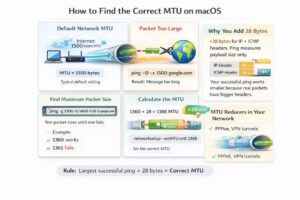
How to Find and Set the Optimal MTU on Mac/macOS
If you have just changed ISPs or moved house and your internet suddenly starts misbehaving the likelihood is your Maximum Transmission Unit (MTU) is set too high for your ISP. The default internet facing MTU is 1500 bytes, BUT depending on your setup, this often needs to be set much lower. Step 1: First check […]
Read more →iTerm2: Clear Scroll Back History with Command + K
I frequently forget this command shortcut, so this post is simply because I am lazy. To clear your history in iTerm press Command + K. Control + L only clears the screen, so as soon as you run the next command you will see the scroll back again. If you want to view your command […]
Read more →Check SPF, DKIM and DMARC Email Security DNS Records
There are three basic ways to secure email, these are: Sender Policy Framework (SPF), Domain Keys Identified Mail (DKIM), Domain-based Message Authentication, Reporting & Conformance (DMARC) definitions. Lets quickly discuss these before we talk about how to check if they have been setup: SPF helps prevent spoofing by verifying the sender’s IP address SPF (Sender […]
Read more →host Command DNS Queries on macOS: 9 Examples
1. Find a list of IP addresses linked to a domain To find the IP address for a particular domain, simply pass the target domain name as an argument after the host command. For a comprehensive lookup using the verbose mode, use -a or -v flag option. The -a option is used to find all Domain records and Zone […]
Read more →Scan Your Local Network With Nikto and Nmap on macOS
Nikto is becoming one of my favourite tools. I like it because of its wide ranging use cases and its simplicity. So whats an example use case for Nikto? When I am bored right now and so I am going to hunt around my local network and see what I can find… Now lets pop […]
Read more →
Fix Wireshark Permission Error on macOS: ChmodBPF Guide
If you see the error “The capture session could not be initiated on the device “en0” (You don’t have permission to capture on that device)” when trying to start a pcap on wireshare you can try installing ChmodBPF; but I suspect you will need to follow the steps below:
Read more →How to Customize the Zsh Prompt in macOS Terminal
When you open terminal you will see that it defaults the information that you see on the prompt, which can use up quite a bit of the screen real estate. Customize the zsh Prompt in Terminal Typically, the default zsh prompt carries information like the username, machine name, and location starting in the user’s home […]
Read more →