https://andrewbaker.ninja/wp-content/themes/twentysixteen/fonts/merriweather-plus-montserrat-plus-inconsolata.css

The Silent Killer in Your AWS Architecture: IOPS Mismatches

Andrew Baker | March 2026

Companion article to: https://andrewbaker.ninja/2026/03/03/knowing-your-iops-are-broken-is-not-the-same-as-knowing-they-are-about-to-break/

The AWS Well-Architected Framework will not spot this. Your cloud governance team will not catch it either, nor will Trusted Advisor. Your war room will be hours into the incident before anyone catches on. Your SRE reviews will miss it, your APM will not flag it, Performance Insights will not surface it, and your FinOps team will have no clue it is even there. It sits quietly in your estate for months, sometimes years, until the day load conditions expose it and you spend four hours in a war room trying to explain to your CTO why a bank cannot process payments.

What is it? IOPS mismatches, where your storage can deliver far more throughput than your compute instance can actually consume.

1. What Is an IOPS Mismatch?

IOPS (Input/Output Operations Per Second) is the fundamental currency of storage performance. When you provision an RDS instance or attach an EBS volume to an EC2 host, you are making two independent decisions: how many IOPS the storage can deliver, and how many IOPS the instance can actually push through its I/O subsystem. These two numbers are governed by entirely separate limits. EBS gp3 and io2 volumes can be provisioned up to 64,000 IOPS, but your EC2 instance has its own maximum EBS throughput ceiling, and for many instance types that ceiling is well below what your storage can theoretically deliver.

The result is a mismatch where you are paying for storage performance that your compute layer cannot reach, and worse, you are designing your system around an IOPS budget that does not actually exist at the instance level. Every dollar you spend on IOPS above that ceiling is money you will never get value from, and none of your tooling will tell you.

2. The AWS Architecture Pattern That Makes This Worse

AWS makes it easy to provision storage and compute independently, and neither the console, the CLI, CloudFormation, nor Terraform will warn you when your storage IOPS ceiling exceeds your instance throughput ceiling. The typical path to a mismatch involves an engineer provisioning an r6g.large with a 3,500 IOPS maximum EBS throughput because the application is memory intensive, while a separate decision by a different team provisions the attached RDS storage with 10,000 IOPS because the database team uses a standard enterprise template. The two numbers are never compared against each other and the system goes to production.

At any institution operating at scale across hundreds of accounts and workloads, the opportunity for this kind of drift is significant. An OU spanning multiple teams, each with their own provisioning habits and templates, will accumulate mismatches over time through the natural entropy of infrastructure management.

Some of the most frequent mismatches appear in exactly the instance types engineers reach for most often. The t3 family is particularly dangerous because it is the default choice for cost-conscious workloads, yet every size from nano to 2xlarge is capped at 2,085 IOPS while a gp3 volume defaults to 3,000 and io1 storage attached by a database team using an enterprise template can easily reach 6,000 or more. The r6g.large caps at 3,500 IOPS and is routinely paired with RDS storage provisioned at double that. The m5.xlarge at 6,000 IOPS is frequently attached to io2 volumes at 10,000. On the RDS side, a db.t3.medium is limited to 1,536 IOPS but is commonly found with io1 storage provisioned at 3,000, and db.r6g.large instances capped at 3,500 are routinely given storage provisioned at 8,000 or more.

3. Why This Causes Outages and Not Just Waste

Paying for IOPS you cannot use is expensive but survivable. The dangerous scenario is what happens at the boundary when load actually increases.

Consider a team that knows their application spikes at just under 30,000 IOPS. They provision storage at 40,000 to give themselves headroom, which is exactly what good engineering practice tells them to do. Everything looks fine in testing, everything looks fine in monitoring, and the system runs without complaint. Then load spikes, the I/O subsystem begins to queue, upstream systems scale out in response, a flood of autoscaling connections exhausts the database connection pool, and services start timing out in a rapid cascading outage. The application is down, and now your team is trying to correlate thread exhaustion in your EKS clusters back to a blind configuration mismatch that no automated tool flagged at any point along the way.

That cascade is the real danger. Under normal conditions your application runs fine because actual I/O demand is modest and the mismatch is invisible. But when demand approaches the instance throughput ceiling, requests begin to queue at the virtualization layer and what was a 1ms storage read becomes 50ms and then 200ms as connection pools back up. In Aurora Serverless v2 or RDS PostgreSQL, connection pool exhaustion under I/O pressure is a documented failure mode where the database appears healthy and is accepting connections but query execution times blow through application timeouts, upstream services retry, retries compound the I/O pressure, and you are now in a feedback loop. On smaller instance types that operate on a credit model for I/O throughput, a sustained I/O spike drains the burst bucket and when it empties throughput drops to the baseline, which is often a fraction of what the application expects, even though the storage volume itself could still deliver perfectly well.

The most insidious part is that CloudWatch metrics can hide this entirely. VolumeReadOps and VolumeWriteOps report what the volume delivered while EBSReadOps on the instance side reports what the instance consumed, and under a mismatch these metrics appear healthy right up until they do not because the bottleneck lives in the virtualized I/O path between instance and volume rather than in either component independently. Performance Insights, which most teams trust to surface database I/O problems, operates above this layer entirely and will show you wait events and query latency but will not show you that the ceiling your instance is hitting is a hardware throughput limit rather than a query or index problem.

4. The FinOps Trap: When Cost Optimisation Creates the Outage

There is a particularly cruel variant of this failure that deserves its own warning. Trusted Advisor and your FinOps team will periodically flag RDS instances with low CPU utilisation as oversized and recommend downsizing to save cost. The recommendation is correct by every metric they can see. CPU is idle, the instance looks like waste, and the resize gets approved and executed. What nobody checks is whether the workload is I/O bound rather than CPU bound, and whether the smaller instance class sits below the provisioned storage IOPS ceiling. The downsize goes through, the system runs fine for weeks because load is modest, and then three months later under a transaction spike you are in an outage with no obvious cause because nobody remembers a routine right-sizing exercise from last quarter. The CloudWatch CPU graphs look fine throughout. The storage metrics look fine. The failure lives entirely in the gap between what the instance can consume and what the storage was provisioned to deliver, and that gap was created by a cost optimisation that was correct by every measure anyone was watching, but deadly by the metrics they couldnt see.

5. Detection Requires Automation

Once you have identified a mismatch the fix is straightforward: upgrade the instance to a class whose throughput ceiling exceeds the provisioned storage IOPS, or reduce the provisioned IOPS on the storage to match what the instance can actually consume. The hard part is finding these mismatches across a large estate before they manifest as incidents, because you cannot do this manually and you cannot rely on individual teams to self-report. It needs to be a scheduled job that generates a report and produces findings you treat with the same severity as any security or cost compliance alert.

The script below queries every account in the OU, enumerates all RDS instances and EC2 volumes, compares provisioned storage IOPS against the instance throughput ceiling for each, and flags every mismatch with a severity classification and an estimated monthly waste figure. Findings are classified as CRITICAL where provisioned IOPS exceed the ceiling by three times or more and require immediate remediation, HIGH at two to three times over for remediation within the current sprint, MEDIUM at 1.5 to two times for the next planning cycle, and LOW for anything above the ceiling but within the 1 to 1.5x range. Output is a colour-coded Excel workbook with a findings sheet and summary tab alongside a flat CSV, and the script exits with code 1 if any CRITICAL findings are present so it can be wired into a CI pipeline for scheduled runs.

To run it you will need boto3, pandas, and openpyxl installed, and your caller identity needs organizations:ListChildren, organizations:DescribeAccount, and sts:AssumeRole into each target account, while the assumed role needs rds:DescribeDBInstances, ec2:DescribeVolumes, and ec2:DescribeInstances.

6. The Broader Lesson

Every major cloud outage I have seen, and this spans AWS and the broader industry, has a mundane configuration decision somewhere near its root cause. It is not a sophisticated attack and not a novel failure mode, it is a number that should have been checked against another number at provisioning time and was not. IOPS mismatches are not glamorous, they do not appear on architectural review templates, and as we have seen they slip past every layer of automated governance you have in place. But in any environment where uptime matters they translate directly into transaction failures, customer impact, and regulatory exposure, which means they deserve the same treatment as any other class of compliance finding. Audit your estate, fix the mismatches, and make it a scheduled job rather than a post-incident action item.

Andrew Baker writes about cloud architecture, banking technology, and the gap between what systems are designed to do and what they actually do under load at andrewbaker.ninja.

7. The Diagnostic Illusion: Why IOPS Mismatches Hide During Outages

One of the reasons IOPS mismatches are so destructive is that they do not behave like normal resource exhaustion. Most infrastructure limits are obvious when they fail.

When CPU reaches 100 percent, everyone can see it. Dashboards turn red. Engineers immediately understand what the bottleneck is. CPU exhaustion is visible and honest. IOPS bottlenecks rarely behave this way. Instead, they fail indirectly.

A storage system can begin throttling I/O when it reaches its provisioned limits. Requests do not immediately fail. They simply get slower. Latency increases. Queues begin to build. This is where the diagnostic illusion appears.

Imagine a system where the database suddenly shows 5,000 active connections, application latency spikes, and the EKS node group begins scaling out. From the outside it looks like a traffic surge or an application scaling problem.

But the real cause might be that the storage layer has quietly hit its true IOPS ceiling, even though dashboards show it running at only 76 percent of the capacity you think it has.

This happens because storage performance is constrained by two key limits at the same time: volume IOPS, and instance throughput. The real limit is always the lowest constraint in the chain, not the number you provisioned against the storage volume.

Once that invisible boundary is crossed, storage latency increases and the entire stack begins compensating. Pods scale horizontally. Applications retry queries. Connection pools expand. Databases appear overloaded. But the failure did not start there. It started when storage quietly hit an IOPS boundary that nobody recognised.

An exhausted CPU is easy to diagnose. A database with 5,000 connections clearly looks like a problem. But explaining that an entire EKS fleet scaled out because storage hit an invisible IOPS ceiling at 76 percent utilisation is a far harder story to tell during a production outage. And that is exactly why IOPS mismatches are such dangerous architectural traps.

WordPress Space Cleanup: A Free WordPress Databas, Media Library Cleanup Plugin and PNG to JPEG convertor

If you run a WordPress site for any length of time, the database quietly fills with junk. Post revisions stack up every time you hit Save. Drafts you abandoned years ago sit there. Spam comments accumulate. Transients expire but never get deleted. Orphaned metadata from plugins you uninstalled months ago quietly occupies table rows nobody ever queries. On a busy blog or a site that has been running for several years, this accumulation can add up to tens of thousands of rows and hundreds of megabytes of wasted space.

I built CloudScale Cleanup to deal with this properly. It is a free, open source WordPress plugin that handles both database cleanup and media library cleanup: unused images, orphaned filesystem files, and image optimisation; through a clean admin interface with full dry run support so you can see exactly what will be deleted before anything is touched.

Github:

https://github.com/andrewbakercloudscale/cloudscale-cleanup

You can download it here: cloudscale-cleanup.zip

What It Cleans

Database Cleanup

Post Revisions: Every time you update a post, WordPress stores a complete copy of the previous version. On an active blog this means hundreds of revision rows per post. CloudScale Cleanup removes revisions older than a configurable threshold (default 30 days), leaving recent ones intact.

Draft Posts: Posts saved as drafts but never published. The threshold (default 90 days) ensures you never accidentally lose something you were actively working on.

Trashed Posts: Posts moved to the WordPress trash. WordPress keeps them indefinitely. The plugin removes them after a configurable number of days.

Auto-Drafts: WordPress creates an auto-draft record every time you open the Add New Post screen. If you navigate away without saving, the empty record remains. These accumulate silently and are almost always safe to delete immediately.

Expired Transients: Temporary cached values stored in your options table by plugins and themes. After expiry WordPress should delete them, but many are never cleaned up. They are completely safe to delete and can number in the thousands on plugin-heavy sites.

Orphaned Post Meta: Metadata rows referencing post IDs that no longer exist. Left behind when posts are deleted without their associated metadata being cleaned up first.

Orphaned User Meta: The same problem for user accounts. When a user is deleted, their metadata rows often remain.

Spam Comments: Comments flagged as spam. A configurable threshold (default 30 days) gives you time to review false positives before they are permanently removed.

Trashed Comments: Comments you have manually moved to the comment trash, removed after a configurable threshold.

WordPress database cleanup plugin interface showing cleanup options

Image Cleanup

Unused Image: Attachments that exist in your media library but cannot be found anywhere on the site: not in post content, not as featured images, not in widget settings, theme mods, the site logo, or the site icon. The site logo and icon are always protected regardless of settings.

Orphaned Filesystem Files: Image files that exist physically on disk inside wp-content/uploads but have no corresponding WordPress attachment record in the database. These are typically left behind after failed imports, manual file operations, or plugin migrations.

Database cleanup results displaying removed items and space saved

Image Optimisation

CloudScale Cleanup can resize and re-compress JPEG and PNG images that exceed configurable maximum dimensions or quality thresholds. This is a destructive operation; it modifies the original files on disk; so the plugin requires explicit confirmation and strongly recommends taking a backup first.

WordPress image optimizer showing PNG to JPEG conversion settings

PNG to JPEG Converter

CloudScale Cleanup WordPress plugin interface screenshot

If you have ever looked at the size of your WordPress uploads folder and wondered why it is so large, the answer is almost certainly PNG files. A single PNG screenshot can easily be 3 to 8 MB. The same image saved as a JPEG at 85% quality is typically 200 to 400 KB; a reduction of 90% or more. Multiply that across dozens or hundreds of images and you are looking at gigabytes of wasted disk space and slower page loads for every visitor.

Most images uploaded to WordPress do not need to be PNGs. PNG is a lossless format designed for images where every pixel matters; technical diagrams, logos with transparency, pixel art. For photographs, screenshots, WhatsApp images, and the vast majority of blog content, JPEG is the correct format. The visual difference at 85% quality is imperceptible to the human eye, but the file size difference is enormous.

CloudScale Cleanup now includes a PNG to JPEG tab that handles this conversion directly inside your WordPress admin. Drop one or more PNG files onto the upload area, set your quality (1 to 100, default 85) and output dimensions, and hit Convert All. The converter uses the same chunked upload architecture that powers the database cleanup, so even very large PNG files are uploaded in small pieces that will not hit PHP upload limits or server timeouts. Once converted, you can download the JPEG directly or click Add to Media to send it straight into your WordPress Media Library.

A typical WordPress blog with 100 PNG images at an average of 4 MB each uses 400 MB of disk space. Converting to JPEG at 85% quality typically reduces that to around 40 MB. On sites with heavy image use, the savings run into multiple gigabytes.

The PNG to JPEG converter bypasses the standard WordPress 2 MB upload limit using chunked uploads. Instead of submitting the entire file through the WordPress media uploader, the browser slices the PNG into smaller pieces (defaulting to 1.5 MB each) and uploads them individually via separate AJAX requests. The server reassembles the chunks, then GD handles the conversion at your chosen quality and size. This lets you convert PNG files up to 200 MB without touching any PHP configuration or asking your host to raise limits.​​​​​​​​​​​​​​​​

Below is me using it from my iphone to post an article. Both Chatgpt and claude create pngs, so i just go to the addin and convert them to jpegs.

Mobile phone screenshot of WordPress cleanup plugin in use

Installation

  1. Download the plugin zip from: https://andrewninjawordpress.s3.af-south-1.amazonaws.com/cloudscale-cleanup.zip
  2. In your WordPress admin, go to Plugins → Add New → Upload Plugin
  3. Choose the zip file and click Install Now
  4. Click Activate Plugin
  5. Navigate to Tools → CloudScale Cleanup in the admin sidebar

If you have an opcode cache running (OPcache, Redis object cache, or a caching plugin like WP Rocket or W3 Total Cache), deactivate and reactivate the plugin after installation to ensure the new files are loaded cleanly.

Using the Plugin

The Dry Run

Before deleting anything, always run a dry run. Click the Dry Run — Preview button on the Database Cleanup tab. The plugin will scan your database and report exactly what it found; how many revisions, which draft posts, how many orphaned meta rows, without touching anything.

The output terminal shows each category with a count, and for items like draft posts it lists the individual post IDs, titles, and dates so you can make an informed decision before proceeding.

If a toggle is switched off, the category will show as SKIPPED (disabled) in the output. Toggle states are respected at the point of scanning, so what you see in the dry run accurately reflects what the actual cleanup will do.

Toggles

Each cleanup category has a toggle switch. Green means it will be included in the next scan or cleanup run. Grey means it will be skipped. Toggle settings are saved independently using the Save Selection button on each card.

This lets you permanently disable categories you never want touched — for example, if you deliberately keep old drafts as reference material, toggle off Draft Posts and it will never appear in scans.

Thresholds

The Cleanup Thresholds card controls the age cutoffs for each category. Every threshold prevents the cleanup from touching items that are too recent. Defaults are conservative:

  • Post revisions older than 30 days
  • Drafts older than 90 days
  • Trashed posts older than 30 days
  • Auto-drafts older than 7 days
  • Spam comments older than 30 days
  • Trashed comments older than 30 days

Adjust these to match your workflow. If you publish daily and never need to recover a revision more than a week old, set the revision threshold to 7 days. If you occasionally return to old drafts, set the draft threshold to 180 days or higher.

Running the Cleanup

Once you are satisfied with the dry run output, click Run Cleanup Now. The plugin will ask for confirmation, then process deletions in chunks to avoid PHP timeout limits. A progress bar tracks completion in real time. The output terminal logs each deleted item.

The chunked processing engine means the cleanup is safe to run on large sites. Even if you have 50,000 orphaned meta rows, the plugin processes them in batches of 50 and reports progress throughout rather than attempting a single massive query that could time out.

Scheduled Cleanup

The Settings tab includes a scheduler that registers a WordPress Cron job to run the database cleanup automatically on selected days at a configured hour.

A note on WordPress Cron: it is not a real cron. It is triggered by page visits. On a low-traffic site, a job scheduled for 3:00 AM may not run until the first visitor arrives that morning. For precise scheduling, disable WP-Cron in wp-config.php and add a real system cron:

# wp-config.phpndefine('DISABLE_WP_CRON', true);
# Server crontabn0 3 * * * curl -s https://yoursite.com/wp-cron.php?doing_wp_cron u003e /dev/null 2u003eu00261

Architecture Notes

The plugin is deliberately self-contained; a single PHP file plus two asset files with no external dependencies and no calls home. It uses WordPress’s own $wpdb for all database operations, respects WordPress nonces for AJAX security, and hooks into the standard admin menu and enqueue system.

Cleanup operations use a three-phase chunked engine: a start action builds the queue and stores it in a transient, a chunk action processes one batch and updates the transient, and a finish action reports the final summary and cleans up. This pattern means the browser never waits more than a few seconds for any single request, and the cleanup can handle arbitrarily large datasets without running into PHP execution time limits.

The toggle state is passed from the browser to the PHP handler on every scan and run request. The PHP handler never assumes toggles are on, if a key is missing from the POST data it treats that category as disabled. This means the dry run and the actual cleanup always respect the current on-screen state, not just whatever was last saved to the database.

Download

The plugin is free and open source.

Download CloudScale Cleanup v1.5.3

Install it, run a dry run, and find out how much cruft has been accumulating in your WordPress database.

Scaling Aurora Serverless v2 PostgreSQL: A Production Deep Dive

Aurora Serverless v2 promises the dream of a database that automatically scales to meet demand, freeing engineering teams from capacity planning. The reality is considerably more nuanced. After running Serverless v2 PostgreSQL clusters under production workloads, I have encountered enough sharp edges to fill a blog post. This is that post.

The topics covered here span the entire lifecycle of running Serverless v2 at scale: from choosing the right minimum ACU to avoid crippling your buffer cache, to managing connection pool saturation across hundreds of application pods, to understanding why Aurora’s aggressive scale down behaviour can cause more production incidents than it prevents. I also cover the connection storm failure pattern that is responsible for the majority of Aurora Serverless v2 production outages, the AWS Advanced JDBC Wrapper, prepared statement planning pitfalls with partitioned tables, reader versus writer traffic routing, vacuuming at scale, and how to build alerting that actually catches scaling issues before your customers do.

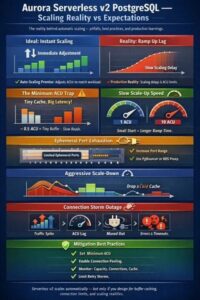
1 The Minimum ACU Trap: Buffer Cache, Memory, and Cold Start Pain

The most consequential decision you will make with Aurora Serverless v2 is choosing your minimum ACU. It is also the decision most teams get wrong.

Each ACU provides approximately 2 GiB of memory with corresponding CPU and networking. When you set a minimum of 0.5 ACUs, you are telling Aurora that 1 GiB of memory is an acceptable baseline for your database. For anything beyond a development environment, this is almost certainly too low.

1.1 Why Low Minimum ACUs Destroy Performance

PostgreSQL relies heavily on its buffer cache (shared_buffers) to keep frequently accessed data in memory. When Aurora scales down to a low ACU count, the buffer cache shrinks proportionally. Data that was previously served from memory is evicted. When load returns, every query that needs that data must now go to Aurora’s storage layer. The BufferCacheHitRatio metric drops and query latencies spike, sometimes by orders of magnitude.

This is not just a performance concern. It is a cascading failure waiting to happen. Here is the sequence that plays out in production:

Traffic drops overnight or during a quiet period. Aurora scales down to its minimum ACU. The buffer cache is flushed. Morning traffic arrives. Every query hits storage. Latencies increase. Application connection pools begin to saturate because queries that used to complete in 2 milliseconds now take 50 milliseconds. The database begins scaling up, but it takes time for the buffer cache to warm. During this warming period, you are effectively running a cold database under production load.

1.2 The Scaling Rate Problem

The rate at which Aurora Serverless v2 can scale up depends on its current capacity. An instance at 2 ACUs scales up more slowly than one at 16 ACUs. AWS documentation states this explicitly: the higher the current capacity, the faster it can scale up. If your minimum is set too low and you experience a sudden burst, the database cannot scale fast enough to meet demand. It scales in 0.5 ACU increments and the increment size grows with current capacity, meaning scaling from 0.5 to 16 ACUs takes meaningfully longer than scaling from 8 to 16 ACUs.

1.3 Practical Minimum ACU Guidance

For production workloads, your minimum ACU should be set high enough that your working dataset fits comfortably in the buffer cache at minimum capacity. Monitor the BufferCacheHitRatio metric over a representative period. If it drops below 99% at any point during normal operations, your minimum is too low.

A practical approach is to look at your provisioned instance metrics before migrating to serverless. If your provisioned r6g.xlarge (32 GiB RAM) cluster consistently uses 20 GiB of buffer cache, your minimum ACU should be at least 10 ACUs (20 GiB / 2 GiB per ACU) to maintain comparable buffer cache performance.

AWS recommends specific minimums for certain features:

  • 2 ACUs minimum if using Database Insights (Performance Insights)
  • 8 ACUs minimum for Global Databases
  • 1 ACU minimum for high connection workloads (max_connections is capped at 2,000 when minimum is set to 0 or 0.5 ACUs)

My recommendation: start with a minimum ACU that represents your steady state workload minus 20%, not the absolute lowest possible. The cost savings from running at 0.5 ACUs during quiet periods are almost never worth the performance degradation and cold start penalty when traffic returns.

2 Port Saturation and Connection Pool Sizing

Connection management is the second most common production issue with Aurora Serverless v2, particularly in microservices architectures where dozens or hundreds of pods each maintain their own connection pools.

2.1 Understanding Port Saturation

Every TCP connection to your Aurora instance consumes an ephemeral port. On the client side, the Linux kernel assigns a source port from the ephemeral range (typically 32768 to 60999, giving you approximately 28,000 ports per source IP). On a single application host or Kubernetes node, if you run many pods that each maintain large connection pools to the same Aurora endpoint, you can exhaust the ephemeral port range on that host.

The symptoms of port saturation are subtle and often misdiagnosed. Connection attempts start timing out intermittently. The database itself shows no signs of stress. CloudWatch metrics for the Aurora instance look fine. The problem is entirely on the client side: the operating system cannot allocate new source ports.

In Kubernetes environments this is particularly treacherous because many pods share the same node’s network namespace (unless using host networking). A single node running 20 pods, each with a connection pool of 20, means 400 connections from a single IP address. Add connection churn from pool recycling and you can approach the ephemeral port limit.

2.2 Detecting Port Saturation

On your application hosts or Kubernetes nodes, monitor the following:

# Count connections to your Aurora endpoint
ss -tn | grep ':5432' | wc -l

# Check ephemeral port usage
cat /proc/sys/net/ipv4/ip_local_port_range
ss -tn state established | wc -l

# On Kubernetes nodes, check connections per pod IP
ss -tn | grep ':5432' | awk '{print $4}' | cut -d: -f1 | sort | uniq -c | sort -rn

2.3 Avoiding Port Saturation

There are several approaches to preventing port saturation, and you should typically combine more than one.

First, widen the ephemeral port range. On Linux, the default range of 32768 to 60999 can be expanded. Set net.ipv4.ip_local_port_range = 1024 65535 in sysctl.conf to nearly double the available ports. Be aware that this overlaps with some well known ports, so ensure your applications do not listen on ports in the lower range.

Second, enable TCP port reuse. Set net.ipv4.tcp_tw_reuse = 1 to allow reuse of TIME_WAIT sockets for new connections to the same destination. This is safe for client side connections and dramatically reduces port pressure during connection churn.

Third, reduce connection pool sizes. This is where proper sizing becomes critical.

2.4 Calculating Connection Pool Size

The PostgreSQL wiki provides a formula that has held up well across many benchmarks:

optimal_connections = (core_count * 2) + effective_spindle_count

For Aurora Serverless v2, where storage is network attached and there are no physical spindles, effective_spindle_count is effectively zero if your working set is cached (which it should be if you have set your minimum ACUs correctly). So the formula simplifies to:

optimal_connections = core_count * 2

Each ACU provides roughly 0.25 vCPUs of compute capacity. At 16 ACUs maximum, you have approximately 4 vCPUs. This means the optimal number of active connections for a 16 ACU instance is around 8 to 10 connections doing active work simultaneously.

This number surprises people. It should not. PostgreSQL is not designed for massive connection parallelism. Every connection spawns a process, each consuming around 10 MiB of memory. Context switching between hundreds of active connections creates overhead that actively degrades throughput.

The formula for your total connection budget across all application instances is:

total_pool_connections = max_connections - superuser_reserved - monitoring_connections
per_pod_pool_size = total_pool_connections / number_of_pods

For Aurora Serverless v2, max_connections is derived from the maximum ACU setting. A rough approximation is:

max_connections ≈ GREATEST(max_ACU * 50, 100)

If your maximum ACU is 16, you get approximately 800 connections. Reserve 3 for superusers, another 10 for monitoring and administrative connections, leaving 787 for your applications. If you run 50 pods, each pod gets approximately 15 connections in its pool. If you run 200 pods, each gets approximately 4.

When the per pod number drops below 5, you need either an external connection pooler (PgBouncer or RDS Proxy) or fewer pods with larger pool sizes. RDS Proxy is the path of least resistance in the AWS ecosystem, though be aware it prevents Aurora Serverless v2 from scaling to zero ACUs since the proxy maintains persistent connections.

2.5 The Microservices Connection Multiplication Problem

In a microservices architecture, the connection math gets worse quickly. If you have 10 microservices, each running 20 pods, each with a connection pool of 10, you need 2,000 connections. This exceeds the max_connections for many ACU configurations.

The solution is PgBouncer in transaction mode, either as a sidecar on each pod or as a shared pool. In transaction mode, a server side connection is only held for the duration of a transaction, not the lifetime of a client connection. This lets you support thousands of client connections with a much smaller number of actual PostgreSQL connections.

3 Aurora’s Aggressive Scale Down and the Lack of Custom Scaling Parameters

This is the section where I become most critical of Aurora Serverless v2, because this behaviour has caused real production incidents.

3.1 The Problem: Aurora Scales Down Too Aggressively

Aurora Serverless v2 uses an internal algorithm to determine when to scale down. You cannot configure this algorithm. You cannot set a cooldown period. You cannot define custom scaling metrics. AWS documentation confirms that Aurora Auto Scaling (the kind that adds readers) is explicitly not supported for Serverless v2 because “scaling based on CPU usage isn’t meaningful for Aurora Serverless v2.”

The scaling down behaviour works as follows: when CPU load decreases, CPU capacity is released relatively quickly. Memory is released more gradually, but it is still released. AWS describes this as a “deliberate architectural choice” where memory is “more gradually released” as demand lessens. In practice, this means that after a burst of traffic, Aurora will begin reducing ACUs within minutes. If another burst arrives before the buffer cache has been properly rebuilt, you hit the cold cache problem described in Section 1.

You cannot tell Aurora to “keep at least 16 ACUs for the next 30 minutes after a burst.” You cannot scale based on a custom CloudWatch metric like queue depth or request rate. You cannot set a scale down cooldown. The only control you have is the minimum and maximum ACU range.

3.2 The Burst Traffic Pattern Problem

Consider a banking application that processes batch payments every 15 minutes. Each batch takes 3 minutes and requires significant database resources. Between batches, the database is relatively idle. Aurora Serverless v2 will scale up for each batch, then aggressively scale back down during the 12 minute quiet period. Each time it scales down, it loses buffer cache. Each time the next batch arrives, it hits cold storage.

With a provisioned instance, you simply size for your peak workload and accept the cost during quiet periods. With Serverless v2, you are forced to choose between setting a high minimum ACU (defeating the purpose of serverless) or accepting degraded burst performance.

3.3 The Workaround

The only reliable workaround is to set your minimum ACU high enough to absorb the scale down behaviour. This means your minimum ACU should be set to the capacity needed to keep your buffer cache warm, not to the lowest possible cost saving value.

For burst workloads specifically, consider running a lightweight background query that keeps the database warm. This is an ugly hack, but it works:

-- Run every 5 minutes from a lightweight scheduler
SELECT count(*) FROM (
    SELECT 1 FROM your_hot_table
    ORDER BY your_commonly_queried_column
    LIMIT 10000
) t;

This keeps frequently accessed pages in the buffer cache and prevents Aurora from releasing memory it will need again shortly.

4 Long Running Queries, Timeouts, and Lock Management

Long running queries interact badly with Aurora Serverless v2’s scaling model in ways that catch teams off guard. A query that would be merely slow on a provisioned instance can become a cascade failure trigger on a serverless cluster.

4.1 What Happens to Queries During a Scaling Event

Aurora Serverless v2 scales compute resources with minimal disruption to running queries, but minimal is not zero. During a scale up event, CPU and memory are added relatively transparently. During a scale down event, if the instance needs to reclaim memory that is currently being used by an active query’s sort or hash buffers, there is contention. Queries that were running fine at 16 ACUs and relying on 4 GiB of work_mem allocations will behave differently at 4 ACUs where the same global work_mem setting is competing with a much smaller memory budget.

The practical consequence is that work_mem should not be set globally to a value that assumes your maximum ACU is always in effect. Set it conservatively at the server level and use SET LOCAL work_mem within specific transactions that need more:

BEGIN;
SET LOCAL work_mem = '256MB';
-- your sort heavy or hash join query here
COMMIT;

This scopes the elevated work_mem to a single transaction without affecting the global setting, which matters when the instance is at lower ACU counts.

4.2 Statement Timeout: Your First Line of Defence

Aurora Serverless v2 has no built in query kill mechanism based on resource pressure. If a long running query is consuming CPU and preventing scale down, it will continue to do so until it completes, is cancelled by the client, or you intervene manually.

Set statement_timeout at the database or role level, not just in application code. Application side timeouts are unreliable: connection drops, application restarts, and network issues can all leave a query running on the server even after the client has given up:

-- For your application role, set a sensible default
ALTER ROLE app_user SET statement_timeout = '30s';

-- For reporting or analytics roles that legitimately need longer
ALTER ROLE analytics_user SET statement_timeout = '300s';

-- Verify what is set
SELECT rolname, rolconfig FROM pg_roles WHERE rolname IN ('app_user', 'analytics_user');

For Aurora Serverless v2 specifically, long running analytical queries should either be directed to a dedicated reader instance (section 6) or run via Aurora’s parallel query feature if eligible, not on the writer at peak hours.

4.3 Idle in Transaction: The Silent ACU Killer

A connection that is idle inside a transaction holds locks, consumes memory, and prevents autovacuum from cleaning up dead rows. At low ACU counts where memory is limited, a handful of idle in transaction connections can cause measurable performance degradation.

Set idle_in_transaction_session_timeout to terminate connections that have opened a transaction and then gone silent:

-- Terminate connections idle in a transaction for more than 60 seconds
ALTER SYSTEM SET idle_in_transaction_session_timeout = '60s';
SELECT pg_reload_conf();

This is a server level parameter. Setting it to 60 seconds will terminate sessions that have started a transaction and not done anything for a minute. This is almost always a bug in application code: a connection pool returning a connection mid transaction, or an application that opened a transaction and crashed. Finding these with a permissive timeout is better than letting them accumulate.

Also set lock_timeout to prevent lock queues from building silently:

ALTER ROLE app_user SET lock_timeout = '10s';

Without a lock timeout, a query waiting on a lock will wait indefinitely. On a serverless cluster, this means connections accumulate in the lock wait state, connection pool queues build up, and by the time you notice, your DatabaseConnections metric has saturated.

4.4 Detecting and Killing Problem Queries

Add these diagnostic queries to your runbook. Run them when monitoring shows ACUUtilization is high but application traffic does not explain it:

-- Queries running longer than 60 seconds
SELECT
    pid,
    now() - pg_stat_activity.query_start AS duration,
    query,
    state,
    wait_event_type,
    wait_event
FROM pg_stat_activity
WHERE (now() - pg_stat_activity.query_start) > INTERVAL '60 seconds'
  AND state != 'idle'
ORDER BY duration DESC;

-- Connections idle in transaction (holding locks, consuming memory)
SELECT
    pid,
    now() - state_change AS idle_duration,
    usename,
    application_name,
    client_addr,
    LEFT(query, 100) AS last_query
FROM pg_stat_activity
WHERE state = 'idle in transaction'
ORDER BY idle_duration DESC;

-- Lock waits that are blocking other queries
SELECT
    blocked.pid AS blocked_pid,
    blocked.query AS blocked_query,
    blocking.pid AS blocking_pid,
    blocking.query AS blocking_query,
    now() - blocked.query_start AS blocked_duration
FROM pg_stat_activity AS blocked
JOIN pg_stat_activity AS blocking
    ON blocking.pid = ANY(pg_blocking_pids(blocked.pid))
ORDER BY blocked_duration DESC;

To terminate a specific query without killing the connection:

SELECT pg_cancel_backend(pid);

To terminate the connection entirely:

SELECT pg_terminate_backend(pid);

4.5 When Not to Use Aurora Serverless v2

Long running query patterns are a signal that Serverless v2 may not be the right choice for a workload. If your cluster regularly runs queries longer than five minutes, hosts analytics or reporting workloads alongside OLTP, or has a predictable and stable baseline load that never drops meaningfully, a provisioned instance with Graviton will almost always outperform Serverless v2 on both cost and latency.

Serverless v2 earns its keep for workloads with genuine variability: overnight quiet periods followed by daytime peaks, bursty batch jobs with unpredictable timing, or development and staging environments that are idle most of the day. For consistent high throughput workloads, the overhead of the scaling mechanism and the buffer cache volatility described in section 1 are costs with no corresponding benefit.

5 The AWS Advanced JDBC Wrapper

If you are running Java applications against Aurora, the AWS Advanced JDBC Wrapper is not optional. It is a significant upgrade over using a standard PostgreSQL or MySQL JDBC driver directly, and it solves several problems that are specific to Aurora’s architecture.

5.1 What It Does

The AWS Advanced JDBC Wrapper sits on top of your existing JDBC driver (PostgreSQL JDBC, MySQL Connector/J, or MariaDB Connector/J) and adds Aurora specific capabilities without requiring you to rewrite your data access code. The key features for production workloads are:

Fast Failover Beyond DNS. When Aurora performs a failover, the cluster endpoint DNS record needs to update to point to the new primary. DNS propagation can take up to 30 seconds. The JDBC Wrapper maintains a real time cache of the Aurora cluster topology by querying Aurora directly. When a failover occurs, it immediately knows which instance is the new primary and reconnects without waiting for DNS. In testing, this reduces failover reconnection time from 30 seconds to approximately 6 seconds with the v1 failover plugin, and even less with Failover v2.

Failover v2 Plugin. The original failover plugin handled each connection’s failover independently. If you had 100 active connections during a failover, each one independently probed the cluster topology to find the new writer. The Failover v2 plugin centralises topology monitoring into a single thread (MonitorRdsHostListProvider), so hundreds of connections can fail over simultaneously without overwhelming the cluster with topology queries.

Enhanced Failure Monitoring. Traditional JDBC drivers detect failures through TCP timeouts, which can take 30 seconds or more. The JDBC Wrapper’s Enhanced Failure Monitoring (EFM) proactively monitors database node health using lightweight probe connections. It detects failures before your application’s connection times out, enabling faster response.

Seamless IAM Authentication. Aurora supports IAM database authentication, but implementing token generation, expiration handling, and renewal in your application is tedious. The wrapper handles the entire IAM authentication lifecycle transparently.

Secrets Manager Integration. Database credentials are retrieved automatically from AWS Secrets Manager. Your application configuration never contains the actual password.

5.2 Read Write Splitting

The read/write splitting plugin is particularly valuable for Aurora Serverless v2 because it allows you to route read traffic to reader instances (which scale independently from the writer in promotion tiers 2 through 15) while keeping write traffic on the writer.

The plugin works by intercepting connection.setReadOnly(true) calls and switching the underlying connection to a reader instance. When setReadOnly(false) is called, it switches back to the writer. In Spring Boot with JPA, this maps directly to @Transactional(readOnly = true) annotations.

# HikariCP configuration with AWS JDBC Wrapper
spring:
  datasource:
    url: jdbc:aws-wrapper:postgresql://your-cluster.cluster-xxx.region.rds.amazonaws.com:5432/mydb
    driver-class-name: software.amazon.jdbc.Driver
    hikari:
      connection-timeout: 30000
      maximum-pool-size: 15
  jpa:
    properties:
      hibernate:
        connection:
          provider_class: software.amazon.jdbc.ds.HikariPooledConnectionProvider

The reader selection strategy is configurable. Options include random (default), round robin, and fastest response time. For Aurora Serverless v2 where reader instances may be at different ACU levels, round robin provides the most even distribution.

One important caveat from the AWS documentation: if you are using Spring’s @Transactional(readOnly = true) annotation, Spring calls setReadOnly(true), runs the method, then calls setReadOnly(false). This constant switching incurs overhead from connection switching. For high throughput read workloads, the AWS documentation actually recommends using separate data sources pointing to the writer and reader cluster URLs rather than using the read/write splitting plugin with Spring annotations. Use the plugin for workloads where the same code path mixes reads and writes and you want automatic routing, and use separate data sources for dedicated read heavy services.

6 Prepared Statement Plans and Partitioned Tables

This is a subtle but consequential issue that can cause significant memory consumption and degraded query performance, particularly on partitioned tables.

6.1 How PostgreSQL Plan Caching Works

When you execute a prepared statement, PostgreSQL goes through parsing, planning, and execution. For the first five executions, it creates a custom plan specific to the parameter values provided. Starting with the sixth execution, it evaluates whether a generic plan (one that works for any parameter values) would be efficient enough. If the generic plan’s estimated cost is close to the average custom plan cost, PostgreSQL switches to reusing the generic plan permanently for that prepared statement.

This is normally a good thing. Planning is expensive, and reusing a generic plan saves planning overhead. The problem arises with partitioned tables.

6.2 The Partition Pruning Problem

When PostgreSQL plans a query against a partitioned table, it determines which partitions are relevant based on the query’s WHERE clause. This is called partition pruning. With a custom plan where the parameter values are known, the planner can prune partitions at planning time (initial pruning). Only the relevant partitions are included in the plan.

With a generic plan, the parameter values are not known at planning time. The planner must generate a plan that covers all partitions, because it does not know which ones will be relevant until execution time. PostgreSQL can still perform runtime pruning during execution, but the plan itself references all partitions.

Here is where the memory problem emerges. When PostgreSQL creates a plan that references a partition, it loads that partition’s metadata into the relation cache (relcache). For a table with hundreds of partitions, this means the relcache for a single prepared statement contains metadata for every partition. Each cached plan also holds locks on all referenced partitions. Multiply this by hundreds of prepared statements across many connections, and memory consumption becomes substantial.

6.3 The Memory Explosion

Consider a table partitioned by date with 365 daily partitions. A typical query filters by a single day. With a custom plan, only 1 partition is referenced. With a generic plan, all 365 partitions are referenced. Each partition’s relcache entry consumes memory (typically several kilobytes per partition including index metadata). Across 200 connections, each with 50 cached generic plans touching 365 partitions, you can consume gigabytes of memory just in relcache entries.

This problem is well documented. PostgreSQL committed a fix in version 17 (commit 525392d5) that prevents partitions pruned during initial pruning from being locked and loaded into the relcache. However, this fix was subsequently reverted (commit 1722d5eb) because it caused issues. PostgreSQL 18 includes partial improvements, but the core problem of generic plans loading all partitions into the relcache is not fully resolved.

6.4 Mitigations for Aurora

For Aurora Serverless v2, where memory directly translates to ACU consumption and cost, this issue is particularly impactful. Several mitigations are available:

Force custom plans where appropriate. For queries that always target a single partition, disable generic plans at the session level:

SET plan_cache_mode = 'force_custom_plan';

This forces PostgreSQL to generate a custom plan for every execution. You pay the planning overhead, but the plan only references the relevant partitions. For queries against large partitioned tables where pruning eliminates most partitions, the planning cost is almost always worth the memory savings.

Reduce partition count. If you have 365 daily partitions, consider monthly partitions (12) or weekly partitions (52). Fewer partitions means smaller relcache footprint per generic plan.

Use PREPARE explicitly. If using PgBouncer in transaction mode, prepared statements from one client can leak to another. Consider whether your connection pooler properly handles prepared statement lifecycle.

Monitor plan memory. Query pg_prepared_statements to see what plans are cached:

SELECT name, statement, generic_plans, custom_plans
FROM pg_prepared_statements;

If generic_plans is high for queries against partitioned tables, those are your candidates for force_custom_plan.

7 Directing Traffic to Readers vs Writers

Aurora provides separate cluster endpoints for writers and readers, but getting your application to use them correctly requires deliberate architecture.

7.1 Aurora Endpoint Types

Aurora provides four endpoint types:

The cluster endpoint (also called the writer endpoint) always points to the current primary instance. Use this for all write operations.

The reader endpoint load balances across all reader instances using round robin DNS. Use this for read only queries.

Instance endpoints connect to a specific instance. Avoid using these in application code as they break failover.

Custom endpoints allow you to define groups of instances for specific workloads. These can be useful for directing analytics queries to larger reader instances while keeping transactional reads on smaller ones.

7.2 Application Level Routing

The simplest approach is two data sources in your application: one pointing to the writer endpoint and one to the reader endpoint. In Spring Boot:

# Writer datasource
app:
  datasource:
    writer:
      url: jdbc:postgresql://cluster.cluster-xxx.region.rds.amazonaws.com:5432/mydb
    reader:
      url: jdbc:postgresql://cluster.cluster-ro-xxx.region.rds.amazonaws.com:5432/mydb

Route services or repository methods to the appropriate data source based on whether they perform reads or writes. This avoids the connection switching overhead of the JDBC Wrapper’s read/write splitting plugin while still distributing load.

7.3 Reader Scaling and Promotion Tiers

Readers in promotion tiers 0 and 1 scale with the writer. They are always sized to handle a failover and take over the writer role. Readers in promotion tiers 2 through 15 scale independently based on their own workload.

For cost optimisation, place your read replicas in tier 2 or higher. They will scale down independently when read traffic is low, rather than tracking the writer’s ACU level. This can save significant cost if your read traffic pattern differs from your write traffic pattern.

For availability, keep at least one reader in tier 0 or 1. This reader will always be sized appropriately to become the writer during a failover, eliminating the risk of a failover promoting an undersized reader.

7.4 DNS TTL and Stale Routing

The reader endpoint uses DNS round robin, which means the DNS TTL affects how quickly your application discovers new readers or stops sending traffic to removed ones. Set your JVM’s DNS cache TTL to a low value:

java.security.Security.setProperty("networkaddress.cache.ttl", "5");
java.security.Security.setProperty("networkaddress.cache.negative.ttl", "3");

The AWS JDBC Wrapper handles this internally through its topology cache, which is another reason to use it.

8 The Outage You Will Most Likely Have: Connection Storm During Scale Lag

All the scaling realities discussed above converge into one specific failure pattern that accounts for the majority of Aurora Serverless v2 production incidents. It does not announce itself as a capacity problem. It announces itself as a wall of connection timeouts and a silent database.

Understanding this pattern, and distinguishing it from CPU saturation, is the difference between an engineer who panics and an engineer who fixes it in under five minutes.

8.1 The Failure Sequence

The pattern plays out in four predictable stages.

Stage 1: Traffic spike arrives. Application concurrency climbs rapidly, whether from a batch job, a marketing event, or a morning surge. Each new application thread or request opens or borrows a database session.

Stage 2: Scale lag creates a window of vulnerability. Aurora Serverless v2 scales fast, but not instantaneously. From a low minimum ACU baseline; say 2 ACUs; reaching 16 ACUs can take 30 to 90 seconds. During this window, max_connections is still calibrated to the current ACU count, not the target. At 2 ACUs on PostgreSQL, you have roughly 135 connections. Your application, unaware of this ceiling, is already trying to open 300.

Stage 3: Connection attempts fail and retry amplification begins. Application connection pools hit the limit and throw errors. Clients retry. Each retry is another connection attempt against a database that is already saturated. The retry storm is now generating more load than the original traffic spike. New ACUs are still spinning up. The database cannot yet serve enough connections to drain the retry queue.

Stage 4: Full saturation. The writer node reaches 100% of its current connection ceiling. All new connections are rejected. RDS Proxy queues fill if you have it deployed, or requests fail immediately if you do not. Application pods begin cascading with database unavailability errors. On CloudWatch, you see DatabaseConnections flatlined at maximum, ServerlessDatabaseCapacity still climbing, the capacity was coming, but the application fell over before it arrived.

8.2 CPU Saturation vs Session Saturation: Two Different Problems

These two failure modes look similar on a dashboard and require completely different responses.

CPU bound scaling failure presents as high CPUUtilization, slow query times, and gradual degradation. Connections succeed but queries run slowly. Aurora is scaling but the workload is compute intensive. The fix is a higher minimum ACU and query optimisation.

Session bound saturation presents as DatabaseConnections at ceiling, CPUUtilization potentially low or moderate, and immediate hard connection errors rather than slow responses. The database may have ample CPU headroom but cannot admit new sessions because the connection limit is a function of current memory, not future memory. The fix is RDS Proxy, higher minimum ACU, and application level connection limiting.

Misdiagnosing session saturation as a CPU problem and throwing more application pods at it makes the situation worse. More pods mean more connection attempts against the same ceiling.

8.3 Why Minimum ACU Is Your Primary Defence

The scaling rate in Aurora Serverless v2 is proportional to current capacity. A database sitting at 0.5 ACUs doubles slowly. A database sitting at 8 ACUs reaches 16 ACUs in seconds. Setting your minimum ACU to match your p95 baseline load is not about cost. it is about ensuring the database can reach adequate capacity before your application runs out of connection budget.

The formula that matters here is simple: at any given ACU level, PostgreSQL on Aurora Serverless v2 allocates roughly GREATEST(75, LEAST(5000, 25 * ACU)) connections as a default max_connections ceiling (the actual formula varies slightly by engine version). At 2 ACUs that gives you around 150 connections. At 8 ACUs you have around 400. Setting minimum ACU too low is effectively setting a connection ceiling at the point your database is most vulnerable, immediately after a surge begins.

8.4 Diagnostic Checklist for This Failure Mode

When you suspect you have hit a connection storm during scale lag, work through these checks in order.

Confirm it is session saturation and not CPU saturation. Check DatabaseConnections against the expected maximum for the current ServerlessDatabaseCapacity. If connections are at ceiling but CPU is below 80%, you have a session problem not a compute problem.

Check the timeline of ACU scaling vs connection spike. In CloudWatch, plot ServerlessDatabaseCapacity and DatabaseConnections on the same axis with a one minute period. If connections hit ceiling before ACUs reached adequate capacity, scale lag is confirmed as the root cause.

Check whether RDS Proxy was in the path. If RDS Proxy was not deployed, every application thread was holding a direct connection. If it was deployed, check ProxyClientConnections and ProxyDatabaseConnections to see whether the proxy queue was the bottleneck rather than the database connection limit directly.

Check your application connection pool configuration. If your pool has no maximum connection limit per pod, each pod will attempt to open as many connections as it has threads. With ten pods each attempting 50 connections you have 500 attempts against a database that allows 150. No amount of Aurora scaling fixes this without application side throttling.

Check your minimum ACU setting. If minimum is below 4 ACUs, you are starting each scaling event from a low connection budget. Increase minimum ACU to match your realistic idle baseline, not the theoretical minimum.

Check whether retries are exponential with jitter. Synchronised retries amplify the storm. If your application retries every 100ms on all pods simultaneously, you are generating burst connection load far exceeding the original spike.

8.5 The Core Issue: Application Concurrency Outpacing Database Scaling Velocity

This is the framing that matters. Aurora Serverless v2 does not have a connection problem. It has a timing problem. The database will scale to handle your load. The question is whether your application can survive the seconds it takes to get there.

This is not unique to Aurora Serverless v2. Any autoscaling database faces the same gap. What makes Aurora Serverless v2 distinctive is that teams deploy it expecting magic, instant, invisible scaling and do not build the application side defensive patterns that provisioned databases trained them to build. They remove connection pooling because “serverless handles it.” They remove retry backoff because “it scales instantly.” And then they hit the 45 second window during a Monday morning surge and the database goes dark.

The correct mental model is: Aurora Serverless v2 scales fast enough that you rarely need to manually intervene on capacity, but not fast enough to absorb an uncontrolled connection storm from a stateless application with no connection budget discipline.

The three interventions that prevent this outage are as follows. RDS Proxy absorbs connection spikes by multiplexing thousands of application connections onto a stable, smaller set of database sessions. It does not eliminate the scale lag window but it means the database is not fighting both a capacity ramp and a connection ceiling simultaneously. A minimum ACU above your realistic idle load ensures the database enters the scaling ramp from a higher starting point and reaches adequate capacity in seconds rather than minutes. Application side connection limiting, whether via connection pool max size, circuit breakers, or concurrency limiters at the service layer, ensures that even under surge conditions your pods do not collectively attempt more connections than the database can admit at its current ACU level.

With all three in place, connection storms during scale lag become a metric to monitor rather than an outage to survive.

9 Monitoring and Alerting on Scaling Issues

The challenge with alerting on Aurora Serverless v2 is that traditional database metrics do not tell the full story. A CPU utilisation of 80% on a provisioned instance means something very different from 80% on a Serverless v2 instance that may be in the process of scaling.

9.1 Essential CloudWatch Metrics

ACUUtilization is the single most important metric. It represents the percentage of the currently allocated capacity that is in use. When this approaches 100%, the instance is at its current capacity ceiling and will attempt to scale up. If it stays at 100%, the instance has hit its maximum ACU and cannot scale further.

ServerlessDatabaseCapacity shows the current ACU value. Plot this alongside your application’s request rate to understand the correlation between traffic and scaling behaviour. This metric is also essential for identifying the aggressive scale down pattern described in Section 3.

FreeableMemory shows available memory at maximum capacity. When this approaches zero, the instance has scaled as high as it can and is running out of memory.

BufferCacheHitRatio should stay above 99% at all times. Any drop below this threshold indicates that the buffer cache is too small for your working set, usually because the instance has scaled down too aggressively.

DatabaseConnections tracks active connections. Alert when this approaches max_connections for your ACU configuration. As described in Section 7, this metric plotted alongside ServerlessDatabaseCapacity is your primary diagnostic for connection storm detection.

9.2 CloudWatch Alarms

Set up the following alarms as a baseline:

# ACU Utilization approaching maximum
aws cloudwatch put-metric-alarm \
  --alarm-name "aurora-acu-utilization-high" \
  --metric-name ACUUtilization \
  --namespace AWS/RDS \
  --statistic Average \
  --period 300 \
  --threshold 90 \
  --comparison-operator GreaterThanThreshold \
  --evaluation-periods 3 \
  --alarm-actions arn:aws:sns:region:account:alerts

# Buffer cache hit ratio dropping
aws cloudwatch put-metric-alarm \
  --alarm-name "aurora-buffer-cache-low" \
  --metric-name BufferCacheHitRatio \
  --namespace AWS/RDS \
  --statistic Average \
  --period 300 \
  --threshold 99 \
  --comparison-operator LessThanThreshold \
  --evaluation-periods 2 \
  --alarm-actions arn:aws:sns:region:account:alerts

# Connection count approaching limit
# For a max ACU of 16, max_connections is approximately 800
aws cloudwatch put-metric-alarm \
  --alarm-name "aurora-connections-high" \
  --metric-name DatabaseConnections \
  --namespace AWS/RDS \
  --statistic Maximum \
  --period 60 \
  --threshold 640 \
  --comparison-operator GreaterThanThreshold \
  --evaluation-periods 2 \
  --alarm-actions arn:aws:sns:region:account:alerts

# Freeable memory critically low
aws cloudwatch put-metric-alarm \
  --alarm-name "aurora-memory-low" \
  --metric-name FreeableMemory \
  --namespace AWS/RDS \
  --statistic Average \
  --period 300 \
  --threshold 524288000 \
  --comparison-operator LessThanThreshold \
  --evaluation-periods 3 \
  --alarm-actions arn:aws:sns:region:account:alerts

9.3 Custom Metrics Worth Tracking

Beyond CloudWatch’s built in metrics, track these at the application level:

Connection pool wait time: how long your application waits for a connection from the pool. Spikes indicate pool saturation.

Transaction duration percentiles: p95 and p99 transaction durations. Sudden increases often correlate with buffer cache misses during scale down.

Connection churn rate: how frequently connections are opened and closed. High churn can indicate pool misconfiguration.

Query plan cache memory: monitor pg_prepared_statements to catch the partition related memory bloat described in Section 5.

9.4 A Dashboard That Tells the Story

Build a dashboard that correlates application request rate (from your APM tool), ServerlessDatabaseCapacity (current ACU), ACUUtilization (percentage of current capacity in use), BufferCacheHitRatio (cache health), DatabaseConnections (connection pressure), and query latency p95 (application perceived performance).

When you can see all six of these on one graph, the cause of any performance incident becomes immediately obvious. The request rate goes up, ACUs lag behind, buffer cache ratio drops, latency spikes. Or connections climb while ACUs are stable, indicating a connection pool problem rather than a compute problem, the session saturation signature described in Section 7.

10 Vacuuming Aurora Serverless v2

Vacuum management on Aurora Serverless v2 deserves special attention because the autovacuum process directly affects ACU consumption and the scaling behaviour of your cluster.

I have written a comprehensive guide on Aurora PostgreSQL vacuum optimization for large tables, including TOAST table tuning and the pg_repack extension, so I will not repeat all of that here. Instead, I will focus on the serverless specific considerations.

10.1 Autovacuum and ACU Scaling

The autovacuum daemon runs as a background process. Its activity counts toward the instance’s CPU and memory utilisation, which means it can trigger scaling. This is by design, but it has consequences.

If your minimum ACU is set low and a vacuum operation starts, the instance will scale up to accommodate the vacuum. When the vacuum completes, the instance scales back down. If you have many tables with aggressive autovacuum settings, you can see constant ACU fluctuations driven entirely by vacuum activity rather than application workload.

For Serverless v2, tune your autovacuum parameters to be aggressive during off peak hours and gentler during peak hours. This is not natively supported by PostgreSQL’s autovacuum, but you can achieve it with scheduled parameter changes:

-- During peak hours: slower, gentler vacuums
ALTER SYSTEM SET autovacuum_vacuum_cost_delay = 20;
ALTER SYSTEM SET autovacuum_vacuum_cost_limit = 200;
SELECT pg_reload_conf();

-- During off peak hours: aggressive vacuums
ALTER SYSTEM SET autovacuum_vacuum_cost_delay = 0;
ALTER SYSTEM SET autovacuum_vacuum_cost_limit = 4000;
SELECT pg_reload_conf();

Schedule these changes using pg_cron or an external scheduler like EventBridge with Lambda.

10.2 Table Level Vacuum Tuning

For high churn tables on Serverless v2, set table level autovacuum parameters to prevent bloat while managing the impact on ACU consumption:

ALTER TABLE high_churn_table SET (
    autovacuum_vacuum_threshold = 5000,
    autovacuum_vacuum_scale_factor = 0.05,
    autovacuum_vacuum_cost_delay = 10,
    autovacuum_analyze_threshold = 2500,
    autovacuum_analyze_scale_factor = 0.05
);

These settings take effect immediately without a restart. They are table level storage parameters, not server level GUCs.

For tables with large text, JSON, or bytea columns, also tune the TOAST table parameters separately:

ALTER TABLE large_data_table SET (
    toast.autovacuum_vacuum_cost_delay = 0,
    toast.autovacuum_vacuum_threshold = 2000,
    toast.autovacuum_vacuum_scale_factor = 0.05,
    toast.autovacuum_vacuum_cost_limit = 3000
);

10.3 Vacuum Monitoring Queries

Regularly check which tables need vacuuming and how the autovacuum is performing:

-- Tables most in need of vacuum
SELECT
    schemaname || '.' || relname AS table_name,
    n_dead_tup,
    n_live_tup,
    ROUND(n_dead_tup::numeric / NULLIF(n_live_tup, 0) * 100, 2) AS dead_pct,
    last_autovacuum,
    last_autoanalyze
FROM pg_stat_user_tables
WHERE n_dead_tup > 1000
ORDER BY n_dead_tup DESC
LIMIT 20;

-- Long running vacuums that may be inflating ACUs
SELECT
    pid,
    now() - xact_start AS duration,
    query
FROM pg_stat_activity
WHERE query LIKE 'autovacuum%'
ORDER BY duration DESC;

11 Putting It All Together

Running Aurora Serverless v2 PostgreSQL well in production requires understanding that “serverless” does not mean “hands off.” The database still needs careful tuning; the nature of that tuning is just different from provisioned instances.

Set your minimum ACU based on buffer cache requirements, not cost optimisation. Size your connection pools using the core count formula and account for the total connection budget across all pods. Accept that Aurora’s aggressive scale down behaviour is a limitation you must design around, not a feature you can configure. Understand that the most common production outage pattern is not a capacity problem., it is a connection storm that arrives during the scale lag window before capacity catches up with demand. Use the AWS Advanced JDBC Wrapper for failover handling and reader routing. Be deliberate about prepared statement caching on partitioned tables. Tune your vacuum settings at the table level, not just globally. And build dashboards that correlate application metrics with Aurora scaling behaviour so you can see problems before they become incidents.

Aurora Serverless v2 is a powerful platform, but it rewards engineers who understand its mechanics and punishes those who treat it as a magic auto scaling box. The scaling is automatic, but the architecture decisions that make it work well, particularly around minimum ACU sizing, RDS Proxy placement, and application side connection discipline, are very much manual.

Redis vs Valkey: A Deep Dive for Enterprise Architects

The in memory data store landscape fractured in March 2024 when Redis Inc abandoned its BSD 3-clause licence in favour of the dual RSALv2/SSPLv1 model. The community response was swift and surgical: Valkey emerged as a Linux Foundation backed fork, supported by AWS, Google Cloud, Oracle, Alibaba, Tencent, and Ericsson. Eighteen months later, both projects have diverged significantly, and the choice between them involves far more than licensing philosophy.

1. The Fork That Changed Everything

When Redis Inc made its licensing move, the stated rationale was protecting against cloud providers offering Redis as a managed service without contribution. The irony was immediate. AWS and Google Cloud responded by backing Valkey with their best Redis engineers. Tencent’s Binbin Zhu alone had contributed nearly a quarter of all Redis open source commits. The technical leadership committee now has over 26 years of combined Redis experience and more than 1,000 commits to the codebase.

Redis Inc CEO Rowan Trollope dismissed the fork at the time, asserting that innovation would differentiate Redis. What he perhaps underestimated was that the innovators had just walked out the door.

By May 2025, Redis pivoted again, adding AGPLv3 as a licensing option for Redis 8. The company brought back Salvatore Sanfilippo (antirez), Redis’s original creator. The messaging was careful: “Redis as open source again.” But the damage to community trust was done. As Kyle Davis, a Valkey maintainer, stated after the September 2024 Valkey 8.0 release: “From this point forward, Redis and Valkey are two different pieces of software.”

2. Architecture: Same Foundation, Diverging Paths

Both Redis and Valkey maintain the single threaded command execution model that ensures atomicity without locks or context switches. This architectural principle remains sacred. What differs is how each project leverages additional threads for I/O operations.

2.1 Threading Models

Redis introduced multi threaded I/O in version 6.0, offloading socket reads and writes to worker threads while keeping data manipulation single threaded. Redis 8.0 enhanced this with a new I/O threading model claiming 112% throughput improvement when setting io-threads to 8 on multi core Intel CPUs.

Valkey took a more aggressive approach. The async I/O threading implementation in Valkey 8.0, contributed primarily by AWS engineers, allows the main thread and I/O threads to operate concurrently. The I/O threads handle reading, parsing, writing responses, polling for I/O events, and even memory deallocation. The main thread orchestrates jobs to I/O threads while executing commands, and the number of active I/O threads adjusts dynamically based on load.

The results speak clearly. On AWS Graviton r7g instances, Valkey 8.0 achieves 1.2 million queries per second compared to 380K QPS in Valkey 7.2 (a 230% improvement). Independent benchmarks from Momento on c8g.2xlarge instances (8 vCPU) showed Valkey 8.1.1 reaching 999.8K RPS on SET operations with 0.8ms p99 latency, while Redis 8.0 achieved 729.4K RPS with 0.99ms p99 latency. That is 37% higher throughput on writes and 60%+ faster p99 latencies on reads.

2.2 Memory Efficiency

Valkey 8.0 introduced a redesigned hash table implementation that reduces memory overhead per key. The 8.1 release pushed further, observing roughly 20 byte reduction per key-value pair for keys without TTL, and up to 30 bytes for keys with TTL. For a dataset with 50 million keys, that translates to roughly 1GB of saved memory.

Redis 8.0 counters with its own optimisations, but the Valkey improvements came from engineers intimately familiar with the original Redis codebase. Google Cloud’s benchmarks show Memorystore for Valkey 8.0 achieving 2x QPS at microsecond latency compared to Memorystore for Redis Cluster.

3. Feature Comparison

3.1 Core Data Types

Both support the standard Redis data types: strings, hashes, lists, sets, sorted sets, streams, HyperLogLog, bitmaps, and geospatial indexes. Both support Lua scripting and Pub/Sub messaging.

3.2 JSON Support

Redis 8.0 bundles RedisJSON (previously a separate module) directly into core, available under the AGPLv3 licence. This provides native JSON document storage with partial updates and JSONPath queries.

Valkey responded with valkey-json, an official module compatible with Valkey 8.0 and above. As of Valkey 8.1, JSON support is production-ready through the valkey bundle container that packages valkey-json 1.0, valkey-bloom 1.0, valkey-search 1.0, and valkey-ldap 1.0 together.

3.3 Vector Search

This is where the AI workload story becomes interesting.

Redis 8.0 introduced vector sets as a new native data type, designed by Sanfilippo himself. It provides high dimensional similarity search directly in core, positioning Redis for semantic search, RAG pipelines, and recommendation systems.

Valkey’s approach is modular. valkey-search provides KNN and HNSW approximate nearest neighbour algorithms, capable of searching billions of vectors with millisecond latencies and over 99% recall. Google Cloud contributed their vector search module to the project, and it is now the official search module for Valkey OSS. Memorystore for Valkey can perform vector search at single digit millisecond latency on over a billion vectors.

The architectural difference matters. Redis embeds vector capability in core; Valkey keeps it modular. For organisations wanting a smaller attack surface or not needing vector search, Valkey’s approach offers more control.

3.4 Probabilistic Data Structures

Both now offer Bloom filters. Redis bundles RedisBloom in core; Valkey provides valkey-bloom as a module. Bloom filters use roughly 98% less memory than traditional sets for membership testing with an acceptable false positive rate.

3.5 Time Series

Redis 8.0 bundles RedisTimeSeries in core. Valkey does not yet have a native time series module, though the roadmap indicates interest.

3.6 Search and Query

Redis 8.0 includes the Redis Query Engine (formerly RediSearch), providing secondary indexing, full-text search, and aggregation capabilities.

Valkey search currently focuses on vector search but explicitly states its goal is to extend Valkey into a full search engine supporting full-text search. This is roadmap, not shipped product, as of late 2025.

4. Licensing: The Uncomfortable Conversation

4.1 Redis Licensing (as of Redis 8.0)

Redis now offers a tri licence model: RSALv2, SSPLv1, and AGPLv3. Users choose one.

AGPLv3 is OSI approved open source, but organisations often avoid it due to its copyleft requirements. If you modify Redis and offer it as a network service, you must release your modifications. Many enterprise legal teams treat AGPL as functionally similar to proprietary for internal use policies.

RSALv2 and SSPLv1 are source available but not open source by OSI definition. Both restrict offering Redis as a managed service without licensing arrangements.

The practical implication: most enterprises consuming Redis 8.0 will either use it unmodified (which sidesteps AGPL concerns) or license Redis commercially.

4.2 Valkey Licensing

Valkey remains BSD 3-clause. Full stop. You can fork it, modify it, commercialise it, and offer it as a managed service without restriction. This is why AWS, Google Cloud, Oracle, and dozens of others are building their managed offerings on Valkey.

For financial services institutions subject to regulatory scrutiny around software licensing, Valkey’s licence clarity is a non-trivial advantage.

5. Commercial Considerations: AWS Reference Pricing

AWS has made its position clear through pricing. The discounts for Valkey versus Redis OSS are substantial and consistent across services.

5.1 Annual Cost Comparison by Cluster Size

The following table shows annual costs for typical ElastiCache node-based deployments in us-east-1 using r7g Graviton3 instances. All configurations assume high availability with one replica per shard. Pricing reflects on-demand rates; reserved instances reduce costs further but maintain the same 20% Valkey discount.

Small Cluster (Development/Small Production)
Configuration: 1 shard, 1 primary + 1 replica = 2 nodes
Node type: cache.r7g.large (13.07 GiB memory, 2 vCPU)
Effective capacity: ~10GB after 25% reservation for overhead

EngineHourly/NodeMonthlyAnnualSavings
Redis OSS$0.274$400$4,800
Valkey$0.219$320$3,840$960/year

Medium Cluster (Production Workload)
Configuration: 3 shards, 1 primary + 1 replica each = 6 nodes
Node type: cache.r7g.xlarge (26.32 GiB memory, 4 vCPU)
Effective capacity: ~60GB after 25% reservation

EngineHourly/NodeMonthlyAnnualSavings
Redis OSS$0.437$1,914$22,968
Valkey$0.350$1,533$18,396$4,572/year

Large Cluster (High Traffic Production)
Configuration: 6 shards, 1 primary + 1 replica each = 12 nodes
Node type: cache.r7g.2xlarge (52.82 GiB memory, 8 vCPU)
Effective capacity: ~240GB after 25% reservation

EngineHourly/NodeMonthlyAnnualSavings
Redis OSS$0.873$7,647$91,764
Valkey$0.698$6,115$73,380$18,384/year

XL Cluster (Enterprise Scale)
Configuration: 12 shards, 1 primary + 2 replicas each = 36 nodes
Node type: cache.r7g.4xlarge (105.81 GiB memory, 16 vCPU)
Effective capacity: ~950GB after 25% reservation
Throughput: 500M+ requests/second capability

EngineHourly/NodeMonthlyAnnualSavings
Redis OSS$1.747$45,918$551,016
Valkey$1.398$36,743$440,916$110,100/year

Serverless Comparison (Variable Traffic)

For serverless deployments, the 33% discount on both storage and compute makes the differential even more pronounced at scale.

WorkloadStorageRequests/secRedis OSS/yearValkey/yearSavings
Small5GB10,000$5,475$3,650$1,825
Medium25GB50,000$16,350$10,900$5,450
Large100GB200,000$54,400$36,250$18,150
XL500GB1,000,000$233,600$155,700$77,900

Note: Serverless calculations assume simple GET/SET operations (1 ECPU per request) with sub-1KB payloads. Complex operations on sorted sets or hashes consume proportionally more ECPUs.

5.2 Memory Efficiency Multiplier

The above comparisons assume identical node sizing, but Valkey 8.1’s memory efficiency improvements often allow downsizing. AWS documented a real customer case where upgrading from ElastiCache for Redis OSS to Valkey 8.1 reduced memory usage by 36%, enabling a downgrade from r7g.xlarge to r7g.large nodes. Combined with the 20% engine discount, total savings reached 50%.

For the Large Cluster example above, if memory efficiency allows downsizing from r7g.2xlarge to r7g.xlarge:

ScenarioConfigurationAnnual Costvs Redis OSS Baseline
Redis OSS (baseline)12× r7g.2xlarge$91,764
Valkey (same nodes)12× r7g.2xlarge$73,380-20%
Valkey (downsized)12× r7g.xlarge$36,792-60%

This 60% saving reflects real-world outcomes when combining engine pricing with memory efficiency gains.

5.3 ElastiCache Serverless

ElastiCache Serverless charges for data storage (GB-hours) and compute (ElastiCache Processing Units or ECPUs). One ECPU covers 1KB of data transferred for simple GET/SET operations. More complex commands like HMGET consume ECPUs proportional to vCPU time or data transferred, whichever is higher.

In us-east-1, ElastiCache Serverless for Valkey prices at $0.0837/GB-hour for storage and $0.00227/million ECPUs. ElastiCache Serverless for Redis OSS prices at $0.125/GB-hour for storage and $0.0034/million ECPUs. That is 33% lower on storage and 33% lower on compute for Valkey.

The minimum metered storage is 100MB for Valkey versus 1GB for Redis OSS. This enables Valkey caches starting at $6/month compared to roughly $91/month for Redis OSS.

For a reference workload of 10GB average storage and 50,000 requests/second (simple GET/SET, sub-1KB payloads), the monthly cost breaks down as follows. Storage runs 10 GB × $0.0837/GB-hour × 730 hours = $611/month for Valkey versus $912.50/month for Redis OSS. Compute runs 180 million ECPUs/hour × 730 hours × $0.00227/million = $298/month for Valkey versus $446/month for Redis OSS. Total monthly cost is roughly $909 for Valkey versus $1,358 for Redis OSS, a 33% saving.

5.4 ElastiCache Node Base

For self managed clusters where you choose instance types, Valkey is priced 20% lower than Redis OSS across all node types.

A cache.r7g.xlarge node (4 vCPU, 26.32 GiB memory) in us-east-1 costs $0.449/hour for Valkey versus $0.561/hour for Redis OSS. Over a month, that is $328 versus $410 per node. For a cluster with 6 nodes (3 shards, 1 replica each), annual savings reach $5,904.

Reserved nodes offer additional discounts (up to 55% for 3 year all upfront) on top of the Valkey pricing advantage. Critically, if you hold Redis OSS reserved node contracts and migrate to Valkey, your reservations continue to apply. You simply receive 20% more value from them.

5.5 MemoryDB

Amazon MemoryDB, the durable in-memory database with multi AZ persistence, follows the same pattern. MemoryDB for Valkey is 30% lower on instance hours than MemoryDB for Redis OSS.

A db.r6g.xlarge node in us-west-2 costs $0.432/hour for Valkey versus approximately $0.617/hour for Redis OSS. For a typical HA deployment (1 shard, 1 primary, 1 replica), monthly costs run $631 for Valkey versus $901 for Redis OSS.

MemoryDB for Valkey also eliminates data written charges up to 10TB/month. Above that threshold, pricing is $0.04/GB, which is 80% lower than MemoryDB for Redis OSS.

5.6 Data Tiering Economics

For workloads with cold data that must remain accessible, ElastiCache and MemoryDB both support data tiering on r6gd node types. This moves infrequently accessed data from memory to SSD automatically.

A db.r6gd.4xlarge with data tiering can store 840GB total (approximately 105GB in memory, 735GB on SSD) at significantly lower cost than pure in-memory equivalents. For compliance workloads requiring 12 months of data retention, this can reduce costs by 52.5% compared to fully in memory configurations while maintaining low millisecond latencies for hot data.

5.7 Scaling Economics

ElastiCache Serverless for Valkey 8.0 scales dramatically faster than 7.2. In AWS benchmarks, scaling from 0 to 5 million RPS takes under 13 minutes on Valkey 8.0 versus 50 minutes on Valkey 7.2. The system doubles supported RPS every 2 minutes versus every 10 minutes.

For burst workloads, this faster scaling means lower peak latencies. The p99 latency during aggressive scaling stays under 8ms for Valkey 8.0 versus potentially spiking during the longer scaling windows of earlier versions.

5.8 Migration Economics

AWS provides zero-downtime, in place upgrades from ElastiCache for Redis OSS to ElastiCache for Valkey. The process is a few clicks in the console or a single CLI command:

aws elasticache modify-replication-group \
  --replication-group-id my-cluster \
  --engine valkey \
  --engine-version 8.0

Your reserved node pricing carries over, and you immediately begin receiving the 20% discount on node based clusters or 33% discount on serverless. There is no migration cost beyond the time to validate application compatibility.

5.9 Total Cost of Ownership

For an enterprise running 100GB across 10 ElastiCache clusters with typical caching workloads, the annual savings from Redis OSS to Valkey are substantial:

Serverless scenario (10 clusters, 10GB each, 100K RPS average per cluster): roughly $109,000/year on Valkey versus $163,000/year on Redis OSS, saving $54,000 annually.

Node-based scenario (10 clusters, cache.r7g.2xlarge, 3 shards + 1 replica each): roughly $315,000/year on Valkey versus $394,000/year on Redis OSS, saving $79,000 annually.

These numbers exclude operational savings from faster scaling, lower latencies reducing retry logic, and memory efficiency improvements allowing smaller node selections.

6. Google Cloud and Azure Considerations

Google Cloud Memorystore for Valkey is generally available with a 99.99% SLA. Committed use discounts offer 20% off for one-year terms and 40% off for three-year terms, fungible across Memorystore for Valkey, Redis Cluster, Redis, and Memcached. Google was first to market with Valkey 8.0 as a managed service.

Azure offers Azure Cache for Redis as a managed service, based on licensed Redis rather than Valkey. Microsoft’s agreement with Redis Inc means Azure customers do not currently have a Valkey option through native Azure services. For Azure-primary organisations wanting Valkey, options include self-managed deployments on AKS or multi-cloud architectures leveraging AWS or GCP for caching.

Redis Cloud (Redis Inc’s managed offering) operates across AWS, GCP, and Azure with consistent pricing. Commercial quotes are required for production workloads, making direct comparison difficult, but the pricing does not include the aggressive discounting that cloud providers apply to Valkey.

7. Third Party Options

Upstash offers a true pay-per-request serverless Redis-compatible service at $0.20 per 100K requests plus $0.25/GB storage. For low-traffic applications (under 1 million requests/month with 1GB storage), Upstash costs roughly $2.25/month versus $91+/month for ElastiCache Serverless Redis OSS. Upstash also provides a REST API for environments where TCP is restricted, such as Cloudflare Workers.

Dragonfly, KeyDB, and other Redis-compatible alternatives exist but lack the cloud provider backing and scale validation that Valkey has demonstrated.

8. Decision Framework

8.1 Choose Valkey When

Licensing clarity matters. BSD 3-clause eliminates legal review friction.

Raw throughput is paramount. 37% higher write throughput, 60%+ lower read latency.

Memory efficiency counts. 20-30 bytes per key adds up at scale.

Cloud provider alignment matters. AWS and GCP are betting their managed services on Valkey.

Cost optimisation is a priority. 20-33% lower pricing on major cloud platforms with zero-downtime migration paths.

Traditional use cases dominate. Caching, session stores, leaderboards, queues.

8.2 Choose Redis When

Vector search must be native. Redis 8’s vector sets are core, not modular.

Time series is critical. RedisTimeSeries in core has no Valkey equivalent today.

Full-text search is needed now. Redis Query Engine ships; Valkey’s is roadmap.

Existing Redis Enterprise investment exists. Redis Software/Redis Cloud with enterprise support, LDAP, RBAC already deployed.

Following the original creator’s technical direction has value. Antirez is back at Redis.

8.3 Choose Managed Serverless When

Traffic is unpredictable. ElastiCache Serverless scales automatically.

Ops overhead must be minimal. No node sizing, patching, or capacity planning.

Low-traffic applications dominate. Valkey’s $6/month minimum versus $91+ for Redis OSS on ElastiCache Serverless.

Multi-region requirements exist. Managed services handle replication complexity.

9. Production Tuning Notes

9.1 Valkey I/O Threading

Enable with io-threads N in configuration. Start with core count minus 2 for the I/O thread count. The system dynamically adjusts active threads based on load, so slight overprovisioning is safe.

For TLS workloads, Valkey 8.1 offloads TLS negotiation to I/O threads, improving new connection rates by roughly 300%.

9.2 Memory Defragmentation

Valkey 8.1 reduced active defrag cycle time to 500 microseconds with anti-starvation protection. This eliminates the historical issue of 1ms+ latency spikes during defragmentation.

9.3 Cluster Scaling

Valkey 8.0 introduced automatic failover for empty shards and replicated migration states. During slot movement, cluster consistency is maintained even through node failures. This was contributed by Google and addresses real production pain from earlier Redis cluster implementations.

10. The Verdict

The Redis fork has produced genuine competition for the first time in the in-memory data store space. Valkey is not merely a “keep the lights on” maintenance fork. It is evolving faster than Redis in core performance characteristics, backed by engineers who wrote much of the original Redis codebase, and supported by the largest cloud providers.

For enterprise architects, the calculus is increasingly straightforward. Unless you have specific dependencies on Redis 8’s bundled modules (particularly time series or full-text search), Valkey offers superior performance, clearer licensing, and lower costs on managed platforms.

The commercial signals are unambiguous. AWS prices Valkey 20-33% below Redis OSS on ElastiCache and 30% below on MemoryDB. Reserved node contracts transfer seamlessly. Migration is zero-downtime. The incentive structure points one direction.

The Redis licence changes in 2024 were intended to monetise cloud provider usage. Instead, they unified the cloud providers behind an alternative that is now outperforming the original. The return to AGPLv3 in 2025 acknowledges the strategic error, but the community momentum has shifted.

Redis is open source again. But the community that made it great is building Valkey.

PostgreSQL 18 A Grown Up Release for Serious Workloads

PostgreSQL 18: A Grown-Up Release for Serious Workloads

Introduction

Every few years PostgreSQL delivers a release that does not just add features, but quietly shifts what the database is capable of at scale. PostgreSQL 18 is one of those releases.

This is not a flashy new syntax everywhere upgrade. Instead, Postgres 18 focuses on long-standing pain points that operators, performance engineers, and platform teams have lived with for years: inefficient IO, planner blind spots, fragile vacuum behaviour, limited observability, and replication features that worked in theory but were awkward in production.

If PostgreSQL 17 was about refinement, PostgreSQL 18 is about removing structural ceilings.

This post is a deep dive into what actually matters, why it matters, and how it changes the way Postgres behaves under real workloads.

Asynchronous IO: Postgres Finally Learns to Overlap Work

For most of its life, PostgreSQL has relied on synchronous IO semantics. When a backend needed a page from disk, it issued a blocking pread() call and waited. The kernel might do some readahead via posix_fadvise(), but fundamentally the process stalled until the data arrived. On cloud storage where individual block reads routinely cost 1-4 milliseconds, these stalls compound rapidly. A sequential scan touching thousands of pages could spend more time waiting for disk than actually processing rows.

PostgreSQL 18 introduces a first-class asynchronous IO subsystem controlled by a new io_method parameter. The implementation provides three modes.

The sync mode preserves PostgreSQL 17 behaviour exactly: blocking reads with kernel-level prefetch hints. This exists for compatibility and troubleshooting.

The worker mode, which is the new default, introduces dedicated background IO worker processes. When a backend needs pages, it submits requests to a shared queue rather than blocking. The IO workers perform the actual reads and signal completion. From the backend’s perspective, execution continues while data arrives in parallel. The number of workers is controlled by io_workers (default 3), and these processes appear in pg_stat_activity with backend_type = 'io worker'.

The io_uring mode uses Linux’s io_uring interface (kernel 5.1+) for direct kernel submission without intermediate worker processes. This establishes a shared ring buffer between Postgres and the kernel, eliminating syscall overhead entirely. The ring buffer architecture means submissions and completions happen through memory operations rather than context switches. This requires building Postgres with --with-liburing.

The practical impact is substantial. Benchmarks consistently show 2-3x improvements in cold-cache sequential scan throughput when moving from sync to worker or io_uring. The improvement is most pronounced on cloud storage (EBS, Azure managed disks, GCP persistent disks) where per-request latency dominates. On local NVMe with sub-100 microsecond latency, the gains are smaller but still measurable.

The subsystem currently covers sequential scans, bitmap heap scans, and VACUUM operations. Write-path AIO is not included in this release.

Related parameters have been updated to reflect the new capabilities. effective_io_concurrency now defaults to 16 (up from 1), and this parameter actually matters when using worker or io_uring modes since it controls how many concurrent read-ahead requests the system will issue. The new io_combine_limit parameter controls how many pages can be combined into a single IO request.

Query Planner Improvements That Reduce “Why Didn’t It Use the Index”

Postgres has always had a conservative planner. Reliable, yes, but sometimes frustrating. PostgreSQL 18 removes several of those sharp edges.

B-tree Skip Scan

Historically, multicolumn B-tree indexes were only useful when queries constrained the leftmost columns. An index on (status, created_at, customer_id) worked brilliantly for queries filtering on status, but a query filtering only on customer_id would trigger a sequential scan despite the index existing.

PostgreSQL 18 introduces skip scan support. The planner can now generate a dynamic equality constraint internally that iterates through every distinct value in the leading column(s), effectively performing separate mini-scans for each value and skipping over irrelevant portions of the index.

The mechanism works by recognising that if a leading column has low cardinality (few distinct values), it is cheaper to perform N separate index descents than to scan the entire table. For an index on (region, category, date) where region has only 5 distinct values, a query on category = 'Electronics' becomes 5 targeted index lookups rather than a full table scan.

Skip scan appears in EXPLAIN output through a new “Index Searches” metric that shows how many separate index descents occurred. The optimisation is automatic when the planner estimates it will be beneficial, and requires no schema changes or hints.

The feature is most effective when leading columns that you are omitting have relatively few distinct values. It becomes less beneficial as the number of distinct values increases, since each distinct value requires a separate index descent.

Self-Join Elimination

The planner can now eliminate unnecessary self-joins when it can prove they add no semantic value. This helps ORM-generated queries that often produce redundant join patterns, complex views that accreted joins over time, and legacy SQL that nobody wants to refactor. The planner detects when a table is joined to itself on its primary key with no additional filtering, and removes the redundant scan entirely.

Improved OR/IN Planning

Postgres 18 improves index usage across OR conditions, IN lists, and set operations like INTERSECT and EXCEPT. These are incremental changes individually, but collectively they mean fewer obviously bad plans in production where the planner previously gave up and fell back to sequential scans.

Vacuum: Eager Freezing and Dynamic Worker Scaling

Vacuum has always been one of Postgres’s most misunderstood subsystems. It works until it does not, and when it does not, the fix is usually “vacuum harder”, which makes things worse. PostgreSQL 18 introduces fundamental changes to how vacuum handles freezing and worker allocation.

The Freezing Problem

PostgreSQL uses 32-bit transaction IDs that wrap around after approximately 2 billion transactions. To prevent wraparound, vacuum must periodically “freeze” old tuples, marking them as visible to all transactions. Historically, this created two problems.

First, normal vacuums would skip pages that were all-visible in the visibility map, only freezing opportunistically. This meant large append-only or slowly-changing tables accumulated unfrozen pages until the vacuum_freeze_table_age threshold forced an aggressive vacuum that scanned the entire table.

Second, these aggressive vacuums were unpredictable IO storms. A table that received light maintenance for months would suddenly demand a full-table scan, spiking latency and storage throughput exactly when you least expected it.

Eager Freezing

PostgreSQL 18 introduces eager freezing, controlled by the vacuum_max_eager_freeze_failure_rate parameter (default 0.03 or 3%). Normal vacuums can now proactively scan and freeze all-visible pages even when not in aggressive mode.

The mechanism divides the table into regions and tracks freezing success and failure rates. When vacuum encounters an all-visible page, it attempts to freeze it. If the page can be frozen (all tuples are old enough), it is marked all-frozen in the visibility map. If not (some tuples are too recent), this counts as a failure.

Vacuum continues eager freezing until failures exceed the configured rate. Successful freezes are internally capped at 20% of all-visible but not all-frozen pages per vacuum, spreading the work across multiple vacuum cycles.

The result is that freezing work gets amortized across normal vacuums rather than accumulating for a massive aggressive vacuum. Tables maintain a lower baseline of unfrozen pages, and aggressive vacuums, when they do occur, have far less work to do.

Dynamic Autovacuum Worker Scaling

Previously, changing autovacuum_max_workers required a server restart. PostgreSQL 18 separates the concepts into autovacuum_worker_slots (maximum slots reserved at startup, requires restart) and autovacuum_max_workers (active limit, reloadable via SIGHUP).

This means you can respond to bloat emergencies by temporarily increasing worker count without a maintenance window. Set autovacuum_worker_slots to your maximum anticipated need at startup, then adjust autovacuum_max_workers dynamically based on current conditions.

Vacuum on Partitioned Tables

VACUUM and ANALYZE now extend recursively into child tables by default for inheritance-based partitioning, matching the behaviour that declarative partitioning already had. Use the ONLY keyword when you want to process just the parent.

A significant new capability is running ANALYZE ONLY on a partitioned parent. This refreshes parent-level statistics without scanning all partitions, useful when partition statistics are current but you need accurate parent-level estimates for better query planning.

Safer Tail Truncation

Vacuum’s tail truncation step (removing empty pages from the end of a table) acquires an ACCESS EXCLUSIVE lock that gets replayed on hot standbys, briefly stalling reads. PostgreSQL 18 adds controls for tuning how aggressively vacuum truncates, which matters for time-series workloads where tables have predictable growth patterns and truncation provides minimal benefit.

Partitioned Tables and Prepared Statement Memory

PostgreSQL 18 addresses a long-standing pain point where prepared statements on heavily partitioned tables caused excessive memory consumption through its improvements to partitionwise joins and plan caching.

The underlying problem was architectural. When executing a prepared statement with a generic plan against a partitioned table, PostgreSQL had to lock all partitions during plan validation, not just the partitions that would actually be accessed. For a table with 365 daily partitions and 3 indexes each, this meant acquiring over 1,400 locks just to validate a plan that might only touch one partition.

Worse, each partition’s metadata had to be loaded into the connection’s local relcache memory. Sessions running prepared statements against heavily partitioned tables would accumulate gigabytes of cached metadata, leading to OOM events under load.

The PostgreSQL 18 release notes indicate work on partition pruning for initial pruning phases that would avoid locking partitions that get pruned away, alongside memory reduction improvements for partitionwise joins. While a complete fix that performs initial pruning before plan validation was attempted (commit 525392d5), it was reverted (commit 1722d5eb) due to complications discovered during testing.

The practical improvements in PostgreSQL 18 come from reduced memory usage in partitionwise join handling (Richard Guo, Tom Lane, Ashutosh Bapat) and improved cost estimates for partition queries. Combined with the existing plan_cache_mode = force_custom_plan workaround, large partition deployments should see improved memory behaviour, though the fundamental prepared statement + generic plan + many partitions issue remains an area of active development.

Observability: You Can Finally See Where the Time Went

Postgres has long suffered from “just enough observability to be dangerous.” PostgreSQL 18 fills critical gaps.

Per-Backend IO Statistics

The pg_stat_io view now reports read bytes, write bytes, WAL IO, and extend operations with enough granularity to answer questions like: Is this query CPU-bound or IO-bound? Are we slow because of WAL writes or data reads? Which backend is actually hammering storage?

For AIO specifically, the new pg_aios system view provides visibility into asynchronous IO operations and requests currently in progress. Combined with pg_stat_activity filtering for backend_type = 'io worker', you can observe the entire IO pipeline.

Enhanced EXPLAIN ANALYZE Output

EXPLAIN ANALYZE now automatically includes BUFFERS output, eliminating the need to remember to add it. The output includes index lookup counts per index scan node, which is critical for understanding skip scan behaviour and multi-column index efficiency.

Material, Window Aggregate, and CTE nodes now report memory and disk usage. This addresses the long-standing mystery of “where did all my work_mem go” in complex analytical queries.

Logical Replication Grows Up

Logical replication has existed for years, but many teams treated it as “promising but sharp.” PostgreSQL 18 removes several of those sharp edges.

Generated Columns Can Replicate

Previously, generated columns had to be recomputed on the subscriber or were not supported cleanly at all. PostgreSQL 18 allows generated column values to be published directly. This matters for heterogeneous subscribers where recomputation might not be possible, downstream analytics systems that need the computed values, and schema evolution scenarios where generated column definitions differ between publisher and subscriber.

Conflict Visibility

Replication conflicts are now logged explicitly and visible via statistics views. This shifts logical replication from “hope it works” to something you can actually operate and debug confidently.

Upgrades Hurt Less

Statistics Survive pg_upgrade

Historically, upgrading meant weeks of suboptimal plans while statistics slowly rebuilt through autovacuum. PostgreSQL 18 allows pg_upgrade to preserve optimizer statistics, meaning better plans immediately after upgrade, fewer post-upgrade fire drills, and less pressure to run ANALYZE on every table manually.

Things That May Bite You

No major release is free of sharp edges. Things to plan for:

Data checksums are now enabled by default for new clusters created with initdb. Existing clusters are not affected, but new deployments will have checksums active unless explicitly disabled.

Time zone abbreviation resolution has changed subtly. If your application relies on ambiguous abbreviations, test thoroughly.

Some vacuum and analyze behaviours differ for partitioned tables with the new recursive defaults. Scripts that relied on explicit partition-by-partition vacuum may need adjustment.

Full-text and trigram indexes may need reindexing depending on collation providers, particularly if upgrading from pre-ICU configurations.

Conclusion: PostgreSQL 18 Raises the Ceiling

PostgreSQL 18 does not radically change how you use Postgres. It changes how far you can push it.

Asynchronous IO removes a long-standing architectural bottleneck. Skip scan and planner improvements reduce manual index gymnastics. Eager freezing and dynamic vacuum scaling make large systems calmer and more predictable. Logical replication finally feels production-ready.

This is the kind of release that platform teams quietly celebrate, not because it adds shiny toys, but because it makes outages rarer, upgrades safer, and performance more understandable.

Postgres 18 is not about doing new things. It is about doing serious things, reliably, at scale.

Why Rubrik’s Architecture Matters: When Restore, Not Backup, Is the Product

1. Backups Should Be Boring (and That Is the Point)

Backups are boring. They should be boring. A backup system that generates excitement is usually signalling failure.

The only time backups become interesting is when they are missing, and that interest level is lethal. Emergency bridges. Frozen change windows. Executive escalation. Media briefings. Regulatory apology letters. Engineers being asked questions that have no safe answers.

Most backup platforms are built for the boring days. Rubrik is designed for the day boredom ends.

2. Backup Is Not the Product. Restore Is.

Many organisations still evaluate backup platforms on the wrong metric: how fast they can copy data somewhere else.

That metric is irrelevant during an incident.

When things go wrong, the only questions that matter are:

  • What can I restore?
  • How fast can it be used?
  • How many restores can run in parallel?
  • How little additional infrastructure is required?

Rubrik treats restore as the primary product, not a secondary feature.

3. Architectural Starting Point: Designed for Failure, Not Demos

Rubrik was built without tape era assumptions. There is no central backup server, no serial job controller, and no media server bottleneck. Instead, it uses a distributed, scale out architecture with a global metadata index and a stateless policy engine.

Restore becomes a metadata lookup problem, not a job replay problem. This distinction is invisible in demos and decisive during outages.

4. Performance Metrics That Actually Matter

Backup throughput is easy to optimise and easy to market. Restore performance is constrained by network fan out, restore concurrency, control plane orchestration, and application host contention.

Rubrik addresses this by default through parallel restore streams, linear scaling with node count, and minimal control plane chatter. Restore performance becomes predictable rather than optimistic.

5. Restore Semantics That Match Reality

The real test of any backup platform is not how elegantly it captures data, but how usefully it returns that data when needed. This is where architectural decisions made years earlier either pay dividends or extract penalties.

5.1 Instant Access Instead of Full Rehydration

Rubrik does not require full data copy back before access. It supports live mount of virtual machines, database mounts directly from backup storage, and file system mounts for selective recovery.

The recovery model becomes access first, copy later if needed. This is the difference between minutes and hours when production is down.

5.2 Dropping a Table Should Not Be a Crisis

Rubrik understands databases as structured systems, not opaque blobs.

It supports table level restores for SQL Server, mounting a database backup as a live database, extracting tables or schemas without restoring the full database, and point in time recovery without rollback.

Accidental table drops should be operational annoyances, not existential threats.

5.3 Supported Database Engines

Rubrik provides native protection for the major enterprise database platforms:

Database EngineLive MountPoint in Time RecoveryKey Constraints
Microsoft SQL ServerYesYes (transaction log replay)SQL 2012+ supported; Always On AG, FCI, standalone
Oracle DatabaseYesYes (archive log replay)RAC, Data Guard, Exadata supported; SPFILE required for automated recovery
SAP HANANoYesBackint API integration; uses native HANA backup scheduling
PostgreSQLNoYes (up to 5 minute RPO)File level incremental; on premises and cloud (AWS, Azure, GCP)
IBM Db2Via Elastic App ServiceYesUses native Db2 backup utilities
MongoDBVia Elastic App ServiceYesSharded and unsharded clusters; no quiescing required
MySQLVia Elastic App ServiceYesUses native MySQL backup tools
CassandraVia Elastic App ServiceYesVia Rubrik Datos IO integration

The distinction between native integration and Elastic App Service matters operationally. Native integration means Rubrik handles discovery, scheduling, and orchestration directly. Elastic App Service means Rubrik provides managed volumes as backup targets while the database’s native tools handle the actual backup process. Both approaches deliver immutability and policy driven retention, but the operational experience differs.

5.4 Live Mount: Constraints and Caveats

Live Mount is Rubrik’s signature capability—mounting backups as live, queryable databases without copying data back to production storage. The database runs with its data files served directly from the Rubrik cluster over NFS (for Oracle) or SMB 3.0 (for SQL Server).

This capability is transformative for specific use cases. It is not a replacement for production storage.

What Live Mount Delivers:

  • Near instant database availability (seconds to minutes, regardless of database size)
  • Zero storage provisioning on the target host
  • Multiple concurrent mounts from the same backup
  • Point in time access across the entire retention window
  • Ideal for granular recovery, DBCC health checks, test/dev cloning, audit queries, and upgrade validation

What Live Mount Does Not Deliver:

  • Production grade I/O performance
  • High availability during Rubrik cluster maintenance
  • Persistence across host or cluster reboots

IOPS Constraints:

Live Mount performance is bounded by the Rubrik appliance’s ability to serve I/O, not by the target host’s storage subsystem. Published figures suggest approximately 30,000 IOPS per Rubrik appliance for Live Mount workloads. This is adequate for reporting queries, data extraction, and validation testing. It is not adequate for transaction heavy production workloads.

The performance characteristics are inherently different from production storage:

MetricProduction SAN/FlashRubrik Live Mount
Random read IOPS100,000+~30,000 per appliance
Latency profileSub millisecondNetwork + NFS overhead
Write optimisationProduction tunedBackup optimised
Concurrent workloadsDesigned for contentionShared with backup operations

SQL Server Live Mount Specifics:

  • Databases mount via SMB 3.0 shares with UNC paths
  • Transaction log replay occurs during mount for point in time positioning
  • The mounted database is read write, but writes go to the Rubrik cluster
  • Supported for standalone instances, Failover Cluster Instances, and Always On Availability Groups
  • Table level recovery requires mounting the database, then using T SQL to extract and import specific objects

Oracle Live Mount Specifics:

  • Data files mount via NFS; redo logs and control files remain on the target host
  • Automated recovery requires source and target configurations to match (RAC to RAC, single instance to single instance, ASM to ASM)
  • Files only recovery allows dissimilar configurations but requires DBA managed RMAN recovery
  • SPFILE is required for automated recovery; PFILE databases require manual intervention
  • Block change tracking (BCT) is disabled on Live Mount targets
  • Live Mount fails if the target host, RAC cluster, or Rubrik cluster reboots during the mount—requiring forced unmount to clean up metadata
  • Direct NFS (DNFS) is recommended on Oracle RAC nodes for improved recovery performance

What Live Mount Is Not:

Live Mount is explicitly designed for temporary access, not sustained production workloads. The use cases Rubrik markets—test/dev, DBCC validation, granular recovery, audit queries—all share a common characteristic: they are time bounded operations that tolerate moderate I/O performance in exchange for instant availability.

Running production transaction processing against a Live Mount database would be technically possible and operationally inadvisable. The I/O profile, the network dependency, and the lack of high availability guarantees make it unsuitable for workloads where performance and uptime matter.

5.5 The Recovery Hierarchy

Understanding when to use each recovery method matters:

Recovery NeedRecommended MethodTime to AccessStorage Required
Extract specific rows/tablesLive Mount + queryMinutesNone
Validate backup integrityLive Mount + DBCCMinutesNone
Clone for test/devLive MountMinutesNone
Full database replacementExport/RestoreHours (size dependent)Full database size
Disaster recovery cutoverInstant RecoveryMinutes (then migrate)Temporary, then full

The strategic value of Live Mount is avoiding full restores when full restores are unnecessary. For a 5TB database where someone dropped a single table, Live Mount means extracting that table in minutes rather than waiting hours for a complete restore.

For actual disaster recovery, where the production database is gone and must be replaced, Live Mount provides bridge access while the full restore completes in parallel. The database is queryable immediately; production grade performance follows once data migration finishes.

5.6 The Hidden Failure Mode After a Successful Restore

Rubrik is not deployed in a single explosive moment. In the real world, it is rolled out carefully over weeks. Systems are onboarded one by one, validated, and then left to settle. Each system performs a single full backup, after which life becomes calm and predictable. From that point forward, everything is incremental. Deltas are small, backup windows shrink, networks breathe easily, and the platform looks deceptively relaxed.

This operating state creates a dangerous illusion.

After a large scale recovery event, you will spend hours restoring systems. That work feels like the crisis. It is not. The real stress event happens later, quietly, on the first night after the restores complete. Every restored system now believes it is brand new. Every one of them schedules a full backup. At that moment, your entire estate attempts to perform a first full backup simultaneously while still serving live traffic.

This is the point where Rubrik appliances, networks, and upstream storage experience their true failure conditions. Not during the restore, but after it. Massive ingest rates, saturated links, constrained disk, and queueing effects all arrive at once. If this scenario is not explicitly planned for, the recovery that looked successful during the day can cascade into instability overnight.

Recovery planning therefore cannot stop at restore completion. Backup re entry must be treated as a first class recovery phase. In most environments, the only viable strategy is to deliberately phase backup schedules over multiple days following a large scale restore. Systems must be staggered back into protection in controlled waves, rather than allowed to collide into a single catastrophic full backup storm.

Restore is the product. But what comes after restore is where architectures either hold, or quietly collapse.

6. Why Logical Streaming Is a Design Failure

Traditional restore models stream backup data through the database host. This guarantees CPU contention, IO pressure, and restore times proportional to database size rather than change size.

Figure 1 illustrates this contrast clearly. Traditional restore requires data to be copied back through the database server, creating high I/O, CPU and network load with correspondingly long restore times. Rubrik’s Live Mount approach mounts the backup copy directly, achieving near zero RTO with minimal data movement. The difference between these approaches becomes decisive when production is down and every minute of restore time translates to business impact.

Rubrik Live Mount dashboard showing instant data recovery interface

Rubrik avoids this by mounting database images and extracting only required objects. The database host stops being collateral damage during recovery.

6.1 The VSS Tax: Why SQL Server Backups Cannot Escape Application Coordination

For VMware workloads without databases, Rubrik can leverage storage level snapshots that are instantaneous, application agnostic, and impose zero load on the guest operating system. The hypervisor freezes the VM state, the storage array captures the point in time image, and the backup completes before the application notices.

SQL Server cannot offer this simplicity. The reason is not a Microsoft limitation or a Rubrik constraint. The reason is transactional consistency.

6.1.1 The Crash Consistent Option Exists

Nothing technically prevents Rubrik, or any backup tool, from taking a pure storage snapshot of a SQL Server volume without application coordination. The snapshot would complete in milliseconds with zero database load.

The problem is what you would recover: a crash consistent image, not an application consistent one.

A crash consistent snapshot captures storage state mid flight. This includes partially written pages, uncommitted transactions, dirty buffers not yet flushed to disk, and potentially torn writes caught mid I/O. SQL Server is designed to recover from exactly this state. Every time the database engine starts after an unexpected shutdown, it runs crash recovery, rolling forward committed transactions from the log and rolling back uncommitted ones.

The database will become consistent. Eventually. Probably.

6.1.2 Why Probably Is Not Good Enough

Crash recovery works. It works reliably. It is tested millions of times daily across every SQL Server instance that experiences an unclean shutdown.

But restore confidence matters. When production is down and executives are asking questions, the difference between “this backup is guaranteed consistent” and “this backup should recover correctly after crash recovery completes” is operationally significant.

Traditional backup architecture with multiple steps and potential failure points during data restore process

VSS exists to eliminate that uncertainty.

6.1.3 What VSS Actually Does

When a backup application requests an application consistent SQL Server snapshot, the sequence shown in Figure 2 executes. The backup server sends a signal through VSS Orchestration, which triggers the SQL Server VSS Writer to prepare the database. This preparation involves flushing dirty pages to storage, hardening transaction logs, and momentarily freezing I/O. Only then does the storage-level snapshot execute, capturing a point-in-time consistent image that requires no crash recovery on restore.

The result is a snapshot that requires no crash recovery on restore. The database is immediately consistent, immediately usable, and carries no uncertainty about transactional integrity.

6.1.4 The Coordination Cost

The VSS freeze window is typically brief, milliseconds to low seconds. But the preparation is not free.

Buffer pool flushes on large databases generate I/O pressure. Checkpoint operations compete with production workloads. The freeze, however short, introduces latency for in flight transactions. The database instance is actively participating in its own backup.

For databases measured in terabytes, with buffer pools consuming hundreds of gigabytes, this coordination overhead becomes operationally visible. Backup windows that appear instantaneous from the storage console are hiding real work inside the SQL Server instance.

Rubrik data management platform dashboard showing backup and restore operations

6.1.5 The Architectural Asymmetry

This creates a fundamental difference in backup elegance across workload types:

Workload TypeBackup MethodApplication LoadRestore State
VMware VM (no database)Storage snapshotZeroCrash consistent (acceptable)
VMware VM (with SQL Server)VSS coordinated snapshotModerateApplication consistent
Physical SQL ServerVSS coordinated snapshotModerate to highApplication consistent
Physical SQL ServerPure storage snapshotZeroCrash consistent (risky)

For a web server or file share, crash consistent is fine. The application has no transactional state worth protecting. For a database, crash consistent means trusting recovery logic rather than guaranteeing consistency.

6.1.6 The Uncomfortable Reality

The largest, most critical SQL Server databases, the ones that would benefit most from zero overhead instantaneous backup, are precisely the workloads where crash consistent snapshots carry the most risk. More transactions in flight. Larger buffer pools. More recovery time if something needs replay.

Rubrik supports VSS coordination because the alternative is shipping backups that might need crash recovery. That uncertainty is acceptable for test environments. It is rarely acceptable for production databases backing financial systems, customer records, or regulatory reporting.

The VSS tax is not a limitation imposed by Microsoft or avoided by competitors. It is the cost of consistency. Every backup platform that claims application consistent SQL Server protection is paying it. The only question is whether they admit the overhead exists.

7. Snapshot Based Protection Is Objectively Better (When You Can Get It)

The previous section explained why SQL Server backups cannot escape application coordination. VSS exists because transactional consistency requires it, and the coordination overhead is the price of certainty.

This makes the contrast with pure snapshot based protection even starker. Where snapshots work cleanly, they are not incrementally better. They are categorically superior.

7.1 What Pure Snapshots Deliver

Snapshot based backups in environments that support them provide:

  • Near instant capture: microseconds to milliseconds, regardless of dataset size
  • Zero application load: the workload never knows a backup occurred
  • Consistent recovery points: the storage layer guarantees point in time consistency
  • Predictable backup windows: duration is independent of data volume
  • No bandwidth consumption during capture: data movement happens later, asynchronously

A 50TB VMware datastore snapshots in the same time as a 50GB datastore. Backup windows become scheduling decisions rather than capacity constraints.

Rubrik exploits this deeply in VMware environments. Snapshot orchestration, instant VM recovery, and live mounts all depend on the hypervisor providing clean, consistent, zero overhead capture points.

7.2 Why This Is Harder Than It Looks

The elegance of snapshot based protection depends entirely on the underlying platform providing the right primitives. This is where the gap between VMware and everything else becomes painful.

VMware offers:

  • Native snapshot APIs with transactional semantics
  • Changed Block Tracking (CBT) for efficient incrementals
  • Hypervisor level consistency without guest coordination
  • Storage integration through VADP (vSphere APIs for Data Protection)

These are not accidental features. VMware invested years building a backup ecosystem because they understood that enterprise adoption required operational maturity, not just compute virtualisation.

Physical hosts offer none of this.

There is no universal snapshot API for bare metal servers. Storage arrays provide snapshot capabilities, but each vendor implements them differently, with different consistency guarantees, different integration points, and different failure modes. The operating system has no standard mechanism to coordinate application state with storage level capture.

7.3 The Physical Host Penalty

This is why physical SQL Server hosts face a compounding disadvantage:

  1. No hypervisor abstraction: there is no layer between the OS and storage that can freeze state cleanly
  2. VSS remains mandatory: application consistency still requires database coordination
  3. No standardised incremental tracking: without CBT or equivalent, every backup must rediscover what changed
  4. Storage integration is bespoke: each array, each SAN, each configuration requires specific handling

The result is that physical hosts with the largest databases—the workloads generating the most backup data, with the longest restore times, under the most operational pressure, receive the least architectural benefit from modern backup platforms.

They are stuck paying the VSS tax without receiving the snapshot dividend.

7.4 The Integration Hierarchy

Backup elegance follows a clear hierarchy based on platform integration depth:

EnvironmentSnapshot QualityIncremental EfficiencyApplication ConsistencyOverall Experience
VMware (no database)ExcellentCBT drivenNot requiredSeamless
VMware (with SQL Server)ExcellentCBT drivenVSS coordinatedGood with overhead
Cloud native (EBS, managed disks)GoodProvider dependentVaries by workloadGenerally clean
Physical with enterprise SANPossibleArray dependentVSS coordinatedComplex but workable
Physical with commodity storageLimitedOften full scanVSS coordinatedPainful

The further down this hierarchy, the more the backup platform must compensate for missing primitives. Rubrik handles this better than most, but even excellent software cannot conjure APIs that do not exist.

7.5 Why the Industry Irony Persists

The uncomfortable truth is that snapshot based protection delivers its greatest value precisely where it is least available.

A 500GB VMware VM snapshots effortlessly. The hypervisor provides everything needed. Backup is boring, as it should be.

A 50TB physical SQL Server, the database actually keeping the business running, containing years of transactional history, backing regulatory reporting and financial reconciliation, must coordinate through VSS, flush terabytes of buffer pool, sustain I/O pressure during capture, and hope the storage layer cooperates.

The workloads that need snapshot elegance the most are architecturally prevented from receiving it.

This is not a Rubrik limitation. It is not a Microsoft conspiracy. It is the accumulated consequence of decades of infrastructure evolution where virtualisation received backup investment and physical infrastructure did not.

7.6 What This Means for Architecture Decisions

Understanding this hierarchy should influence infrastructure strategy:

Virtualise where possible. The backup benefits alone often justify the overhead. A SQL Server VM with VSS coordination still benefits from CBT, instant recovery, and hypervisor level orchestration.

Choose storage with snapshot maturity. If physical hosts are unavoidable, enterprise arrays with proven snapshot integration reduce the backup penalty. This is not the place for commodity storage experimentation.

Accept the VSS overhead. For SQL Server workloads, crash consistent snapshots are technically possible but operationally risky. The coordination cost is worth paying. Budget for it in backup windows and I/O capacity.

Plan restore, not backup. Snapshot speed is irrelevant if restore requires hours of data rehydration. The architectural advantage of snapshots extends to recovery only if the platform supports instant mount and selective restore.

Rubrik’s value in this landscape is not eliminating the integration gaps, nobody can, but navigating them intelligently. Where snapshots work, Rubrik exploits them fully. Where they do not, Rubrik minimises the penalty through parallel restore, live mounts, and metadata driven recovery.

The goal remains the same: make restore the product, regardless of how constrained the backup capture had to be.

8. Rubrik Restore Policies: Strategy, Trade offs, and Gotchas

SLA Domains are Rubrik’s policy abstraction layer, and understanding how to configure them properly separates smooth recoveries from painful ones. The flexibility is substantial, but so are the consequences of misconfiguration.

8.1 Understanding SLA Domain Architecture

Rubrik’s policy model centres on SLA Domains, named policies that define retention, frequency, replication, and archival behaviour. Objects are assigned to SLA Domains rather than configured individually, which creates operational leverage but requires upfront design discipline.

The core parameters that matter for restore planning:

Snapshot Frequency determines your Recovery Point Objective (RPO). A 4-hour frequency means you could lose up to 4 hours of data. For SQL Server with log backup enabled, transaction logs between snapshots reduce effective RPO to minutes, but the full snapshot frequency still determines how quickly you can access a baseline restore point.

Local Retention controls how many snapshots remain on the Rubrik cluster for instant access. This is your Live Mount window. Data within local retention restores in minutes. Data beyond it requires rehydration from archive, which takes hours.

Replication copies snapshots to a secondary Rubrik cluster, typically in another location. This is your disaster recovery tier. Replication targets can serve Live Mount operations, meaning DR isn’t just “eventually consistent backup copies” but actual instant recovery capability at the secondary site.

Archival moves aged snapshots to object storage (S3, Azure Blob, Google Cloud Storage). Archive tier data cannot be Live Mounted, it must be retrieved first, which introduces retrieval latency and potentially egress costs.

8.2 The Retention vs. Recovery Speed Trade off

This is where most organisations get the policy design wrong.

The temptation is to keep minimal local retention and archive aggressively to reduce storage costs. The consequence is that any restore request older than a few days becomes a multi hour operation.

Consider the mathematics for a 5TB SQL Server database:

Recovery ScenarioLocal RetentionTime to AccessOperational Impact
Yesterday’s backupWithin local retention2-5 minutes (Live Mount)Minimal
Last week’s backupWithin local retention2-5 minutes (Live Mount)Minimal
Last month’s backupArchived4-8 hours (retrieval + restore)Significant
Last quarter’s backupArchived (cold tier)12-24 hoursMajor incident

The storage cost of keeping 30 days local versus 7 days local might seem significant when multiplied across the estate. But the operational cost of a 6 hour restore delay during an audit request or compliance investigation often exceeds years of incremental storage spend.

Recommendation: Size local retention to cover your realistic recovery scenarios, not your theoretical minimum. For most organisations, 14-30 days of local retention provides the right balance between cost and operational flexibility.

8.3 SLA Domain Design Patterns

8.3.1 Pattern 1: Tiered by Criticality

Create separate SLA Domains for different criticality levels:

  • Platinum: 4 hour snapshots, 30 day local retention, synchronous replication, 7 year archive
  • Gold: 8 hour snapshots, 14 day local retention, asynchronous replication, 3 year archive
  • Silver: Daily snapshots, 7 day local retention, no replication, 1 year archive
  • Bronze: Daily snapshots, 7 day local retention, no replication, 90 day archive

This pattern works well when criticality maps cleanly to workload types, but creates governance overhead when applications span tiers.

8.3.2 Pattern 2: Tiered by Recovery Requirements

Align SLA Domains to recovery time objectives rather than business criticality:

  • Instant Recovery: Maximum local retention, synchronous replication, Live Mount always available
  • Same Day Recovery: 14 day local retention, asynchronous replication
  • Next Day Recovery: 7 day local retention, archive first strategy

This pattern acknowledges that “critical” and “needs instant recovery” aren’t always the same thing. A compliance archive might be business critical but tolerate 24 hour recovery times.

8.3.3 Pattern 3: Application Aligned

Create SLA Domains per major application or database platform:

  • SQL Server Production
  • SQL Server Non Production
  • Oracle Production
  • VMware Infrastructure
  • File Shares

This pattern simplifies troubleshooting and reporting but can lead to policy sprawl as the estate grows.

8.4 Log Backup Policies: The Hidden Complexity

For SQL Server and Oracle, snapshot frequency alone doesn’t tell the full story. Transaction log backups between snapshots determine actual RPO.

Rubrik supports log backup frequencies down to 1 minute for SQL Server. The trade offs:

Aggressive Log Backup (1-5 minute frequency):

  • Sub 5 minute RPO
  • Higher metadata overhead on Rubrik cluster
  • More objects to manage during restore
  • Longer Live Mount preparation time (more logs to replay)

Conservative Log Backup (15-60 minute frequency):

  • Acceptable RPO for most workloads
  • Lower operational overhead
  • Faster Live Mount operations
  • Simpler troubleshooting

Gotcha: Log backup frequency creates a hidden I/O load on the source database. A 1 minute log backup interval on a high transaction database generates constant log backup traffic. For already I/O constrained databases, this can become the straw that breaks performance.

Recommendation: Match log backup frequency to actual RPO requirements, not aspirational ones. If the business can tolerate 15 minutes of data loss, don’t configure 1 minute log backups just because you can.

8.5 Replication Topology Gotchas

Replication seems straightforward, copy snapshots to another cluster, but the implementation details matter.

8.5.1 Gotcha 1: Replication Lag Under Load

Asynchronous replication means the target cluster is always behind the source. During high backup activity (month end processing, batch loads), this lag can extend to hours. If a disaster occurs during this window, you lose more data than your SLA suggests.

Monitor replication lag as an operational metric, not just a capacity planning number.

8.5.2 Gotcha 2: Bandwidth Contention with Production Traffic

Replication competes for the same network paths as production traffic. If your backup replication saturates a WAN link, production application performance degrades.

Either implement QoS policies to protect production traffic, or schedule replication during low utilisation windows. Rubrik supports replication scheduling, but the default is “as fast as possible,” which isn’t always appropriate.

8.5.3 Gotcha 3: Cascaded Replication Complexity

For multi site architectures, you might configure Site A → Site B → Site C replication. Each hop adds latency and failure modes. A Site B outage breaks the chain to Site C.

Consider whether hub and spoke (Site A replicates independently to both B and C) better matches your DR requirements, despite the additional bandwidth consumption.

8.6 Archive Tier Selection: Retrieval Time Matters

Object storage isn’t monolithic. The choice between storage classes has direct recovery implications.

Storage ClassTypical Retrieval TimeUse Case
S3 Standard / Azure HotImmediateFrequently accessed archives
S3 Standard-IA / Azure CoolImmediate (higher retrieval cost)Infrequent but urgent access
S3 Glacier Instant RetrievalMillisecondsCompliance archives with occasional audit access
S3 Glacier Flexible Retrieval1-12 hoursLong-term retention with rare access
S3 Glacier Deep Archive12-48 hoursLegal hold, never access unless subpoenaed

Gotcha: Rubrik’s archive policy assigns snapshots to a single storage class. If your retention spans 7 years, all 7 years of archives pay the same storage rate, even though year 1 archives are accessed far more frequently than year 7 archives.

Recommendation: Consider tiered archive policies—recent archives to Standard-IA, aged archives to Glacier. This requires multiple SLA Domains and careful lifecycle management, but the cost savings compound significantly at scale.

8.7 Policy Assignment Gotchas

8.7.1 Gotcha 1: Inheritance and Override Conflicts

Rubrik supports hierarchical policy assignment (cluster → host → database). When policies conflict, the resolution logic isn’t always intuitive. A database with an explicit SLA assignment won’t inherit changes made to its parent host’s policy.

Document your policy hierarchy explicitly. During audits, the question “what policy actually applies to this database?” should have an immediate, verifiable answer.

8.7.2 Gotcha 2: Pre script and Post script Failures

Custom scripts for application quiescing or notification can fail, and failure handling varies. A pre script failure might skip the backup entirely (safe but creates a gap) or proceed without proper quiescing (dangerous).

Test script failure modes explicitly. Know what happens when your notification webhook is unreachable or your custom quiesce script times out.

8.7.3 Gotcha 3: Time Zone Confusion

Rubrik displays times in the cluster’s configured time zone, but SLA schedules operate in UTC unless explicitly configured otherwise. An “8 PM backup” might run at midnight local time if the time zone mapping is wrong.

Verify backup execution times after policy configuration, don’t trust the schedule display alone.

8.8 Testing Your Restore Policies

Policy design is theoretical until tested. The following tests should be regular operational practice:

Live Mount Validation: Mount a backup from local retention and verify application functionality. This proves both backup integrity and Live Mount operational capability.

Archive Retrieval Test: Retrieve a backup from archive tier and time the operation. Compare actual retrieval time against SLA commitments.

Replication Failover Test: Perform a Live Mount from the replication target, not the source cluster. This validates that DR actually works, not just that replication is running.

Point in Time Recovery Test: For databases with log backup enabled, recover to a specific timestamp between snapshots. This validates that log chain integrity is maintained.

Concurrent Restore Test: Simulate a ransomware scenario by triggering multiple simultaneous restores. Measure whether your infrastructure can sustain the required parallelism.

8.9 Policy Review Triggers

SLA Domains shouldn’t be “set and forget.” Trigger policy reviews when:

  • Application criticality changes (promotion to production, decommissioning)
  • Recovery requirements change (new compliance mandates, audit findings)
  • Infrastructure changes (new replication targets, storage tier availability)
  • Performance issues emerge (backup windows exceeded, replication lag growing)
  • Cost optimisation cycles (storage spend review, cloud egress analysis)

The goal is proactive policy maintenance, not reactive incident response when a restore takes longer than expected.

9. Ransomware: Where Architecture Is Exposed

9.1 The Restore Storm Problem

After ransomware, the challenge is not backup availability. The challenge is restoring everything at once.

Constraints appear immediately. East-west traffic saturates. DWDM links run hot. Core switch buffers overflow. Cloud egress throttling kicks in.

Rubrik mitigates this through parallel restores, SLA based prioritisation, and live mounts for critical systems. What it cannot do is defeat physics. A good recovery plan avoids turning a data breach into a network outage.

10. SaaS vs Appliance: This Is a Network Decision

Functionally, Rubrik SaaS and on prem appliances share the same policy engine, metadata index, and restore semantics.

The difference is bandwidth reality.

On prem appliances provide fast local restores, predictable latency, and minimal WAN dependency. SaaS based protection provides excellent cloud workload coverage and operational simplicity, but restore speed is bounded by network capacity and egress costs.

Hybrid estates usually require both.

11. Why Rubrik in the Cloud?

Cloud providers offer native backup primitives. These are necessary but insufficient. They do not provide unified policy across environments, cross account recovery at scale, ransomware intelligence, or consistent restore semantics. Rubrik turns cloud backups into recoverable systems rather than isolated snapshots.

11.1 Should You Protect Your AWS Root and Crypto Accounts?

Yes, because losing the control plane is worse than losing data.

Rubrik protects IAM configuration, account state, and infrastructure metadata. After a compromise, restoring how the account was configured is as important as restoring the data itself.

12. Backup Meets Security (Finally)

Rubrik integrates threat awareness into recovery using entropy analysis, change rate anomaly detection, and snapshot divergence tracking.cThis answers the most dangerous question in recovery: which backup is actually safe to restore? Most platforms cannot answer this with confidence.

13. VMware First Class Citizen, Physical Hosts Still Lag

Rubrik’s deepest integrations exist in VMware environments, including snapshot orchestration, instant VM recovery, and live mounts.

The uncomfortable reality remains that physical hosts with the largest datasets would benefit most from snapshot based protection, yet receive the least integration. This is an industry gap, not just a tooling one.

14. When Rubrik Is Not the Right Tool

Rubrik is not universal.

It is less optimal when bandwidth is severely constrained, estates are very small, or tape workflows are legally mandated.

Rubrik’s value emerges at scale, under pressure, and during failure.

15. Conclusion: Boredom Is Success

Backups should be boring. Restores should be quiet. Executives should never know the platform exists.

The only time backups become exciting is when they fail, and that excitement is almost always lethal.

Rubrik is not interesting because it stores data. It is interesting because, when everything is already on fire, restore remains a controlled engineering exercise rather than a panic response.

References

  1. Gartner Magic Quadrant for Enterprise Backup and Recovery Solutions – https://www.gartner.com/en/documents/5138291
  2. Rubrik Technical Architecture Whitepapers – https://www.rubrik.com/resources
  3. Microsoft SQL Server Backup and Restore Internals – https://learn.microsoft.com/en-us/sql/relational-databases/backup-restore/backup-overview-sql-server
  4. VMware Snapshot and Backup Best Practices – https://knowledge.broadcom.com/external/article?legacyId=1025279
  5. AWS Backup and Recovery Documentation – https://docs.aws.amazon.com/aws-backup/
  6. NIST SP 800-209 Security Guidelines for Storage Infrastructure – https://csrc.nist.gov/publications/detail/sp/800-209/final
  7. Rubrik SQL Live Mount Documentation – https://www.rubrik.com/solutions/sql-live-mount
  8. Rubrik Oracle Live Mount Documentation – https://docs.rubrik.com/en-us/saas/oracle/oracle_live_mount.html
  9. Rubrik for Oracle and Microsoft SQL Server Data Sheet – https://www.rubrik.com/content/dam/rubrik/en/resources/data-sheet/Rubrik-for-Oracle-and-Microsoft-SQL-Sever-DS.pdf
  10. Rubrik Enhanced Performance for Microsoft SQL and Oracle Database – https://www.rubrik.com/blog/technology/2021/12/rubrik-enhanced-performance-for-microsoft-sql-and-oracle-database
  11. Rubrik PostgreSQL Support Announcement – https://www.rubrik.com/blog/technology/24/10/rubrik-expands-database-protection-with-postgre-sql-support-and-on-premises-sensitive-data-monitoring-for-microsoft-sql-server
  12. Rubrik Elastic App Service – https://www.rubrik.com/solutions/elastic-app-service
  13. Rubrik and VMware vSphere Reference Architecture – https://www.rubrik.com/content/dam/rubrik/en/resources/white-paper/ra-rubrik-vmware-vsphere.pdf
  14. Protecting Microsoft SQL Server with Rubrik Technical White Paper – https://www.rubrik.com/content/dam/rubrik/en/resources/white-paper/rwp-protecting-microsoft-sql-server-with-rubrik.pdf
  15. The Definitive Guide to Rubrik Cloud Data Management – https://www.rubrik.com/content/dam/rubrik/en/resources/white-paper/rwp-definitive-guide-to-rubrik-cdm.pdf
  16. Rubrik Oracle Tools GitHub Repository – https://github.com/rubrikinc/rubrik_oracle_tools
  17. Automating SQL Server Live Mounts with Rubrik – https://virtuallysober.com/2017/08/08/automating-sql-server-live-mounts-with-rubrik-alta-4-0/

Aurora PostgreSQL: Archiving and Restoring Partitions from Large Tables to Iceberg and Parquet on S3

A Complete Guide to Archiving, Restoring, and Querying Large Table Partitions

When dealing with multi-terabyte tables in Aurora PostgreSQL, keeping historical partitions online becomes increasingly expensive and operationally burdensome. This guide presents a complete solution for archiving partitions to S3 in Iceberg/Parquet format, restoring them when needed, and querying archived data directly via a Spring Boot API without database restoration.

1. Architecture Overview

The solution comprises three components:

  1. Archive Script: Exports a partition from Aurora PostgreSQL to Parquet files organised in Iceberg table format on S3
  2. Restore Script: Imports archived data from S3 back into a staging table for validation and migration to the main table
  3. Query API: A Spring Boot application that reads Parquet files directly from S3, applying predicate pushdown for efficient filtering

This approach reduces storage costs by approximately 70 to 80 percent compared to keeping data in Aurora, while maintaining full queryability through the API layer.

2. Prerequisites and Dependencies

2.1 Python Environment

pip install boto3 pyarrow psycopg2-binary pandas pyiceberg sqlalchemy

2.2 AWS Configuration

Ensure your environment has appropriate IAM permissions:

{
    "Version": "2012-10-17",
    "Statement": [
        {
            "Effect": "Allow",
            "Action": [
                "s3:PutObject",
                "s3:GetObject",
                "s3:ListBucket",
                "s3:DeleteObject"
            ],
            "Resource": [
                "arn:aws:s3:::your-archive-bucket",
                "arn:aws:s3:::your-archive-bucket/*"
            ]
        },
        {
            "Effect": "Allow",
            "Action": [
                "glue:CreateTable",
                "glue:GetTable",
                "glue:UpdateTable",
                "glue:DeleteTable"
            ],
            "Resource": "*"
        }
    ]
}

2.3 Java Dependencies

For the Spring Boot API, add these to your pom.xml:

<dependencies>
    <dependency>
        <groupId>org.springframework.boot</groupId>
        <artifactId>spring-boot-starter-web</artifactId>
    </dependency>
    <dependency>
        <groupId>org.apache.parquet</groupId>
        <artifactId>parquet-avro</artifactId>
        <version>1.14.1</version>
    </dependency>
    <dependency>
        <groupId>org.apache.hadoop</groupId>
        <artifactId>hadoop-aws</artifactId>
        <version>3.3.6</version>
    </dependency>
    <dependency>
        <groupId>org.apache.hadoop</groupId>
        <artifactId>hadoop-common</artifactId>
        <version>3.3.6</version>
    </dependency>
    <dependency>
        <groupId>software.amazon.awssdk</groupId>
        <artifactId>s3</artifactId>
        <version>2.25.0</version>
    </dependency>
    <dependency>
        <groupId>org.apache.iceberg</groupId>
        <artifactId>iceberg-core</artifactId>
        <version>1.5.0</version>
    </dependency>
    <dependency>
        <groupId>org.apache.iceberg</groupId>
        <artifactId>iceberg-parquet</artifactId>
        <version>1.5.0</version>
    </dependency>
    <dependency>
        <groupId>org.apache.iceberg</groupId>
        <artifactId>iceberg-aws</artifactId>
        <version>1.5.0</version>
    </dependency>
</dependencies>

3. The Archive Script

This script extracts a partition from Aurora PostgreSQL and writes it to S3 in Iceberg table format with Parquet data files.

3.1 Configuration Module

# config.py

from dataclasses import dataclass
from typing import Optional
import os


@dataclass
class DatabaseConfig:
    host: str
    port: int
    database: str
    user: str
    password: str

    @classmethod
    def from_environment(cls) -> "DatabaseConfig":
        return cls(
            host=os.environ["AURORA_HOST"],
            port=int(os.environ.get("AURORA_PORT", "5432")),
            database=os.environ["AURORA_DATABASE"],
            user=os.environ["AURORA_USER"],
            password=os.environ["AURORA_PASSWORD"]
        )

    @property
    def connection_string(self) -> str:
        return f"postgresql://{self.user}:{self.password}@{self.host}:{self.port}/{self.database}"


@dataclass
class S3Config:
    bucket: str
    prefix: str
    region: str

    @classmethod
    def from_environment(cls) -> "S3Config":
        return cls(
            bucket=os.environ["ARCHIVE_S3_BUCKET"],
            prefix=os.environ.get("ARCHIVE_S3_PREFIX", "aurora-archives"),
            region=os.environ.get("AWS_REGION", "eu-west-1")
        )


@dataclass  
class ArchiveConfig:
    table_name: str
    partition_column: str
    partition_value: str
    schema_name: str = "public"
    batch_size: int = 100000
    compression: str = "snappy"

3.2 Schema Introspection

# schema_inspector.py

from typing import Dict, List, Tuple, Any
import psycopg2
from psycopg2.extras import RealDictCursor
import pyarrow as pa


class SchemaInspector:
    """Inspects PostgreSQL table schema and converts to PyArrow schema."""

    POSTGRES_TO_ARROW = {
        "integer": pa.int32(),
        "bigint": pa.int64(),
        "smallint": pa.int16(),
        "real": pa.float32(),
        "double precision": pa.float64(),
        "numeric": pa.decimal128(38, 10),
        "text": pa.string(),
        "character varying": pa.string(),
        "varchar": pa.string(),
        "char": pa.string(),
        "character": pa.string(),
        "boolean": pa.bool_(),
        "date": pa.date32(),
        "timestamp without time zone": pa.timestamp("us"),
        "timestamp with time zone": pa.timestamp("us", tz="UTC"),
        "time without time zone": pa.time64("us"),
        "time with time zone": pa.time64("us"),
        "uuid": pa.string(),
        "json": pa.string(),
        "jsonb": pa.string(),
        "bytea": pa.binary(),
    }

    def __init__(self, connection_string: str):
        self.connection_string = connection_string

    def get_table_columns(
        self, 
        schema_name: str, 
        table_name: str
    ) -> List[Dict[str, Any]]:
        """Retrieve column definitions from information_schema."""
        query = """
            SELECT 
                column_name,
                data_type,
                is_nullable,
                column_default,
                ordinal_position,
                character_maximum_length,
                numeric_precision,
                numeric_scale
            FROM information_schema.columns
            WHERE table_schema = %s 
              AND table_name = %s
            ORDER BY ordinal_position
        """

        with psycopg2.connect(self.connection_string) as conn:
            with conn.cursor(cursor_factory=RealDictCursor) as cur:
                cur.execute(query, (schema_name, table_name))
                return list(cur.fetchall())

    def get_primary_key_columns(
        self, 
        schema_name: str, 
        table_name: str
    ) -> List[str]:
        """Retrieve primary key column names."""
        query = """
            SELECT a.attname
            FROM pg_index i
            JOIN pg_attribute a ON a.attrelid = i.indrelid 
                AND a.attnum = ANY(i.indkey)
            JOIN pg_class c ON c.oid = i.indrelid
            JOIN pg_namespace n ON n.oid = c.relnamespace
            WHERE i.indisprimary
              AND n.nspname = %s
              AND c.relname = %s
            ORDER BY array_position(i.indkey, a.attnum)
        """

        with psycopg2.connect(self.connection_string) as conn:
            with conn.cursor() as cur:
                cur.execute(query, (schema_name, table_name))
                return [row[0] for row in cur.fetchall()]

    def postgres_type_to_arrow(
        self, 
        pg_type: str, 
        precision: int = None, 
        scale: int = None
    ) -> pa.DataType:
        """Convert PostgreSQL type to PyArrow type."""
        pg_type_lower = pg_type.lower()

        if pg_type_lower == "numeric" and precision and scale:
            return pa.decimal128(precision, scale)

        if pg_type_lower in self.POSTGRES_TO_ARROW:
            return self.POSTGRES_TO_ARROW[pg_type_lower]

        if pg_type_lower.startswith("character varying"):
            return pa.string()

        if pg_type_lower.endswith("[]"):
            base_type = pg_type_lower[:-2]
            if base_type in self.POSTGRES_TO_ARROW:
                return pa.list_(self.POSTGRES_TO_ARROW[base_type])

        return pa.string()

    def build_arrow_schema(
        self, 
        schema_name: str, 
        table_name: str
    ) -> pa.Schema:
        """Build PyArrow schema from PostgreSQL table definition."""
        columns = self.get_table_columns(schema_name, table_name)

        fields = []
        for col in columns:
            arrow_type = self.postgres_type_to_arrow(
                col["data_type"],
                col.get("numeric_precision"),
                col.get("numeric_scale")
            )
            nullable = col["is_nullable"] == "YES"
            fields.append(pa.field(col["column_name"], arrow_type, nullable=nullable))

        return pa.Schema(fields)

    def get_partition_info(
        self, 
        schema_name: str, 
        table_name: str
    ) -> Dict[str, Any]:
        """Get partition strategy information if table is partitioned."""
        query = """
            SELECT 
                pt.partstrat,
                array_agg(a.attname ORDER BY pos.idx) as partition_columns
            FROM pg_partitioned_table pt
            JOIN pg_class c ON c.oid = pt.partrelid
            JOIN pg_namespace n ON n.oid = c.relnamespace
            CROSS JOIN LATERAL unnest(pt.partattrs) WITH ORDINALITY AS pos(attnum, idx)
            JOIN pg_attribute a ON a.attrelid = c.oid AND a.attnum = pos.attnum
            WHERE n.nspname = %s AND c.relname = %s
            GROUP BY pt.partstrat
        """

        with psycopg2.connect(self.connection_string) as conn:
            with conn.cursor(cursor_factory=RealDictCursor) as cur:
                cur.execute(query, (schema_name, table_name))
                result = cur.fetchone()

                if result:
                    strategy_map = {"r": "range", "l": "list", "h": "hash"}
                    return {
                        "is_partitioned": True,
                        "strategy": strategy_map.get(result["partstrat"], "unknown"),
                        "partition_columns": result["partition_columns"]
                    }

                return {"is_partitioned": False}

3.3 Archive Script

#!/usr/bin/env python3
# archive_partition.py

"""
Archive a partition from Aurora PostgreSQL to S3 in Iceberg/Parquet format.

Usage:
    python archive_partition.py \
        --table transactions \
        --partition-column transaction_date \
        --partition-value 2024-01 \
        --schema public
"""

import argparse
import json
import logging
import sys
from datetime import datetime
from pathlib import Path
from typing import Generator, Dict, Any, Optional
import hashlib

import boto3
import pandas as pd
import psycopg2
from psycopg2.extras import RealDictCursor
import pyarrow as pa
import pyarrow.parquet as pq

from config import DatabaseConfig, S3Config, ArchiveConfig
from schema_inspector import SchemaInspector


logging.basicConfig(
    level=logging.INFO,
    format="%(asctime)s [%(levelname)s] %(message)s"
)
logger = logging.getLogger(__name__)


class PartitionArchiver:
    """Archives PostgreSQL partitions to S3 in Iceberg format."""

    def __init__(
        self,
        db_config: DatabaseConfig,
        s3_config: S3Config,
        archive_config: ArchiveConfig
    ):
        self.db_config = db_config
        self.s3_config = s3_config
        self.archive_config = archive_config
        self.schema_inspector = SchemaInspector(db_config.connection_string)
        self.s3_client = boto3.client("s3", region_name=s3_config.region)

    def _generate_archive_path(self) -> str:
        """Generate S3 path for archive files."""
        return (
            f"{self.s3_config.prefix}/"
            f"{self.archive_config.schema_name}/"
            f"{self.archive_config.table_name}/"
            f"{self.archive_config.partition_column}={self.archive_config.partition_value}"
        )

    def _build_extraction_query(self) -> str:
        """Build query to extract partition data."""
        full_table = (
            f"{self.archive_config.schema_name}.{self.archive_config.table_name}"
        )

        partition_info = self.schema_inspector.get_partition_info(
            self.archive_config.schema_name,
            self.archive_config.table_name
        )

        if partition_info["is_partitioned"]:
            partition_table = (
                f"{self.archive_config.table_name}_"
                f"{self.archive_config.partition_value.replace('-', '_')}"
            )
            return f"SELECT * FROM {self.archive_config.schema_name}.{partition_table}"

        return (
            f"SELECT * FROM {full_table} "
            f"WHERE {self.archive_config.partition_column} = %s"
        )

    def _stream_partition_data(self) -> Generator[pd.DataFrame, None, None]:
        """Stream partition data in batches."""
        query = self._build_extraction_query()
        partition_info = self.schema_inspector.get_partition_info(
            self.archive_config.schema_name,
            self.archive_config.table_name
        )

        with psycopg2.connect(self.db_config.connection_string) as conn:
            with conn.cursor(
                name="archive_cursor",
                cursor_factory=RealDictCursor
            ) as cur:
                if partition_info["is_partitioned"]:
                    cur.execute(query)
                else:
                    cur.execute(query, (self.archive_config.partition_value,))

                while True:
                    rows = cur.fetchmany(self.archive_config.batch_size)
                    if not rows:
                        break
                    yield pd.DataFrame(rows)

    def _write_parquet_to_s3(
        self,
        table: pa.Table,
        file_number: int,
        arrow_schema: pa.Schema
    ) -> Dict[str, Any]:
        """Write a Parquet file to S3 and return metadata."""
        archive_path = self._generate_archive_path()
        file_name = f"data_{file_number:05d}.parquet"
        s3_key = f"{archive_path}/data/{file_name}"

        buffer = pa.BufferOutputStream()
        pq.write_table(
            table,
            buffer,
            compression=self.archive_config.compression,
            write_statistics=True
        )

        data = buffer.getvalue().to_pybytes()

        self.s3_client.put_object(
            Bucket=self.s3_config.bucket,
            Key=s3_key,
            Body=data,
            ContentType="application/octet-stream"
        )

        return {
            "path": f"s3://{self.s3_config.bucket}/{s3_key}",
            "file_size_bytes": len(data),
            "record_count": table.num_rows
        }

    def _write_iceberg_metadata(
        self,
        arrow_schema: pa.Schema,
        data_files: list,
        total_records: int
    ) -> None:
        """Write Iceberg table metadata files."""
        archive_path = self._generate_archive_path()

        schema_dict = {
            "type": "struct",
            "schema_id": 0,
            "fields": []
        }

        for i, field in enumerate(arrow_schema):
            field_type = self._arrow_to_iceberg_type(field.type)
            schema_dict["fields"].append({
                "id": i + 1,
                "name": field.name,
                "required": not field.nullable,
                "type": field_type
            })

        table_uuid = hashlib.md5(
            f"{self.archive_config.table_name}_{datetime.utcnow().isoformat()}".encode()
        ).hexdigest()

        manifest_entries = []
        for df in data_files:
            manifest_entries.append({
                "status": 1,
                "snapshot_id": 1,
                "data_file": {
                    "file_path": df["path"],
                    "file_format": "PARQUET",
                    "record_count": df["record_count"],
                    "file_size_in_bytes": df["file_size_bytes"]
                }
            })

        metadata = {
            "format_version": 2,
            "table_uuid": table_uuid,
            "location": f"s3://{self.s3_config.bucket}/{archive_path}",
            "last_sequence_number": 1,
            "last_updated_ms": int(datetime.utcnow().timestamp() * 1000),
            "last_column_id": len(arrow_schema),
            "current_schema_id": 0,
            "schemas": [schema_dict],
            "partition_spec": [],
            "default_spec_id": 0,
            "last_partition_id": 0,
            "properties": {
                "source.table": self.archive_config.table_name,
                "source.schema": self.archive_config.schema_name,
                "source.partition_column": self.archive_config.partition_column,
                "source.partition_value": self.archive_config.partition_value,
                "archive.timestamp": datetime.utcnow().isoformat(),
                "archive.total_records": str(total_records)
            },
            "current_snapshot_id": 1,
            "snapshots": [
                {
                    "snapshot_id": 1,
                    "timestamp_ms": int(datetime.utcnow().timestamp() * 1000),
                    "summary": {
                        "operation": "append",
                        "added_data_files": str(len(data_files)),
                        "total_records": str(total_records)
                    },
                    "manifest_list": f"s3://{self.s3_config.bucket}/{archive_path}/metadata/manifest_list.json"
                }
            ]
        }

        self.s3_client.put_object(
            Bucket=self.s3_config.bucket,
            Key=f"{archive_path}/metadata/v1.metadata.json",
            Body=json.dumps(metadata, indent=2),
            ContentType="application/json"
        )

        self.s3_client.put_object(
            Bucket=self.s3_config.bucket,
            Key=f"{archive_path}/metadata/manifest_list.json",
            Body=json.dumps(manifest_entries, indent=2),
            ContentType="application/json"
        )

        self.s3_client.put_object(
            Bucket=self.s3_config.bucket,
            Key=f"{archive_path}/metadata/version_hint.text",
            Body="1",
            ContentType="text/plain"
        )

    def _arrow_to_iceberg_type(self, arrow_type: pa.DataType) -> str:
        """Convert PyArrow type to Iceberg type string."""
        type_mapping = {
            pa.int16(): "int",
            pa.int32(): "int",
            pa.int64(): "long",
            pa.float32(): "float",
            pa.float64(): "double",
            pa.bool_(): "boolean",
            pa.string(): "string",
            pa.binary(): "binary",
            pa.date32(): "date",
        }

        if arrow_type in type_mapping:
            return type_mapping[arrow_type]

        if pa.types.is_timestamp(arrow_type):
            if arrow_type.tz:
                return "timestamptz"
            return "timestamp"

        if pa.types.is_decimal(arrow_type):
            return f"decimal({arrow_type.precision},{arrow_type.scale})"

        if pa.types.is_list(arrow_type):
            inner = self._arrow_to_iceberg_type(arrow_type.value_type)
            return f"list<{inner}>"

        return "string"

    def _save_schema_snapshot(self, arrow_schema: pa.Schema) -> None:
        """Save schema information for restore validation."""
        archive_path = self._generate_archive_path()

        columns = self.schema_inspector.get_table_columns(
            self.archive_config.schema_name,
            self.archive_config.table_name
        )

        pk_columns = self.schema_inspector.get_primary_key_columns(
            self.archive_config.schema_name,
            self.archive_config.table_name
        )

        schema_snapshot = {
            "source_table": {
                "schema": self.archive_config.schema_name,
                "table": self.archive_config.table_name
            },
            "columns": columns,
            "primary_key_columns": pk_columns,
            "arrow_schema": arrow_schema.to_string(),
            "archived_at": datetime.utcnow().isoformat()
        }

        self.s3_client.put_object(
            Bucket=self.s3_config.bucket,
            Key=f"{archive_path}/schema_snapshot.json",
            Body=json.dumps(schema_snapshot, indent=2, default=str),
            ContentType="application/json"
        )

    def archive(self) -> Dict[str, Any]:
        """Execute the archive operation."""
        logger.info(
            f"Starting archive of {self.archive_config.schema_name}."
            f"{self.archive_config.table_name} "
            f"partition {self.archive_config.partition_column}="
            f"{self.archive_config.partition_value}"
        )

        arrow_schema = self.schema_inspector.build_arrow_schema(
            self.archive_config.schema_name,
            self.archive_config.table_name
        )

        self._save_schema_snapshot(arrow_schema)

        data_files = []
        total_records = 0
        file_number = 0

        for batch_df in self._stream_partition_data():
            table = pa.Table.from_pandas(batch_df, schema=arrow_schema)
            file_meta = self._write_parquet_to_s3(table, file_number, arrow_schema)
            data_files.append(file_meta)
            total_records += file_meta["record_count"]
            file_number += 1

            logger.info(
                f"Written file {file_number}: {file_meta['record_count']} records"
            )

        self._write_iceberg_metadata(arrow_schema, data_files, total_records)

        result = {
            "status": "success",
            "table": f"{self.archive_config.schema_name}.{self.archive_config.table_name}",
            "partition": f"{self.archive_config.partition_column}={self.archive_config.partition_value}",
            "location": f"s3://{self.s3_config.bucket}/{self._generate_archive_path()}",
            "total_records": total_records,
            "total_files": len(data_files),
            "total_bytes": sum(f["file_size_bytes"] for f in data_files),
            "archived_at": datetime.utcnow().isoformat()
        }

        logger.info(f"Archive complete: {total_records} records in {len(data_files)} files")
        return result


def main():
    parser = argparse.ArgumentParser(
        description="Archive Aurora PostgreSQL partition to S3"
    )
    parser.add_argument("--table", required=True, help="Table name")
    parser.add_argument("--partition-column", required=True, help="Partition column name")
    parser.add_argument("--partition-value", required=True, help="Partition value to archive")
    parser.add_argument("--schema", default="public", help="Schema name")
    parser.add_argument("--batch-size", type=int, default=100000, help="Batch size for streaming")

    args = parser.parse_args()

    db_config = DatabaseConfig.from_environment()
    s3_config = S3Config.from_environment()
    archive_config = ArchiveConfig(
        table_name=args.table,
        partition_column=args.partition_column,
        partition_value=args.partition_value,
        schema_name=args.schema,
        batch_size=args.batch_size
    )

    archiver = PartitionArchiver(db_config, s3_config, archive_config)
    result = archiver.archive()

    print(json.dumps(result, indent=2))
    return 0


if __name__ == "__main__":
    sys.exit(main())

4. The Restore Script

This script reverses the archive operation by reading Parquet files from S3 and loading them into a staging table.

4.1 Restore Script

#!/usr/bin/env python3
# restore_partition.py

"""
Restore an archived partition from S3 back to Aurora PostgreSQL.

Usage:
    python restore_partition.py \
        --source-path s3://bucket/prefix/schema/table/partition_col=value \
        --target-table transactions_staging \
        --target-schema public
"""

import argparse
import json
import logging
import sys
from datetime import datetime
from typing import Dict, Any, List, Optional
from urllib.parse import urlparse

import boto3
import pandas as pd
import psycopg2
from psycopg2 import sql
from psycopg2.extras import execute_values
import pyarrow.parquet as pq

from config import DatabaseConfig


logging.basicConfig(
    level=logging.INFO,
    format="%(asctime)s [%(levelname)s] %(message)s"
)
logger = logging.getLogger(__name__)


class PartitionRestorer:
    """Restores archived partitions from S3 to PostgreSQL."""

    def __init__(
        self,
        db_config: DatabaseConfig,
        source_path: str,
        target_schema: str,
        target_table: str,
        create_table: bool = True,
        batch_size: int = 10000
    ):
        self.db_config = db_config
        self.source_path = source_path
        self.target_schema = target_schema
        self.target_table = target_table
        self.create_table = create_table
        self.batch_size = batch_size

        parsed = urlparse(source_path)
        self.bucket = parsed.netloc
        self.prefix = parsed.path.lstrip("/")

        self.s3_client = boto3.client("s3")

    def _load_schema_snapshot(self) -> Dict[str, Any]:
        """Load the schema snapshot from the archive."""
        response = self.s3_client.get_object(
            Bucket=self.bucket,
            Key=f"{self.prefix}/schema_snapshot.json"
        )
        return json.loads(response["Body"].read())

    def _load_iceberg_metadata(self) -> Dict[str, Any]:
        """Load Iceberg metadata."""
        response = self.s3_client.get_object(
            Bucket=self.bucket,
            Key=f"{self.prefix}/metadata/v1.metadata.json"
        )
        return json.loads(response["Body"].read())

    def _list_data_files(self) -> List[str]:
        """List all Parquet data files in the archive."""
        data_prefix = f"{self.prefix}/data/"

        files = []
        paginator = self.s3_client.get_paginator("list_objects_v2")

        for page in paginator.paginate(Bucket=self.bucket, Prefix=data_prefix):
            for obj in page.get("Contents", []):
                if obj["Key"].endswith(".parquet"):
                    files.append(obj["Key"])

        return sorted(files)

    def _postgres_type_from_column_def(self, col: Dict[str, Any]) -> str:
        """Convert column definition to PostgreSQL type."""
        data_type = col["data_type"]

        if data_type == "character varying":
            max_len = col.get("character_maximum_length")
            if max_len:
                return f"varchar({max_len})"
            return "text"

        if data_type == "numeric":
            precision = col.get("numeric_precision")
            scale = col.get("numeric_scale")
            if precision and scale:
                return f"numeric({precision},{scale})"
            return "numeric"

        return data_type

    def _create_staging_table(
        self,
        schema_snapshot: Dict[str, Any],
        conn: psycopg2.extensions.connection
    ) -> None:
        """Create the staging table based on archived schema."""
        columns = schema_snapshot["columns"]

        column_defs = []
        for col in columns:
            pg_type = self._postgres_type_from_column_def(col)
            nullable = "" if col["is_nullable"] == "YES" else " NOT NULL"
            column_defs.append(f'    "{col["column_name"]}" {pg_type}{nullable}')

        create_sql = f"""
            DROP TABLE IF EXISTS {self.target_schema}.{self.target_table};
            CREATE TABLE {self.target_schema}.{self.target_table} (
{chr(10).join(column_defs)}
            )
        """

        with conn.cursor() as cur:
            cur.execute(create_sql)
        conn.commit()

        logger.info(f"Created staging table {self.target_schema}.{self.target_table}")

    def _insert_batch(
        self,
        df: pd.DataFrame,
        columns: List[str],
        conn: psycopg2.extensions.connection
    ) -> int:
        """Insert a batch of records into the staging table."""
        if df.empty:
            return 0

        for col in df.columns:
            if pd.api.types.is_datetime64_any_dtype(df[col]):
                df[col] = df[col].apply(
                    lambda x: x.isoformat() if pd.notna(x) else None
                )

        values = [tuple(row) for row in df[columns].values]

        column_names = ", ".join(f'"{c}"' for c in columns)
        insert_sql = f"""
            INSERT INTO {self.target_schema}.{self.target_table} ({column_names})
            VALUES %s
        """

        with conn.cursor() as cur:
            execute_values(cur, insert_sql, values, page_size=self.batch_size)

        return len(values)

    def restore(self) -> Dict[str, Any]:
        """Execute the restore operation."""
        logger.info(f"Starting restore from {self.source_path}")

        schema_snapshot = self._load_schema_snapshot()
        metadata = self._load_iceberg_metadata()
        data_files = self._list_data_files()

        logger.info(f"Found {len(data_files)} data files to restore")

        columns = [col["column_name"] for col in schema_snapshot["columns"]]

        with psycopg2.connect(self.db_config.connection_string) as conn:
            if self.create_table:
                self._create_staging_table(schema_snapshot, conn)

            total_records = 0

            for file_key in data_files:
                s3_uri = f"s3://{self.bucket}/{file_key}"
                logger.info(f"Restoring from {file_key}")

                response = self.s3_client.get_object(Bucket=self.bucket, Key=file_key)
                table = pq.read_table(response["Body"])
                df = table.to_pandas()

                file_records = 0
                for start in range(0, len(df), self.batch_size):
                    batch_df = df.iloc[start:start + self.batch_size]
                    inserted = self._insert_batch(batch_df, columns, conn)
                    file_records += inserted

                conn.commit()
                total_records += file_records
                logger.info(f"Restored {file_records} records from {file_key}")

        result = {
            "status": "success",
            "source": self.source_path,
            "target": f"{self.target_schema}.{self.target_table}",
            "total_records": total_records,
            "files_processed": len(data_files),
            "restored_at": datetime.utcnow().isoformat()
        }

        logger.info(f"Restore complete: {total_records} records")
        return result


def main():
    parser = argparse.ArgumentParser(
        description="Restore archived partition from S3 to PostgreSQL"
    )
    parser.add_argument("--source-path", required=True, help="S3 path to archived partition")
    parser.add_argument("--target-table", required=True, help="Target table name")
    parser.add_argument("--target-schema", default="public", help="Target schema name")
    parser.add_argument("--batch-size", type=int, default=10000, help="Insert batch size")
    parser.add_argument("--no-create", action="store_true", help="Don't create table, assume it exists")

    args = parser.parse_args()

    db_config = DatabaseConfig.from_environment()

    restorer = PartitionRestorer(
        db_config=db_config,
        source_path=args.source_path,
        target_schema=args.target_schema,
        target_table=args.target_table,
        create_table=not args.no_create,
        batch_size=args.batch_size
    )

    result = restorer.restore()
    print(json.dumps(result, indent=2))
    return 0


if __name__ == "__main__":
    sys.exit(main())

5. SQL Operations for Partition Migration

Once data is restored to a staging table, you need SQL operations to validate and migrate it to the main table.

5.1 Schema Validation

-- Validate that staging table schema matches the main table

CREATE OR REPLACE FUNCTION validate_table_schemas(
    p_source_schema TEXT,
    p_source_table TEXT,
    p_target_schema TEXT,
    p_target_table TEXT
) RETURNS TABLE (
    validation_type TEXT,
    column_name TEXT,
    source_value TEXT,
    target_value TEXT,
    is_valid BOOLEAN
) AS $$
BEGIN
    -- Check column count
    RETURN QUERY
    SELECT 
        'column_count'::TEXT,
        NULL::TEXT,
        src.cnt::TEXT,
        tgt.cnt::TEXT,
        src.cnt = tgt.cnt
    FROM 
        (SELECT COUNT(*)::INT AS cnt 
         FROM information_schema.columns 
         WHERE table_schema = p_source_schema 
           AND table_name = p_source_table) src,
        (SELECT COUNT(*)::INT AS cnt 
         FROM information_schema.columns 
         WHERE table_schema = p_target_schema 
           AND table_name = p_target_table) tgt;

    -- Check each column exists with matching type
    RETURN QUERY
    SELECT 
        'column_definition'::TEXT,
        src.column_name,
        src.data_type || COALESCE('(' || src.character_maximum_length::TEXT || ')', ''),
        COALESCE(tgt.data_type || COALESCE('(' || tgt.character_maximum_length::TEXT || ')', ''), 'MISSING'),
        src.data_type = COALESCE(tgt.data_type, '') 
            AND COALESCE(src.character_maximum_length, 0) = COALESCE(tgt.character_maximum_length, 0)
    FROM 
        information_schema.columns src
    LEFT JOIN 
        information_schema.columns tgt 
        ON tgt.table_schema = p_target_schema 
        AND tgt.table_name = p_target_table
        AND tgt.column_name = src.column_name
    WHERE 
        src.table_schema = p_source_schema 
        AND src.table_name = p_source_table
    ORDER BY src.ordinal_position;

    -- Check nullability
    RETURN QUERY
    SELECT 
        'nullability'::TEXT,
        src.column_name,
        src.is_nullable,
        COALESCE(tgt.is_nullable, 'MISSING'),
        src.is_nullable = COALESCE(tgt.is_nullable, '')
    FROM 
        information_schema.columns src
    LEFT JOIN 
        information_schema.columns tgt 
        ON tgt.table_schema = p_target_schema 
        AND tgt.table_name = p_target_table
        AND tgt.column_name = src.column_name
    WHERE 
        src.table_schema = p_source_schema 
        AND src.table_name = p_source_table
    ORDER BY src.ordinal_position;
END;
$$ LANGUAGE plpgsql;

-- Usage
SELECT * FROM validate_table_schemas('public', 'transactions_staging', 'public', 'transactions');

5.2 Comprehensive Validation Report

-- Generate a full validation report before migration

CREATE OR REPLACE FUNCTION generate_migration_report(
    p_staging_schema TEXT,
    p_staging_table TEXT,
    p_target_schema TEXT,
    p_target_table TEXT,
    p_partition_column TEXT,
    p_partition_value TEXT
) RETURNS TABLE (
    check_name TEXT,
    result TEXT,
    details JSONB
) AS $$
DECLARE
    v_staging_count BIGINT;
    v_existing_count BIGINT;
    v_schema_valid BOOLEAN;
BEGIN
    -- Get staging table count
    EXECUTE format(
        'SELECT COUNT(*) FROM %I.%I',
        p_staging_schema, p_staging_table
    ) INTO v_staging_count;

    RETURN QUERY SELECT 
        'staging_record_count'::TEXT,
        'INFO'::TEXT,
        jsonb_build_object('count', v_staging_count);

    -- Check for existing data in target partition
    BEGIN
        EXECUTE format(
            'SELECT COUNT(*) FROM %I.%I WHERE %I = $1',
            p_target_schema, p_target_table, p_partition_column
        ) INTO v_existing_count USING p_partition_value;

        IF v_existing_count > 0 THEN
            RETURN QUERY SELECT 
                'existing_partition_data'::TEXT,
                'WARNING'::TEXT,
                jsonb_build_object(
                    'count', v_existing_count,
                    'message', 'Target partition already contains data'
                );
        ELSE
            RETURN QUERY SELECT 
                'existing_partition_data'::TEXT,
                'OK'::TEXT,
                jsonb_build_object('count', 0);
        END IF;
    EXCEPTION WHEN undefined_column THEN
        RETURN QUERY SELECT 
            'partition_column_check'::TEXT,
            'ERROR'::TEXT,
            jsonb_build_object(
                'message', format('Partition column %s not found', p_partition_column)
            );
    END;

    -- Validate schemas match
    SELECT bool_and(is_valid) INTO v_schema_valid
    FROM validate_table_schemas(
        p_staging_schema, p_staging_table,
        p_target_schema, p_target_table
    );

    RETURN QUERY SELECT 
        'schema_validation'::TEXT,
        CASE WHEN v_schema_valid THEN 'OK' ELSE 'ERROR' END::TEXT,
        jsonb_build_object('schemas_match', v_schema_valid);

    -- Check for null values in NOT NULL columns
    RETURN QUERY
    SELECT 
        'null_check_' || c.column_name,
        CASE WHEN null_count > 0 THEN 'ERROR' ELSE 'OK' END,
        jsonb_build_object('null_count', null_count)
    FROM information_schema.columns c
    CROSS JOIN LATERAL (
        SELECT COUNT(*) as null_count 
        FROM (
            SELECT 1 
            FROM information_schema.columns ic
            WHERE ic.table_schema = p_staging_schema
              AND ic.table_name = p_staging_table
              AND ic.column_name = c.column_name
        ) x
    ) nc
    WHERE c.table_schema = p_target_schema
      AND c.table_name = p_target_table
      AND c.is_nullable = 'NO';
END;
$$ LANGUAGE plpgsql;

-- Usage
SELECT * FROM generate_migration_report(
    'public', 'transactions_staging',
    'public', 'transactions',
    'transaction_date', '2024-01'
);

5.3 Partition Migration

-- Migrate data from staging table to main table

CREATE OR REPLACE PROCEDURE migrate_partition_data(
    p_staging_schema TEXT,
    p_staging_table TEXT,
    p_target_schema TEXT,
    p_target_table TEXT,
    p_partition_column TEXT,
    p_partition_value TEXT,
    p_delete_existing BOOLEAN DEFAULT FALSE,
    p_batch_size INTEGER DEFAULT 50000
)
LANGUAGE plpgsql
AS $$
DECLARE
    v_columns TEXT;
    v_total_migrated BIGINT := 0;
    v_batch_migrated BIGINT;
    v_validation_passed BOOLEAN;
BEGIN
    -- Validate schemas match
    SELECT bool_and(is_valid) INTO v_validation_passed
    FROM validate_table_schemas(
        p_staging_schema, p_staging_table,
        p_target_schema, p_target_table
    );

    IF NOT v_validation_passed THEN
        RAISE EXCEPTION 'Schema validation failed. Run validate_table_schemas() for details.';
    END IF;

    -- Build column list
    SELECT string_agg(quote_ident(column_name), ', ' ORDER BY ordinal_position)
    INTO v_columns
    FROM information_schema.columns
    WHERE table_schema = p_staging_schema
      AND table_name = p_staging_table;

    -- Delete existing data if requested
    IF p_delete_existing THEN
        EXECUTE format(
            'DELETE FROM %I.%I WHERE %I = $1',
            p_target_schema, p_target_table, p_partition_column
        ) USING p_partition_value;

        RAISE NOTICE 'Deleted existing data for partition % = %', 
            p_partition_column, p_partition_value;
    END IF;

    -- Migrate in batches using a cursor approach
    LOOP
        EXECUTE format($sql$
            WITH to_migrate AS (
                SELECT ctid 
                FROM %I.%I 
                WHERE NOT EXISTS (
                    SELECT 1 FROM %I.%I t 
                    WHERE t.%I = $1
                )
                LIMIT $2
            ),
            inserted AS (
                INSERT INTO %I.%I (%s)
                SELECT %s 
                FROM %I.%I s
                WHERE s.ctid IN (SELECT ctid FROM to_migrate)
                RETURNING 1
            )
            SELECT COUNT(*) FROM inserted
        $sql$,
            p_staging_schema, p_staging_table,
            p_target_schema, p_target_table, p_partition_column,
            p_target_schema, p_target_table, v_columns,
            v_columns,
            p_staging_schema, p_staging_table
        ) INTO v_batch_migrated USING p_partition_value, p_batch_size;

        v_total_migrated := v_total_migrated + v_batch_migrated;

        IF v_batch_migrated = 0 THEN
            EXIT;
        END IF;

        RAISE NOTICE 'Migrated batch: % records (total: %)', v_batch_migrated, v_total_migrated;
        COMMIT;
    END LOOP;

    RAISE NOTICE 'Migration complete. Total records migrated: %', v_total_migrated;
END;
$$;

-- Usage
CALL migrate_partition_data(
    'public', 'transactions_staging',
    'public', 'transactions',
    'transaction_date', '2024-01',
    TRUE,   -- delete existing
    50000   -- batch size
);

5.4 Attach Partition (for Partitioned Tables)

-- For natively partitioned tables, attach the staging table as a partition

CREATE OR REPLACE PROCEDURE attach_restored_partition(
    p_staging_schema TEXT,
    p_staging_table TEXT,
    p_target_schema TEXT,
    p_target_table TEXT,
    p_partition_column TEXT,
    p_partition_start TEXT,
    p_partition_end TEXT
)
LANGUAGE plpgsql
AS $$
DECLARE
    v_partition_name TEXT;
    v_constraint_name TEXT;
BEGIN
    -- Validate schemas match
    IF NOT (
        SELECT bool_and(is_valid)
        FROM validate_table_schemas(
            p_staging_schema, p_staging_table,
            p_target_schema, p_target_table
        )
    ) THEN
        RAISE EXCEPTION 'Schema validation failed';
    END IF;

    -- Add constraint to staging table that matches partition bounds
    v_constraint_name := p_staging_table || '_partition_check';

    EXECUTE format($sql$
        ALTER TABLE %I.%I 
        ADD CONSTRAINT %I 
        CHECK (%I >= %L AND %I < %L)
    $sql$,
        p_staging_schema, p_staging_table,
        v_constraint_name,
        p_partition_column, p_partition_start,
        p_partition_column, p_partition_end
    );

    -- Validate constraint without locking
    EXECUTE format($sql$
        ALTER TABLE %I.%I 
        VALIDATE CONSTRAINT %I
    $sql$,
        p_staging_schema, p_staging_table,
        v_constraint_name
    );

    -- Detach old partition if exists
    v_partition_name := p_target_table || '_' || replace(p_partition_start, '-', '_');

    BEGIN
        EXECUTE format($sql$
            ALTER TABLE %I.%I 
            DETACH PARTITION %I.%I
        $sql$,
            p_target_schema, p_target_table,
            p_target_schema, v_partition_name
        );
        RAISE NOTICE 'Detached existing partition %', v_partition_name;
    EXCEPTION WHEN undefined_table THEN
        RAISE NOTICE 'No existing partition to detach';
    END;

    -- Rename staging table to partition name
    EXECUTE format($sql$
        ALTER TABLE %I.%I RENAME TO %I
    $sql$,
        p_staging_schema, p_staging_table,
        v_partition_name
    );

    -- Attach as partition
    EXECUTE format($sql$
        ALTER TABLE %I.%I 
        ATTACH PARTITION %I.%I 
        FOR VALUES FROM (%L) TO (%L)
    $sql$,
        p_target_schema, p_target_table,
        p_staging_schema, v_partition_name,
        p_partition_start, p_partition_end
    );

    RAISE NOTICE 'Successfully attached partition % to %', 
        v_partition_name, p_target_table;
END;
$$;

-- Usage for range partitioned table
CALL attach_restored_partition(
    'public', 'transactions_staging',
    'public', 'transactions',
    'transaction_date',
    '2024-01-01', '2024-02-01'
);

5.5 Cleanup Script

-- Clean up after successful migration

CREATE OR REPLACE PROCEDURE cleanup_after_migration(
    p_staging_schema TEXT,
    p_staging_table TEXT,
    p_verify_target_schema TEXT DEFAULT NULL,
    p_verify_target_table TEXT DEFAULT NULL,
    p_verify_count BOOLEAN DEFAULT TRUE
)
LANGUAGE plpgsql
AS $$
DECLARE
    v_staging_count BIGINT;
    v_target_count BIGINT;
BEGIN
    IF p_verify_count AND p_verify_target_schema IS NOT NULL THEN
        EXECUTE format(
            'SELECT COUNT(*) FROM %I.%I',
            p_staging_schema, p_staging_table
        ) INTO v_staging_count;

        EXECUTE format(
            'SELECT COUNT(*) FROM %I.%I',
            p_verify_target_schema, p_verify_target_table
        ) INTO v_target_count;

        IF v_target_count < v_staging_count THEN
            RAISE WARNING 'Target count (%) is less than staging count (%). Migration may be incomplete.',
                v_target_count, v_staging_count;
            RETURN;
        END IF;
    END IF;

    EXECUTE format(
        'DROP TABLE IF EXISTS %I.%I',
        p_staging_schema, p_staging_table
    );

    RAISE NOTICE 'Dropped staging table %.%', p_staging_schema, p_staging_table;
END;
$$;

-- Usage
CALL cleanup_after_migration(
    'public', 'transactions_staging',
    'public', 'transactions',
    TRUE
);

6. Spring Boot Query API

This API allows querying archived data directly from S3 without restoring to the database.

6.1 Project Structure

src/main/java/com/example/archivequery/
    ArchiveQueryApplication.java
    config/
        AwsConfig.java
        ParquetConfig.java
    controller/
        ArchiveQueryController.java
    service/
        ParquetQueryService.java
        PredicateParser.java
    model/
        QueryRequest.java
        QueryResponse.java
        ArchiveMetadata.java
    predicate/
        Predicate.java
        ComparisonPredicate.java
        LogicalPredicate.java
        PredicateEvaluator.java

6.2 Application Configuration

// ArchiveQueryApplication.java
package com.example.archivequery;

import org.springframework.boot.SpringApplication;
import org.springframework.boot.autoconfigure.SpringBootApplication;

@SpringBootApplication
public class ArchiveQueryApplication {
    public static void main(String[] args) {
        SpringApplication.run(ArchiveQueryApplication.class, args);
    }
}

6.3 AWS Configuration

// config/AwsConfig.java
package com.example.archivequery.config;

import org.springframework.beans.factory.annotation.Value;
import org.springframework.context.annotation.Bean;
import org.springframework.context.annotation.Configuration;
import software.amazon.awssdk.auth.credentials.DefaultCredentialsProvider;
import software.amazon.awssdk.regions.Region;
import software.amazon.awssdk.services.s3.S3Client;

@Configuration
public class AwsConfig {

    @Value("${aws.region:eu-west-1}")
    private String region;

    @Bean
    public S3Client s3Client() {
        return S3Client.builder()
            .region(Region.of(region))
            .credentialsProvider(DefaultCredentialsProvider.create())
            .build();
    }
}

6.4 Parquet Configuration

// config/ParquetConfig.java
package com.example.archivequery.config;

import org.apache.hadoop.conf.Configuration;
import org.springframework.beans.factory.annotation.Value;
import org.springframework.context.annotation.Bean;

@org.springframework.context.annotation.Configuration
public class ParquetConfig {

    @Value("${aws.region:eu-west-1}")
    private String region;

    @Bean
    public Configuration hadoopConfiguration() {
        Configuration conf = new Configuration();
        conf.set("fs.s3a.impl", "org.apache.hadoop.fs.s3a.S3AFileSystem");
        conf.set("fs.s3a.aws.credentials.provider", 
            "com.amazonaws.auth.DefaultAWSCredentialsProviderChain");
        conf.set("fs.s3a.endpoint.region", region);
        return conf;
    }
}

6.5 Model Classes

// model/QueryRequest.java
package com.example.archivequery.model;

import java.util.List;
import java.util.Map;

public record QueryRequest(
    String archivePath,
    List<String> columns,
    Map<String, Object> filters,
    String filterExpression,
    Integer limit,
    Integer offset
) {
    public QueryRequest {
        if (limit == null) limit = 1000;
        if (offset == null) offset = 0;
    }
}
// model/QueryResponse.java
package com.example.archivequery.model;

import java.util.List;
import java.util.Map;

public record QueryResponse(
    List<Map<String, Object>> data,
    long totalMatched,
    long totalScanned,
    long executionTimeMs,
    Map<String, String> schema,
    String archivePath
) {}
// model/ArchiveMetadata.java
package com.example.archivequery.model;

import java.time.Instant;
import java.util.List;
import java.util.Map;

public record ArchiveMetadata(
    String tableUuid,
    String location,
    List<ColumnDefinition> columns,
    Map<String, String> properties,
    Instant archivedAt
) {
    public record ColumnDefinition(
        int id,
        String name,
        String type,
        boolean required
    ) {}
}

6.6 Predicate Classes

// predicate/Predicate.java
package com.example.archivequery.predicate;

import java.util.Map;

public sealed interface Predicate 
    permits ComparisonPredicate, LogicalPredicate {

    boolean evaluate(Map<String, Object> record);
}
// predicate/ComparisonPredicate.java
package com.example.archivequery.predicate;

import java.math.BigDecimal;
import java.time.LocalDate;
import java.time.LocalDateTime;
import java.util.Map;
import java.util.Objects;

public record ComparisonPredicate(
    String column,
    Operator operator,
    Object value
) implements Predicate {

    public enum Operator {
        EQ, NE, GT, GE, LT, LE, LIKE, IN, IS_NULL, IS_NOT_NULL
    }

    @Override
    public boolean evaluate(Map<String, Object> record) {
        Object recordValue = record.get(column);

        return switch (operator) {
            case IS_NULL -> recordValue == null;
            case IS_NOT_NULL -> recordValue != null;
            case EQ -> Objects.equals(recordValue, convertValue(recordValue));
            case NE -> !Objects.equals(recordValue, convertValue(recordValue));
            case GT -> compare(recordValue, convertValue(recordValue)) > 0;
            case GE -> compare(recordValue, convertValue(recordValue)) >= 0;
            case LT -> compare(recordValue, convertValue(recordValue)) < 0;
            case LE -> compare(recordValue, convertValue(recordValue)) <= 0;
            case LIKE -> matchesLike(recordValue);
            case IN -> matchesIn(recordValue);
        };
    }

    private Object convertValue(Object recordValue) {
        if (recordValue == null || value == null) return value;

        if (recordValue instanceof LocalDate && value instanceof String s) {
            return LocalDate.parse(s);
        }
        if (recordValue instanceof LocalDateTime && value instanceof String s) {
            return LocalDateTime.parse(s);
        }
        if (recordValue instanceof BigDecimal && value instanceof Number n) {
            return new BigDecimal(n.toString());
        }
        if (recordValue instanceof Long && value instanceof Number n) {
            return n.longValue();
        }
        if (recordValue instanceof Integer && value instanceof Number n) {
            return n.intValue();
        }
        if (recordValue instanceof Double && value instanceof Number n) {
            return n.doubleValue();
        }

        return value;
    }

    @SuppressWarnings({"unchecked", "rawtypes"})
    private int compare(Object a, Object b) {
        if (a == null || b == null) return 0;
        if (a instanceof Comparable ca && b instanceof Comparable cb) {
            return ca.compareTo(cb);
        }
        return 0;
    }

    private boolean matchesLike(Object recordValue) {
        if (recordValue == null || value == null) return false;
        String pattern = value.toString()
            .replace("%", ".*")
            .replace("_", ".");
        return recordValue.toString().matches(pattern);
    }

    private boolean matchesIn(Object recordValue) {
        if (recordValue == null || value == null) return false;
        if (value instanceof Iterable<?> iterable) {
            for (Object item : iterable) {
                if (Objects.equals(recordValue, item)) return true;
            }
        }
        return false;
    }
}
// predicate/LogicalPredicate.java
package com.example.archivequery.predicate;

import java.util.List;
import java.util.Map;

public record LogicalPredicate(
    Operator operator,
    List<Predicate> predicates
) implements Predicate {

    public enum Operator {
        AND, OR, NOT
    }

    @Override
    public boolean evaluate(Map<String, Object> record) {
        return switch (operator) {
            case AND -> predicates.stream().allMatch(p -> p.evaluate(record));
            case OR -> predicates.stream().anyMatch(p -> p.evaluate(record));
            case NOT -> !predicates.getFirst().evaluate(record);
        };
    }
}
// predicate/PredicateEvaluator.java
package com.example.archivequery.predicate;

import java.util.Map;

public class PredicateEvaluator {

    private final Predicate predicate;

    public PredicateEvaluator(Predicate predicate) {
        this.predicate = predicate;
    }

    public boolean matches(Map<String, Object> record) {
        if (predicate == null) return true;
        return predicate.evaluate(record);
    }
}

6.7 Predicate Parser

// service/PredicateParser.java
package com.example.archivequery.service;

import com.example.archivequery.predicate.*;
import org.springframework.stereotype.Service;

import java.util.*;
import java.util.regex.Matcher;
import java.util.regex.Pattern;

@Service
public class PredicateParser {

    private static final Pattern COMPARISON_PATTERN = Pattern.compile(
        "(\\w+)\\s*(=|!=|<>|>=|<=|>|<|LIKE|IN|IS NULL|IS NOT NULL)\\s*(.*)?"
    );

    public Predicate parse(String expression) {
        if (expression == null || expression.isBlank()) {
            return null;
        }
        return parseExpression(expression.trim());
    }

    public Predicate fromFilters(Map<String, Object> filters) {
        if (filters == null || filters.isEmpty()) {
            return null;
        }

        List<Predicate> predicates = new ArrayList<>();

        for (Map.Entry<String, Object> entry : filters.entrySet()) {
            String key = entry.getKey();
            Object value = entry.getValue();

            if (key.endsWith("_gt")) {
                predicates.add(new ComparisonPredicate(
                    key.substring(0, key.length() - 3),
                    ComparisonPredicate.Operator.GT,
                    value
                ));
            } else if (key.endsWith("_gte")) {
                predicates.add(new ComparisonPredicate(
                    key.substring(0, key.length() - 4),
                    ComparisonPredicate.Operator.GE,
                    value
                ));
            } else if (key.endsWith("_lt")) {
                predicates.add(new ComparisonPredicate(
                    key.substring(0, key.length() - 3),
                    ComparisonPredicate.Operator.LT,
                    value
                ));
            } else if (key.endsWith("_lte")) {
                predicates.add(new ComparisonPredicate(
                    key.substring(0, key.length() - 4),
                    ComparisonPredicate.Operator.LE,
                    value
                ));
            } else if (key.endsWith("_ne")) {
                predicates.add(new ComparisonPredicate(
                    key.substring(0, key.length() - 3),
                    ComparisonPredicate.Operator.NE,
                    value
                ));
            } else if (key.endsWith("_like")) {
                predicates.add(new ComparisonPredicate(
                    key.substring(0, key.length() - 5),
                    ComparisonPredicate.Operator.LIKE,
                    value
                ));
            } else if (key.endsWith("_in") && value instanceof List<?> list) {
                predicates.add(new ComparisonPredicate(
                    key.substring(0, key.length() - 3),
                    ComparisonPredicate.Operator.IN,
                    list
                ));
            } else {
                predicates.add(new ComparisonPredicate(
                    key,
                    ComparisonPredicate.Operator.EQ,
                    value
                ));
            }
        }

        if (predicates.size() == 1) {
            return predicates.getFirst();
        }

        return new LogicalPredicate(LogicalPredicate.Operator.AND, predicates);
    }

    private Predicate parseExpression(String expression) {
        String upper = expression.toUpperCase();

        int andIndex = findLogicalOperator(upper, " AND ");
        if (andIndex > 0) {
            String left = expression.substring(0, andIndex);
            String right = expression.substring(andIndex + 5);
            return new LogicalPredicate(
                LogicalPredicate.Operator.AND,
                List.of(parseExpression(left), parseExpression(right))
            );
        }

        int orIndex = findLogicalOperator(upper, " OR ");
        if (orIndex > 0) {
            String left = expression.substring(0, orIndex);
            String right = expression.substring(orIndex + 4);
            return new LogicalPredicate(
                LogicalPredicate.Operator.OR,
                List.of(parseExpression(left), parseExpression(right))
            );
        }

        if (upper.startsWith("NOT ")) {
            return new LogicalPredicate(
                LogicalPredicate.Operator.NOT,
                List.of(parseExpression(expression.substring(4)))
            );
        }

        if (expression.startsWith("(") && expression.endsWith(")")) {
            return parseExpression(expression.substring(1, expression.length() - 1));
        }

        return parseComparison(expression);
    }

    private int findLogicalOperator(String expression, String operator) {
        int depth = 0;
        int index = 0;

        while (index < expression.length()) {
            char c = expression.charAt(index);
            if (c == '(') depth++;
            else if (c == ')') depth--;
            else if (depth == 0 && expression.substring(index).startsWith(operator)) {
                return index;
            }
            index++;
        }
        return -1;
    }

    private Predicate parseComparison(String expression) {
        Matcher matcher = COMPARISON_PATTERN.matcher(expression.trim());

        if (!matcher.matches()) {
            throw new IllegalArgumentException("Invalid expression: " + expression);
        }

        String column = matcher.group(1);
        String operatorStr = matcher.group(2).toUpperCase();
        String valueStr = matcher.group(3);

        ComparisonPredicate.Operator operator = switch (operatorStr) {
            case "=" -> ComparisonPredicate.Operator.EQ;
            case "!=", "<>" -> ComparisonPredicate.Operator.NE;
            case ">" -> ComparisonPredicate.Operator.GT;
            case ">=" -> ComparisonPredicate.Operator.GE;
            case "<" -> ComparisonPredicate.Operator.LT;
            case "<=" -> ComparisonPredicate.Operator.LE;
            case "LIKE" -> ComparisonPredicate.Operator.LIKE;
            case "IN" -> ComparisonPredicate.Operator.IN;
            case "IS NULL" -> ComparisonPredicate.Operator.IS_NULL;
            case "IS NOT NULL" -> ComparisonPredicate.Operator.IS_NOT_NULL;
            default -> throw new IllegalArgumentException("Unknown operator: " + operatorStr);
        };

        Object value = parseValue(valueStr, operator);

        return new ComparisonPredicate(column, operator, value);
    }

    private Object parseValue(String valueStr, ComparisonPredicate.Operator operator) {
        if (operator == ComparisonPredicate.Operator.IS_NULL || 
            operator == ComparisonPredicate.Operator.IS_NOT_NULL) {
            return null;
        }

        if (valueStr == null || valueStr.isBlank()) {
            return null;
        }

        valueStr = valueStr.trim();

        if (valueStr.startsWith("'") && valueStr.endsWith("'")) {
            return valueStr.substring(1, valueStr.length() - 1);
        }

        if (operator == ComparisonPredicate.Operator.IN) {
            if (valueStr.startsWith("(") && valueStr.endsWith(")")) {
                valueStr = valueStr.substring(1, valueStr.length() - 1);
            }
            return Arrays.stream(valueStr.split(","))
                .map(String::trim)
                .map(s -> s.startsWith("'") ? s.substring(1, s.length() - 1) : parseNumber(s))
                .toList();
        }

        return parseNumber(valueStr);
    }

    private Object parseNumber(String s) {
        try {
            if (s.contains(".")) {
                return Double.parseDouble(s);
            }
            return Long.parseLong(s);
        } catch (NumberFormatException e) {
            return s;
        }
    }
}

6.8 Parquet Query Service

// service/ParquetQueryService.java
package com.example.archivequery.service;

import com.example.archivequery.model.*;
import com.example.archivequery.predicate.*;
import com.fasterxml.jackson.databind.ObjectMapper;
import org.apache.hadoop.conf.Configuration;
import org.apache.hadoop.fs.Path;
import org.apache.parquet.avro.AvroParquetReader;
import org.apache.parquet.hadoop.ParquetReader;
import org.apache.parquet.hadoop.util.HadoopInputFile;
import org.apache.avro.generic.GenericRecord;
import org.slf4j.Logger;
import org.slf4j.LoggerFactory;
import org.springframework.stereotype.Service;
import software.amazon.awssdk.services.s3.S3Client;
import software.amazon.awssdk.services.s3.model.*;

import java.io.IOException;
import java.net.URI;
import java.time.*;
import java.util.*;
import java.util.concurrent.*;
import java.util.stream.Collectors;

@Service
public class ParquetQueryService {

    private static final Logger log = LoggerFactory.getLogger(ParquetQueryService.class);

    private final S3Client s3Client;
    private final Configuration hadoopConfig;
    private final PredicateParser predicateParser;
    private final ObjectMapper objectMapper;
    private final ExecutorService executorService;

    public ParquetQueryService(
        S3Client s3Client,
        Configuration hadoopConfig,
        PredicateParser predicateParser
    ) {
        this.s3Client = s3Client;
        this.hadoopConfig = hadoopConfig;
        this.predicateParser = predicateParser;
        this.objectMapper = new ObjectMapper();
        this.executorService = Executors.newFixedThreadPool(
            Runtime.getRuntime().availableProcessors()
        );
    }

    public QueryResponse query(QueryRequest request) {
        long startTime = System.currentTimeMillis();

        Predicate predicate = buildPredicate(request);
        PredicateEvaluator evaluator = new PredicateEvaluator(predicate);

        List<String> dataFiles = listDataFiles(request.archivePath());

        List<Map<String, Object>> allResults = Collections.synchronizedList(new ArrayList<>());
        long[] counters = new long[2];

        List<Future<?>> futures = new ArrayList<>();

        for (String dataFile : dataFiles) {
            futures.add(executorService.submit(() -> {
                try {
                    QueryFileResult result = queryFile(
                        dataFile, 
                        request.columns(), 
                        evaluator
                    );
                    synchronized (counters) {
                        counters[0] += result.matched();
                        counters[1] += result.scanned();
                    }
                    allResults.addAll(result.records());
                } catch (IOException e) {
                    log.error("Error reading file: " + dataFile, e);
                }
            }));
        }

        for (Future<?> future : futures) {
            try {
                future.get();
            } catch (InterruptedException | ExecutionException e) {
                log.error("Error waiting for query completion", e);
            }
        }

        List<Map<String, Object>> paginatedResults = allResults.stream()
            .skip(request.offset())
            .limit(request.limit())
            .collect(Collectors.toList());

        Map<String, String> schema = extractSchema(request.archivePath());

        long executionTime = System.currentTimeMillis() - startTime;

        return new QueryResponse(
            paginatedResults,
            counters[0],
            counters[1],
            executionTime,
            schema,
            request.archivePath()
        );
    }

    public ArchiveMetadata getMetadata(String archivePath) {
        try {
            URI uri = URI.create(archivePath);
            String bucket = uri.getHost();
            String prefix = uri.getPath().substring(1);

            GetObjectRequest getRequest = GetObjectRequest.builder()
                .bucket(bucket)
                .key(prefix + "/metadata/v1.metadata.json")
                .build();

            byte[] content = s3Client.getObjectAsBytes(getRequest).asByteArray();
            Map<String, Object> metadata = objectMapper.readValue(content, Map.class);

            List<Map<String, Object>> schemas = (List<Map<String, Object>>) metadata.get("schemas");
            Map<String, Object> currentSchema = schemas.getFirst();
            List<Map<String, Object>> fields = (List<Map<String, Object>>) currentSchema.get("fields");

            List<ArchiveMetadata.ColumnDefinition> columns = fields.stream()
                .map(f -> new ArchiveMetadata.ColumnDefinition(
                    ((Number) f.get("id")).intValue(),
                    (String) f.get("name"),
                    (String) f.get("type"),
                    (Boolean) f.get("required")
                ))
                .toList();

            Map<String, String> properties = (Map<String, String>) metadata.get("properties");

            String archivedAtStr = properties.get("archive.timestamp");
            Instant archivedAt = archivedAtStr != null ? 
                Instant.parse(archivedAtStr) : Instant.now();

            return new ArchiveMetadata(
                (String) metadata.get("table_uuid"),
                (String) metadata.get("location"),
                columns,
                properties,
                archivedAt
            );
        } catch (Exception e) {
            throw new RuntimeException("Failed to read archive metadata", e);
        }
    }

    private Predicate buildPredicate(QueryRequest request) {
        Predicate filterPredicate = predicateParser.fromFilters(request.filters());
        Predicate expressionPredicate = predicateParser.parse(request.filterExpression());

        if (filterPredicate == null) return expressionPredicate;
        if (expressionPredicate == null) return filterPredicate;

        return new LogicalPredicate(
            LogicalPredicate.Operator.AND,
            List.of(filterPredicate, expressionPredicate)
        );
    }

    private List<String> listDataFiles(String archivePath) {
        URI uri = URI.create(archivePath);
        String bucket = uri.getHost();
        String prefix = uri.getPath().substring(1) + "/data/";

        ListObjectsV2Request listRequest = ListObjectsV2Request.builder()
            .bucket(bucket)
            .prefix(prefix)
            .build();

        List<String> files = new ArrayList<>();
        ListObjectsV2Response response;

        do {
            response = s3Client.listObjectsV2(listRequest);

            for (S3Object obj : response.contents()) {
                if (obj.key().endsWith(".parquet")) {
                    files.add("s3a://" + bucket + "/" + obj.key());
                }
            }

            listRequest = listRequest.toBuilder()
                .continuationToken(response.nextContinuationToken())
                .build();

        } while (response.isTruncated());

        return files;
    }

    private record QueryFileResult(
        List<Map<String, Object>> records,
        long matched,
        long scanned
    ) {}

    private QueryFileResult queryFile(
        String filePath,
        List<String> columns,
        PredicateEvaluator evaluator
    ) throws IOException {
        List<Map<String, Object>> results = new ArrayList<>();
        long matched = 0;
        long scanned = 0;

        Path path = new Path(filePath);
        HadoopInputFile inputFile = HadoopInputFile.fromPath(path, hadoopConfig);

        try (ParquetReader<GenericRecord> reader = AvroParquetReader
                .<GenericRecord>builder(inputFile)
                .withConf(hadoopConfig)
                .build()) {

            GenericRecord record;
            while ((record = reader.read()) != null) {
                scanned++;
                Map<String, Object> recordMap = recordToMap(record);

                if (evaluator.matches(recordMap)) {
                    matched++;

                    if (columns != null && !columns.isEmpty()) {
                        Map<String, Object> projected = new LinkedHashMap<>();
                        for (String col : columns) {
                            if (recordMap.containsKey(col)) {
                                projected.put(col, recordMap.get(col));
                            }
                        }
                        results.add(projected);
                    } else {
                        results.add(recordMap);
                    }
                }
            }
        }

        return new QueryFileResult(results, matched, scanned);
    }

    private Map<String, Object> recordToMap(GenericRecord record) {
        Map<String, Object> map = new LinkedHashMap<>();

        for (org.apache.avro.Schema.Field field : record.getSchema().getFields()) {
            String name = field.name();
            Object value = record.get(name);
            map.put(name, convertValue(value));
        }

        return map;
    }

    private Object convertValue(Object value) {
        if (value == null) return null;

        if (value instanceof org.apache.avro.util.Utf8) {
            return value.toString();
        }

        if (value instanceof org.apache.avro.generic.GenericRecord nested) {
            return recordToMap(nested);
        }

        if (value instanceof java.nio.ByteBuffer buffer) {
            byte[] bytes = new byte[buffer.remaining()];
            buffer.get(bytes);
            return Base64.getEncoder().encodeToString(bytes);
        }

        if (value instanceof Integer i) {
            return LocalDate.ofEpochDay(i);
        }

        if (value instanceof Long l && l > 1_000_000_000_000L) {
            return LocalDateTime.ofInstant(
                Instant.ofEpochMilli(l / 1000), 
                ZoneOffset.UTC
            );
        }

        return value;
    }

    private Map<String, String> extractSchema(String archivePath) {
        try {
            ArchiveMetadata metadata = getMetadata(archivePath);
            return metadata.columns().stream()
                .collect(Collectors.toMap(
                    ArchiveMetadata.ColumnDefinition::name,
                    ArchiveMetadata.ColumnDefinition::type,
                    (a, b) -> a,
                    LinkedHashMap::new
                ));
        } catch (Exception e) {
            log.warn("Failed to extract schema", e);
            return Collections.emptyMap();
        }
    }
}

6.9 REST Controller

// controller/ArchiveQueryController.java
package com.example.archivequery.controller;

import com.example.archivequery.model.*;
import com.example.archivequery.service.ParquetQueryService;
import org.springframework.http.ResponseEntity;
import org.springframework.web.bind.annotation.*;

import java.util.List;
import java.util.Map;

@RestController
@RequestMapping("/api/v1/archives")
public class ArchiveQueryController {

    private final ParquetQueryService queryService;

    public ArchiveQueryController(ParquetQueryService queryService) {
        this.queryService = queryService;
    }

    @PostMapping("/query")
    public ResponseEntity<QueryResponse> query(@RequestBody QueryRequest request) {
        QueryResponse response = queryService.query(request);
        return ResponseEntity.ok(response);
    }

    @GetMapping("/query")
    public ResponseEntity<QueryResponse> queryGet(
        @RequestParam String archivePath,
        @RequestParam(required = false) List<String> columns,
        @RequestParam(required = false) String filter,
        @RequestParam(defaultValue = "1000") Integer limit,
        @RequestParam(defaultValue = "0") Integer offset
    ) {
        QueryRequest request = new QueryRequest(
            archivePath,
            columns,
            null,
            filter,
            limit,
            offset
        );

        QueryResponse response = queryService.query(request);
        return ResponseEntity.ok(response);
    }

    @GetMapping("/metadata")
    public ResponseEntity<ArchiveMetadata> getMetadata(
        @RequestParam String archivePath
    ) {
        ArchiveMetadata metadata = queryService.getMetadata(archivePath);
        return ResponseEntity.ok(metadata);
    }

    @GetMapping("/schema/{schema}/{table}/{partitionValue}")
    public ResponseEntity<ArchiveMetadata> getMetadataByTable(
        @PathVariable String schema,
        @PathVariable String table,
        @PathVariable String partitionValue,
        @RequestParam String bucket,
        @RequestParam(defaultValue = "aurora-archives") String prefix
    ) {
        String archivePath = String.format(
            "s3://%s/%s/%s/%s/%s",
            bucket, prefix, schema, table, partitionValue
        );

        ArchiveMetadata metadata = queryService.getMetadata(archivePath);
        return ResponseEntity.ok(metadata);
    }

    @PostMapping("/query/{schema}/{table}/{partitionValue}")
    public ResponseEntity<QueryResponse> queryByTable(
        @PathVariable String schema,
        @PathVariable String table,
        @PathVariable String partitionValue,
        @RequestParam String bucket,
        @RequestParam(defaultValue = "aurora-archives") String prefix,
        @RequestBody Map<String, Object> requestBody
    ) {
        String archivePath = String.format(
            "s3://%s/%s/%s/%s/%s",
            bucket, prefix, schema, table, partitionValue
        );

        List<String> columns = requestBody.containsKey("columns") ?
            (List<String>) requestBody.get("columns") : null;

        Map<String, Object> filters = requestBody.containsKey("filters") ?
            (Map<String, Object>) requestBody.get("filters") : null;

        String filterExpression = requestBody.containsKey("filterExpression") ?
            (String) requestBody.get("filterExpression") : null;

        Integer limit = requestBody.containsKey("limit") ?
            ((Number) requestBody.get("limit")).intValue() : 1000;

        Integer offset = requestBody.containsKey("offset") ?
            ((Number) requestBody.get("offset")).intValue() : 0;

        QueryRequest request = new QueryRequest(
            archivePath,
            columns,
            filters,
            filterExpression,
            limit,
            offset
        );

        QueryResponse response = queryService.query(request);
        return ResponseEntity.ok(response);
    }
}

6.10 Application Properties

# application.yml
server:
  port: 8080

aws:
  region: ${AWS_REGION:eu-west-1}

spring:
  application:
    name: archive-query-service

logging:
  level:
    com.example.archivequery: DEBUG
    org.apache.parquet: WARN
    org.apache.hadoop: WARN

7. Usage Examples

7.1 Archive a Partition

# Set environment variables
export AURORA_HOST=your-cluster.cluster-xxxx.eu-west-1.rds.amazonaws.com
export AURORA_DATABASE=production
export AURORA_USER=admin
export AURORA_PASSWORD=your-password
export ARCHIVE_S3_BUCKET=my-archive-bucket
export ARCHIVE_S3_PREFIX=aurora-archives
export AWS_REGION=eu-west-1

# Archive January 2024 transactions
python archive_partition.py \
    --table transactions \
    --partition-column transaction_month \
    --partition-value 2024-01 \
    --schema public \
    --batch-size 100000

7.2 Query Archived Data via API

# Get archive metadata
curl -X GET "https://localhost:8080/api/v1/archives/metadata?archivePath=s3://my-archive-bucket/aurora-archives/public/transactions/transaction_month=2024-01"

# Query with filters (POST)
curl -X POST "https://localhost:8080/api/v1/archives/query" \
    -H "Content-Type: application/json" \
    -d '{
        "archivePath": "s3://my-archive-bucket/aurora-archives/public/transactions/transaction_month=2024-01",
        "columns": ["transaction_id", "customer_id", "amount", "transaction_date"],
        "filters": {
            "amount_gte": 1000,
            "status": "completed"
        },
        "limit": 100,
        "offset": 0
    }'

# Query with expression filter (GET)
curl -X GET "https://localhost:8080/api/v1/archives/query" \
    --data-urlencode "archivePath=s3://my-archive-bucket/aurora-archives/public/transactions/transaction_month=2024-01" \
    --data-urlencode "filter=amount >= 1000 AND status = 'completed'" \
    --data-urlencode "columns=transaction_id,customer_id,amount" \
    --data-urlencode "limit=50"

7.3 Restore Archived Data

# Restore to staging table
python restore_partition.py \
    --source-path s3://my-archive-bucket/aurora-archives/public/transactions/transaction_month=2024-01 \
    --target-table transactions_staging \
    --target-schema public \
    --batch-size 10000

7.4 Migrate to Main Table

-- Validate before migration
SELECT * FROM generate_migration_report(
    'public', 'transactions_staging',
    'public', 'transactions',
    'transaction_month', '2024-01'
);

-- Migrate data
CALL migrate_partition_data(
    'public', 'transactions_staging',
    'public', 'transactions',
    'transaction_month', '2024-01',
    TRUE,    -- delete existing data in partition
    50000    -- batch size
);

-- Clean up staging table
CALL cleanup_after_migration(
    'public', 'transactions_staging',
    'public', 'transactions',
    TRUE     -- verify counts
);

8. Operational Considerations

8.1 Cost Analysis

The cost savings from this approach are significant:

Storage TypeMonthly Cost per TB
Aurora PostgreSQL$230
S3 Standard$23
S3 Intelligent Tiering$23 (hot) to $4 (archive)
S3 Glacier Instant Retrieval$4

For a 10TB historical dataset:

  • Aurora: $2,300/month
  • S3 with Parquet (7:1 compression): ~$33/month
  • Savings: ~98.5%

8.2 Query Performance

The Spring Boot API performance depends on:

  1. Data file size: Smaller files (100MB to 250MB) enable better parallelism
  2. Predicate selectivity: Higher selectivity means fewer records to deserialise
  3. Column projection: Requesting fewer columns reduces I/O
  4. S3 latency: Use same region as the bucket

Expected performance for a 1TB partition (compressed to ~150GB Parquet):

Query TypeTypical Latency
Point lookup (indexed column)500ms to 2s
Range scan (10% selectivity)5s to 15s
Full scan with aggregation30s to 60s

8.3 Monitoring and Alerting

Implement these CloudWatch metrics for production use:

@Component
public class QueryMetrics {

    private final MeterRegistry meterRegistry;

    public void recordQuery(QueryResponse response) {
        meterRegistry.counter("archive.query.count").increment();

        meterRegistry.timer("archive.query.duration")
            .record(response.executionTimeMs(), TimeUnit.MILLISECONDS);

        meterRegistry.gauge("archive.query.records_scanned", response.totalScanned());
        meterRegistry.gauge("archive.query.records_matched", response.totalMatched());
    }
}

9. Conclusion

This solution provides a complete data lifecycle management approach for large Aurora PostgreSQL tables. The archive script efficiently exports partitions to the cost effective Iceberg/Parquet format on S3, while the restore script enables seamless data recovery when needed. The Spring Boot API bridges the gap by allowing direct queries against archived data, eliminating the need for restoration in many analytical scenarios.

Key benefits:

  1. Cost reduction: 90 to 98 percent storage cost savings compared to keeping data in Aurora
  2. Operational flexibility: Query archived data without restoration
  3. Schema preservation: Full schema metadata maintained for reliable restores
  4. Partition management: Clean attach/detach operations for partitioned tables
  5. Predicate pushdown: Efficient filtering reduces data transfer and processing

The Iceberg format ensures compatibility with the broader data ecosystem, allowing tools like Athena, Spark, and Trino to query the same archived data when needed for more complex analytical workloads.

MacOs: Getting Started with Memgraph, Memgraph MCP and Claude Desktop by Analyzing test banking data for Mule Accounts

1. Introduction

This guide walks you through setting up Memgraph with Claude Desktop on your laptop to analyze relationships between mule accounts in banking systems. By the end of this tutorial, you’ll have a working setup where Claude can query and visualize banking transaction patterns to identify potential mule account networks.

Why Graph Databases for Fraud Detection?

Traditional relational databases store data in tables with rows and columns, which works well for structured, hierarchical data. However, fraud detection requires understanding relationships between entities—and this is where graph databases excel.

In fraud investigation, the connections matter more than the entities themselves:

  • Follow the money: Tracing funds through multiple accounts requires traversing relationships, not joining tables
  • Multi-hop queries: Finding patterns like “accounts connected within 3 transactions” is natural in graphs but complex in SQL
  • Pattern matching: Detecting suspicious structures (like a controller account distributing to multiple mules) is intuitive with graph queries
  • Real-time analysis: Graph databases can quickly identify new connections as transactions occur

Mule account schemes specifically benefit from graph analysis because they form distinct network patterns:

  • A central controller account receives large deposits
  • Funds are rapidly distributed to multiple recruited “mule” accounts
  • Mules quickly withdraw cash or transfer funds, completing the laundering cycle
  • These patterns create a recognizable “hub-and-spoke” topology in a graph

In a traditional relational database, finding these patterns requires multiple complex JOINs and recursive queries. In a graph database, you simply ask: “show me accounts connected to this one” or “find all paths between these two accounts.”

Why This Stack?

We’ve chosen a powerful combination of technologies that work seamlessly together:

Memgraph (Graph Database)

  • Native graph database built for speed and real-time analytics
  • Uses Cypher query language (intuitive, SQL-like syntax for graphs)
  • In-memory architecture provides millisecond query responses
  • Perfect for fraud detection where you need to explore relationships quickly
  • Lightweight and runs easily in Docker on your laptop
  • Open-source with excellent tooling (Memgraph Lab for visualization)

Claude Desktop (AI Interface)

  • Natural language interface eliminates the need to learn Cypher query syntax
  • Ask questions in plain English: “Which accounts received money from ACC006?”
  • Claude translates your questions into optimized graph queries automatically
  • Provides explanations and insights alongside query results
  • Dramatically lowers the barrier to entry for graph analysis

MCP (Model Context Protocol)

  • Connects Claude directly to Memgraph
  • Enables Claude to execute queries and retrieve real-time data
  • Secure, local connection—your data never leaves your machine
  • Extensible architecture allows adding other tools and databases

Why Not PostgreSQL?

While PostgreSQL is excellent for transactional data storage, graph relationships in SQL require:

  • Complex recursive CTEs (Common Table Expressions) for multi-hop queries
  • Multiple JOINs that become exponentially slower as relationships deepen
  • Manual construction of relationship paths
  • Limited visualization capabilities for network structures

Memgraph’s native graph model represents accounts and transactions as nodes and edges, making relationship queries natural and performant. For fraud detection where you need to quickly explore “who’s connected to whom,” graph databases are the right tool.

What You’ll Build

By following this guide, you’ll create:

The ability to ask natural language questions and get instant graph insights

A local Memgraph database with 57 accounts and 512 transactions

A realistic mule account network hidden among legitimate transactions

An AI-powered analysis interface through Claude Desktop

2. Prerequisites

Before starting, ensure you have:

  • macOS laptop
  • Homebrew package manager (we’ll install if needed)
  • Claude Desktop app installed
  • Basic terminal knowledge

3. Automated Setup

Below is a massive script. I did have it as single scripts, but it has merged into a large hazardous blob of bash. This script is badged under the “it works on my laptop” disclaimer!

cat > ~/setup_memgraph_complete.sh << 'EOF'
#!/bin/bash

# Complete automated setup for Memgraph + Claude Desktop

echo "========================================"
echo "Memgraph + Claude Desktop Setup"
echo "========================================"
echo ""

# Step 1: Install Rancher Desktop
echo "Step 1/7: Installing Rancher Desktop..."

# Check if Docker daemon is already running
DOCKER_RUNNING=false
if command -v docker &> /dev/null && docker info &> /dev/null 2>&1; then
    echo "Container runtime is already running!"
    DOCKER_RUNNING=true
fi

if [ "$DOCKER_RUNNING" = false ]; then
    # Check if Homebrew is installed
    if ! command -v brew &> /dev/null; then
        echo "Installing Homebrew first..."
        /bin/bash -c "$(curl -fsSL https://raw.githubusercontent.com/Homebrew/install/HEAD/install.sh)"
        
        # Add Homebrew to PATH for Apple Silicon Macs
        if [[ $(uname -m) == 'arm64' ]]; then
            echo 'eval "$(/opt/homebrew/bin/brew shellenv)"' >> ~/.zprofile
            eval "$(/opt/homebrew/bin/brew shellenv)"
        fi
    fi
    
    # Check if Rancher Desktop is installed
    RANCHER_INSTALLED=false
    if brew list --cask rancher 2>/dev/null | grep -q rancher; then
        RANCHER_INSTALLED=true
        echo "Rancher Desktop is installed via Homebrew."
    fi
    
    # If not installed, install it
    if [ "$RANCHER_INSTALLED" = false ]; then
        echo "Installing Rancher Desktop..."
        brew install --cask rancher
        sleep 3
    fi
    
    echo "Starting Rancher Desktop..."
    
    # Launch Rancher Desktop
    if [ -d "/Applications/Rancher Desktop.app" ]; then
        echo "Launching Rancher Desktop from /Applications..."
        open "/Applications/Rancher Desktop.app"
        sleep 5
    else
        echo ""
        echo "Please launch Rancher Desktop manually:"
        echo "  1. Press Cmd+Space"
        echo "  2. Type 'Rancher Desktop'"
        echo "  3. Press Enter"
        echo ""
        echo "Waiting for you to launch Rancher Desktop..."
        echo "Press Enter once you've started Rancher Desktop"
        read
    fi
    
    # Add Rancher Desktop to PATH
    export PATH="$HOME/.rd/bin:$PATH"
    
    echo "Waiting for container runtime to start (this may take 30-60 seconds)..."
    # Wait for docker command to become available
    for i in {1..60}; do
        if command -v docker &> /dev/null && docker info &> /dev/null 2>&1; then
            echo ""
            echo "Container runtime is running!"
            break
        fi
        echo -n "."
        sleep 3
    done
    
    if ! command -v docker &> /dev/null || ! docker info &> /dev/null 2>&1; then
        echo ""
        echo "Rancher Desktop is taking longer than expected. Please:"
        echo "1. Wait for Rancher Desktop to fully initialize"
        echo "2. Accept any permissions requests"
        echo "3. Once you see 'Kubernetes is running' in Rancher Desktop, press Enter"
        read
        
        # Try to add Rancher Desktop to PATH
        export PATH="$HOME/.rd/bin:$PATH"
        
        # Check one more time
        if ! command -v docker &> /dev/null || ! docker info &> /dev/null 2>&1; then
            echo "Container runtime still not responding."
            echo "Please ensure Rancher Desktop is fully started and try again."
            exit 1
        fi
    fi
fi

# Ensure docker is in PATH for the rest of the script
export PATH="$HOME/.rd/bin:$PATH"

echo ""
echo "Step 2/7: Installing Memgraph container..."

# Stop and remove existing container if it exists
if docker ps -a 2>/dev/null | grep -q memgraph; then
    echo "Removing existing Memgraph container..."
    docker stop memgraph 2>/dev/null || true
    docker rm memgraph 2>/dev/null || true
fi

docker pull memgraph/memgraph-platform || { echo "Failed to pull Memgraph image"; exit 1; }
docker run -d -p 7687:7687 -p 7444:7444 -p 3000:3000 \
  --name memgraph \
  -v memgraph_data:/var/lib/memgraph \
  memgraph/memgraph-platform || { echo "Failed to start Memgraph container"; exit 1; }

echo "Waiting for Memgraph to be ready..."
sleep 10

echo ""
echo "Step 3/7: Installing Python and Memgraph MCP server..."

# Install Python if not present
if ! command -v python3 &> /dev/null; then
    echo "Installing Python..."
    brew install python3
fi

# Install uv package manager
if ! command -v uv &> /dev/null; then
    echo "Installing uv package manager..."
    curl -LsSf https://astral.sh/uv/install.sh | sh
    export PATH="$HOME/.local/bin:$PATH"
fi

echo "Memgraph MCP will be configured to run via uv..."

echo ""
echo "Step 4/7: Configuring Claude Desktop..."

CONFIG_DIR="$HOME/Library/Application Support/Claude"
CONFIG_FILE="$CONFIG_DIR/claude_desktop_config.json"

mkdir -p "$CONFIG_DIR"

if [ -f "$CONFIG_FILE" ] && [ -s "$CONFIG_FILE" ]; then
    echo "Backing up existing Claude configuration..."
    cp "$CONFIG_FILE" "$CONFIG_FILE.backup.$(date +%s)"
fi

# Get the full path to uv
UV_PATH=$(which uv 2>/dev/null || echo "$HOME/.local/bin/uv")

# Merge memgraph config with existing config
if [ -f "$CONFIG_FILE" ] && [ -s "$CONFIG_FILE" ]; then
    echo "Merging memgraph config with existing MCP servers..."
    
    # Use Python to merge JSON (more reliable than jq which may not be installed)
    python3 << PYTHON_MERGE
import json
import sys

config_file = "$CONFIG_FILE"
uv_path = "${UV_PATH}"

try:
    # Read existing config
    with open(config_file, 'r') as f:
        config = json.load(f)
    
    # Ensure mcpServers exists
    if 'mcpServers' not in config:
        config['mcpServers'] = {}
    
    # Add/update memgraph server
    config['mcpServers']['memgraph'] = {
        "command": uv_path,
        "args": [
            "run",
            "--with",
            "mcp-memgraph",
            "--python",
            "3.13",
            "mcp-memgraph"
        ],
        "env": {
            "MEMGRAPH_HOST": "localhost",
            "MEMGRAPH_PORT": "7687"
        }
    }
    
    # Write merged config
    with open(config_file, 'w') as f:
        json.dump(config, f, indent=2)
    
    print("Successfully merged memgraph config")
    sys.exit(0)
except Exception as e:
    print(f"Error merging config: {e}", file=sys.stderr)
    sys.exit(1)
PYTHON_MERGE
    
    if [ $? -ne 0 ]; then
        echo "Failed to merge config, creating new one..."
        cat > "$CONFIG_FILE" << JSON
{
  "mcpServers": {
    "memgraph": {
      "command": "${UV_PATH}",
      "args": [
        "run",
        "--with",
        "mcp-memgraph",
        "--python",
        "3.13",
        "mcp-memgraph"
      ],
      "env": {
        "MEMGRAPH_HOST": "localhost",
        "MEMGRAPH_PORT": "7687"
      }
    }
  }
}
JSON
    fi
else
    echo "Creating new Claude Desktop configuration..."
    cat > "$CONFIG_FILE" << JSON
{
  "mcpServers": {
    "memgraph": {
      "command": "${UV_PATH}",
      "args": [
        "run",
        "--with",
        "mcp-memgraph",
        "--python",
        "3.13",
        "mcp-memgraph"
      ],
      "env": {
        "MEMGRAPH_HOST": "localhost",
        "MEMGRAPH_PORT": "7687"
      }
    }
  }
}
JSON
fi

echo "Claude Desktop configured!"

echo ""
echo "Step 5/7: Setting up mgconsole..."
echo "mgconsole will be used via Docker (included in memgraph/memgraph-platform)"

echo ""
echo "Step 6/7: Setting up database schema..."

sleep 5  # Give Memgraph extra time to be ready

echo "Clearing existing data..."
echo "MATCH (n) DETACH DELETE n;" | docker exec -i memgraph mgconsole --host 127.0.0.1 --port 7687

echo "Creating indexes..."
cat <<'CYPHER' | docker exec -i memgraph mgconsole --host 127.0.0.1 --port 7687
CREATE INDEX ON :Account(account_id);
CREATE INDEX ON :Account(account_type);
CREATE INDEX ON :Person(person_id);
CYPHER

echo ""
echo "Step 7/7: Populating test data..."

echo "Loading core mule account data..."
cat <<'CYPHER' | docker exec -i memgraph mgconsole --host 127.0.0.1 --port 7687
CREATE (p1:Person {person_id: 'P001', name: 'John Smith', age: 45, risk_score: 'low'})
CREATE (a1:Account {account_id: 'ACC001', account_type: 'checking', balance: 15000, opened_date: '2020-01-15', status: 'active'})
CREATE (p1)-[:OWNS {since: '2020-01-15'}]->(a1)
CREATE (p2:Person {person_id: 'P002', name: 'Sarah Johnson', age: 38, risk_score: 'low'})
CREATE (a2:Account {account_id: 'ACC002', account_type: 'savings', balance: 25000, opened_date: '2019-06-10', status: 'active'})
CREATE (p2)-[:OWNS {since: '2019-06-10'}]->(a2)
CREATE (p3:Person {person_id: 'P003', name: 'Michael Brown', age: 22, risk_score: 'high'})
CREATE (a3:Account {account_id: 'ACC003', account_type: 'checking', balance: 500, opened_date: '2024-08-01', status: 'active'})
CREATE (p3)-[:OWNS {since: '2024-08-01'}]->(a3)
CREATE (p4:Person {person_id: 'P004', name: 'Lisa Chen', age: 19, risk_score: 'high'})
CREATE (a4:Account {account_id: 'ACC004', account_type: 'checking', balance: 300, opened_date: '2024-08-05', status: 'active'})
CREATE (p4)-[:OWNS {since: '2024-08-05'}]->(a4)
CREATE (p5:Person {person_id: 'P005', name: 'David Martinez', age: 21, risk_score: 'high'})
CREATE (a5:Account {account_id: 'ACC005', account_type: 'checking', balance: 450, opened_date: '2024-08-03', status: 'active'})
CREATE (p5)-[:OWNS {since: '2024-08-03'}]->(a5)
CREATE (p6:Person {person_id: 'P006', name: 'Robert Wilson', age: 35, risk_score: 'critical'})
CREATE (a6:Account {account_id: 'ACC006', account_type: 'business', balance: 2000, opened_date: '2024-07-15', status: 'active'})
CREATE (p6)-[:OWNS {since: '2024-07-15'}]->(a6)
CREATE (p7:Person {person_id: 'P007', name: 'Unknown Entity', risk_score: 'critical'})
CREATE (a7:Account {account_id: 'ACC007', account_type: 'business', balance: 150000, opened_date: '2024-06-01', status: 'active'})
CREATE (p7)-[:OWNS {since: '2024-06-01'}]->(a7)
CREATE (a7)-[:TRANSACTION {transaction_id: 'TXN001', amount: 50000, timestamp: '2024-09-01T10:15:00', type: 'wire_transfer', flagged: true}]->(a6)
CREATE (a6)-[:TRANSACTION {transaction_id: 'TXN002', amount: 9500, timestamp: '2024-09-01T14:30:00', type: 'transfer', flagged: true}]->(a3)
CREATE (a6)-[:TRANSACTION {transaction_id: 'TXN003', amount: 9500, timestamp: '2024-09-01T14:32:00', type: 'transfer', flagged: true}]->(a4)
CREATE (a6)-[:TRANSACTION {transaction_id: 'TXN004', amount: 9500, timestamp: '2024-09-01T14:35:00', type: 'transfer', flagged: true}]->(a5)
CREATE (a3)-[:TRANSACTION {transaction_id: 'TXN005', amount: 9000, timestamp: '2024-09-02T09:00:00', type: 'cash_withdrawal', flagged: true}]->(a6)
CREATE (a4)-[:TRANSACTION {transaction_id: 'TXN006', amount: 9000, timestamp: '2024-09-02T09:15:00', type: 'cash_withdrawal', flagged: true}]->(a6)
CREATE (a5)-[:TRANSACTION {transaction_id: 'TXN007', amount: 9000, timestamp: '2024-09-02T09:30:00', type: 'cash_withdrawal', flagged: true}]->(a6)
CREATE (a7)-[:TRANSACTION {transaction_id: 'TXN008', amount: 45000, timestamp: '2024-09-15T11:20:00', type: 'wire_transfer', flagged: true}]->(a6)
CREATE (a6)-[:TRANSACTION {transaction_id: 'TXN009', amount: 9800, timestamp: '2024-09-15T15:00:00', type: 'transfer', flagged: true}]->(a3)
CREATE (a6)-[:TRANSACTION {transaction_id: 'TXN010', amount: 9800, timestamp: '2024-09-15T15:05:00', type: 'transfer', flagged: true}]->(a4)
CREATE (a1)-[:TRANSACTION {transaction_id: 'TXN011', amount: 150, timestamp: '2024-09-10T12:00:00', type: 'debit_card', flagged: false}]->(a2)
CREATE (a2)-[:TRANSACTION {transaction_id: 'TXN012', amount: 1000, timestamp: '2024-09-12T10:00:00', type: 'transfer', flagged: false}]->(a1);
CYPHER

echo "Loading noise data (50 accounts, 500 transactions)..."
cat <<'CYPHER' | docker exec -i memgraph mgconsole --host 127.0.0.1 --port 7687
UNWIND range(1, 50) AS i
WITH i,
     ['Alice', 'Bob', 'Carol', 'David', 'Emma', 'Frank', 'Grace', 'Henry', 'Iris', 'Jack',
      'Karen', 'Leo', 'Mary', 'Nathan', 'Olivia', 'Peter', 'Quinn', 'Rachel', 'Steve', 'Tina',
      'Uma', 'Victor', 'Wendy', 'Xavier', 'Yara', 'Zack', 'Amy', 'Ben', 'Chloe', 'Daniel',
      'Eva', 'Fred', 'Gina', 'Hugo', 'Ivy', 'James', 'Kate', 'Luke', 'Mia', 'Noah',
      'Opal', 'Paul', 'Rosa', 'Sam', 'Tara', 'Umar', 'Vera', 'Will', 'Xena', 'Yuki'] AS firstNames,
     ['Anderson', 'Baker', 'Clark', 'Davis', 'Evans', 'Foster', 'Garcia', 'Harris', 'Irwin', 'Jones',
      'King', 'Lopez', 'Miller', 'Nelson', 'Owens', 'Parker', 'Quinn', 'Reed', 'Scott', 'Taylor',
      'Underwood', 'Vargas', 'White', 'Young', 'Zhao', 'Adams', 'Brooks', 'Collins', 'Duncan', 'Ellis'] AS lastNames,
     ['checking', 'savings', 'checking', 'savings', 'checking'] AS accountTypes,
     ['low', 'low', 'low', 'medium', 'low'] AS riskScores,
     ['2018-03-15', '2018-07-22', '2019-01-10', '2019-05-18', '2019-09-30', '2020-02-14', '2020-06-25', '2020-11-08', '2021-04-17', '2021-08-29', '2022-01-20', '2022-05-12', '2022-10-03', '2023-02-28', '2023-07-15'] AS dates
WITH i,
     firstNames[toInteger(rand() * size(firstNames))] + ' ' + lastNames[toInteger(rand() * size(lastNames))] AS fullName,
     accountTypes[toInteger(rand() * size(accountTypes))] AS accType,
     riskScores[toInteger(rand() * size(riskScores))] AS risk,
     toInteger(rand() * 40 + 25) AS age,
     toInteger(rand() * 80000 + 1000) AS balance,
     dates[toInteger(rand() * size(dates))] AS openDate
CREATE (p:Person {person_id: 'NOISE_P' + toString(i), name: fullName, age: age, risk_score: risk})
CREATE (a:Account {account_id: 'NOISE_ACC' + toString(i), account_type: accType, balance: balance, opened_date: openDate, status: 'active'})
CREATE (p)-[:OWNS {since: openDate}]->(a);
UNWIND range(1, 500) AS i
WITH i,
     toInteger(rand() * 50 + 1) AS fromIdx,
     toInteger(rand() * 50 + 1) AS toIdx,
     ['transfer', 'debit_card', 'check', 'atm_withdrawal', 'direct_deposit', 'wire_transfer', 'mobile_payment'] AS txnTypes,
     ['2024-01-15', '2024-02-20', '2024-03-10', '2024-04-05', '2024-05-18', '2024-06-22', '2024-07-14', '2024-08-09', '2024-09-25', '2024-10-30'] AS dates
WHERE fromIdx <> toIdx
WITH i, fromIdx, toIdx, txnTypes, dates,
     txnTypes[toInteger(rand() * size(txnTypes))] AS txnType,
     toInteger(rand() * 5000 + 10) AS amount,
     (rand() < 0.05) AS shouldFlag,
     dates[toInteger(rand() * size(dates))] AS txnDate
MATCH (from:Account {account_id: 'NOISE_ACC' + toString(fromIdx)})
MATCH (to:Account {account_id: 'NOISE_ACC' + toString(toIdx)})
CREATE (from)-[:TRANSACTION {
    transaction_id: 'NOISE_TXN' + toString(i),
    amount: amount,
    timestamp: txnDate + 'T' + toString(toInteger(rand() * 24)) + ':' + toString(toInteger(rand() * 60)) + ':00',
    type: txnType,
    flagged: shouldFlag
}]->(to);
CYPHER

echo ""
echo "========================================"
echo "Setup Complete!"
echo "========================================"
echo ""
echo "Next steps:"
echo "1. Restart Claude Desktop (Quit and reopen)"
echo "2. Open Memgraph Lab at https://localhost:3000"
echo "3. Start asking Claude questions about the mule account data!"
echo ""
echo "Example query: 'Show me all accounts owned by people with high or critical risk scores in Memgraph'"
echo ""

EOF

chmod +x ~/setup_memgraph_complete.sh
~/setup_memgraph_complete.sh

The script will:

  1. Install Rancher Desktop (if not already installed)
  2. Install Homebrew (if needed)
  3. Pull and start Memgraph container
  4. Install Node.js and Memgraph MCP server
  5. Configure Claude Desktop automatically
  6. Install mgconsole CLI tool
  7. Set up database schema with indexes
  8. Populate with mule account data and 500+ noise transactions

After the script completes, restart Claude Desktop (quit and reopen) for the MCP configuration to take effect.

4. Verifying the Setup

Verify the setup by accessing Memgraph Lab at https://localhost:3000 or using mgconsole via Docker:

docker exec -it memgraph mgconsole --host 127.0.0.1 --port 7687

In mgconsole, run:

MATCH (n) RETURN count(n);

You should see:

+----------+
| count(n) |
+----------+
| 152      |
+----------+
1 row in set (round trip in 0.002 sec)

Check the transaction relationships:

MATCH ()-[r:TRANSACTION]->() RETURN count(r);

You should see:

+----------+
| count(r) |
+----------+
| 501      |
+----------+
1 row in set (round trip in 0.002 sec)

Verify the mule accounts are still identifiable:

MATCH (p:Person)-[:OWNS]->(a:Account)
WHERE p.risk_score IN ['high', 'critical']
RETURN p.name, a.account_id, p.risk_score
ORDER BY p.risk_score DESC;

This should return the 5 suspicious accounts from our mule network:

+------------------+------------------+------------------+
| p.name           | a.account_id     | p.risk_score     |
+------------------+------------------+------------------+
| "Michael Brown"  | "ACC003"         | "high"           |
| "Lisa Chen"      | "ACC004"         | "high"           |
| "David Martinez" | "ACC005"         | "high"           |
| "Robert Wilson"  | "ACC006"         | "critical"       |
| "Unknown Entity" | "ACC007"         | "critical"       |
+------------------+------------------+------------------+
5 rows in set (round trip in 0.002 sec)

5. Using Claude with Memgraph

Now that everything is set up, you can interact with Claude Desktop to analyze the mule account network. Here are example queries you can try:

Example 1: Find All High-Risk Accounts

Ask Claude:

Show me all accounts owned by people with high or critical risk scores in Memgraph

Claude will query Memgraph and return results showing the suspicious accounts (ACC003, ACC004, ACC005, ACC006, ACC007), filtering out the 50+ noise accounts.

Example 2: Identify Transaction Patterns

Ask Claude:

Find all accounts that received money from ACC006 within a 24-hour period. Show the transaction amounts and timestamps.

Claude will identify the three mule accounts (ACC003, ACC004, ACC005) that received similar amounts in quick succession.

Example 3: Trace Money Flow

Ask Claude:

Trace the flow of money from ACC007 through the network. Show me the complete transaction path.

Claude will visualize the path: ACC007 -> ACC006 -> [ACC003, ACC004, ACC005], revealing the laundering pattern.

Example 4: Calculate Total Funds

Ask Claude:

Calculate the total amount of money that flowed through ACC006 in September 2024

Claude will aggregate all incoming and outgoing transactions for the controller account.

Example 5: Find Rapid Withdrawal Patterns

Ask Claude:

Find accounts where money was withdrawn within 48 hours of being deposited. What are the amounts and account holders?

This reveals the classic mule account behavior of quick cash extraction.

Example 6: Network Analysis

Ask Claude:

Show me all accounts that have transaction relationships with ACC006. Create a visualization of this network.

Claude will generate a graph showing the controller account at the center with connections to both the source and mule accounts.

Example 7: Risk Assessment

Ask Claude:

Which accounts have received flagged transactions totaling more than $15,000? List them by total amount.

This helps identify which mule accounts have processed the most illicit funds.

6. Understanding the Graph Visualization

When Claude displays graph results, you’ll see:

  • Nodes: Circles representing accounts and persons
  • Edges: Lines representing transactions or ownership relationships
  • Properties: Attributes like amounts, timestamps, and risk scores

The graph structure makes it easy to spot:

  • Central nodes (controllers) with many connections
  • Similar transaction patterns across multiple accounts
  • Timing correlations between related transactions
  • Isolation of legitimate vs. suspicious account clusters

7. Advanced Analysis Queries

Once you’re comfortable with basic queries, try these advanced analyses:

Community Detection

Ask Claude:

Find groups of accounts that frequently transact with each other. Are there separate communities in the network?

Temporal Analysis

Ask Claude:

Show me the timeline of transactions for accounts owned by people under 25 years old. Are there any patterns?

Shortest Path Analysis

Ask Claude:

What's the shortest path of transactions between ACC007 and ACC003? How many hops does it take?

8. Cleaning Up

When you’re done experimenting, you can stop and remove the Memgraph container:

docker stop memgraph
docker rm memgraph

To remove the data volume completely:

docker volume rm memgraph_data

To restart later with fresh data, just run the setup script again.

9. Troubleshooting

Docker Not Running

If you get errors about Docker not running:

open -a Docker

Wait for Docker Desktop to start, then verify:

docker info

Memgraph Container Won’t Start

Check if ports are already in use:

lsof -i :7687
lsof -i :3000

Kill any conflicting processes or change the port mappings in the docker run command.

Claude Can’t Connect to Memgraph

Verify the MCP server configuration:

cat ~/Library/Application\ Support/Claude/claude_desktop_config.json

Ensure Memgraph is running:

docker ps | grep memgraph

Restart Claude Desktop completely after configuration changes.

mgconsole Command Not Found

Install it manually:

brew install memgraph/tap/mgconsole

No Data Returned from Queries

Check if data was loaded successfully:

mgconsole --host 127.0.0.1 --port 7687 -e "MATCH (n) RETURN count(n);"

If the count is 0, rerun the setup script.

10. Next Steps

Now that you have a working setup, you can:

  • Add more complex transaction patterns
  • Implement real-time fraud detection rules
  • Create additional graph algorithms for anomaly detection
  • Connect to real banking data sources (with proper security)
  • Build automated alerting for suspicious patterns
  • Expand the schema to include IP addresses, devices, and locations

The combination of Memgraph’s graph database capabilities and Claude’s natural language interface makes it easy to explore and analyze complex relationship data without writing complex Cypher queries manually.

11. Conclusion

You now have a complete environment for analyzing banking mule accounts using Memgraph and Claude Desktop. The graph database structure naturally represents the relationships between accounts, making it ideal for fraud detection. Claude’s integration through MCP allows you to query and visualize this data using natural language, making sophisticated analysis accessible without deep technical knowledge.

The test dataset demonstrates typical mule account patterns: rapid movement of funds through multiple accounts, young account holders, recently opened accounts, and structured amounts designed to avoid reporting thresholds. These patterns are much easier to spot in a graph database than in traditional relational databases.

Experiment with different queries and explore how graph thinking can reveal hidden patterns in connected data.

Deep Dive into PostgreSQL Prepared Statements: When Plan Caching Goes Wrong leading to Memory Exhaustion

Prepared statements are one of PostgreSQL’s most powerful features for query optimization. By parsing and planning queries once, then reusing those plans for subsequent executions, they can dramatically improve performance. But this optimization comes with a hidden danger: sometimes caching the same plan for every execution can lead to catastrophic memory exhaustion and performance degradation.

In this deep dive, we’ll explore how prepared statement plan caching works, when it fails spectacularly, and how PostgreSQL has evolved to address these challenges.

1. Understanding Prepared Statements and Plan Caching

When you execute a prepared statement in PostgreSQL, the database goes through several phases:

  1. Parsing: Converting the SQL text into a parse tree
  2. Planning: Creating an execution plan based on statistics and parameters
  3. Execution: Running the plan against actual data

The promise of prepared statements is simple: do steps 1 and 2 once, then reuse the results for repeated executions with different parameter values.

-- Prepare the statement
PREPARE get_orders AS
SELECT * FROM orders WHERE customer_id = $1;

-- Execute multiple times with different parameters
EXECUTE get_orders(123);
EXECUTE get_orders(456);
EXECUTE get_orders(789);

PostgreSQL uses a clever heuristic to decide when to cache plans. For the first five executions, it creates a custom plan specific to the parameter values. Starting with the sixth execution, it evaluates whether a generic plan (one that works for any parameter value) would be more efficient. If the average cost of the custom plans is close enough to the generic plan’s cost, PostgreSQL switches to reusing the generic plan.

2. The Dark Side: Memory Exhaustion from Plan Caching

Here’s where things can go catastrophically wrong. Consider a partitioned table:

CREATE TABLE events (
    id BIGSERIAL,
    event_date DATE,
    user_id INTEGER,
    event_type TEXT,
    data JSONB
) PARTITION BY RANGE (event_date);

-- Create 365 partitions, one per day
CREATE TABLE events_2024_01_01 PARTITION OF events
    FOR VALUES FROM ('2024-01-01') TO ('2024-01-02');
CREATE TABLE events_2024_01_02 PARTITION OF events
    FOR VALUES FROM ('2024-01-02') TO ('2024-01-03');
-- ... 363 more partitions

Now consider this prepared statement:

PREPARE get_events AS
SELECT * FROM events WHERE event_date = $1;

The Problem: Generic Plans Can’t Prune Partitions

When PostgreSQL creates a generic plan for this query, it doesn’t know which specific date you’ll query at execution time. Without this knowledge, the planner cannot perform partition pruning the critical optimization that eliminates irrelevant partitions from consideration.

Here’s what happens:

  1. Custom plan (first 5 executions): PostgreSQL sees the actual date value, realizes only one partition is relevant, and creates a plan that touches only that partition. Fast and efficient.
  2. Generic plan (6th execution onward): PostgreSQL creates a plan that must be valid for ANY date value. Since it can’t know which partition you’ll need, it includes ALL 365 partitions in the plan.

The result: Instead of reading from 1 partition, PostgreSQL’s generic plan prepares to read from all 365 partitions. This leads to:

  • Memory exhaustion: The query plan itself becomes enormous, containing nodes for every partition
  • Planning overhead: Even though the plan is cached, initializing it for execution requires allocating memory for all partition nodes
  • Execution inefficiency: The executor must check every partition, even though 364 of them will return zero rows

In extreme cases with thousands of partitions, this can consume gigabytes of memory per connection and bring your database to its knees.

3. Partition Pruning: The Critical Optimization and How It Works

Partition pruning is the process of eliminating partitions that cannot possibly contain relevant data based on query constraints. Understanding partition pruning in depth is essential for working with partitioned tables effectively.

3.1 What Is Partition Pruning?

At its core, partition pruning is PostgreSQL’s mechanism for avoiding unnecessary work. When you query a partitioned table, the database analyzes your WHERE clause and determines which partitions could possibly contain matching rows. All other partitions are excluded from the query execution entirely.

Consider a table partitioned by date range:

CREATE TABLE sales (
    sale_id BIGINT,
    sale_date DATE,
    amount NUMERIC,
    product_id INTEGER
) PARTITION BY RANGE (sale_date);

CREATE TABLE sales_2023_q1 PARTITION OF sales
    FOR VALUES FROM ('2023-01-01') TO ('2023-04-01');
    
CREATE TABLE sales_2023_q2 PARTITION OF sales
    FOR VALUES FROM ('2023-04-01') TO ('2023-07-01');
    
CREATE TABLE sales_2023_q3 PARTITION OF sales
    FOR VALUES FROM ('2023-07-01') TO ('2023-10-01');
    
CREATE TABLE sales_2023_q4 PARTITION OF sales
    FOR VALUES FROM ('2023-10-01') TO ('2024-01-01');

When you execute:

SELECT * FROM sales WHERE sale_date = '2023-05-15';

PostgreSQL performs partition pruning by examining the partition constraints. It determines that only sales_2023_q2 can contain rows with sale_date = ‘2023-05-15’, so it completely ignores the other three partitions. They never get opened, scanned, or loaded into memory.

3.2 The Two Stages of Partition Pruning

PostgreSQL performs partition pruning at two distinct stages in query execution, and understanding the difference is crucial for troubleshooting performance issues.

Stage 1: Plan Time Pruning (Static Pruning)

Plan time pruning happens during the query planning phase, before execution begins. This is the ideal scenario because pruned partitions never appear in the execution plan at all.

When it occurs:

  • The query contains literal values in the WHERE clause
  • The partition key columns are directly compared to constants
  • The planner can evaluate the partition constraints at planning time

Example:

EXPLAIN SELECT * FROM sales WHERE sale_date = '2023-05-15';

Output might show:

Seq Scan on sales_2023_q2 sales
  Filter: (sale_date = '2023-05-15'::date)

Notice that only one partition appears in the plan. The other three partitions were pruned away during planning, and they consume zero resources.

What makes plan time pruning possible:

The planner evaluates the WHERE clause condition against each partition’s constraint. For sales_2023_q2, the constraint is:

sale_date >= '2023-04-01' AND sale_date < '2023-07-01'

The planner performs boolean logic: “Can sale_date = ‘2023-05-15’ be true if the constraint requires sale_date >= ‘2023-04-01’ AND sale_date < ‘2023-07-01’?” Yes, it can. For the other partitions, the answer is no, so they’re eliminated.

Performance characteristics:

  • No runtime overhead for pruned partitions
  • Minimal memory usage
  • Optimal query performance
  • The execution plan is lean and specific

Stage 2: Execution Time Pruning (Dynamic Pruning)

Execution time pruning, also called runtime pruning, happens during query execution rather than planning. This occurs when the planner cannot determine which partitions to prune until the query actually runs.

When it occurs:

  • Parameters or variables are used instead of literal values
  • Subqueries provide the filter values
  • Join conditions determine which partitions are needed
  • Prepared statements with parameters

Example:

PREPARE get_sales AS 
SELECT * FROM sales WHERE sale_date = $1;

EXPLAIN (ANALYZE) EXECUTE get_sales('2023-05-15');

With execution time pruning, the plan initially includes all partitions, but the output shows:

Append (actual rows=100)
  Subplans Removed: 3
  -> Seq Scan on sales_2023_q2 sales (actual rows=100)
       Filter: (sale_date = '2023-05-15'::date)

The key indicator is “Subplans Removed: 3”, which tells you that three partitions were pruned at execution time.

How execution time pruning works:

During the initialization phase of query execution, PostgreSQL evaluates the actual parameter values and applies the same constraint checking logic as plan time pruning. However, instead of eliminating partitions from the plan, it marks them as “pruned” and skips their initialization and execution.

The critical difference:

Even though execution time pruning skips scanning the pruned partitions, the plan still contains nodes for all partitions. This means:

  • Memory is allocated for all partition nodes (though less than full initialization)
  • The plan structure is larger
  • There is a small runtime cost to check each partition
  • More complex bookkeeping is required

This is why execution time pruning, while much better than no pruning, is not quite as efficient as plan time pruning.

3.3 Partition Pruning with Different Partition Strategies

PostgreSQL supports multiple partitioning strategies, and pruning works differently for each.

Range Partitioning

Range partitioning is the most common and supports the most effective pruning:

CREATE TABLE measurements (
    measurement_time TIMESTAMPTZ,
    sensor_id INTEGER,
    value NUMERIC
) PARTITION BY RANGE (measurement_time);

Pruning logic: PostgreSQL uses range comparison. Given a filter like measurement_time >= '2024-01-01' AND measurement_time < '2024-02-01', it identifies all partitions whose ranges overlap with this query range.

Pruning effectiveness: Excellent. Range comparisons are computationally cheap and highly selective.

List Partitioning

List partitioning groups rows by discrete values:

CREATE TABLE orders (
    order_id BIGINT,
    country_code TEXT,
    amount NUMERIC
) PARTITION BY LIST (country_code);

CREATE TABLE orders_us PARTITION OF orders
    FOR VALUES IN ('US');
    
CREATE TABLE orders_uk PARTITION OF orders
    FOR VALUES IN ('UK');
    
CREATE TABLE orders_eu PARTITION OF orders
    FOR VALUES IN ('DE', 'FR', 'IT', 'ES');

Pruning logic: PostgreSQL checks if the query value matches any value in each partition’s list.

SELECT * FROM orders WHERE country_code = 'FR';

Only orders_eu is accessed because ‘FR’ appears in its value list.

Pruning effectiveness: Very good for equality comparisons. Less effective for OR conditions across many values or pattern matching.

Hash Partitioning

Hash partitioning distributes rows using a hash function:

CREATE TABLE users (
    user_id BIGINT,
    username TEXT,
    email TEXT
) PARTITION BY HASH (user_id);

CREATE TABLE users_p0 PARTITION OF users
    FOR VALUES WITH (MODULUS 4, REMAINDER 0);
    
CREATE TABLE users_p1 PARTITION OF users
    FOR VALUES WITH (MODULUS 4, REMAINDER 1);
-- ... p2, p3

Pruning logic: PostgreSQL computes the hash of the query value and determines which partition it maps to.

SELECT * FROM users WHERE user_id = 12345;

PostgreSQL calculates hash(12345) % 4 and accesses only the matching partition.

Pruning effectiveness: Excellent for equality on the partition key. Completely ineffective for range queries, pattern matching, or anything except exact equality matches.

3.4 Complex Partition Pruning Scenarios

Real world queries are often more complex than simple equality comparisons. Here’s how pruning handles various scenarios:

Multi Column Partition Keys

CREATE TABLE events (
    event_date DATE,
    region TEXT,
    data JSONB
) PARTITION BY RANGE (event_date, region);

Pruning works on the leading columns of the partition key. A query filtering only on event_date can still prune effectively. A query filtering only on region cannot prune at all because region is not the leading column.

OR Conditions

SELECT * FROM sales 
WHERE sale_date = '2023-05-15' OR sale_date = '2023-08-20';

PostgreSQL must access partitions for both dates (Q2 and Q3), so it keeps both and prunes Q1 and Q4. OR conditions reduce pruning effectiveness.

Inequality Comparisons

SELECT * FROM sales WHERE sale_date >= '2023-05-01';

PostgreSQL prunes partitions entirely before the date (Q1) but must keep all partitions from Q2 onward. Range queries reduce pruning selectivity.

Joins Between Partitioned Tables

SELECT * FROM sales s
JOIN products p ON s.product_id = p.product_id
WHERE s.sale_date = '2023-05-15';

If sales is partitioned by sale_date, that partition pruning works normally. If products is also partitioned, PostgreSQL attempts partitionwise joins where possible, enabling pruning on both sides.

Subqueries Providing Values

SELECT * FROM sales 
WHERE sale_date = (SELECT MAX(order_date) FROM orders);

This requires execution time pruning because the subquery must run before PostgreSQL knows which partition to access.

3.5 Monitoring Partition Pruning

To verify partition pruning is working, use EXPLAIN:

EXPLAIN (ANALYZE, BUFFERS) 
SELECT * FROM sales WHERE sale_date = '2023-05-15';

What to look for:

Plan time pruning succeeded:

Seq Scan on sales_2023_q2

Only one partition appears in the plan at all.

Execution time pruning succeeded:

Append
  Subplans Removed: 3
  -> Seq Scan on sales_2023_q2

All partitions appear in the plan structure, but “Subplans Removed” shows pruning happened.

No pruning occurred:

Append
  -> Seq Scan on sales_2023_q1
  -> Seq Scan on sales_2023_q2
  -> Seq Scan on sales_2023_q3
  -> Seq Scan on sales_2023_q4

All partitions were scanned. This indicates a problem.

3.6 Why Partition Pruning Fails

Understanding why pruning fails helps you fix it:

  1. Query doesn’t filter on partition key: If your WHERE clause doesn’t reference the partition column(s), PostgreSQL cannot prune.
  2. Function calls on partition key: WHERE EXTRACT(YEAR FROM sale_date) = 2023 prevents pruning because PostgreSQL can’t map the function result back to partition ranges. Use WHERE sale_date >= '2023-01-01' AND sale_date < '2024-01-01' instead.
  3. Type mismatches: If your partition key is DATE but you compare to TEXT without explicit casting, pruning may fail.
  4. Generic plans in prepared statements: As discussed in the main article, generic plans prevent plan time pruning and older PostgreSQL versions struggled with execution time pruning.
  5. OR conditions with non-partition columns: WHERE sale_date = '2023-05-15' OR customer_id = 100 prevents pruning because customer_id isn’t the partition key.
  6. Volatile functions: WHERE sale_date = CURRENT_DATE may prevent plan time pruning (but should work with execution time pruning).

3.7 Partition Pruning Performance Impact

The performance difference between pruned and unpruned queries can be staggering:

Example scenario: 1000 partitions, each with 1 million rows. Query targets one partition.

With pruning:

  • Partitions opened: 1
  • Rows scanned: 1 million
  • Memory for plan nodes: ~10KB
  • Query time: 50ms

Without pruning:

  • Partitions opened: 1000
  • Rows scanned: 1 billion (returning ~1 million)
  • Memory for plan nodes: ~10MB
  • Query time: 45 seconds

The difference is not incremental; it’s exponential as partition count grows.

4. Partition Pruning in Prepared Statements: The Core Problem

Let me illustrate the severity with a real-world scenario:

-- Table with 1000 partitions
CREATE TABLE metrics (
    timestamp TIMESTAMPTZ,
    metric_name TEXT,
    value NUMERIC
) PARTITION BY RANGE (timestamp);

-- Create 1000 daily partitions...

-- Prepared statement
PREPARE get_metrics AS
SELECT * FROM metrics 
WHERE timestamp >= $1 AND timestamp < $2;

After the 6th execution, PostgreSQL switches to a generic plan. Each subsequent execution:

  1. Allocates memory for 1000 partition nodes
  2. Initializes executor state for 1000 partitions
  3. Checks 1000 partition constraints
  4. Returns data from just 1-2 partitions

If you have 100 connections each executing this prepared statement, you’re multiplying this overhead by 100. With connection poolers reusing connections (and thus reusing prepared statements), the problem compounds.

6. The Fix: Evolution Across PostgreSQL Versions

PostgreSQL has steadily improved partition pruning for prepared statements:

PostgreSQL 11: Execution-Time Pruning Introduced

PostgreSQL 11 introduced run-time partition pruning, but it had significant limitations with prepared statements. Generic plans still included all partitions in memory, even if they could be skipped during execution.

PostgreSQL 12: Better Prepared Statement Pruning

PostgreSQL 12 made substantial improvements:

  • Generic plans gained the ability to defer partition pruning to execution time more effectively
  • The planner became smarter about when to use generic vs. custom plans for partitioned tables
  • Memory consumption for generic plans improved significantly

However, issues remained in edge cases, particularly with: • Multi level partitioning • Complex join queries involving partitioned tables • Prepared statements in stored procedures

PostgreSQL 13-14: Refined Heuristics

These versions improved the cost model for deciding between custom and generic plans:

  • Better accounting for partition pruning benefits in the cost calculation
  • More accurate statistics gathering on partitioned tables
  • Improved handling of partitionwise joins

PostgreSQL 15-16: The Real Game Changers

PostgreSQL 15 and 16 brought transformative improvements:

PostgreSQL 15:

  • Dramatically reduced memory usage for generic plans on partitioned tables
  • Improved execution-time pruning performance
  • Better handling of prepared statements with partition pruning

PostgreSQL 16:

  • Introduced incremental sorting improvements that benefit partitioned queries
  • Enhanced partition-wise aggregation
  • More aggressive execution-time pruning

The key breakthrough: PostgreSQL now builds “stub” plans that allocate minimal memory for partitions that will be pruned, rather than fully initializing all partition nodes.

Workarounds for Older Versions

If you’re stuck on older PostgreSQL versions, here are strategies to avoid the prepared statement pitfall:

1. Disable Generic Plans

Force PostgreSQL to always use custom plans:

-- Set at session level
SET plan_cache_mode = force_custom_plan;

-- Or for specific prepared statement contexts
PREPARE get_events AS
SELECT * FROM events WHERE event_date = $1;

-- Before execution
SET LOCAL plan_cache_mode = force_custom_plan;
EXECUTE get_events('2024-06-15');

This sacrifices the planning time savings but ensures proper partition pruning.

2. Use Statement Level Caching Instead

Many ORMs and database drivers offer statement level caching that doesn’t persist across multiple executions:

# psycopg2 example - named cursors create server-side cursors
# but don't persist plans
cursor = connection.cursor()
cursor.execute(
    "SELECT * FROM events WHERE event_date = %s",
    (date_value,)
)

3. Adjust plan_cache_mode Per Query

PostgreSQL 12+ provides plan_cache_mode:

-- auto (default): use PostgreSQL's heuristics
-- force_generic_plan: always use generic plan
-- force_custom_plan: always use custom plan

SET plan_cache_mode = force_custom_plan;

For partitioned tables, force_custom_plan is often the right choice.

4. Increase Custom Plan Count

The threshold of 5 custom plans before switching to generic is hardcoded, but you can work around it by using different prepared statement names or by periodically deallocating and recreating prepared statements:

DEALLOCATE get_events;
PREPARE get_events AS SELECT * FROM events WHERE event_date = $1;

5. Partition Pruning Hints

In PostgreSQL 12+, you can sometimes coerce the planner into better behavior:

-- Using an explicit constraint that helps the planner
SELECT * FROM events 
WHERE event_date = $1 
  AND event_date >= CURRENT_DATE - INTERVAL '1 year';

This additional constraint provides a hint about the parameter range.

Best Practices

  1. Monitor your query plans: Use EXPLAIN (ANALYZE, BUFFERS) to check if partition pruning is happening:
EXPLAIN (ANALYZE, BUFFERS) EXECUTE get_events('2024-06-15');

Look for “Partitions removed” in the output.

  1. Check prepared statement statistics: Query pg_prepared_statements to see generic vs. custom plan usage:
SELECT name, 
       generic_plans, 
       custom_plans 
FROM pg_prepared_statements;
  1. Upgrade PostgreSQL: If you’re dealing with large partitioned tables, the improvements in PostgreSQL 15+ are worth the upgrade effort.
  2. Design partitions appropriately: Don’t over-partition. Having 10,000 tiny partitions creates problems even with perfect pruning.
  3. Use connection pooling wisely: Prepared statements persist per connection. With connection pooling, long-lived connections accumulate many prepared statements. Configure your pooler to occasionally recycle connections.
  4. Benchmark both modes: Test your specific workload with both custom and generic plans to measure the actual impact.

Conclusion

Prepared statements are a powerful optimization, but their interaction with partitioned tables exposes a fundamental tension: caching for reuse versus specificity for efficiency. PostgreSQL’s evolution from version 11 through 16 represents a masterclass in addressing this challenge.

The key takeaway: if you’re using prepared statements with partitioned tables on PostgreSQL versions older than 15, be vigilant about plan caching behavior. Monitor memory usage, check execution plans, and don’t hesitate to force custom plans when generic plans cause problems.

For modern PostgreSQL installations (15+), the improvements are substantial enough that the traditional guidance of “be careful with prepared statements on partitioned tables” is becoming outdated. The database now handles these scenarios with far more intelligence and efficiency.

But understanding the history and mechanics remains crucial, because the next time you see mysterious memory growth in your PostgreSQL connections, you’ll know exactly where to look.

Amazon Aurora DSQL: A Deep Dive into Performance and Limitations

1. Executive Summary

Amazon Aurora DSQL represents AWS’s ambitious entry into the distributed SQL database market, announced at re:Invent 2024. It’s a serverless, distributed SQL database featuring active active high availability and PostgreSQL compatibility. While the service offers impressive architectural innovations including 99.99% single region and 99.999% multi region availability, but it comes with significant limitations that developers must carefully consider. This analysis examines Aurora DSQL’s performance characteristics, architectural tradeoffs, and critical constraints that impact real world applications.

Key Takeaways:

  • Aurora DSQL excels at multiregion active active workloads with low latency reads and writes
  • Significant PostgreSQL compatibility gaps limit migration paths for existing applications
  • Optimistic concurrency control requires application level retry logic
  • Preview phase limitations include 10,000 row transaction limits and missing critical features
  • Pricing model is complex and difficult to predict without production testing

1.1 Architecture Overview

Aurora DSQL fundamentally reimagines distributed database architecture by decoupling transaction processing from storage. The service overcomes two historical challenges: achieving multi region strong consistency with low latency and syncing servers with microsecond accuracy around the globe.

1.2 Core Components

The system consists of three independently scalable components:

  1. Compute Layer: Executes SQL queries without managing locks
  2. Commit/Journal Layer: Handles transaction ordering and conflict detection
  3. Storage Layer: Provides durable, queryable storage built from transaction logs

The Journal logs every transaction, while the Adjudicator component manages transaction isolation and conflict resolution. This separation allows Aurora DSQL to scale each component independently based on workload demands.

1.3 Multi Region Architecture

In multi region configurations, clusters provide two regional endpoints that present a single logical database supporting concurrent read and write operations with strong data consistency. A third witness region stores transaction logs for recovery purposes, enabling the system to maintain availability even during regional failures.

2. Performance Characteristics

2.1 Read and Write Latency

In simple workload tests, read latency achieves single digit milliseconds, while write latency is approximately two roundtrip times to the nearest region at commit. This predictable latency model differs significantly from traditional databases where performance degrades under contention.

Transaction latency remains constant relative to statement count, even across regions. This consistency provides predictable performance characteristics regardless of transaction complexity—a significant advantage for globally distributed applications.

2.2 Scalability Claims

AWS claims Aurora DSQL delivers reads and writes that are four times faster than Google Cloud Spanner. However, real world benchmarks will further reveal performance at extreme scale, as Aurora DSQL is yet to be truly tested on an enterprise scale.

The service provides virtually unlimited scalability from a single endpoint, eliminating manual provisioning and management of database instances. The architecture automatically partitions the key space to detect conflicting transactions, allowing it to scale without traditional sharding complexity.

2.3 Concurrency Control Tradeoffs

Aurora DSQL uses optimistic concurrency control (OCC), where transactions run without considering other concurrent transactions, with conflict detection happening at commit time. While this prevents slow transactions from blocking others, it requires applications to handle transaction retries.

OCC provides better scalability for query processing and a more robust cluster for realistic failures by avoiding locking mechanisms that can lead to deadlocks or performance bottlenecks. However, this comes at the cost of increased application complexity.

3. Critical Limitations

3.1 Transaction Constraints

The preview version imposes several hard limits that significantly impact application design:

  • Maximum 10,000 rows modified per transaction
  • Transaction size cannot exceed 10 MiB
  • Sessions are capped at 1 hour, requiring reconnection for long lived processes
  • Cannot mix DDL and DML statements within a single transaction

Common DDL/DML Limitation Example:

The most common pattern that fails in Aurora DSQL is SELECT INTO, which combines table creation and data population in a single statement:

BEGIN;
SELECT id, username, created_at 
INTO new_users_copy 
FROM users 
WHERE active = true;
COMMIT;  <em>-- ERROR: SELECT INTO mixes DDL and DML</em>

This pattern is extremely common in:

  • ETL processes that create temporary staging tables and load data with SELECT INTO
  • Reporting workflows that materialize query results into new tables
  • Database migrations that create tables and seed initial data
  • Test fixtures that set up schema and populate test data
  • Multi-tenant applications that dynamically create tenant-specific tables and initialize them

The workaround requires splitting into separate transactions using CREATE TABLE followed by INSERT INTO ... SELECT:

<em>-- Transaction 1: Create table structure</em>
BEGIN;
CREATE TABLE new_users_copy (
    id BIGINT,
    username TEXT,
    created_at TIMESTAMP
);
COMMIT;

<em>-- Transaction 2: Populate with data</em>
BEGIN;
INSERT INTO new_users_copy 
SELECT id, username, created_at 
FROM users 
WHERE active = true;
COMMIT;

This limitation stems from Aurora DSQL’s asynchronous DDL processing architecture, where schema changes are propagated separately from data changes across the distributed system.

These constraints make Aurora DSQL unsuitable for batch processing workloads or applications requiring large bulk operations.

3.2 Missing PostgreSQL Features

Aurora DSQL sacrifices several critical PostgreSQL features for performance and scalability:

Not Supported:

  • No foreign keys
  • No temporary tables
  • No views
  • No triggers, PL/pgSQL, sequences, or explicit locking
  • No serializable isolation level or LOCK TABLE support
  • No PostgreSQL extensions (pgcrypto, PostGIS, PGVector, hstore)

Unsupported Data Types:

  • No SERIAL or BIGSERIAL (auto incrementing integers)
  • No JSON or JSONB types
  • No range types (tsrange, int4range, etc.)
  • No geospatial types (geometry, geography)
  • No vector types
  • TEXT type limited to 1MB (vs. 1GB in PostgreSQL)

Aurora DSQL prioritizes scalability, sacrificing some features for performance. The distributed architecture and asynchronous DDL requirements prevent support for extensions that depend on PostgreSQL’s internal storage format. These omissions require significant application redesign for PostgreSQL migrations.

3.3 Isolation Level Limitations

Aurora DSQL supports strong snapshot isolation, equivalent to repeatable read isolation in PostgreSQL. This creates several important implications:

  1. Write Skew Anomalies: Applications susceptible to write skew cannot rely on serializable isolation to prevent conflicts.

What is Write Skew?

Write skew is a database anomaly that occurs when two concurrent transactions read overlapping data, make disjoint updates based on what they read, and both commit successfully—even though the result violates a business constraint. This happens because snapshot isolation only detects direct write write conflicts on the same rows, not constraint violations across different rows.

Classic example: A hospital requires at least two doctors on call at all times. Two transactions check the current count (finds 2 doctors), both see the requirement is satisfied, and both remove themselves from the on call roster. Both transactions modify different rows (their own records), so snapshot isolation sees no conflict. Both commit successfully, leaving zero doctors on call and violating the business rule.

In PostgreSQL with serializable isolation, this would be prevented because the database detects the anomaly and aborts one transaction. Aurora DSQL’s snapshot isolation cannot prevent this, requiring application level logic to handle such constraints.

  1. Referential Integrity Challenges: Without foreign keys and serializable isolation, maintaining referential integrity requires application side logic using SELECT FOR UPDATE to lock parent keys during child table inserts.
  2. Conflict Detection: Aurora DSQL uses optimistic concurrency control where SELECT FOR UPDATE intents are not synchronized to be visible to other transactions until commit.

4. Inter Region Consistency and Data Durability

4.1 Strong Consistency Guarantees

Aurora DSQL provides strong consistency across all regional endpoints, ensuring that reads and writes to any endpoint always reflect the same logical state. This is achieved through synchronous replication and careful transaction ordering:

How It Works:

  1. Synchronous Commits: When a transaction commits, Aurora DSQL writes to the distributed transaction log and synchronously replicates all committed log data across regions before acknowledging the commit to the client.
  2. Single Logical Database: Both regional endpoints in a multi region cluster present the same logical database. Readers consistently see the same data regardless of which endpoint they query.
  3. Zero Replication Lag: Unlike traditional asynchronous replication, there is no replication lag on commit. The commit only succeeds after data is durably stored across regions.
  4. Witness Region: A third region stores transaction logs for durability but doesn’t have a query endpoint. This witness region ensures multi region durability without requiring three full active regions.

4.2 Can You Lose Data?

Aurora DSQL is designed with strong durability guarantees that make data loss extremely unlikely:

Single Region Configuration:

  • All write transactions are synchronously replicated to storage replicas across three Availability Zones
  • Replication uses quorum based commits, ensuring data survives even if one AZ fails completely
  • No risk of data loss due to replication lag because replication is always synchronous

Multi Region Configuration:

  • Committed transactions are synchronously written to the transaction log in both active regions plus the witness region
  • A transaction only acknowledges success after durable storage across multiple regions
  • Even if an entire AWS region becomes unavailable, committed data remains accessible from the other region

Failure Scenarios:

Single AZ Failure: Aurora DSQL automatically routes to healthy AZs. No data loss occurs because data is replicated across three AZs synchronously.

Single Region Failure (Multi Region Setup): Applications can continue operating from the remaining active region with zero data loss. All committed transactions were synchronously replicated before the commit acknowledgment was sent.

Component Failure: Individual component failures (compute, storage, journal) are handled through Aurora DSQL’s self healing architecture. The system automatically repairs failed replicas asynchronously while serving requests from healthy components.

4.3 Will Everything Always Be in Both Regions?

Yes, with important caveats:

Committed Data: Once a transaction receives a commit acknowledgment, that data is guaranteed to exist in both active regions. The synchronous replication model ensures this.

Uncommitted Transactions: Transactions that haven’t yet committed exist only in their originating region’s session state. If that region fails before commit, the transaction is lost (which is expected behavior).

Durability vs. Availability Tradeoff: The strong consistency model means that if cross region network connectivity is lost, write operations may be impacted. Aurora DSQL prioritizes consistency over availability in the CAP theorem sense, it won’t accept writes that can’t be properly replicated.

Geographic Restrictions: Multi region clusters are currently limited to geographic groupings (US regions together, European regions together, Asia Pacific regions together). You cannot pair US East with EU West, which limits truly global active active deployments.

4.4 Consistency Risks and Limitations

While Aurora DSQL provides strong consistency, developers should understand these considerations:

Network Partition Handling: In the event of a network partition between regions, Aurora DSQL’s behavior depends on which components can maintain quorum. The system is designed to maintain consistency, which may mean rejecting writes rather than accepting writes that can’t be properly replicated.

Write Skew at Application Level: While individual transactions are consistent, applications must still handle write skew anomalies that can occur with snapshot isolation (as discussed in the Isolation Level Limitations section).

Time Synchronization Dependency: Aurora DSQL relies on Amazon Time Sync Service for precise time coordination. While highly reliable, this creates a subtle dependency on time synchronization for maintaining transaction ordering across regions.

This test measures basic insert latency using the PostgreSQL wire protocol:

#!/bin/bash
# Basic Aurora DSQL Performance Test
# Prerequisites: AWS CLI, psql, jq
# Configuration
REGION="us-east-1"
CLUSTER_ENDPOINT="your-cluster-endpoint.dsql.us-east-1.on.aws"
DATABASE="testdb"
# Generate temporary authentication token
export PGPASSWORD=$(aws dsql generate-db-connect-admin-auth-token \
  --hostname $CLUSTER_ENDPOINT \
  --region $REGION \
  --expires-in 3600)
export PGHOST=$CLUSTER_ENDPOINT
export PGDATABASE=$DATABASE
export PGUSER=admin
# Create test table
psql << 'EOF'
DROP TABLE IF EXISTS perf_test;
CREATE TABLE perf_test (
  id BIGSERIAL PRIMARY KEY,
  data TEXT,
  created_at TIMESTAMP DEFAULT CURRENT_TIMESTAMP
);
EOF
# Run timed insert test
echo "Running 100 sequential inserts..."
time psql -c "
DO \$\$
DECLARE
  i INT;
BEGIN
  FOR i IN 1..100 LOOP
    INSERT INTO perf_test (data) 
    VALUES ('test_data_' || i);
  END LOOP;
END \$\$;
"
# Test transaction commit latency
echo "Testing transaction commit latency..."
psql << 'EOF'
\timing on
BEGIN;
INSERT INTO perf_test (data) VALUES ('commit_test');
COMMIT;
EOF

4.4 Concurrency Control Testing

Test optimistic concurrency behavior and conflict detection:

#!/usr/bin/env python3
"""
Aurora DSQL Concurrency Test
Tests optimistic concurrency control and retry logic
"""
import psycopg2
import boto3
import time
from concurrent.futures import ThreadPoolExecutor, as_completed
def get_auth_token(endpoint, region):
    """Generate IAM authentication token"""
    client = boto3.client('dsql', region_name=region)
    return client.generate_db_connect_admin_auth_token(
        hostname=endpoint,
        region=region,
        expires_in=3600
    )
def connect(endpoint, database, region):
    """Create database connection"""
    token = get_auth_token(endpoint, region)
    return psycopg2.connect(
        host=endpoint,
        database=database,
        user='admin',
        password=token,
        sslmode='require'
    )
def update_with_retry(endpoint, database, region, row_id, new_value, max_retries=5):
    """Update with exponential backoff retry logic"""
    retries = 0
    delay = 0.1
    
    while retries < max_retries:
        conn = None
        try:
            conn = connect(endpoint, database, region)
            cursor = conn.cursor()
            
            # Start transaction
            cursor.execute("BEGIN")
            
            # Read current value
            cursor.execute(
                "SELECT value FROM test_table WHERE id = %s FOR UPDATE",
                (row_id,)
            )
            current = cursor.fetchone()
            
            # Simulate some processing
            time.sleep(0.01)
            
            # Update value
            cursor.execute(
                "UPDATE test_table SET value = %s WHERE id = %s",
                (new_value, row_id)
            )
            
            # Commit
            cursor.execute("COMMIT")
            
            return True, retries
            
        except psycopg2.Error as e:
            if "change conflicts with another transaction" in str(e):
                retries += 1
                if retries < max_retries:
                    time.sleep(delay)
                    delay *= 2  # Exponential backoff
                    continue
            raise
        finally:
            if conn:
                conn.close()
    
    return False, max_retries
def run_concurrency_test(endpoint, database, region, num_threads=10):
    """Run concurrent updates on same row"""
    
    # Setup test table
    conn = connect(endpoint, database, region)
    cursor = conn.cursor()
    cursor.execute("""
        CREATE TABLE IF NOT EXISTS test_table (
            id BIGINT PRIMARY KEY,
            value INT
        )
    """)
    cursor.execute("INSERT INTO test_table (id, value) VALUES (1, 0)")
    conn.commit()
    conn.close()
    
    # Run concurrent updates
    start_time = time.time()
    results = {'success': 0, 'failed': 0, 'total_retries': 0}
    
    with ThreadPoolExecutor(max_workers=num_threads) as executor:
        futures = [
            executor.submit(update_with_retry, endpoint, database, region, 1, i)
            for i in range(num_threads)
        ]
        
        for future in as_completed(futures):
            success, retries = future.result()
            if success:
                results['success'] += 1
            else:
                results['failed'] += 1
            results['total_retries'] += retries
    
    elapsed = time.time() - start_time
    
    print(f"\nConcurrency Test Results:")
    print(f"Duration: {elapsed:.2f}s")
    print(f"Successful: {results['success']}")
    print(f"Failed: {results['failed']}")
    print(f"Total Retries: {results['total_retries']}")
    print(f"Avg Retries per Transaction: {results['total_retries']/num_threads:.2f}")
if __name__ == "__main__":
    ENDPOINT = "your-cluster-endpoint.dsql.us-east-1.on.aws"
    DATABASE = "testdb"
    REGION = "us-east-1"
    
    run_concurrency_test(ENDPOINT, DATABASE, REGION)

4.5 Multi Region Latency Test

Measure cross region write latency:

// Node.js Multi-Region Latency Test
const { Client } = require('pg');
const AWS = require('aws-sdk');
async function getAuthToken(endpoint, region) {
  const dsql = new AWS.DSQL({ region });
  const params = {
    hostname: endpoint,
    region: region,
    expiresIn: 3600
  };
  return dsql.generateDbConnectAdminAuthToken(params);
}
async function testRegionalLatency(endpoints, database) {
  const results = [];
  
  for (const [region, endpoint] of Object.entries(endpoints)) {
    const token = await getAuthToken(endpoint, region);
    
    const client = new Client({
      host: endpoint,
      database: database,
      user: 'admin',
      password: token,
      ssl: { rejectUnauthorized: true }
    });
    
    await client.connect();
    
    // Measure read latency
    const readStart = Date.now();
    await client.query('SELECT 1');
    const readLatency = Date.now() - readStart;
    
    // Measure write latency (includes commit sync)
    const writeStart = Date.now();
    await client.query('BEGIN');
    await client.query('INSERT INTO latency_test (ts) VALUES (NOW())');
    await client.query('COMMIT');
    const writeLatency = Date.now() - writeStart;
    
    results.push({
      region,
      readLatency,
      writeLatency
    });
    
    await client.end();
  }
  
  console.log('Multi-Region Latency Results:');
  console.table(results);
}
// Usage
const endpoints = {
  'us-east-1': 'cluster-1.dsql.us-east-1.on.aws',
  'us-west-2': 'cluster-1.dsql.us-west-2.on.aws'
};
testRegionalLatency(endpoints, 'testdb');

4.6 Transaction Size Limit Test

Verify the 10,000 row transaction limit impacts on operations:

#!/usr/bin/env python3
"""
Test Aurora DSQL transaction size limits
"""
import psycopg2
import boto3
def connect(endpoint, database, region):
    """Create database connection"""
    client = boto3.client('dsql', region_name=region)
    token = client.generate_db_connect_admin_auth_token(
        hostname=endpoint,
        region=region,
        expires_in=3600
    )
    return psycopg2.connect(
        host=endpoint,
        database=database,
        user='admin',
        password=token,
        sslmode='require'
    )
def test_limits(endpoint, database, region):
    """Test transaction row limits"""
    conn = connect(endpoint, database, region)
    cursor = conn.cursor()
    
    # Create test table
    cursor.execute("""
        CREATE TABLE IF NOT EXISTS limit_test (
            id BIGSERIAL PRIMARY KEY,
            data TEXT
        )
    """)
    conn.commit()
    
    # Test under limit (should succeed)
    print("Testing 9,999 row insert (under limit)...")
    try:
        cursor.execute("BEGIN")
        for i in range(9999):
            cursor.execute(
                "INSERT INTO limit_test (data) VALUES (%s)",
                (f"row_{i}",)
            )
        cursor.execute("COMMIT")
        print("✓ Success: Under-limit transaction committed")
    except Exception as e:
        print(f"✗ Failed: {e}")
        cursor.execute("ROLLBACK")
    
    conn.close()
if __name__ == "__main__":
    ENDPOINT = "your-cluster-endpoint.dsql.us-east-1.on.aws"
    DATABASE = "testdb"
    REGION = "us-east-1"
    
    test_limits(ENDPOINT, DATABASE, REGION)

5. Aurora DSQL and af-south-1 (Cape Town): Regional Availability and Performance Impact

5.1 Current Regional Support

As of the preview launch in November 2024, Amazon Aurora DSQL is not available in the af-south-1 (Cape Town) region. AWS has initially launched DSQL in a limited set of regions, focusing on major US, European, and Asia Pacific markets. The Cape Town region, while part of AWS’s global infrastructure, has not been included in the initial preview rollout.

This absence is significant for African businesses and organizations looking to leverage DSQL’s distributed SQL capabilities, as there is currently no way to deploy a regional endpoint within the African continent.

5.2 Geographic Pairing Limitations

Even if af-south-1 support is added in the future, Aurora DSQL’s current multi region architecture imposes geographic restrictions on region pairing. According to AWS documentation, multi region clusters are limited to specific geographic groupings:

  • US regions can only pair with other US regions
  • European regions can only pair with other European regions
  • Asia Pacific regions can only pair with other Asia Pacific regions

This means that even with af-south-1 support, African deployments would likely be restricted to pairing with other African regions. Given that AWS currently operates only one region in Africa (Cape Town), true multi region DSQL deployment within the continent would require AWS to launch additional African regions first.

5.3 The 150ms RTT Challenge

The network round trip time (RTT) between Cape Town and major AWS regions presents a fundamental performance challenge for Aurora DSQL deployments. Typical RTT measurements from af-south-1 to other regions include:

  • af-south-1 to eu-west-1 (Ireland): approximately 150ms
  • af-south-1 to us-east-1 (Virginia): approximately 200ms
  • af-south-1 to ap-southeast-1 (Singapore): approximately 280ms

To understand the performance impact of 150ms RTT, we need to examine how Aurora DSQL’s architecture handles write operations.

5.4 Write Performance Impact Analysis

Aurora DSQL’s write latency is directly tied to network round trip times because of its synchronous replication model. When a transaction commits:

  1. The client sends a COMMIT request to the nearest regional endpoint
  2. The commit layer synchronously replicates the transaction log to all regions in the cluster
  3. The system waits for acknowledgment from all regions before confirming the commit to the client
  4. Only after all regions have durably stored the transaction does the client receive confirmation

According to AWS documentation, write latency is approximately two round trip times to the nearest region at commit. This means:

5.5 Single Region Scenario (Hypothetical af-south-1)

If Aurora DSQL were available in af-south-1 as a single region deployment, write performance would be competitive with other regions. The write latency would be roughly:

  • Local RTT within af-south-1: approximately 2-5ms (between availability zones)
  • Expected write latency: 4-10ms (two RTTs)

This would provide acceptable performance for most transactional workloads.

5.6 Multi Region Scenario (af-south-1 paired with eu-west-1)

In a multi region configuration pairing Cape Town with Ireland, the 150ms RTT creates severe performance constraints:

  • Cross region RTT: 150ms
  • Write latency calculation: 2 × 150ms = 300ms minimum per write transaction
  • Best case scenario with optimizations: 250-350ms per transaction

This 300ms write latency has cascading effects on application throughput:

Throughput Impact:

  • With 300ms per transaction, a single connection can complete approximately 3.3 transactions per second
  • To achieve 100 transactions per second, you would need at least 30 concurrent database connections
  • To achieve 1,000 transactions per second, you would need 300+ concurrent connections

Comparison to US/EU Deployments:

  • us-east-1 to us-west-2: approximately 60ms RTT = 120ms write latency
  • eu-west-1 to eu-central-1: approximately 25ms RTT = 50ms write latency

An af-south-1 to eu-west-1 pairing would experience 6x slower writes compared to typical European region pairings and 2.5x slower writes compared to cross-US deployments.

5.7 Optimistic Concurrency Control Compounds the Problem

Aurora DSQL’s optimistic concurrency control (OCC) makes the latency problem worse for African deployments. When transactions conflict:

  1. The application must detect the conflict (after waiting 300ms for the failed commit)
  2. The application implements retry logic with exponential backoff
  3. Each retry attempt incurs another 300ms commit latency

For a workload with 20% conflict rate requiring retries:

  • First attempt: 300ms (80% success)
  • Second attempt: 300ms + backoff delay (15% success)
  • Third attempt: 300ms + backoff delay (4% success)
  • Fourth attempt: 300ms + backoff delay (1% success)

Average transaction time balloons to 400-500ms when accounting for retries and backoff delays, reducing effective throughput to 2-2.5 transactions per second per connection.

5.8 Read Performance Considerations

While write performance suffers significantly, read performance from af-south-1 would be less impacted:

  • Local reads: If querying data from a local af-south-1 endpoint, read latency would remain in single digit milliseconds
  • Cross region reads: Reading from eu-west-1 while located in Cape Town would incur the 150ms RTT, but this is expected behavior for geo-distributed queries

Aurora DSQL’s architecture excels at providing low latency reads from the nearest regional endpoint, so applications that are read-heavy could still benefit from local read performance even with degraded write performance.

5.9 Cost Implications

The 150ms RTT also impacts cost through increased DPU consumption:

  • Longer transaction times mean connections remain open longer
  • More concurrent connections are needed to achieve target throughput
  • Higher retry rates consume additional DPUs for conflict resolution
  • Network data transfer costs between continents are higher than intra-region transfer

A workload that might consume 1 million DPUs in a us-east-1/us-west-2 configuration could easily consume 2-3 million DPUs in an af-south-1/eu-west-1 configuration due to longer transaction times and retry overhead.

At $8 per million DPUs, this represents a 2-3x cost increase purely from geographic latency, before considering higher network transfer costs.

5.10 Viability Assessment for African Deployments

Aurora DSQL is currently not viable for af-south-1 deployments due to:

5.1 Immediate Blockers

  1. No regional availability: DSQL is not offered in af-south-1
  2. No local pairing options: Even if available, there are no other African regions to pair with for multi region deployments
  3. Geographic restrictions: Current architecture prevents pairing af-south-1 with regions outside Africa

5.2 Performance Barriers (if it were available)

  1. Write performance: 300ms write latency makes DSQL unsuitable for:
    • High frequency transactional systems
    • Real time inventory management
    • Interactive user facing applications requiring sub 100ms response times
    • Any workload requiring more than 10-20 transactions per second without massive connection pooling
  2. Cost efficiency: 2-3x higher DPU consumption makes the service economically unviable compared to regional alternatives
  3. Retry amplification: Optimistic concurrency control multiplies the latency problem, making high contention workloads essentially unusable

5.3 Scenarios where DSQL might work (Hypothetically)

If Aurora DSQL becomes available in af-south-1, it could potentially serve:

  1. Asynchronous workloads: Background job processing, batch operations, and tasks where 300ms latency is acceptable
  2. Read-heavy applications: Systems that primarily read locally but occasionally sync writes to Europe
  3. Low-volume transactional systems: Applications processing fewer than 10 transactions per second
  4. Eventually consistent workflows: Systems that can tolerate write delays and handle retries gracefully

However, for these use cases, traditional Aurora PostgreSQL with cross region read replicas or DynamoDB Global Tables would likely provide better performance and cost efficiency.

5.4 Recommendations for African Organizations

Until AWS expands Aurora DSQL availability and addresses the latency constraints, organizations in Africa should consider:

  1. Aurora PostgreSQL: Deploy in af-south-1 with cross region read replicas to Europe or the Middle East for disaster recovery
  2. DynamoDB Global Tables: For globally distributed data with eventual consistency requirements
  3. RDS PostgreSQL: For traditional relational workloads that don’t require multi region active active
  4. Self-managed solutions: CockroachDB or YugabyteDB can be deployed in af-south-1 and paired with regions of your choice, avoiding AWS’s geographic restrictions

5.5 Future Outlook

For Aurora DSQL to become viable in Africa, AWS would need to:

  1. Launch DSQL in af-south-1: Basic prerequisite for any African deployment
  2. Add more African regions: To enable multi region deployments within acceptable latency bounds
  3. Remove geographic pairing restrictions: Allow af-south-1 to pair with me-south-1 (Bahrain) or other nearby regions with better latency profiles
  4. Optimize for high latency scenarios: Implement asynchronous commit options or relaxed consistency modes for geo-distributed deployments

None of these improvements have been announced, and given DSQL’s preview status, African availability is unlikely in the near term.

5.6 Quantified Performance Impact Summary

Single write transaction latency:

  • Local (within af-south-1): 4-10ms (estimated)
  • To eu-west-1: 300ms (6x slower than EU region pairs, 2.5x slower than US region pairs)
  • To us-east-1: 400ms
  • To ap-southeast-1: 560ms

Throughput per connection:

  • Local: 100-250 TPS (estimated)
  • To eu-west-1: 3.3 TPS (30x reduction)
  • With 20% retry rate: 2-2.5 TPS (50x reduction)

Cost multiplier:

  • Estimated 2-3x DPU consumption compared to low latency region pairs
  • Additional cross continental data transfer costs

Conclusion: The 150ms RTT to Europe creates a 6x write latency penalty and reduces per-connection throughput by 30-50x. Combined with the lack of regional availability, geographic pairing restrictions, and cost implications, Aurora DSQL is not viable for African deployments in its current form. Organizations in af-south-1 should continue using traditional database solutions until AWS addresses these fundamental constraints.

5.7 Performance Analysis

5.7.1 Strengths

  1. Predictable Latency: Transaction latency remains constant regardless of statement count, providing consistent performance characteristics that simplify capacity planning.
  2. Multi Region Active Active: Both regional endpoints support concurrent read and write operations with strong data consistency, enabling true active active configurations without complex replication lag management.
  3. No Single Point of Contention: A single slow client or long running query doesn’t impact other transactions because contention is handled at commit time on the server side.

5.7.2 Weaknesses

  1. High Contention Workload Performance: Applications with frequent updates to small key ranges experience high retry rates (see detailed explanation in Performance Analysis section above).
  2. Application Complexity: Aurora DSQL’s optimistic concurrency control minimizes cross region latency but requires applications to handle retries. This shifts complexity from the database to application code.
  3. Feature Gaps: Missing PostgreSQL features like foreign keys, triggers, views, and critical data types like JSON/JSONB require application redesign. Some developers view it as barely a database, more like a key value store with basic PostgreSQL wire compatibility.
  4. Unpredictable Costs: The pricing model is monumentally confusing, with costs varying based on DPU consumption that’s difficult to predict without production testing.

5.8 Use Case Recommendations

5.8.1 Good Fit

Global Ecommerce Platforms

Applications requiring continuous availability across regions with strong consistency for inventory and order management. If your business depends on continuous availability—like global ecommerce or financial platforms—Aurora DSQL’s active active model is a game changer.

Multi Tenant SaaS Applications

Services with dynamic scaling requirements and geographic distribution of users. The automatic scaling eliminates capacity planning concerns.

Financial Services (with caveats)

Transaction processing systems that can implement application level retry logic and work within the snapshot isolation model.

5.8.2 Poor Fit

Batch Processing Systems

The 10,000 row transaction limit makes Aurora DSQL unsuitable for bulk data operations, ETL processes, or large scale data migrations.

Legacy PostgreSQL Applications

Applications depending on foreign keys, triggers, stored procedures, views, or serializable isolation will require extensive rewrites.

High Contention Workloads

Applications with frequent updates to small key ranges (like continuously updating stock tickers, inventory counters for popular items, or high frequency account balance updates) will experience high retry rates and degraded throughput due to optimistic concurrency control. See the detailed explanation in the Performance Analysis section for why this occurs.

6. Comparison with Alternatives

vs. Google Cloud Spanner

Aurora DSQL claims 4x faster performance, but Spanner has been used for multi region consistent deployments at proven enterprise scale. Spanner uses its own SQL dialect, while Aurora DSQL provides PostgreSQL wire protocol compatibility.

vs. CockroachDB

YugabyteDB is more compatible with PostgreSQL, supporting features like triggers, PL/pgSQL, foreign keys, sequences, all isolation levels, and explicit locking. CockroachDB offers similar advantages with battle tested multi cloud deployment options, while Aurora DSQL is AWS exclusive and still in preview.

vs. Aurora PostgreSQL

Traditional Aurora PostgreSQL provides full PostgreSQL compatibility with proven reliability but lacks the multi region active active capabilities and automatic horizontal scaling of DSQL. The choice depends on whether distributed architecture benefits outweigh compatibility trade offs.

6.1 Production Readiness Assessment

Preview Status Concerns

As of November 2024, Aurora DSQL remains in public preview with several implications:

  • No production SLA guarantees
  • Feature set still evolving
  • Limited regional availability
  • Pricing subject to change at general availability

Missing Observability

During preview, instrumentation is limited. PostgreSQL doesn’t provide EXPLAIN ANALYZE output from commits, making it difficult to understand what happens during the synchronization and wait phases.

Migration Complexity

Aurora DSQL prioritizes scalability, sacrificing some features for performance. This requires careful evaluation of application dependencies on unsupported PostgreSQL features before attempting migration.

6.2 Pricing Considerations

Billing for Aurora DSQL is based on two primary measures: Distributed Processing Units (DPU) and storage, with costs of $8 per million DPU and $0.33 per GB month in US East.

However, DPU consumption varies unpredictably based on query complexity, making cost forecasting extremely difficult. The result of cost modeling exercises amounts to “yes, this will cost you some amount of money,” which is unacceptable when costs rise beyond science experiment levels.

The AWS Free Tier provides 100,000 DPUs and 1 GB month of storage monthly, allowing for initial testing without costs.

6.3 Recommendations

For New Applications

Aurora DSQL makes sense for greenfield projects where:

  • Multi region active active is a core requirement
  • Application can be designed around optimistic concurrency from the start
  • Features like foreign keys and triggers aren’t architectural requirements
  • Team accepts preview stage maturity risks

For Existing Applications

Migration from PostgreSQL requires:

  • Comprehensive audit of PostgreSQL feature dependencies
  • Redesign of referential integrity enforcement
  • Implementation of retry logic for optimistic concurrency
  • Extensive testing to validate cost models
  • Acceptance that some features may require application level implementation

Testing Strategy

Before production commitment:

  1. Benchmark actual workloads against Aurora DSQL to measure real DPU consumption
  2. Test at production scale to validate the 10,000 row transaction limit doesn’t impact operations
  3. Implement comprehensive retry logic and verify behavior under contention
  4. Measure cross region latency for your specific geographic requirements
  5. Calculate total cost of ownership including application development effort for missing features

7. Conclusion

Amazon Aurora DSQL represents significant innovation in distributed SQL database architecture, solving genuine problems around multi region strong consistency and operational simplicity. The technical implementation particularly the disaggregated architecture and optimistic concurrency control demonstrates sophisticated engineering.

However, the service makes substantial tradeoffs that limit its applicability. The missing PostgreSQL features, transaction size constraints, and optimistic concurrency requirements create significant migration friction for existing applications. The unpredictable pricing model adds further uncertainty.

For organizations building new globally distributed applications with flexible architectural requirements, Aurora DSQL deserves serious evaluation. For teams with existing PostgreSQL applications or those requiring full PostgreSQL compatibility, traditional Aurora PostgreSQL or alternative distributed SQL databases may provide better paths forward.

As the service matures beyond preview status, AWS will likely address some limitations and provide better cost prediction tools. Until then, Aurora DSQL remains a promising but unfinished solution that requires careful evaluation against specific requirements and willingness to adapt applications to its architectural constraints.

References

Last Updated: November 2024 | Preview Status: Public Preview