
WordPress Code Plugin That Stays in Sync With GitHub: A New Way to Embed Source Code in Posts

Embedding a GitHub URL in a CloudScale Code Block turns any WordPress post into a live mirror of that file, automatically refreshed each night via a cron job. Readers always see current code rather than a stale snapshot, and a visible View on GitHub link traces every snippet back to its canonical source, eliminating silent drift between published posts and evolving repositories.
A CloudScale Cyber DevTools feature — v1.9.962
Source: CloudScale Cyber DevTools — Code Block Help
The moment you paste code into WordPress manually, you create a fork of reality.
On one side is the repository: the canonical, reviewed, version-controlled source of truth. On the other is the blog post: a static snapshot that was accurate the day you published it and begins drifting from reality the same afternoon. Most technical WordPress sites are full of these forks. Most authors have no idea how many they have accumulated, or how far the drift has gone.
The GitHub Linking feature in CloudScale Cyber DevTools collapses that fork entirely. Technical blogs should not contain copies of code. They should reference living sources of truth.
1. The hidden problem with technical blogging
One of the biggest problems with technical publishing is that code ages faster than the prose around it. A blog post written six months ago may still rank highly in search results while the code inside it no longer compiles, references deprecated APIs, contains security vulnerabilities, or diverges completely from what is actually running in production.
The result is silent trust decay. Readers stop trusting technical blogs because examples fail. Developers copy broken patterns into production codebases. Engineering teams discover that their published architecture posts contradict their actual infrastructure. And the decay is invisible to the author because there is no mechanism in WordPress to alert you when a file you pasted three years ago has since been patched seventeen times.
Most code block plugins address syntax highlighting, copy buttons, and visual presentation. They do not address the fundamental problem, which is that static code snippets are untrustworthy over time. GitHub Linking is in a different category entirely. It addresses source of truth, publishing workflow, content lifecycle, and documentation integrity — not just appearance.
2. Why this matters for SEO, authority, and AI indexing
Technical content has different decay characteristics to other content. A banking strategy article from 2023 may remain accurate and authoritative for years. A Kubernetes YAML snippet from 2023 may already be broken. That distinction is consequential for publishers who care about search performance and audience trust.
Content freshness and E-E-A-T. Google increasingly rewards technically authoritative content and penalises stale or misleading information. When a reader lands on your post from a search result and the first code block they encounter throws a deprecation warning, they bounce immediately. That damages engagement metrics, trust signals, backlink potential, and long-term authority in exactly the domain where you are trying to build it. Synced code blocks create what might best be called living technical content: the post automatically evolves alongside the repository, and Google’s freshness signals reflect genuine updates rather than cosmetic edits.
AI indexing and hallucination risk. This is the critical angle for 2026. Large language models powering ChatGPT, Perplexity, Gemini, and Claude continuously ingest code examples from technical blogs and developer documentation. When those examples are stale, the AI spreads stale patterns. It confidently recommends deprecated APIs, outdated package versions, and superseded authentication flows because that is what it found in the public corpus. If your blog contains synced, accurate code, it becomes a continuously reliable reference surface for AI systems. If it contains frozen snapshots, your posts become a liability in the AI knowledge graph, amplifying broken patterns at scale across every developer who asks a related question.
Developer trust as a brand signal. A developer who copies broken code from your blog and spends two hours debugging it is unlikely to return, share the post, or consider you a credible technical source. The inverse is also true: a developer who finds that your examples consistently work, stay current, and link back to auditable source files will treat your blog as a reference rather than a one-time hit. That is the kind of audience behaviour that builds domain authority over time.
3. The engineering workflow perspective
Most discussions of WordPress code embeds focus on the editorial workflow: how do you get code into a post, how does it look, and how easy is it to copy. That framing misses the more important story.
GitHub Linking reframes the publishing workflow so that engineering becomes the source of truth for technical content. The implied model is no longer “author copies code into WordPress.” It is: the repository drives publication. A pull request that improves a function automatically updates every blog post that references it. A security patch applied to a shared utility propagates across all embedded instances without a single manual edit. Documentation drift — the gap between what you publish and what is actually deployed — becomes structurally much harder to accumulate.
This extends the same philosophy that already governs modern engineering practice. We treat infrastructure as code, policy as code, and configuration as code precisely because we recognise that human copy-paste workflows create divergence over time. GitHub Linking applies the same principle to technical publishing.
4. The real cost of stale code: three concrete scenarios
Abstract arguments about drift and decay are easier to understand with specific examples.
Scenario one: the security patch problem. A vulnerability is discovered in an authentication pattern that appears in 40 blog posts across your site — embedded directly into Gutenberg code blocks over three years of publishing. Without synced embeds, you face a manual editing exercise across 40 posts, hunting down each instance, verifying the fix, and republishing. With GitHub Linking, you push the fix to the repository once and every post updates automatically on the next nightly sync. The exposure window collapses from days to hours.
Scenario two: the SDK migration. Your engineering team migrates AWS SDK usage from v2 to v3. This affects example code across years of published tutorials. Without synced embeds, those tutorials now teach the old pattern. With synced embeds, the examples follow the repository. Readers who land on a two-year-old post from a search result still get working, current code.
Scenario three: architecture as published fact. Your team publishes infrastructure and architecture posts directly from production repository files. The documentation cannot drift from reality because it is sourced from reality. Readers, auditors, and AI systems all see the same code that is actually running.
5. What the plugin does
GitHub Linking is implemented as a feature of the CloudScale Code Block. Instead of pasting code into the block manually, you link the block to a file in a GitHub repository. The block content becomes a live mirror of that file. A nightly cron job keeps it current. Every reader sees a View on GitHub link in the block footer pointing at the canonical version.
6. Basic usage: mirroring a whole file
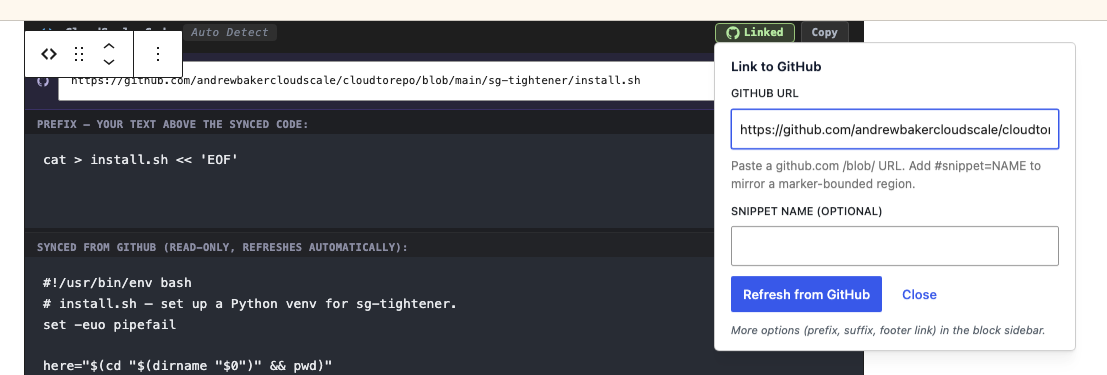
The common case takes four steps. Add a CloudScale Code Block to your post, click the GitHub button in the block toolbar, paste a github.com/.../blob/... URL into the popover, and click Fetch from GitHub. The block content is replaced with the raw file contents, the language is auto-detected from the file extension (.py becomes Python, .sh becomes Bash, and so on), and a View on GitHub link is rendered below the block on the published post.
The GitHub button sits on the block’s own toolbar next to the Copy, Paste, and Clear controls, so you do not need to open the sidebar for the common case. Once a block is linked, the button turns green and displays “Linked” so you can identify synced blocks at a glance.
7. The split-view editor
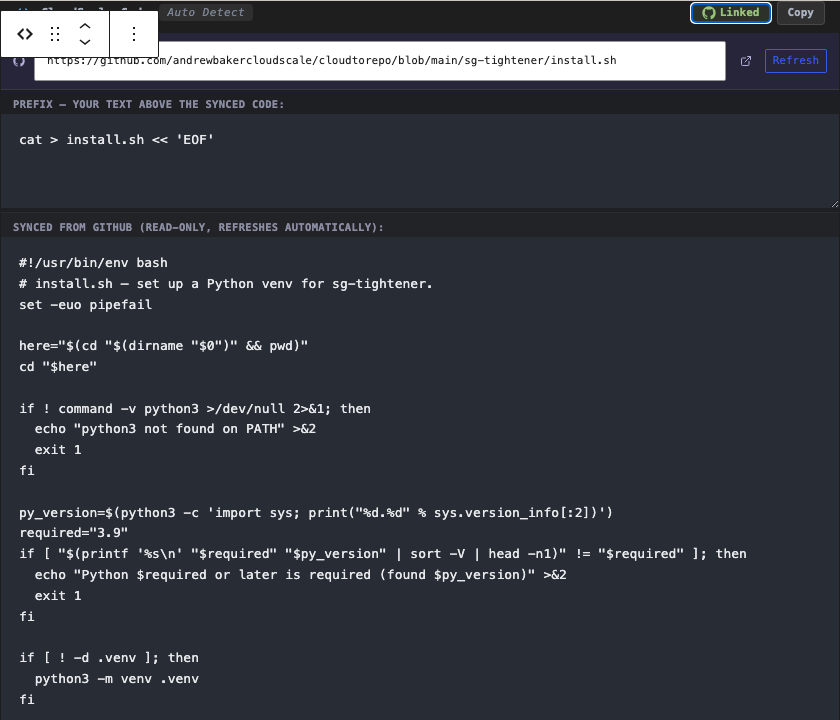
The moment you give a block a GitHub URL, the editor switches from a single textarea to a three-zone layout. A URL banner sits at the top with the live GitHub URL, an external-link icon to the source, and a Refresh button for on-demand sync. Below that is a Prefix zone for your own text that will appear above the synced code on every refresh. The middle zone shows the content synced from GitHub and is read-only. A Suffix zone beneath it lets you add your own text below the synced content.
The read-only middle zone is the architectural point: you cannot accidentally edit the mirrored content out of sync with the repo. The prefix and suffix zones are yours to use freely.
The sidebar provides access to the same controls plus additional options: the Prefix field, the Suffix field, the View on GitHub footer toggle, the last-sync timestamp, and the Stale badge.
8. Snippet markers: quoting part of a file
Sometimes you want to quote a 20-line region from a 600-line file. Wrap that region in marker comments in your source code:
# csdt:start name=parse_flags
def parse_flags(argv):
    ...
# csdt:end name=parse_flags
Markers work in any comment style — #, //, /* ... */, <!-- ... -->, -- — and only the literal csdt:start name=NAME and csdt:end name=NAME text matters. Names accept letters, digits, underscores, dots, and hyphens. Once the markers are in place, either put the snippet name in the Snippet name field in the sidebar, or append #snippet=parse_flags to the GitHub URL. The block will mirror only that region, automatically dedented to remove the common leading whitespace.
9. Prefix and suffix: wrapping a file without polluting it
A common tutorial pattern is to wrap a code block so readers can copy-paste the whole thing into a terminal. You want the blog block to show:
cat > install.sh << 'EOF'
<the actual install.sh body>
EOF
But you do not want those wrapper lines in your install.sh on GitHub, because they would break the script when run directly. The solution is to leave the GitHub file clean and put the wrapping lines in the Prefix and Suffix fields. Every sync builds the block as prefix plus the raw GitHub body plus suffix. The file stays runnable on its own, the blog post stays copy-pasteable, and you only ever update the wrapper in one place.
10. What readers see
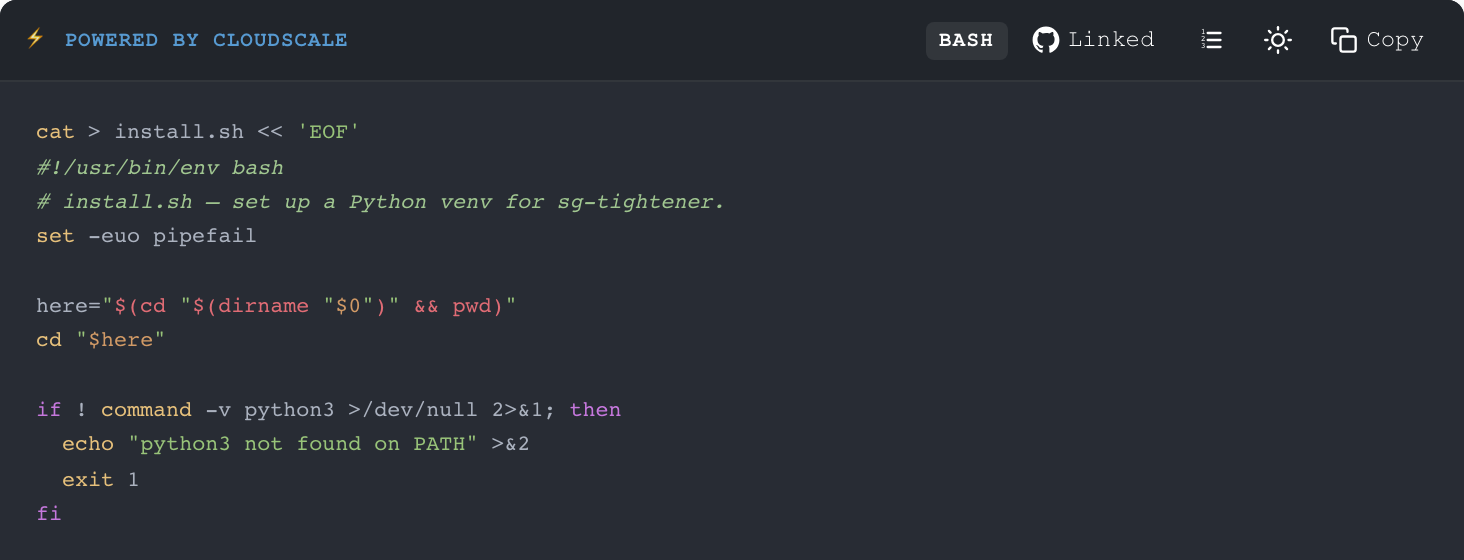
On the public post, a linked block renders identically to a normal CloudScale Code Block with one addition: a small View on GitHub link in the footer pointing at the exact blob/BRANCH/path URL. For snippet blocks, the link includes the #L42-L87 anchor for the extracted line range so readers land directly on the relevant section. You can toggle this footer off per block using the Show View on GitHub link switch in the sidebar if you prefer a quieter presentation.
11. Architecture
The feature is implemented in one PHP class — includes/class-github-sync.php — and a block of editor JavaScript that re-renders the block whenever githubUrl is set.
11.1 Block attributes
When you link a block, the following attributes are stored on it:
| Attribute | Purpose |
|---|---|
githubUrl | The full github.com/.../blob/... URL |
githubSnippet | Marker name, optional; empty means whole file |
githubPrefix | Text prepended on every sync |
githubSuffix | Text appended on every sync |
githubBlockId | A stable UUID v4 stamped on first link; the cron uses this to find the exact block inside post_content across edits |
githubLastSync | Unix timestamp of the most recent successful sync |
githubLastSha | SHA256 of the last fetched file body, used to skip unchanged files |
githubShowLink | Whether to render the View on GitHub footer |
11.2 The index table
On every post save, the plugin indexes every linked block into wp_csdt_github_blocks. The indexer reconciles three cases on each save: new linked blocks are inserted, blocks with a changed URL or snippet are updated, and blocks that were deleted or had their URL cleared are removed. Trashing or deleting a post drops every row for that post in one shot via before_delete_post and wp_trash_post.
11.3 Two sync paths
On-demand sync via REST. Clicking Refresh from GitHub in the editor hits POST /wp-json/csdt/v1/github-sync with the URL, snippet name, and post ID. The endpoint checks that the caller has edit_post permission for that specific post, applies a per-user rate limit of 30 calls per minute, parses the URL with a strict /blob/ regex, fetches the file body from raw.githubusercontent.com with a 10-second timeout, extracts and dedents the snippet if one was specified, and returns the content, SHA, line range, and auto-detected language. The editor then writes the result onto the block’s content and sync attributes.
Nightly cron. A daily csdt_github_sync_daily event processes 100 rows from the index in oldest-last-synced-first order. For each row it re-fetches the file body. If the SHA matches the stored value, it stamps last_sync to now and stops with no write and no revision churn. If the SHA differs, it extracts the snippet, verifies that the post still contains a block with the same UID and the same URL, mutates the block in place inside the parsed block tree, and writes the post back via wp_update_post with revisions suppressed and a re-entrancy guard on save_post to prevent recursion. If anything fails — network error, 404, missing marker — the error is recorded on the row and the existing block content is preserved untouched. The next nightly tick retries automatically.
11.4 The stale flag
If a row’s last_sync timestamp is more than seven days old, the editor surfaces a Stale badge on that block. This is the signal that the cron is not running, or that the last several syncs have errored. Checking last_error in the index table shows exactly which problem occurred.
12. Security model
GitHub Linking crosses three trust boundaries — an authenticated REST endpoint, an outbound HTTP fetch, and a write into post_content — and each one received its own hardening pass.
The URL parser is strict and only matches ^https?://github\.com/OWNER/REPO/blob/BRANCH/PATH. A javascript: URL, a data: URL, or an arbitrary domain will not parse and will never reach wp_remote_get. The editor anchor in the URL banner is gated on the same parser, so a tampered githubUrl attribute cannot render as a clickable javascript: link.
The capability check is post-scoped. The REST endpoint requires current_user_can('edit_post', $post_id) rather than the broader edit_posts. A Contributor who can edit their own drafts cannot trigger an outbound HTTP fetch through your host for someone else’s post.
The rate limit is per user at 30 calls per minute via a transient, preventing a compromised account from using your server as a GitHub scraper.
Snippet names are allow-listed. Marker names must match ^[A-Za-z0-9_.\-]+$ and are quoted via preg_quote before injection into the search regex, eliminating ReDoS and regex injection vectors.
GitHub errors are scrubbed before they reach the response. Raw wp_remote_get error messages can leak internal DNS server IPs, proxy hostnames, and absolute paths from the host’s outbound network. The endpoint returns generic strings such as “Network error contacting GitHub” and logs the real detail server-side.
The cron verifies the index before writing. Before every rewrite, the cron re-parses the post’s current content and confirms that the row still describes the same block by checking both the UID and the githubUrl. If the index row has diverged from the post, the row is dropped and save_post will rebuild it from the authoritative content. This means a tampered index table row cannot write attacker-chosen URL content into a legitimate post.
Revisions and re-entrancy are both handled. Cron writes pass through wp_update_post with wp_revisions_to_keep filtered to 0 for the duration of the call, and a static $is_cron_syncing flag suppresses the save_post indexer so the cron write does not recurse back through the indexer that created its row.
13. A real-world example
The AWS Security Group Hardening post on andrewbaker.ninja embeds seven full source files — Python tools, an IAM policy, the install script — each linked to its counterpart in the cloudtorepo/sg-tightener repository. Each block uses prefix and suffix to wrap the file in a cat > FILE << 'EOF' ... EOF install pattern, so a reader can paste the whole block into a terminal and have a working install on disk. When sg_tightener.py receives a fix, the post picks it up on the nightly sync, and the View on GitHub footer always points at the current canonical version. The post has provenance. It has version alignment. It is auditable in a way that a manually pasted code block never is.
14. Why this changes technical publishing
Most WordPress plugins compete on features within an established category. GitHub Linking is not competing on features. It is operating in a different category: content integrity infrastructure for technical publishers.
The difference matters because the problems it solves are structural, not cosmetic. Static code snippets are fundamentally untrustworthy over time — not because authors are careless, but because no manual process reliably keeps dozens or hundreds of embedded snippets current across a long-lived technical site. The only solution is to remove the manual process and replace it with a structural guarantee.
For engineering teams publishing architecture content from production repositories, that guarantee means documentation cannot diverge from reality by construction. For individual technical authors, it means their back catalogue becomes an asset that appreciates rather than a liability that accumulates debt. For readers and AI systems ingesting the content, it means the examples are as current as the repository they came from.
Write the code once, in the repo, and the blog catches up by itself.
GitHub Linking ships in CloudScale Cyber DevTools v1.9.961 and above, available now from the plugin repository.