1. Backups Should Be Boring (and That Is the Point)
Backups are boring. They should be boring. A backup system that generates excitement is usually signalling failure.
The only time backups become interesting is when they are missing, and that interest level is lethal. Emergency bridges. Frozen change windows. Executive escalation. Media briefings. Regulatory apology letters. Engineers being asked questions that have no safe answers.
Most backup platforms are built for the boring days. Rubrik is designed for the day boredom ends.
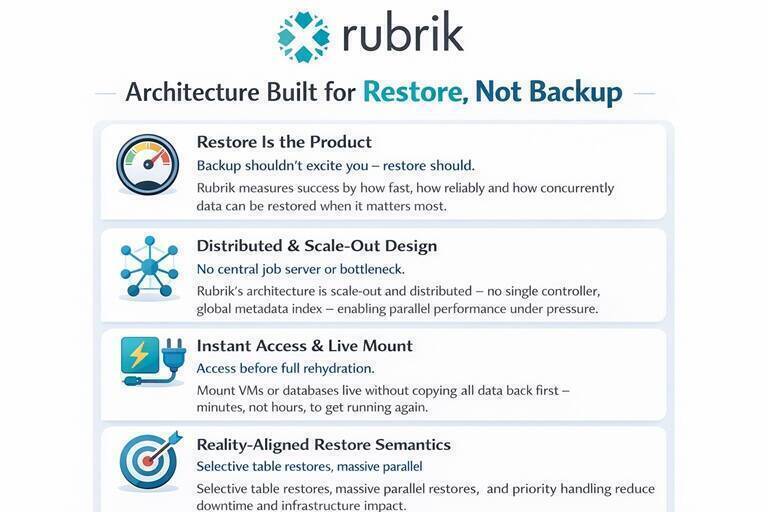
2. Backup Is Not the Product. Restore Is.
Many organisations still evaluate backup platforms on the wrong metric: how fast they can copy data somewhere else.
That metric is irrelevant during an incident.
When things go wrong, the only questions that matter are:
- What can I restore?
- How fast can it be used?
- How many restores can run in parallel?
- How little additional infrastructure is required?
Rubrik treats restore as the primary product, not a secondary feature.
3. Architectural Starting Point: Designed for Failure, Not Demos
Rubrik was built without tape era assumptions. There is no central backup server, no serial job controller, and no media server bottleneck. Instead, it uses a distributed, scale out architecture with a global metadata index and a stateless policy engine.
Restore becomes a metadata lookup problem, not a job replay problem. This distinction is invisible in demos and decisive during outages.
4. Performance Metrics That Actually Matter
Backup throughput is easy to optimise and easy to market. Restore performance is constrained by network fan out, restore concurrency, control plane orchestration, and application host contention.
Rubrik addresses this by default through parallel restore streams, linear scaling with node count, and minimal control plane chatter. Restore performance becomes predictable rather than optimistic.
5. Restore Semantics That Match Reality
The real test of any backup platform is not how elegantly it captures data, but how usefully it returns that data when needed. This is where architectural decisions made years earlier either pay dividends or extract penalties.
5.1 Instant Access Instead of Full Rehydration
Rubrik does not require full data copy back before access. It supports live mount of virtual machines, database mounts directly from backup storage, and file system mounts for selective recovery.
The recovery model becomes access first, copy later if needed. This is the difference between minutes and hours when production is down.
5.2 Dropping a Table Should Not Be a Crisis
Rubrik understands databases as structured systems, not opaque blobs.
It supports table level restores for SQL Server, mounting a database backup as a live database, extracting tables or schemas without restoring the full database, and point in time recovery without rollback.
Accidental table drops should be operational annoyances, not existential threats.
5.3 Supported Database Engines
Rubrik provides native protection for the major enterprise database platforms:
| Database Engine | Live Mount | Point in Time Recovery | Key Constraints |
|---|---|---|---|
| Microsoft SQL Server | Yes | Yes (transaction log replay) | SQL 2012+ supported; Always On AG, FCI, standalone |
| Oracle Database | Yes | Yes (archive log replay) | RAC, Data Guard, Exadata supported; SPFILE required for automated recovery |
| SAP HANA | No | Yes | Backint API integration; uses native HANA backup scheduling |
| PostgreSQL | No | Yes (up to 5 minute RPO) | File level incremental; on premises and cloud (AWS, Azure, GCP) |
| IBM Db2 | Via Elastic App Service | Yes | Uses native Db2 backup utilities |
| MongoDB | Via Elastic App Service | Yes | Sharded and unsharded clusters; no quiescing required |
| MySQL | Via Elastic App Service | Yes | Uses native MySQL backup tools |
| Cassandra | Via Elastic App Service | Yes | Via Rubrik Datos IO integration |
The distinction between native integration and Elastic App Service matters operationally. Native integration means Rubrik handles discovery, scheduling, and orchestration directly. Elastic App Service means Rubrik provides managed volumes as backup targets while the database’s native tools handle the actual backup process. Both approaches deliver immutability and policy driven retention, but the operational experience differs.
5.4 Live Mount: Constraints and Caveats
Live Mount is Rubrik’s signature capability—mounting backups as live, queryable databases without copying data back to production storage. The database runs with its data files served directly from the Rubrik cluster over NFS (for Oracle) or SMB 3.0 (for SQL Server).
This capability is transformative for specific use cases. It is not a replacement for production storage.
What Live Mount Delivers:
- Near instant database availability (seconds to minutes, regardless of database size)
- Zero storage provisioning on the target host
- Multiple concurrent mounts from the same backup
- Point in time access across the entire retention window
- Ideal for granular recovery, DBCC health checks, test/dev cloning, audit queries, and upgrade validation
What Live Mount Does Not Deliver:
- Production grade I/O performance
- High availability during Rubrik cluster maintenance
- Persistence across host or cluster reboots
IOPS Constraints:
Live Mount performance is bounded by the Rubrik appliance’s ability to serve I/O, not by the target host’s storage subsystem. Published figures suggest approximately 30,000 IOPS per Rubrik appliance for Live Mount workloads. This is adequate for reporting queries, data extraction, and validation testing. It is not adequate for transaction heavy production workloads.
The performance characteristics are inherently different from production storage:
| Metric | Production SAN/Flash | Rubrik Live Mount |
|---|---|---|
| Random read IOPS | 100,000+ | ~30,000 per appliance |
| Latency profile | Sub millisecond | Network + NFS overhead |
| Write optimisation | Production tuned | Backup optimised |
| Concurrent workloads | Designed for contention | Shared with backup operations |
SQL Server Live Mount Specifics:
- Databases mount via SMB 3.0 shares with UNC paths
- Transaction log replay occurs during mount for point in time positioning
- The mounted database is read write, but writes go to the Rubrik cluster
- Supported for standalone instances, Failover Cluster Instances, and Always On Availability Groups
- Table level recovery requires mounting the database, then using T SQL to extract and import specific objects
Oracle Live Mount Specifics:
- Data files mount via NFS; redo logs and control files remain on the target host
- Automated recovery requires source and target configurations to match (RAC to RAC, single instance to single instance, ASM to ASM)
- Files only recovery allows dissimilar configurations but requires DBA managed RMAN recovery
- SPFILE is required for automated recovery; PFILE databases require manual intervention
- Block change tracking (BCT) is disabled on Live Mount targets
- Live Mount fails if the target host, RAC cluster, or Rubrik cluster reboots during the mount—requiring forced unmount to clean up metadata
- Direct NFS (DNFS) is recommended on Oracle RAC nodes for improved recovery performance
What Live Mount Is Not:
Live Mount is explicitly designed for temporary access, not sustained production workloads. The use cases Rubrik markets—test/dev, DBCC validation, granular recovery, audit queries—all share a common characteristic: they are time bounded operations that tolerate moderate I/O performance in exchange for instant availability.
Running production transaction processing against a Live Mount database would be technically possible and operationally inadvisable. The I/O profile, the network dependency, and the lack of high availability guarantees make it unsuitable for workloads where performance and uptime matter.
5.5 The Recovery Hierarchy
Understanding when to use each recovery method matters:
| Recovery Need | Recommended Method | Time to Access | Storage Required |
|---|---|---|---|
| Extract specific rows/tables | Live Mount + query | Minutes | None |
| Validate backup integrity | Live Mount + DBCC | Minutes | None |
| Clone for test/dev | Live Mount | Minutes | None |
| Full database replacement | Export/Restore | Hours (size dependent) | Full database size |
| Disaster recovery cutover | Instant Recovery | Minutes (then migrate) | Temporary, then full |
The strategic value of Live Mount is avoiding full restores when full restores are unnecessary. For a 5TB database where someone dropped a single table, Live Mount means extracting that table in minutes rather than waiting hours for a complete restore.
For actual disaster recovery, where the production database is gone and must be replaced, Live Mount provides bridge access while the full restore completes in parallel. The database is queryable immediately; production grade performance follows once data migration finishes.
5.6 The Hidden Failure Mode After a Successful Restore
Rubrik is not deployed in a single explosive moment. In the real world, it is rolled out carefully over weeks. Systems are onboarded one by one, validated, and then left to settle. Each system performs a single full backup, after which life becomes calm and predictable. From that point forward, everything is incremental. Deltas are small, backup windows shrink, networks breathe easily, and the platform looks deceptively relaxed.
This operating state creates a dangerous illusion.
After a large scale recovery event, you will spend hours restoring systems. That work feels like the crisis. It is not. The real stress event happens later, quietly, on the first night after the restores complete. Every restored system now believes it is brand new. Every one of them schedules a full backup. At that moment, your entire estate attempts to perform a first full backup simultaneously while still serving live traffic.
This is the point where Rubrik appliances, networks, and upstream storage experience their true failure conditions. Not during the restore, but after it. Massive ingest rates, saturated links, constrained disk, and queueing effects all arrive at once. If this scenario is not explicitly planned for, the recovery that looked successful during the day can cascade into instability overnight.
Recovery planning therefore cannot stop at restore completion. Backup re entry must be treated as a first class recovery phase. In most environments, the only viable strategy is to deliberately phase backup schedules over multiple days following a large scale restore. Systems must be staggered back into protection in controlled waves, rather than allowed to collide into a single catastrophic full backup storm.
Restore is the product. But what comes after restore is where architectures either hold, or quietly collapse.
6. Why Logical Streaming Is a Design Failure
Traditional restore models stream backup data through the database host. This guarantees CPU contention, IO pressure, and restore times proportional to database size rather than change size.
Figure 1 illustrates this contrast clearly. Traditional restore requires data to be copied back through the database server, creating high I/O, CPU and network load with correspondingly long restore times. Rubrik’s Live Mount approach mounts the backup copy directly, achieving near zero RTO with minimal data movement. The difference between these approaches becomes decisive when production is down and every minute of restore time translates to business impact.
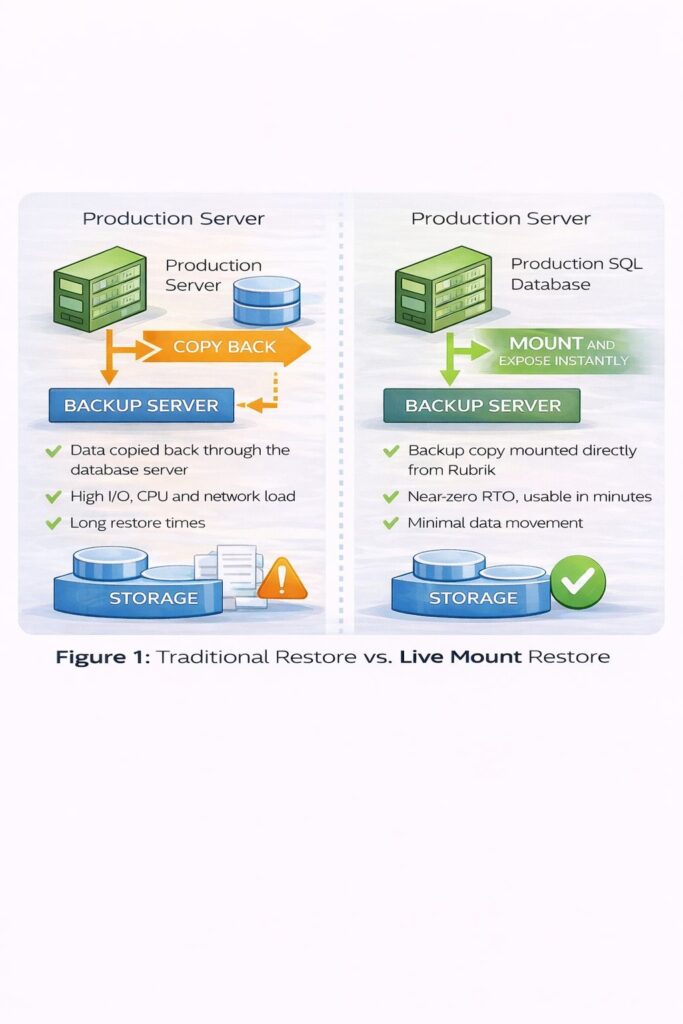
Rubrik avoids this by mounting database images and extracting only required objects. The database host stops being collateral damage during recovery.
6.1 The VSS Tax: Why SQL Server Backups Cannot Escape Application Coordination
For VMware workloads without databases, Rubrik can leverage storage level snapshots that are instantaneous, application agnostic, and impose zero load on the guest operating system. The hypervisor freezes the VM state, the storage array captures the point in time image, and the backup completes before the application notices.
SQL Server cannot offer this simplicity. The reason is not a Microsoft limitation or a Rubrik constraint. The reason is transactional consistency.
6.1.1 The Crash Consistent Option Exists
Nothing technically prevents Rubrik, or any backup tool, from taking a pure storage snapshot of a SQL Server volume without application coordination. The snapshot would complete in milliseconds with zero database load.
The problem is what you would recover: a crash consistent image, not an application consistent one.
A crash consistent snapshot captures storage state mid flight. This includes partially written pages, uncommitted transactions, dirty buffers not yet flushed to disk, and potentially torn writes caught mid I/O. SQL Server is designed to recover from exactly this state. Every time the database engine starts after an unexpected shutdown, it runs crash recovery, rolling forward committed transactions from the log and rolling back uncommitted ones.
The database will become consistent. Eventually. Probably.
6.1.2 Why Probably Is Not Good Enough
Crash recovery works. It works reliably. It is tested millions of times daily across every SQL Server instance that experiences an unclean shutdown.
But restore confidence matters. When production is down and executives are asking questions, the difference between “this backup is guaranteed consistent” and “this backup should recover correctly after crash recovery completes” is operationally significant.
VSS exists to eliminate that uncertainty.
6.1.3 What VSS Actually Does
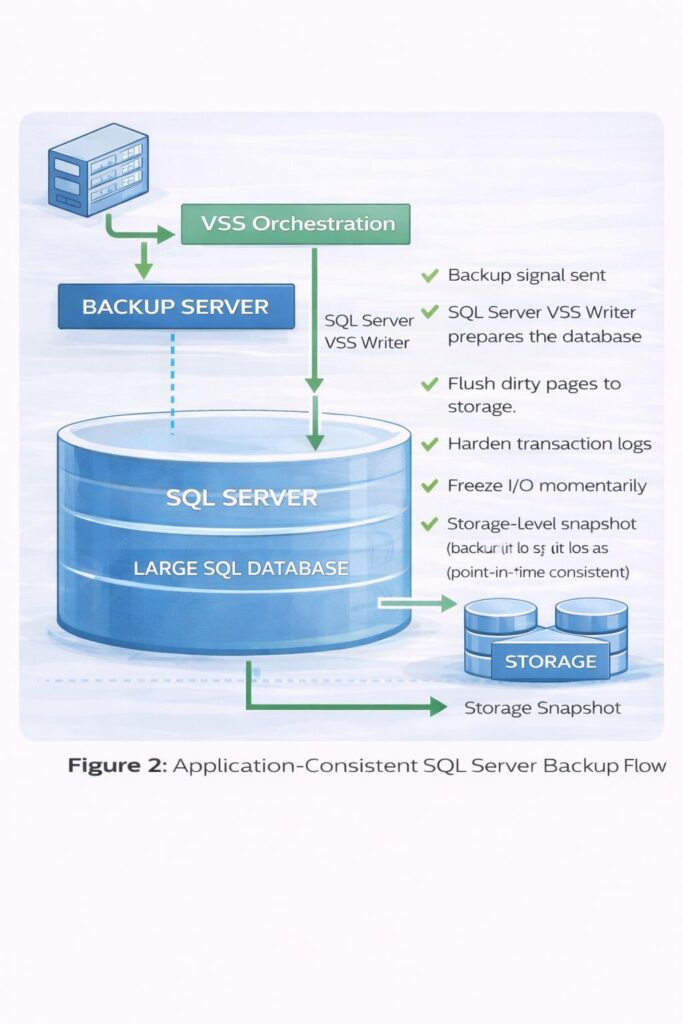
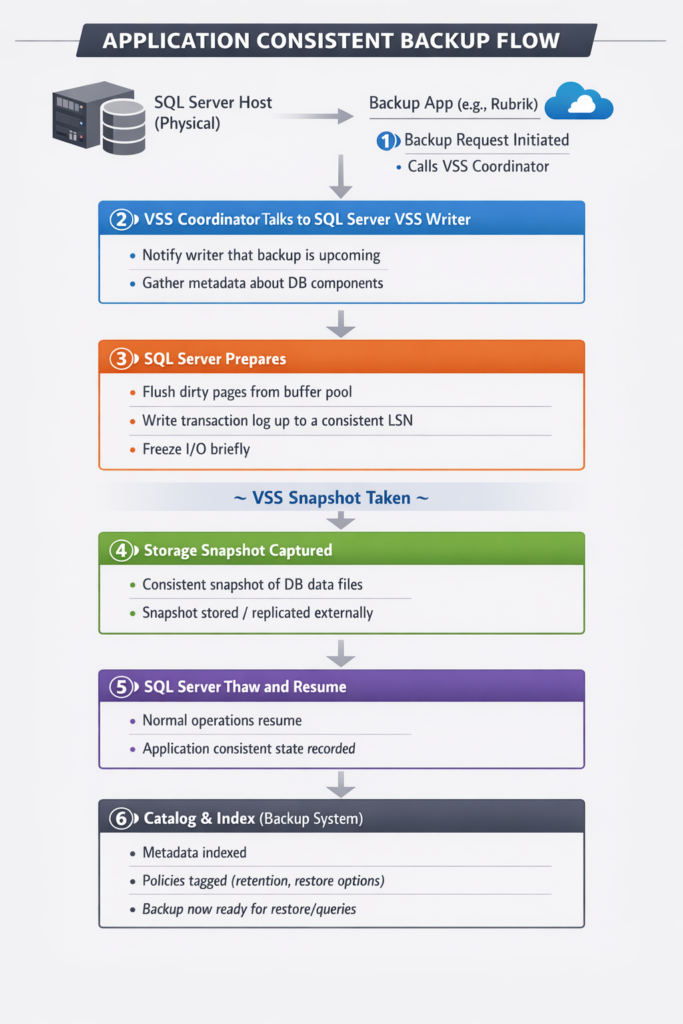
When a backup application requests an application consistent SQL Server snapshot, the sequence shown in Figure 2 executes. The backup server sends a signal through VSS Orchestration, which triggers the SQL Server VSS Writer to prepare the database. This preparation involves flushing dirty pages to storage, hardening transaction logs, and momentarily freezing I/O. Only then does the storage-level snapshot execute, capturing a point-in-time consistent image that requires no crash recovery on restore.
The result is a snapshot that requires no crash recovery on restore. The database is immediately consistent, immediately usable, and carries no uncertainty about transactional integrity.
6.1.4 The Coordination Cost
The VSS freeze window is typically brief, milliseconds to low seconds. But the preparation is not free.
Buffer pool flushes on large databases generate I/O pressure. Checkpoint operations compete with production workloads. The freeze, however short, introduces latency for in flight transactions. The database instance is actively participating in its own backup.
For databases measured in terabytes, with buffer pools consuming hundreds of gigabytes, this coordination overhead becomes operationally visible. Backup windows that appear instantaneous from the storage console are hiding real work inside the SQL Server instance.
6.1.5 The Architectural Asymmetry
This creates a fundamental difference in backup elegance across workload types:
| Workload Type | Backup Method | Application Load | Restore State |
|---|---|---|---|
| VMware VM (no database) | Storage snapshot | Zero | Crash consistent (acceptable) |
| VMware VM (with SQL Server) | VSS coordinated snapshot | Moderate | Application consistent |
| Physical SQL Server | VSS coordinated snapshot | Moderate to high | Application consistent |
| Physical SQL Server | Pure storage snapshot | Zero | Crash consistent (risky) |
For a web server or file share, crash consistent is fine. The application has no transactional state worth protecting. For a database, crash consistent means trusting recovery logic rather than guaranteeing consistency.
6.1.6 The Uncomfortable Reality
The largest, most critical SQL Server databases, the ones that would benefit most from zero overhead instantaneous backup, are precisely the workloads where crash consistent snapshots carry the most risk. More transactions in flight. Larger buffer pools. More recovery time if something needs replay.
Rubrik supports VSS coordination because the alternative is shipping backups that might need crash recovery. That uncertainty is acceptable for test environments. It is rarely acceptable for production databases backing financial systems, customer records, or regulatory reporting.
The VSS tax is not a limitation imposed by Microsoft or avoided by competitors. It is the cost of consistency. Every backup platform that claims application consistent SQL Server protection is paying it. The only question is whether they admit the overhead exists.
7. Snapshot Based Protection Is Objectively Better (When You Can Get It)
The previous section explained why SQL Server backups cannot escape application coordination. VSS exists because transactional consistency requires it, and the coordination overhead is the price of certainty.
This makes the contrast with pure snapshot based protection even starker. Where snapshots work cleanly, they are not incrementally better. They are categorically superior.
7.1 What Pure Snapshots Deliver
Snapshot based backups in environments that support them provide:
- Near instant capture: microseconds to milliseconds, regardless of dataset size
- Zero application load: the workload never knows a backup occurred
- Consistent recovery points: the storage layer guarantees point in time consistency
- Predictable backup windows: duration is independent of data volume
- No bandwidth consumption during capture: data movement happens later, asynchronously
A 50TB VMware datastore snapshots in the same time as a 50GB datastore. Backup windows become scheduling decisions rather than capacity constraints.
Rubrik exploits this deeply in VMware environments. Snapshot orchestration, instant VM recovery, and live mounts all depend on the hypervisor providing clean, consistent, zero overhead capture points.
7.2 Why This Is Harder Than It Looks
The elegance of snapshot based protection depends entirely on the underlying platform providing the right primitives. This is where the gap between VMware and everything else becomes painful.
VMware offers:
- Native snapshot APIs with transactional semantics
- Changed Block Tracking (CBT) for efficient incrementals
- Hypervisor level consistency without guest coordination
- Storage integration through VADP (vSphere APIs for Data Protection)
These are not accidental features. VMware invested years building a backup ecosystem because they understood that enterprise adoption required operational maturity, not just compute virtualisation.
Physical hosts offer none of this.
There is no universal snapshot API for bare metal servers. Storage arrays provide snapshot capabilities, but each vendor implements them differently, with different consistency guarantees, different integration points, and different failure modes. The operating system has no standard mechanism to coordinate application state with storage level capture.
7.3 The Physical Host Penalty
This is why physical SQL Server hosts face a compounding disadvantage:
- No hypervisor abstraction: there is no layer between the OS and storage that can freeze state cleanly
- VSS remains mandatory: application consistency still requires database coordination
- No standardised incremental tracking: without CBT or equivalent, every backup must rediscover what changed
- Storage integration is bespoke: each array, each SAN, each configuration requires specific handling
The result is that physical hosts with the largest databases—the workloads generating the most backup data, with the longest restore times, under the most operational pressure, receive the least architectural benefit from modern backup platforms.
They are stuck paying the VSS tax without receiving the snapshot dividend.
7.4 The Integration Hierarchy
Backup elegance follows a clear hierarchy based on platform integration depth:
| Environment | Snapshot Quality | Incremental Efficiency | Application Consistency | Overall Experience |
|---|---|---|---|---|
| VMware (no database) | Excellent | CBT driven | Not required | Seamless |
| VMware (with SQL Server) | Excellent | CBT driven | VSS coordinated | Good with overhead |
| Cloud native (EBS, managed disks) | Good | Provider dependent | Varies by workload | Generally clean |
| Physical with enterprise SAN | Possible | Array dependent | VSS coordinated | Complex but workable |
| Physical with commodity storage | Limited | Often full scan | VSS coordinated | Painful |
The further down this hierarchy, the more the backup platform must compensate for missing primitives. Rubrik handles this better than most, but even excellent software cannot conjure APIs that do not exist.
7.5 Why the Industry Irony Persists
The uncomfortable truth is that snapshot based protection delivers its greatest value precisely where it is least available.
A 500GB VMware VM snapshots effortlessly. The hypervisor provides everything needed. Backup is boring, as it should be.
A 50TB physical SQL Server, the database actually keeping the business running, containing years of transactional history, backing regulatory reporting and financial reconciliation, must coordinate through VSS, flush terabytes of buffer pool, sustain I/O pressure during capture, and hope the storage layer cooperates.
The workloads that need snapshot elegance the most are architecturally prevented from receiving it.
This is not a Rubrik limitation. It is not a Microsoft conspiracy. It is the accumulated consequence of decades of infrastructure evolution where virtualisation received backup investment and physical infrastructure did not.
7.6 What This Means for Architecture Decisions
Understanding this hierarchy should influence infrastructure strategy:
Virtualise where possible. The backup benefits alone often justify the overhead. A SQL Server VM with VSS coordination still benefits from CBT, instant recovery, and hypervisor level orchestration.
Choose storage with snapshot maturity. If physical hosts are unavoidable, enterprise arrays with proven snapshot integration reduce the backup penalty. This is not the place for commodity storage experimentation.
Accept the VSS overhead. For SQL Server workloads, crash consistent snapshots are technically possible but operationally risky. The coordination cost is worth paying. Budget for it in backup windows and I/O capacity.
Plan restore, not backup. Snapshot speed is irrelevant if restore requires hours of data rehydration. The architectural advantage of snapshots extends to recovery only if the platform supports instant mount and selective restore.
Rubrik’s value in this landscape is not eliminating the integration gaps, nobody can, but navigating them intelligently. Where snapshots work, Rubrik exploits them fully. Where they do not, Rubrik minimises the penalty through parallel restore, live mounts, and metadata driven recovery.
The goal remains the same: make restore the product, regardless of how constrained the backup capture had to be.
8. Rubrik Restore Policies: Strategy, Trade offs, and Gotchas
SLA Domains are Rubrik’s policy abstraction layer, and understanding how to configure them properly separates smooth recoveries from painful ones. The flexibility is substantial, but so are the consequences of misconfiguration.
8.1 Understanding SLA Domain Architecture
Rubrik’s policy model centres on SLA Domains, named policies that define retention, frequency, replication, and archival behaviour. Objects are assigned to SLA Domains rather than configured individually, which creates operational leverage but requires upfront design discipline.
The core parameters that matter for restore planning:
Snapshot Frequency determines your Recovery Point Objective (RPO). A 4-hour frequency means you could lose up to 4 hours of data. For SQL Server with log backup enabled, transaction logs between snapshots reduce effective RPO to minutes, but the full snapshot frequency still determines how quickly you can access a baseline restore point.
Local Retention controls how many snapshots remain on the Rubrik cluster for instant access. This is your Live Mount window. Data within local retention restores in minutes. Data beyond it requires rehydration from archive, which takes hours.
Replication copies snapshots to a secondary Rubrik cluster, typically in another location. This is your disaster recovery tier. Replication targets can serve Live Mount operations, meaning DR isn’t just “eventually consistent backup copies” but actual instant recovery capability at the secondary site.
Archival moves aged snapshots to object storage (S3, Azure Blob, Google Cloud Storage). Archive tier data cannot be Live Mounted, it must be retrieved first, which introduces retrieval latency and potentially egress costs.
8.2 The Retention vs. Recovery Speed Trade off
This is where most organisations get the policy design wrong.
The temptation is to keep minimal local retention and archive aggressively to reduce storage costs. The consequence is that any restore request older than a few days becomes a multi hour operation.
Consider the mathematics for a 5TB SQL Server database:
| Recovery Scenario | Local Retention | Time to Access | Operational Impact |
|---|---|---|---|
| Yesterday’s backup | Within local retention | 2-5 minutes (Live Mount) | Minimal |
| Last week’s backup | Within local retention | 2-5 minutes (Live Mount) | Minimal |
| Last month’s backup | Archived | 4-8 hours (retrieval + restore) | Significant |
| Last quarter’s backup | Archived (cold tier) | 12-24 hours | Major incident |
The storage cost of keeping 30 days local versus 7 days local might seem significant when multiplied across the estate. But the operational cost of a 6 hour restore delay during an audit request or compliance investigation often exceeds years of incremental storage spend.
Recommendation: Size local retention to cover your realistic recovery scenarios, not your theoretical minimum. For most organisations, 14-30 days of local retention provides the right balance between cost and operational flexibility.
8.3 SLA Domain Design Patterns
8.3.1 Pattern 1: Tiered by Criticality
Create separate SLA Domains for different criticality levels:
- Platinum: 4 hour snapshots, 30 day local retention, synchronous replication, 7 year archive
- Gold: 8 hour snapshots, 14 day local retention, asynchronous replication, 3 year archive
- Silver: Daily snapshots, 7 day local retention, no replication, 1 year archive
- Bronze: Daily snapshots, 7 day local retention, no replication, 90 day archive
This pattern works well when criticality maps cleanly to workload types, but creates governance overhead when applications span tiers.
8.3.2 Pattern 2: Tiered by Recovery Requirements
Align SLA Domains to recovery time objectives rather than business criticality:
- Instant Recovery: Maximum local retention, synchronous replication, Live Mount always available
- Same Day Recovery: 14 day local retention, asynchronous replication
- Next Day Recovery: 7 day local retention, archive first strategy
This pattern acknowledges that “critical” and “needs instant recovery” aren’t always the same thing. A compliance archive might be business critical but tolerate 24 hour recovery times.
8.3.3 Pattern 3: Application Aligned
Create SLA Domains per major application or database platform:
- SQL Server Production
- SQL Server Non Production
- Oracle Production
- VMware Infrastructure
- File Shares
This pattern simplifies troubleshooting and reporting but can lead to policy sprawl as the estate grows.
8.4 Log Backup Policies: The Hidden Complexity
For SQL Server and Oracle, snapshot frequency alone doesn’t tell the full story. Transaction log backups between snapshots determine actual RPO.
Rubrik supports log backup frequencies down to 1 minute for SQL Server. The trade offs:
Aggressive Log Backup (1-5 minute frequency):
- Sub 5 minute RPO
- Higher metadata overhead on Rubrik cluster
- More objects to manage during restore
- Longer Live Mount preparation time (more logs to replay)
Conservative Log Backup (15-60 minute frequency):
- Acceptable RPO for most workloads
- Lower operational overhead
- Faster Live Mount operations
- Simpler troubleshooting
Gotcha: Log backup frequency creates a hidden I/O load on the source database. A 1 minute log backup interval on a high transaction database generates constant log backup traffic. For already I/O constrained databases, this can become the straw that breaks performance.
Recommendation: Match log backup frequency to actual RPO requirements, not aspirational ones. If the business can tolerate 15 minutes of data loss, don’t configure 1 minute log backups just because you can.
8.5 Replication Topology Gotchas
Replication seems straightforward, copy snapshots to another cluster, but the implementation details matter.
8.5.1 Gotcha 1: Replication Lag Under Load
Asynchronous replication means the target cluster is always behind the source. During high backup activity (month end processing, batch loads), this lag can extend to hours. If a disaster occurs during this window, you lose more data than your SLA suggests.
Monitor replication lag as an operational metric, not just a capacity planning number.
8.5.2 Gotcha 2: Bandwidth Contention with Production Traffic
Replication competes for the same network paths as production traffic. If your backup replication saturates a WAN link, production application performance degrades.
Either implement QoS policies to protect production traffic, or schedule replication during low utilisation windows. Rubrik supports replication scheduling, but the default is “as fast as possible,” which isn’t always appropriate.
8.5.3 Gotcha 3: Cascaded Replication Complexity
For multi site architectures, you might configure Site A → Site B → Site C replication. Each hop adds latency and failure modes. A Site B outage breaks the chain to Site C.
Consider whether hub and spoke (Site A replicates independently to both B and C) better matches your DR requirements, despite the additional bandwidth consumption.
8.6 Archive Tier Selection: Retrieval Time Matters
Object storage isn’t monolithic. The choice between storage classes has direct recovery implications.
| Storage Class | Typical Retrieval Time | Use Case |
|---|---|---|
| S3 Standard / Azure Hot | Immediate | Frequently accessed archives |
| S3 Standard-IA / Azure Cool | Immediate (higher retrieval cost) | Infrequent but urgent access |
| S3 Glacier Instant Retrieval | Milliseconds | Compliance archives with occasional audit access |
| S3 Glacier Flexible Retrieval | 1-12 hours | Long-term retention with rare access |
| S3 Glacier Deep Archive | 12-48 hours | Legal hold, never access unless subpoenaed |
Gotcha: Rubrik’s archive policy assigns snapshots to a single storage class. If your retention spans 7 years, all 7 years of archives pay the same storage rate, even though year 1 archives are accessed far more frequently than year 7 archives.
Recommendation: Consider tiered archive policies—recent archives to Standard-IA, aged archives to Glacier. This requires multiple SLA Domains and careful lifecycle management, but the cost savings compound significantly at scale.
8.7 Policy Assignment Gotchas
8.7.1 Gotcha 1: Inheritance and Override Conflicts
Rubrik supports hierarchical policy assignment (cluster → host → database). When policies conflict, the resolution logic isn’t always intuitive. A database with an explicit SLA assignment won’t inherit changes made to its parent host’s policy.
Document your policy hierarchy explicitly. During audits, the question “what policy actually applies to this database?” should have an immediate, verifiable answer.
8.7.2 Gotcha 2: Pre script and Post script Failures
Custom scripts for application quiescing or notification can fail, and failure handling varies. A pre script failure might skip the backup entirely (safe but creates a gap) or proceed without proper quiescing (dangerous).
Test script failure modes explicitly. Know what happens when your notification webhook is unreachable or your custom quiesce script times out.
8.7.3 Gotcha 3: Time Zone Confusion
Rubrik displays times in the cluster’s configured time zone, but SLA schedules operate in UTC unless explicitly configured otherwise. An “8 PM backup” might run at midnight local time if the time zone mapping is wrong.
Verify backup execution times after policy configuration, don’t trust the schedule display alone.
8.8 Testing Your Restore Policies
Policy design is theoretical until tested. The following tests should be regular operational practice:
Live Mount Validation: Mount a backup from local retention and verify application functionality. This proves both backup integrity and Live Mount operational capability.
Archive Retrieval Test: Retrieve a backup from archive tier and time the operation. Compare actual retrieval time against SLA commitments.
Replication Failover Test: Perform a Live Mount from the replication target, not the source cluster. This validates that DR actually works, not just that replication is running.
Point in Time Recovery Test: For databases with log backup enabled, recover to a specific timestamp between snapshots. This validates that log chain integrity is maintained.
Concurrent Restore Test: Simulate a ransomware scenario by triggering multiple simultaneous restores. Measure whether your infrastructure can sustain the required parallelism.
8.9 Policy Review Triggers
SLA Domains shouldn’t be “set and forget.” Trigger policy reviews when:
- Application criticality changes (promotion to production, decommissioning)
- Recovery requirements change (new compliance mandates, audit findings)
- Infrastructure changes (new replication targets, storage tier availability)
- Performance issues emerge (backup windows exceeded, replication lag growing)
- Cost optimisation cycles (storage spend review, cloud egress analysis)
The goal is proactive policy maintenance, not reactive incident response when a restore takes longer than expected.
9. Ransomware: Where Architecture Is Exposed
9.1 The Restore Storm Problem
After ransomware, the challenge is not backup availability. The challenge is restoring everything at once.
Constraints appear immediately. East-west traffic saturates. DWDM links run hot. Core switch buffers overflow. Cloud egress throttling kicks in.
Rubrik mitigates this through parallel restores, SLA based prioritisation, and live mounts for critical systems. What it cannot do is defeat physics. A good recovery plan avoids turning a data breach into a network outage.
10. SaaS vs Appliance: This Is a Network Decision
Functionally, Rubrik SaaS and on prem appliances share the same policy engine, metadata index, and restore semantics.
The difference is bandwidth reality.
On prem appliances provide fast local restores, predictable latency, and minimal WAN dependency. SaaS based protection provides excellent cloud workload coverage and operational simplicity, but restore speed is bounded by network capacity and egress costs.
Hybrid estates usually require both.
11. Why Rubrik in the Cloud?
Cloud providers offer native backup primitives. These are necessary but insufficient. They do not provide unified policy across environments, cross account recovery at scale, ransomware intelligence, or consistent restore semantics. Rubrik turns cloud backups into recoverable systems rather than isolated snapshots.
11.1 Should You Protect Your AWS Root and Crypto Accounts?
Yes, because losing the control plane is worse than losing data.
Rubrik protects IAM configuration, account state, and infrastructure metadata. After a compromise, restoring how the account was configured is as important as restoring the data itself.
12. Backup Meets Security (Finally)
Rubrik integrates threat awareness into recovery using entropy analysis, change rate anomaly detection, and snapshot divergence tracking.cThis answers the most dangerous question in recovery: which backup is actually safe to restore? Most platforms cannot answer this with confidence.
13. VMware First Class Citizen, Physical Hosts Still Lag
Rubrik’s deepest integrations exist in VMware environments, including snapshot orchestration, instant VM recovery, and live mounts.
The uncomfortable reality remains that physical hosts with the largest datasets would benefit most from snapshot based protection, yet receive the least integration. This is an industry gap, not just a tooling one.
14. When Rubrik Is Not the Right Tool
Rubrik is not universal.
It is less optimal when bandwidth is severely constrained, estates are very small, or tape workflows are legally mandated.
Rubrik’s value emerges at scale, under pressure, and during failure.
15. Conclusion: Boredom Is Success
Backups should be boring. Restores should be quiet. Executives should never know the platform exists.
The only time backups become exciting is when they fail, and that excitement is almost always lethal.
Rubrik is not interesting because it stores data. It is interesting because, when everything is already on fire, restore remains a controlled engineering exercise rather than a panic response.
References
- Gartner Magic Quadrant for Enterprise Backup and Recovery Solutions – https://www.gartner.com/en/documents/5138291
- Rubrik Technical Architecture Whitepapers – https://www.rubrik.com/resources
- Microsoft SQL Server Backup and Restore Internals – https://learn.microsoft.com/en-us/sql/relational-databases/backup-restore/backup-overview-sql-server
- VMware Snapshot and Backup Best Practices – https://knowledge.broadcom.com/external/article?legacyId=1025279
- AWS Backup and Recovery Documentation – https://docs.aws.amazon.com/aws-backup/
- NIST SP 800-209 Security Guidelines for Storage Infrastructure – https://csrc.nist.gov/publications/detail/sp/800-209/final
- Rubrik SQL Live Mount Documentation – https://www.rubrik.com/solutions/sql-live-mount
- Rubrik Oracle Live Mount Documentation – https://docs.rubrik.com/en-us/saas/oracle/oracle_live_mount.html
- Rubrik for Oracle and Microsoft SQL Server Data Sheet – https://www.rubrik.com/content/dam/rubrik/en/resources/data-sheet/Rubrik-for-Oracle-and-Microsoft-SQL-Sever-DS.pdf
- Rubrik Enhanced Performance for Microsoft SQL and Oracle Database – https://www.rubrik.com/blog/technology/2021/12/rubrik-enhanced-performance-for-microsoft-sql-and-oracle-database
- Rubrik PostgreSQL Support Announcement – https://www.rubrik.com/blog/technology/24/10/rubrik-expands-database-protection-with-postgre-sql-support-and-on-premises-sensitive-data-monitoring-for-microsoft-sql-server
- Rubrik Elastic App Service – https://www.rubrik.com/solutions/elastic-app-service
- Rubrik and VMware vSphere Reference Architecture – https://www.rubrik.com/content/dam/rubrik/en/resources/white-paper/ra-rubrik-vmware-vsphere.pdf
- Protecting Microsoft SQL Server with Rubrik Technical White Paper – https://www.rubrik.com/content/dam/rubrik/en/resources/white-paper/rwp-protecting-microsoft-sql-server-with-rubrik.pdf
- The Definitive Guide to Rubrik Cloud Data Management – https://www.rubrik.com/content/dam/rubrik/en/resources/white-paper/rwp-definitive-guide-to-rubrik-cdm.pdf
- Rubrik Oracle Tools GitHub Repository – https://github.com/rubrikinc/rubrik_oracle_tools
- Automating SQL Server Live Mounts with Rubrik – https://virtuallysober.com/2017/08/08/automating-sql-server-live-mounts-with-rubrik-alta-4-0/