
Regulatory Risk: The Missing Seventh Pillar of the AWS Well-Architected Framework
Regulatory Risk is the author's proposed seventh pillar of the AWS Well Architected Framework, not an official AWS term. It describes how freely your architecture lets you exit, change provider or bring workloads back in house. It can be measured with an exit risk score from 0 to 100, explained, planned and tracked quarterly.
Regulatory Risk: The Missing Seventh Pillar of the AWS Well-Architected FrameworkAndrew Baker's Technology Blog Posts, 20/Oct/2026
https://andrewbaker.ninja/2026/10/20/regulatory-risk-the-missing-seventh-pillar-of-aws-well-architected/
A free, open source tool that measures how hard it would be to leave AWS across a whole AWS Organization or OU, works out what a second AWS region would cost, and turns the answers into a board ready report.
Every regulated firm that runs on AWS has had the same conversation. Someone in a risk committee asks “how locked in are we?”, and the room answers with feelings. Some people are sure it would take a decade, others say Kubernetes makes it easy, and because nobody has a number the conversation ends where it started, with a vague sense of exposure and an action to “look into it”.
Risk without transparency is just fear and anxiety. You cannot govern a feeling, size it, track it or bring it down. So I built a tool that replaces the feeling with evidence drawn from your own AWS usage. It is MIT licensed and the source is on GitHub at andrewbakercloudscale/aws-regulatory-risk-review-framework.
1. Why Regulated Firms Need This
The AWS Well-Architected Framework has six pillars: Operational Excellence, Security, Reliability, Performance Efficiency, Cost Optimization and Sustainability. They are good pillars, and together they describe a workload that runs well on AWS. None of them asks the question a regulator asks first: could you leave if you had to?
For banks, insurers, payment providers, market infrastructure and healthcare, that question is not optional. Running material workloads in the public cloud is outsourcing, and outsourcing rules expect documented exit plans for the arrangements that matter most, with the precise obligation depending on the jurisdiction and on how the function or arrangement is classified:
- EU DORA (Article 28): exit strategies for ICT third party services that support critical or important functions, sufficiently tested and periodically reviewed.
- EBA Guidelines on outsourcing (EBA/GL/2019/02): documented exit plans for critical or important functions, with an assessment of how complex and costly an exit would be.
- UK PRA SS2/21: stressed exit plans for material outsourcing, covering alternative providers and timelines.
- APRA CPS 230: exit plans for material service providers, so critical operations continue if a provider fails or the arrangement ends.
- SARB Prudential Authority Directive 3/2018 and Guidance Note G5/2018 (cloud computing and offshoring of data): exit and contingency arrangements for material cloud use.
Not every workload in a regulated firm needs the same exit plan, but the ones supporting critical functions do, and most exit plans I have seen for those were written in a workshop. They name a target cloud, assume containers make everything portable, and guess a timeline. They are hard to defend because they are not built on anything a reviewer can check.
2. Regulatory Risk as the Seventh Pillar
AWS has not ignored these concerns. The Well-Architected Framework has specialist lenses, and the Digital Sovereignty Lens released this year covers residency, access control and resiliency for sovereign workloads. Lenses, though, assess whether a workload is well built within AWS. What I am proposing is a separate, measured dimension that asks whether the institution keeps acceptable control over its dependency on AWS itself. This is my proposal, not an AWS term, and it is meant to sit alongside the existing pillars rather than compete with them.
I find it helps to split regulatory risk into three questions, because they need different answers:
- Supplier exit risk: could we replace AWS within an acceptable period, and at what cost?
- Regional concentration risk: could our critical workloads survive the loss of an AWS region?
- Correlated failure risk: could several critical customer channels fail together because they share one dependency?
A second region reduces the second risk but does nothing for the first, and a credible exit plan does not give you an acceptable recovery time when a region fails. The tool measures all three: the exit score and estimate cover the first, the multi region view the second, and the resilience view the third (see section 8). Like the other pillars, each is a design property you can measure and improve:
- Measure it: a 0 to 100 exit risk score per OU and per account, weighted by where the money is actually spent.
- Explain it: which services and which accounts drive the score, why each service is hard to move, and the migration path for each.
- Plan it: an indicative range for the cost, effort and time of a full exit, adjusted for how mature your delivery is.
- Track it: rescan every quarter, so new lock in shows up when it is adopted, not when the exit is needed.
None of this is an argument against AWS or against its proprietary services. DynamoDB, Lambda and Amazon Connect are often exactly the right choice. The point is to make each of those choices known and priced, rather than an accident nobody can quantify.
3. What It Does
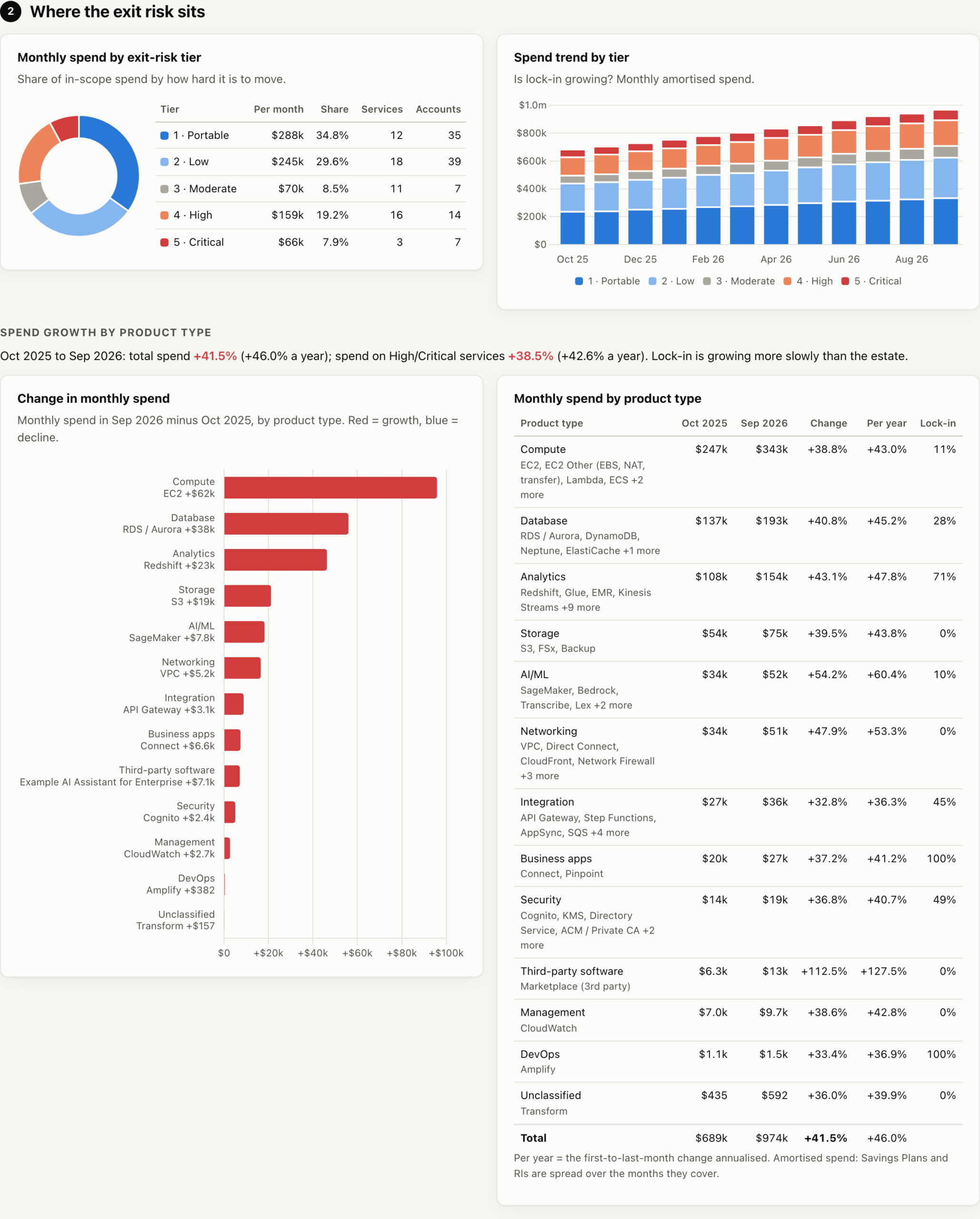
The tool reads two things from the management (payer) account, both read only: the account and OU structure from AWS Organizations, and up to twelve months of usage per account and service from Cost Explorer. Cost Explorer is simply the data source here. It tells the tool which services each account uses and how heavily, and the risk itself comes from scoring every service against an open catalog of 120 AWS services, ranked from portable to critical:
- Portable (EC2, EKS, EFS, ElastiCache, MSK, OpenSearch): runs largely unchanged elsewhere.
- Low (S3, RDS and Aurora, ECS, DocumentDB, CloudFront): a well known equivalent exists.
- Moderate (SQS, SNS, API Gateway, Athena, SageMaker, Bedrock): needs rework, but the patterns are standard.
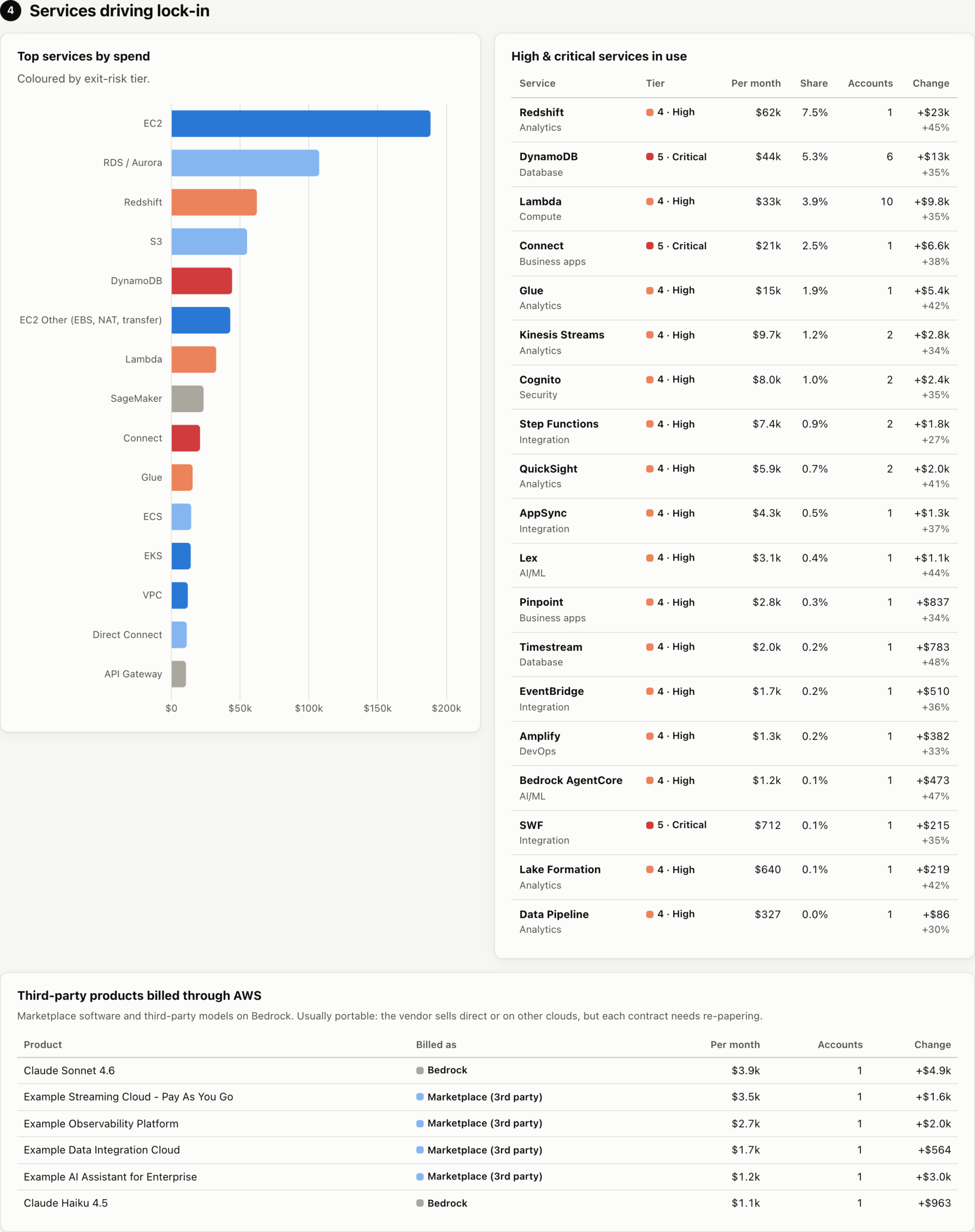
- High (Lambda, Redshift, Glue, Kinesis, Step Functions, EventBridge, Cognito): needs reengineering.
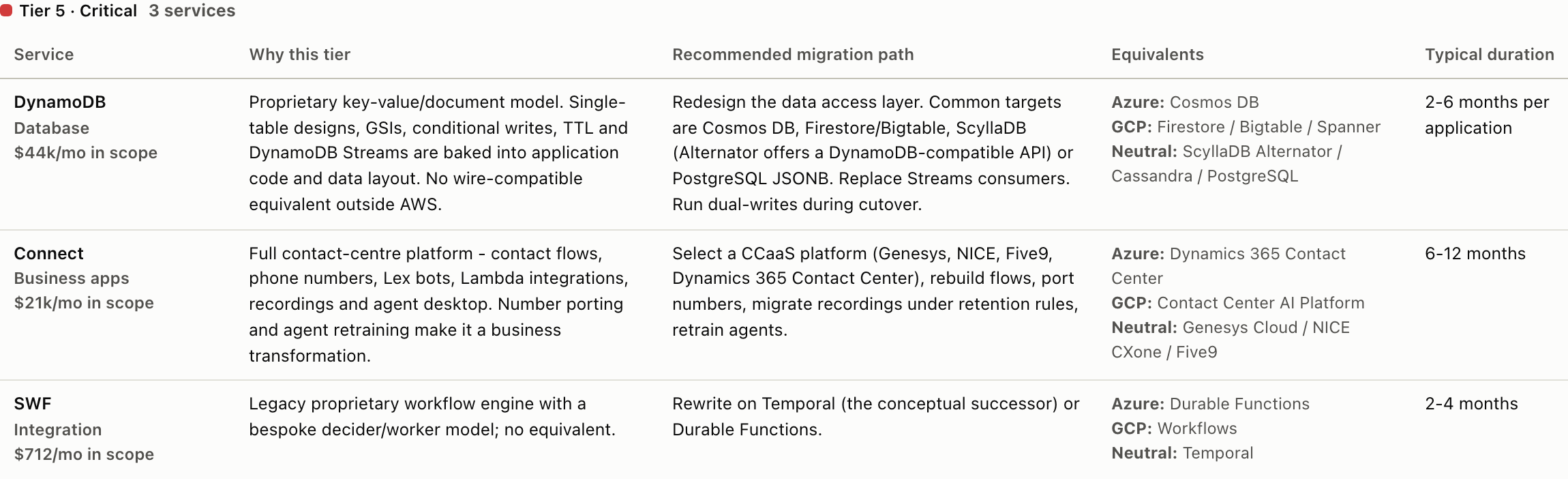
- Critical (DynamoDB, Connect, Greengrass): no drop in equivalent, so the data model, access patterns or flows have to be rebuilt. Compatible APIs such as ScyllaDB Alternator for DynamoDB shorten the code changes, but the capacity, consistency and streams behaviour still have to be redesigned and tested.
Every tier comes with a written rationale, a recommended migration path and a typical duration, and the catalog is a reviewable file in the repo. The tiers are defaults for a typical use of each service, not facts about your architecture: a Kafka cluster on MSK speaks a portable protocol, but its networking, IAM and operations may not move as easily, and a Lambda estate can be anything from a few portable functions to a deeply integrated event mesh. If you disagree with a tier, you can challenge it in a pull request rather than in a meeting.
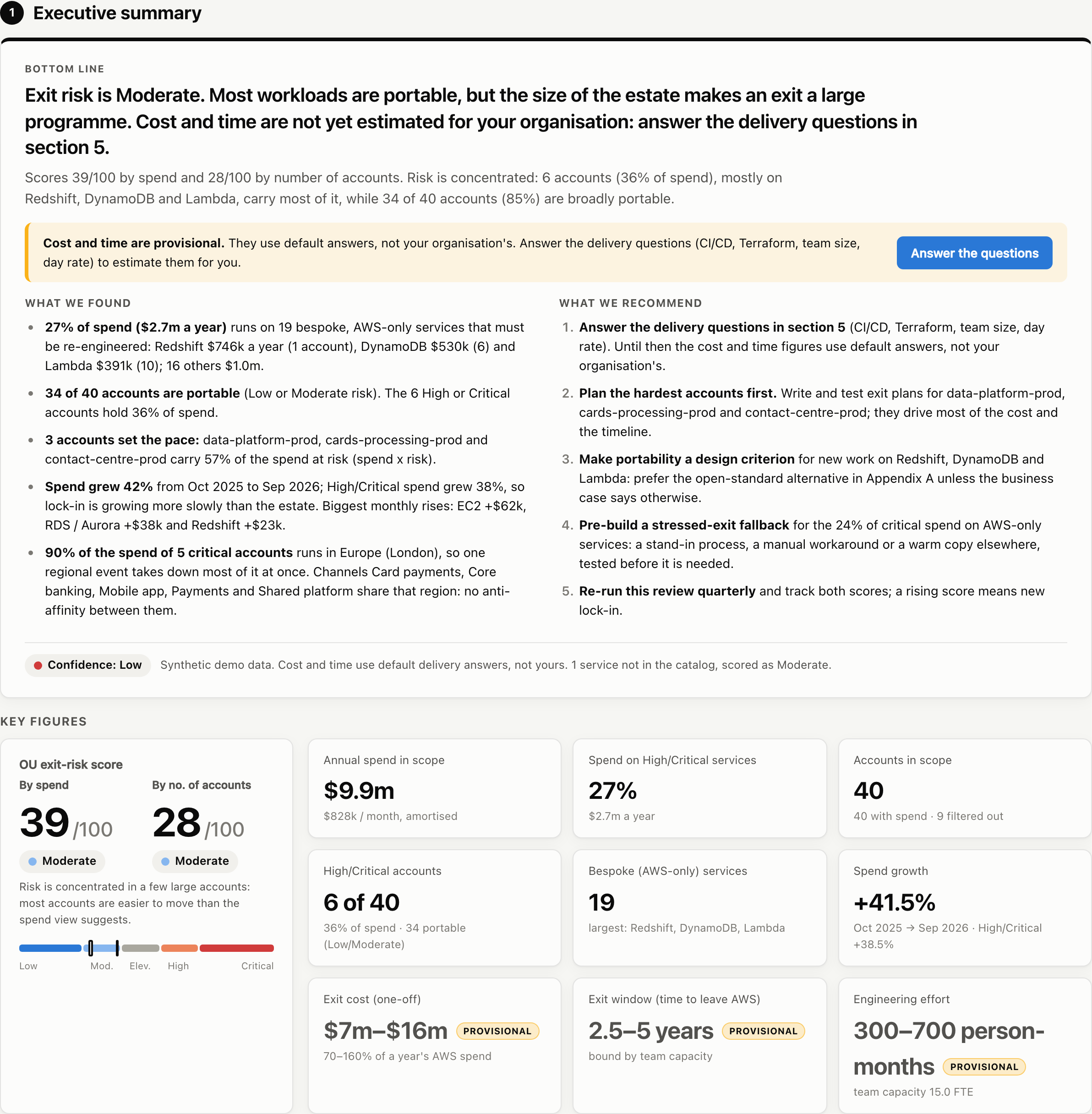
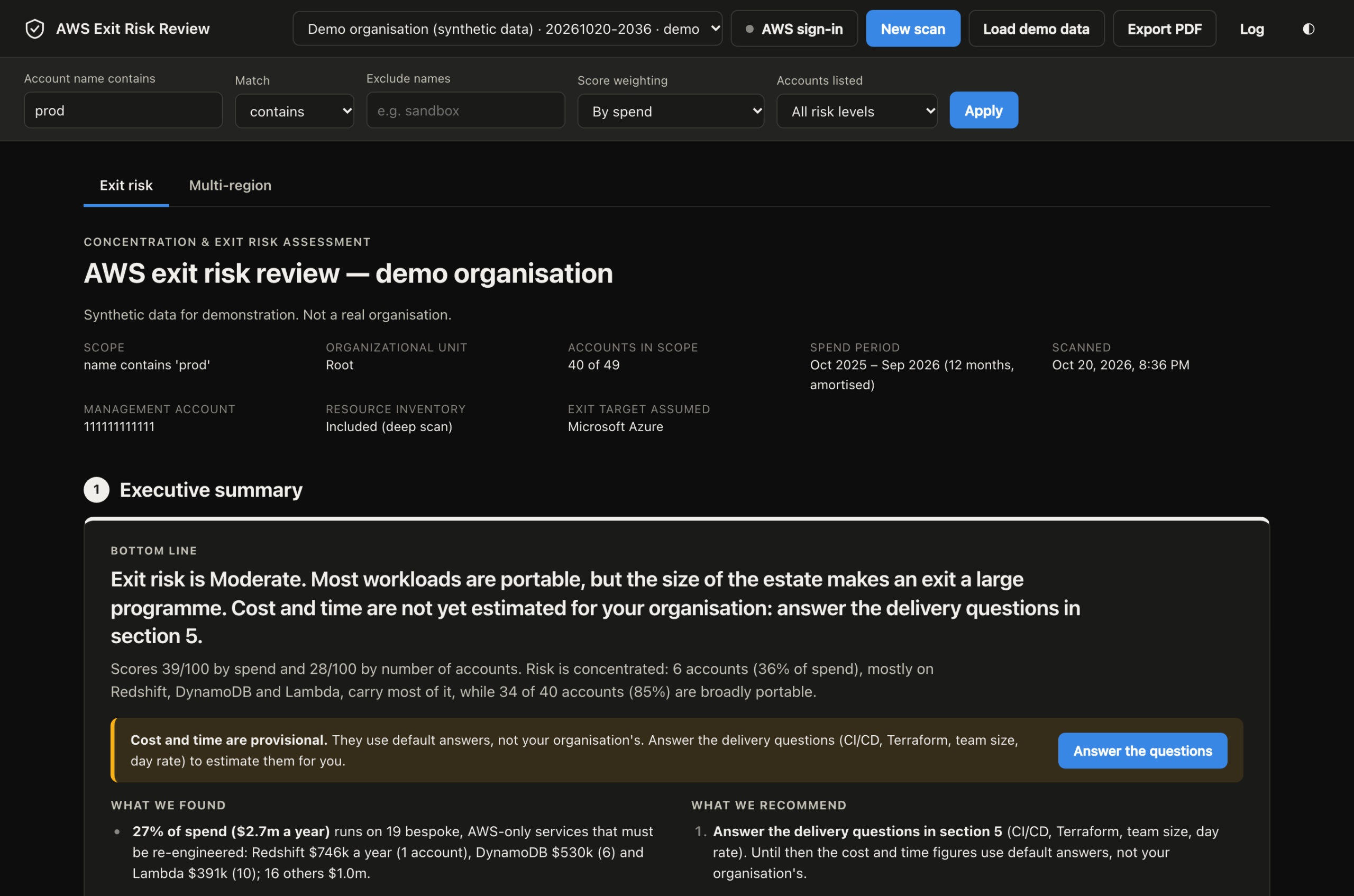
The executive summary opens with the bottom line, then what was found, what to do about it, and how confident the numbers are:
4. Two Scores, Because Concentration Matters
A single average hides the shape of the risk. One large contact centre on Amazon Connect can dominate a spend weighted score, even when every other account would move easily, so the report gives two scores:
- By spend: each account counts in proportion to what it costs, which shows where the bulk of the estate that would have to move sits.
- By number of accounts: every account counts equally, which shows how widespread the problem is.
When the spend score is well above the account score, the risk is concentrated in a few big accounts, and the exit plan can focus on them. When it is the other way round, the risk is widespread across many small workloads, which is a different and usually harder programme. The report says which one you have in plain English, and counts how many accounts are portable against how many are high risk.
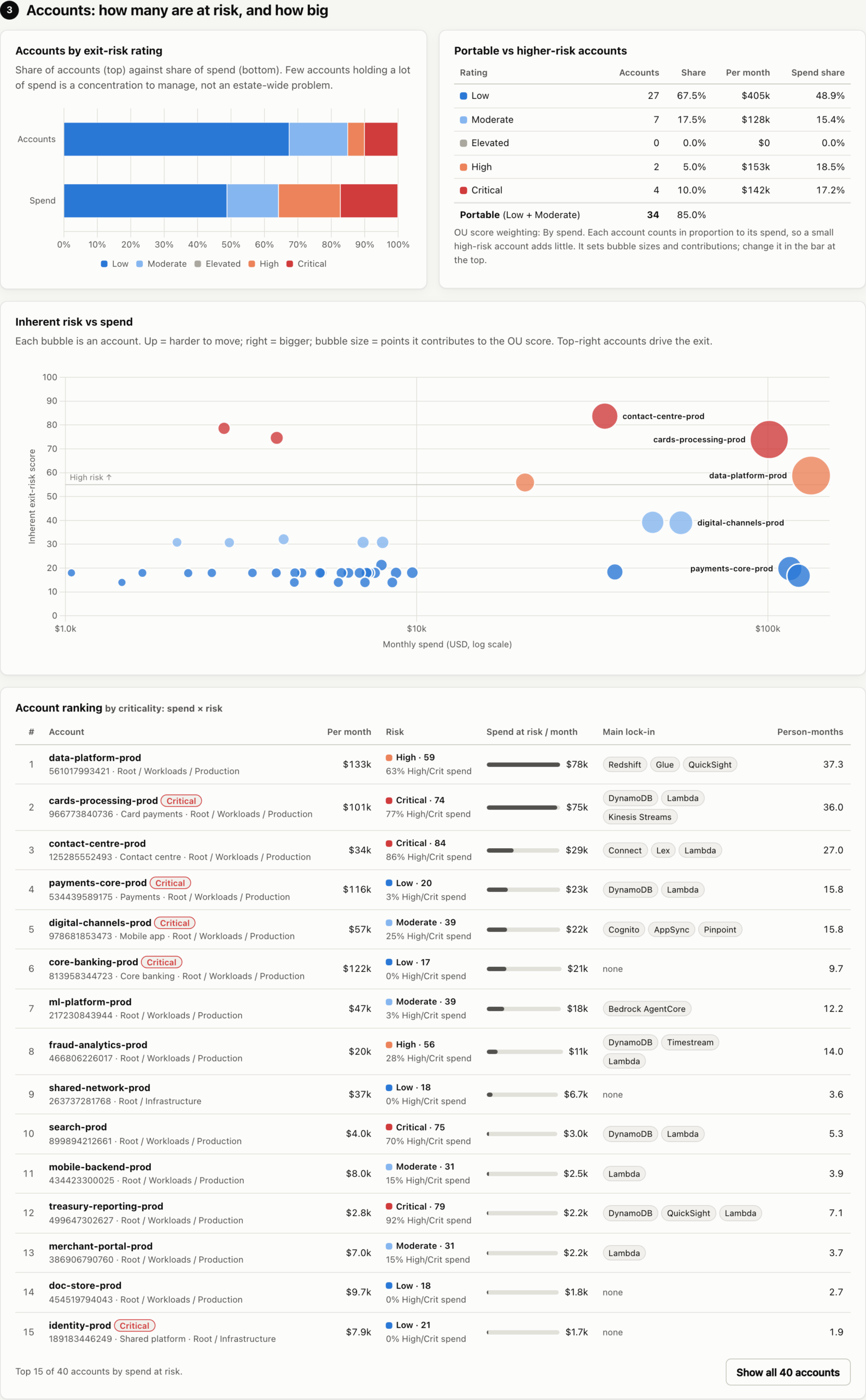
The account ranking sorts by spend at risk, which is monthly spend multiplied by the risk score. It is a ranking index rather than a loss estimate, and its job is to put the big, hard to move accounts at the top, because they set the pace of any exit. A small account full of proprietary services is still flagged, but it does not distort the picture.
The services view shows which AWS only services drive the lock in, and how fast spend on them is growing:
5. From a Score to an Exit Plan
A score tells you how worried to be, but a board also wants to know what leaving would take. Section 5 of the report builds an estimate bottom up from the services each account uses, then adjusts it with a short questionnaire answered on the page:
- Do teams use one standard CI/CD pipeline, several, or mostly manual deployment?
- Is the infrastructure in Terraform and current with production, drifting, in CloudFormation, or not in code at all?
- How big is the core cloud team, and how much of their time could go on an exit?
- Where would you go: Azure, Google Cloud, Oracle, a sovereign cloud, an on premises platform you already run, or your own physical data centre? For a data centre it also asks where the hardware goes (space you already have, colocation or a new build) and whether you need a second site for disaster recovery, and prices the hardware and the lead time.
- What does a day of engineering cost, and how long would you run both platforms in parallel?
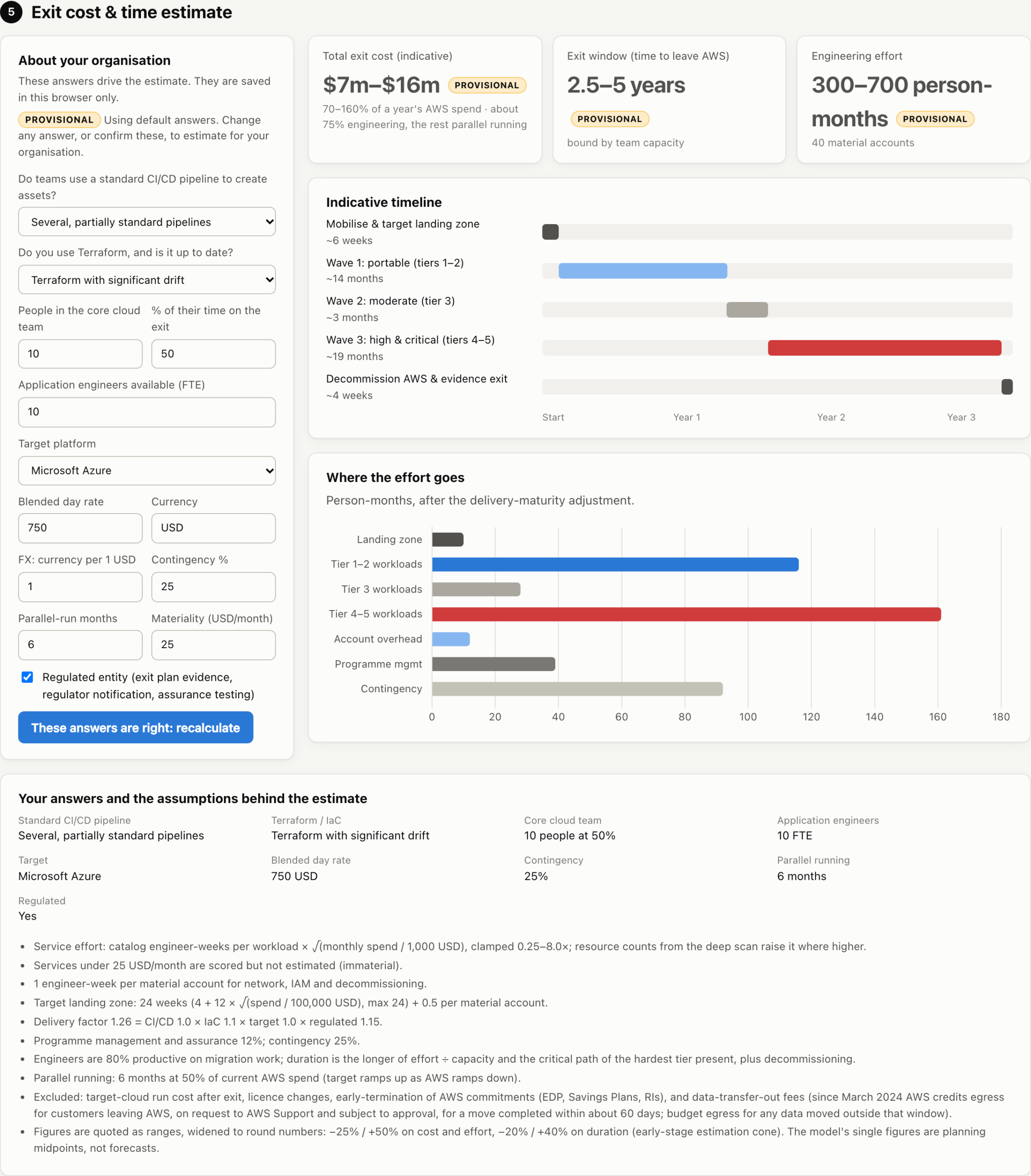
The estimate is deliberately quoted as ranges, never single figures, for example “$7m to $16m” and “2.5 to 5 years”. An early stage estimate quoted to the nearest hundred thousand dollars would claim precision it does not have, and a board will rightly anchor on whatever number it sees. Until the questions are answered, cost and time are marked provisional and stay out of the headline. This is a starting estimate for planning, not a validated exit plan, and every coefficient behind it is listed on the report so it can be challenged.
6. How the Exit Cost and Time Are Estimated
The estimate is built bottom up from the services in use, not guessed top down. The coefficients below are planning heuristics I chose and expose so they can be argued with; they are not calibrated against a body of completed exits. Every step is in the open, and the full detail is in the methodology documentation in the repo:
- Effort per service: each material service in each account gets the catalog’s typical engineer weeks for that service (a few for EC2, many for DynamoDB or Connect), scaled by the square root of its monthly spend over $1k. Four times the spend is roughly twice the work, because the design, tooling and tests are reused. With the optional deep scan, resource counts (Lambda functions, DynamoDB tables, state machines) sharpen the size.
- Per account: one more week for each account with material spend, for networking, IAM and decommissioning.
- Delivery maturity: the total is multiplied by your answers. One standard CI/CD pipeline is 0.85, mostly manual deployment 1.3. Terraform that matches production is 0.8, CloudFormation or CDK 1.25 (the code itself must be rewritten), and little or no infrastructure as code 1.5. The target matters too (Azure or Google Cloud 1.0, an on premises platform you already run 1.35, your own physical data centre 1.5), and a regulated firm adds 15% for exit plan evidence and assurance.
- Landing zone: the target platform’s foundations, from 4 to 24 weeks depending on the size of the estate, plus half a week per account.
- Programme management and contingency: 12% for programme management, then your contingency on top.
- Time: effort divided by the people available (core cloud team times their allocation, plus application engineers), at 80% productive time. It can never be shorter than the critical path set by the hardest service in use, which is 26 weeks when a Critical service like Connect or DynamoDB is present. That is a floor, and a large transactional system with heavy reconciliation can easily take longer. Four weeks of decommissioning are added, and the report says whether people or the critical path is the constraint, so a board knows whether hiring would help.
- Cost: engineer weeks times the day rate, plus running both platforms in parallel, which defaults to half of the AWS bill for the parallel run months you choose. The real overlap depends on how the migration is sequenced and how long environments are duplicated.
- Exiting to your own data centre: choose a physical data centre as the target and two more questions appear: where the hardware goes (space you already run, colocation, or a new build) and whether to buy a second site for disaster recovery. Nothing can move until the facility exists, so its lead time goes on the critical path (about 4 months for existing space, 6 for colocation, 2 years for a new build). The one off cost adds hardware (9 months of the AWS bill, 60% more for a DR site) and the facility (none, 2 or 12 months of the bill per site). Running the data centre afterwards (power, cooling, staff, maintenance, hardware refresh) is listed as excluded, so nobody mistakes the one off cost for the whole bill.
- Ranges: cost is quoted from 25% below to 50% above the midpoint, and time from 20% below to 40% above, rounded outward. These are scenario ranges, not statistical confidence intervals, and the skew is deliberate because migrations overrun far more often than they underrun.
Summing effort service by service has one known weakness. Lambda, API Gateway, DynamoDB and EventBridge in one account may be a single tightly coupled application rather than four separate migrations, which the model will overstate, while one DynamoDB service line feeding dozens of independently deployed applications will be understated. The deep scan narrows this, but it does not remove it.
7. Multi Region: What a Second Region Would Cost
Once the exit plan is in place, the next question from a regulator is usually about concentration inside AWS: what happens if a whole region fails? The Multi-region tab answers it from the same scan, with no new permissions. It shows what a second region would add to the bill each year, what it would cost and how long it would take to build, how many more people you would need, and which region to use.
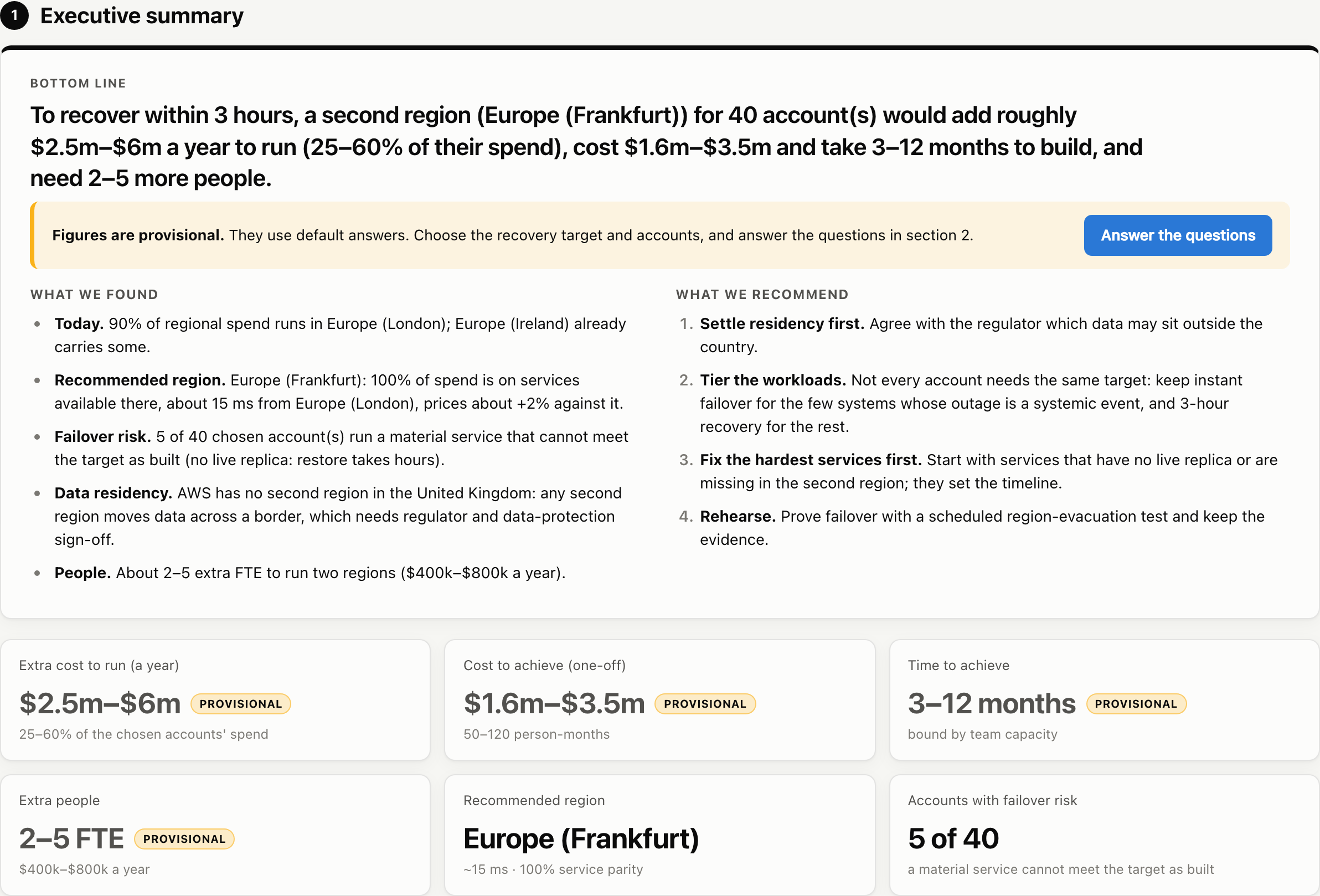
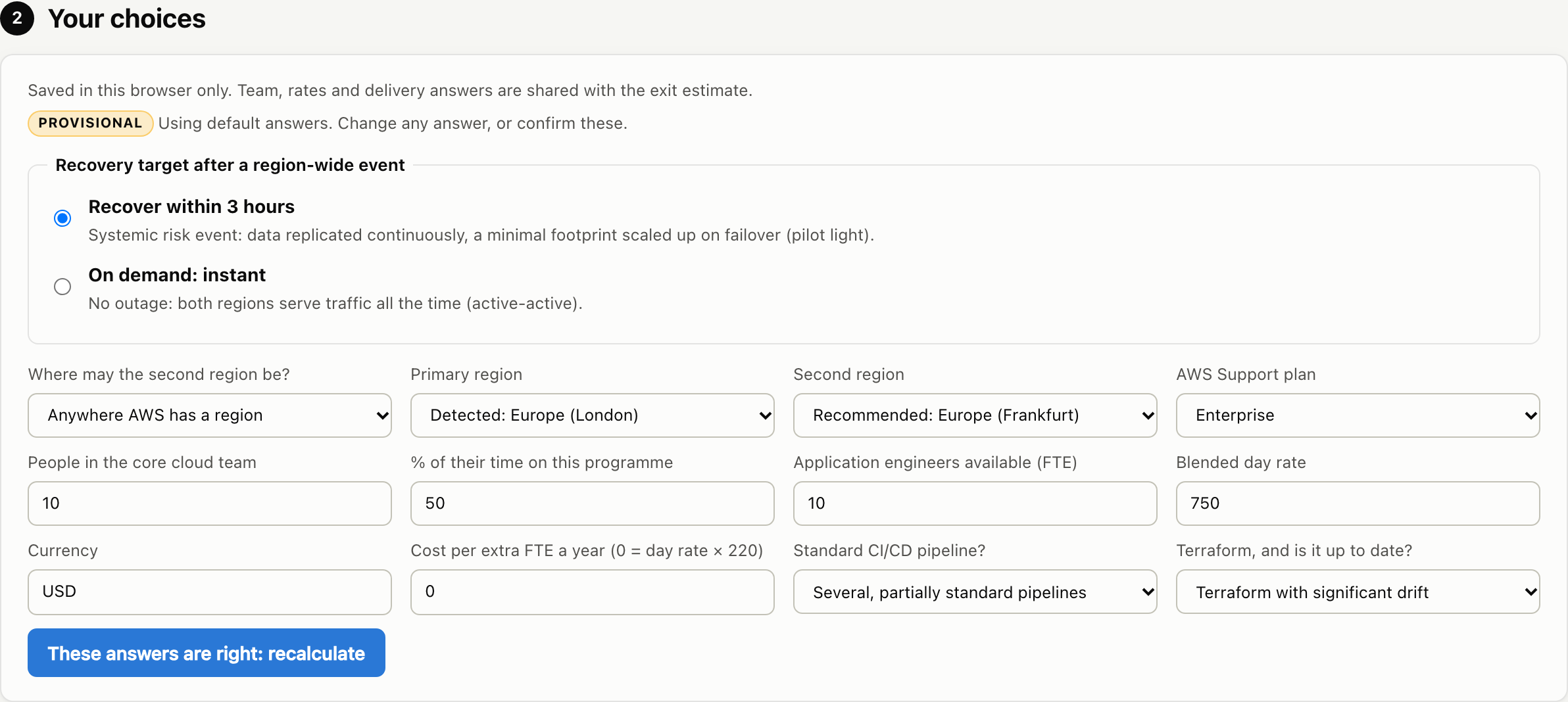
You choose the recovery target, and it changes everything downstream:
- Recover within 3 hours, for a systemic risk event: data is replicated continuously and a small footprint runs in the second region, scaled up on failover (pilot light). By default the model runs compute there at about 12% of today’s cost, databases at 45% and storage at 80%. These are model defaults for a pilot light design, not AWS cost ratios, and your own architecture may differ.
- On demand: instant, which means active/active: both regions serve traffic all the time, so most services run in full twice, latency between the regions matters, and more people are needed to run it.
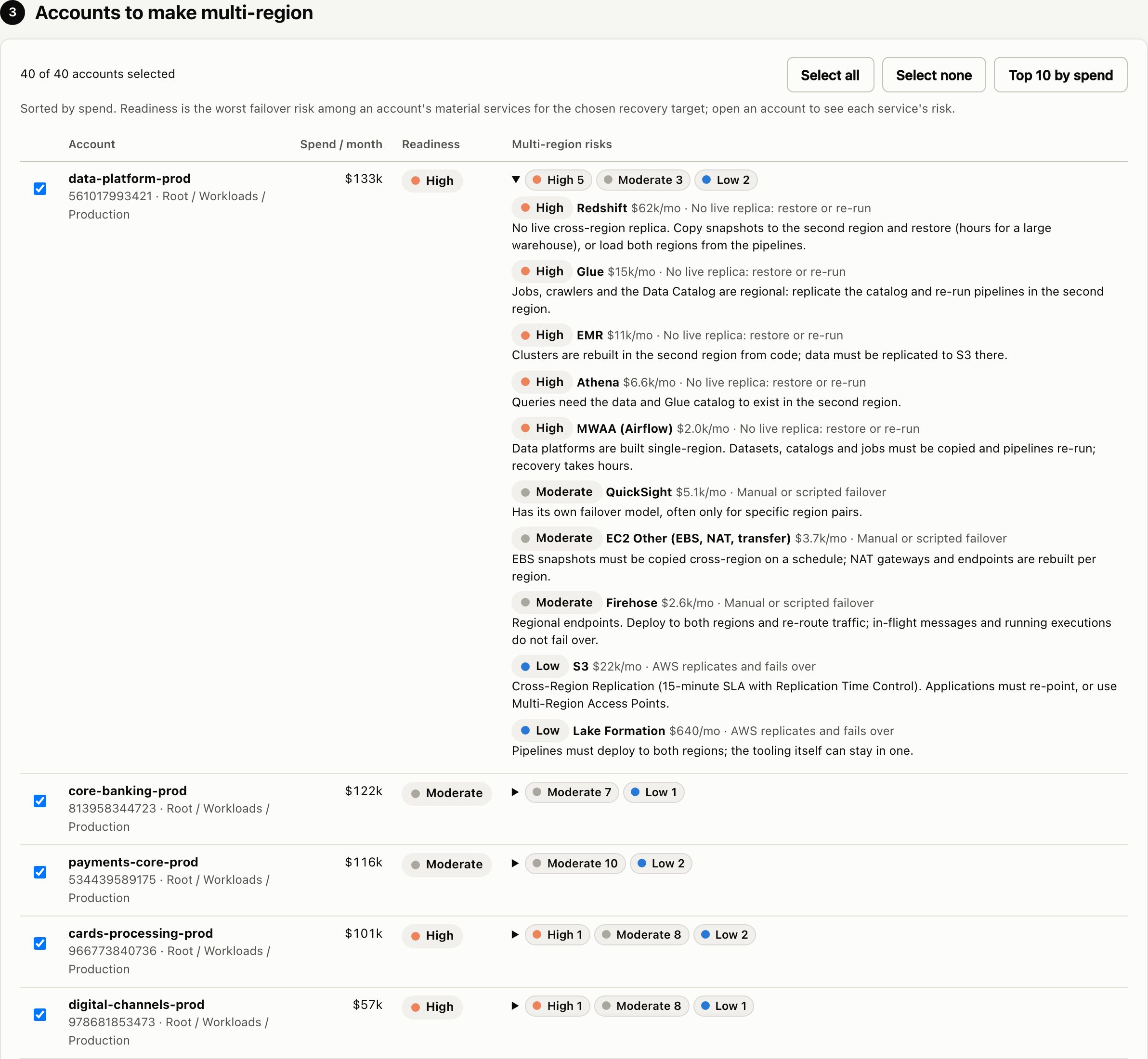
Not every account needs a second region. The accounts are listed by spend, and you tick the ones that should be multi region. Each account shows its readiness and, for every service it uses, the multi region risk and what has to be done. EC2, for example, has no cross region failover: images, launch templates and capacity must exist in the second region and be started by a runbook or automation. Redshift, Glue and EMR have no live replica and must be restored or rerun, which takes hours. S3 cross region replication and DynamoDB global tables keep the data moving continuously, but replication is not failover: S3 replication is asynchronous, and in both cases recovery still depends on how traffic is routed, what consistency the application needs, the failover automation, and whether it has been tested. Bulk data movement has its own regional limits too. DynamoDB import from S3 handles up to 15 TB of source data at a time in us-east-1, us-west-2 and eu-west-1, but only 1 TB in every other region, so reloading a large table into a second region such as Cape Town or Frankfurt has to be split into batches and takes longer. Export to S3 is the same everywhere (up to 100 TB in flight), and adding a global table replica backfills up to 10 TB per region per day unless AWS raises the quota. Check these quotas against your largest tables before you write the recovery time into a plan, for a second region and for an exit alike.
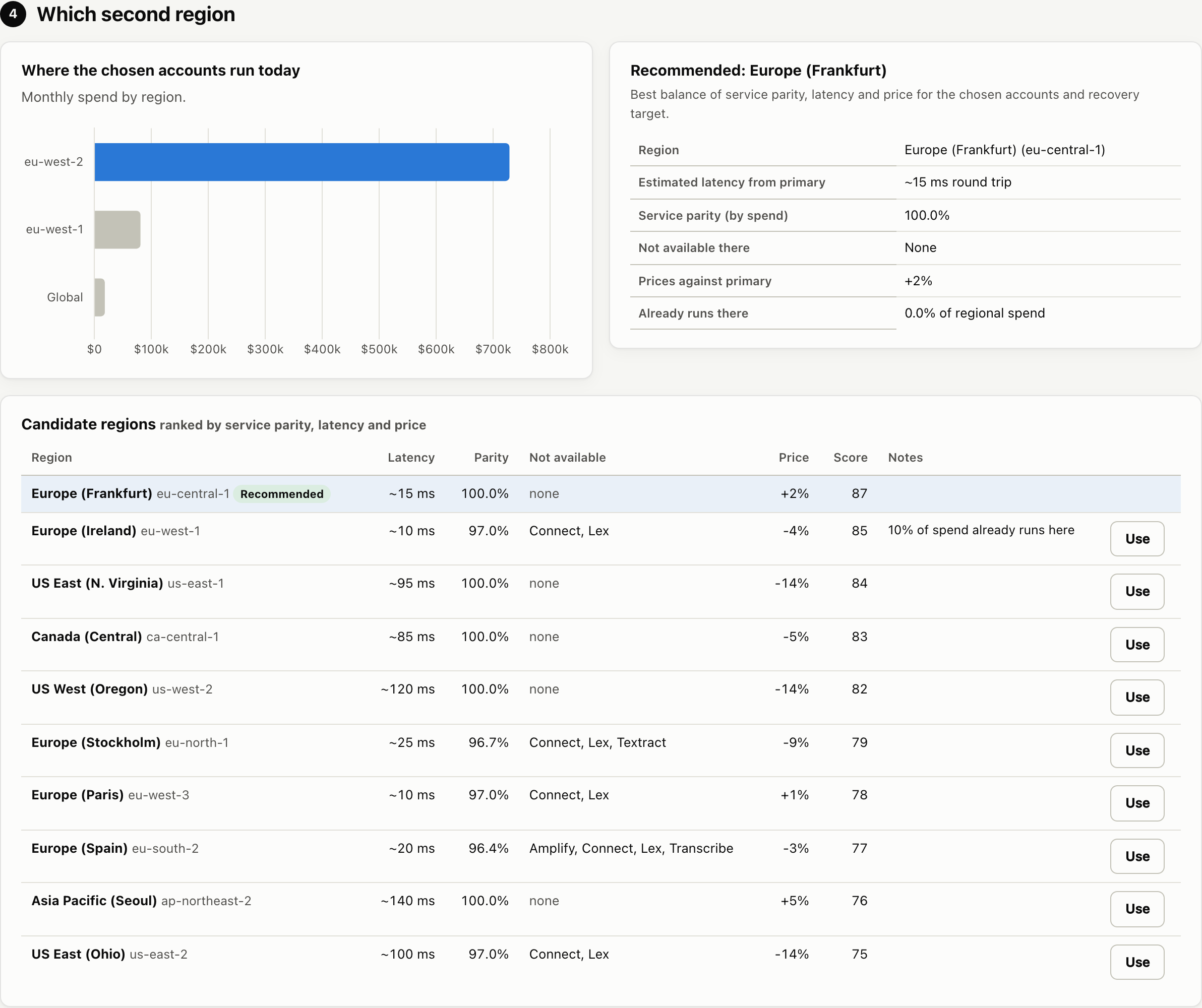
The second region is recommended from three things: service parity (is every service you use offered there, from the AWS regional services list), latency from your primary region, and price. A missing service is penalised heavily, because it means rearchitecture. You can restrict the choice for data residency to the same continent, the same jurisdiction or the same country. Where AWS has only one region in a country, the report says so plainly, because any second region then moves data across a border.
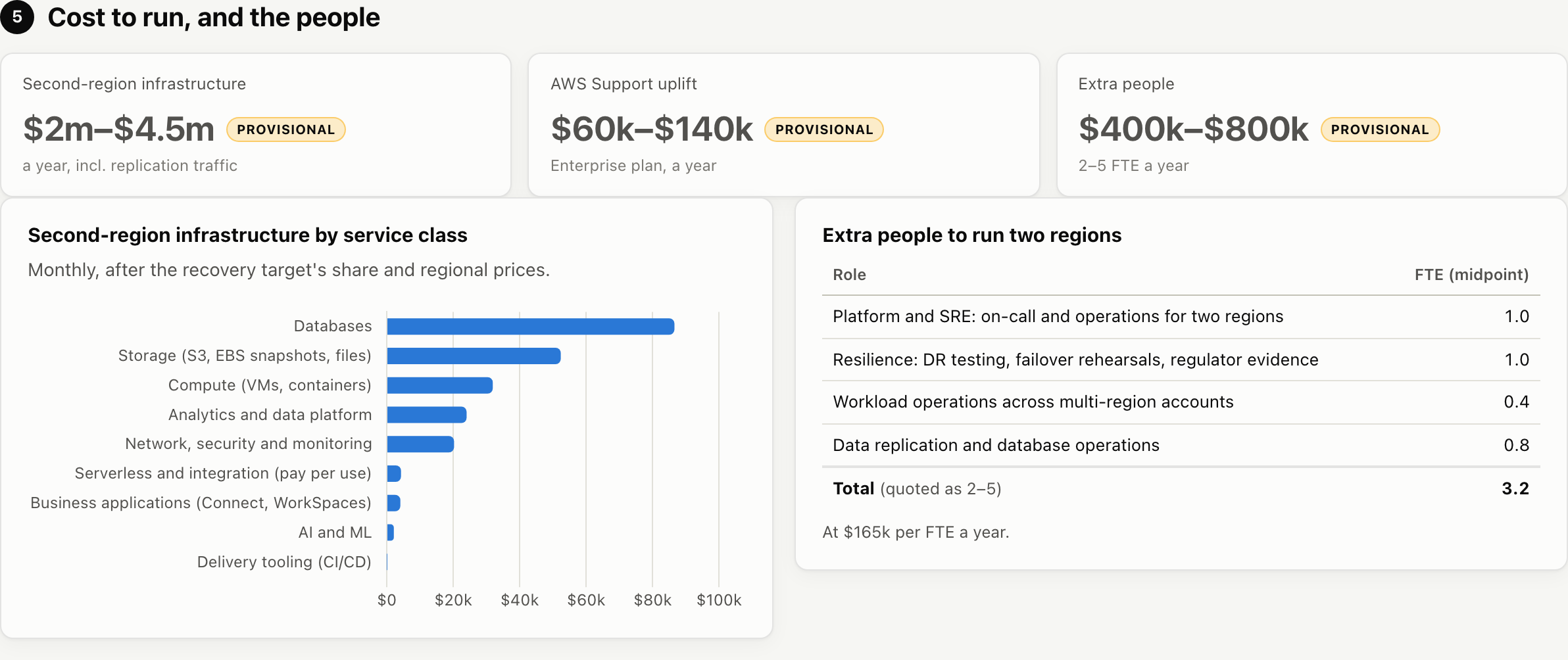
The run cost adds up the second region infrastructure by service class, the replication traffic between regions, the larger AWS Support bill (it is a percentage of usage), and the extra people: on call and operations for two regions, DR testing and regulator evidence, and data replication.
The cost and time to achieve it are built the same way as the exit estimate: engineer weeks per service and account, a second region landing zone, a DR programme of runbooks and rehearsals, the same delivery maturity factors, programme management and contingency, and half the second region’s run cost while it is built. Again, everything is a range.
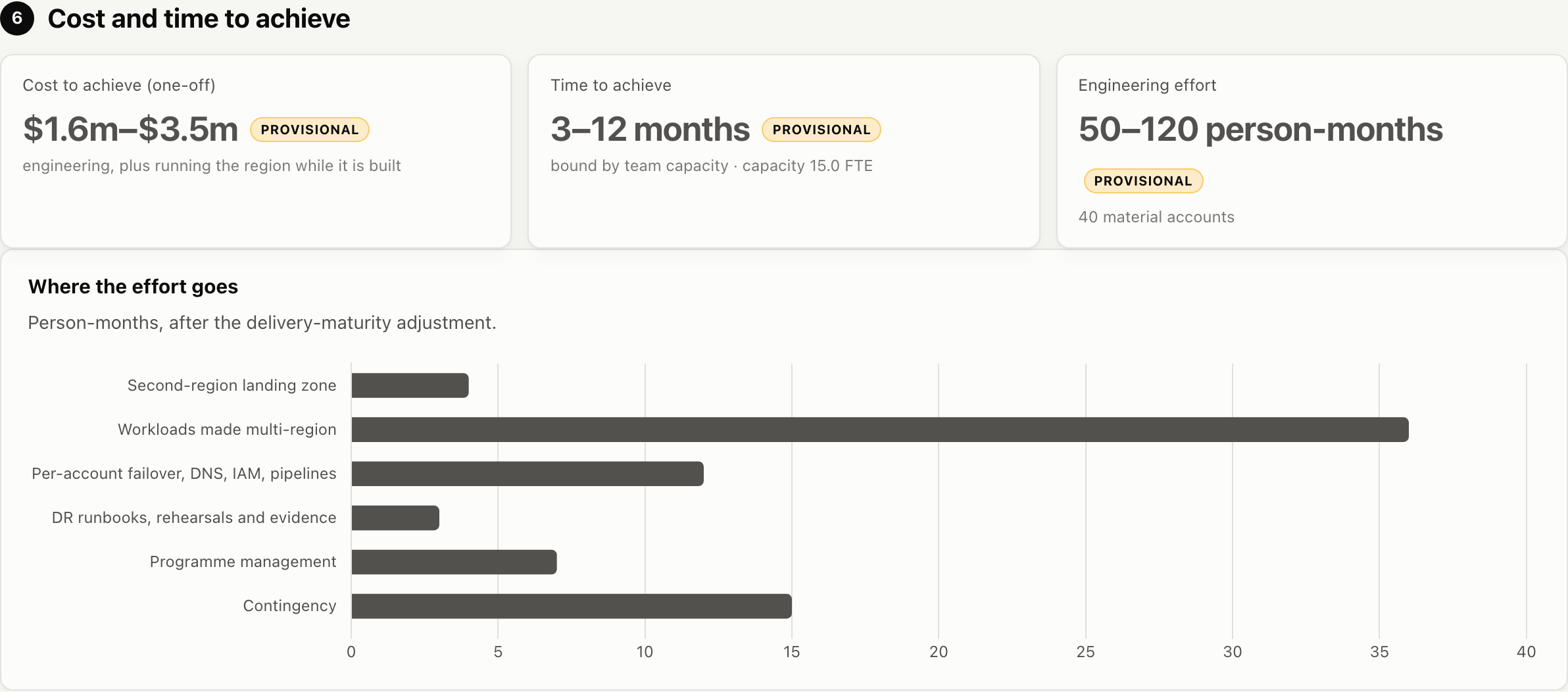
The full method is in MULTI_REGION.md, and there is a sample multi region PDF from the demo data.
8. Anti Affinity and Path Divergence for Tier 1 Channels
A second region protects you from a region failing, but it does not protect you from everything failing together. The bigger risk for a bank is correlated failure: the card rail, the mobile app and the internet bank all sharing one region, one network path, one identity service and one deployment pipeline, so that a single fault takes every channel down at once. To customers that is a global outage, even if most of your systems are healthy.
The answer is anti affinity: deliberately keeping your tier 1 channels apart, so they cannot fail together.
- Isolate the card payment rail from the mobile app. Run them in different regions, or put the card rail on separate physical infrastructure (your own data centre or a different provider). A bad deployment, a regional event or an expired certificate in the app estate then cannot touch card authorisations.
- Use what card systems already give you. Card schemes support stand in processing: if the issuer cannot be reached, the scheme or processor approves transactions against agreed limits. A card rail that is isolated and has stand in keeps customers paying at the till while the app is down, and the app outage stays an app outage.
- Diverge the paths, not only the hosting. Isolation is only as good as what is shared. Give each tier 1 channel its own network path and connectivity, DNS, identity and secrets, deployment pipeline and change windows, and its own monitoring. If both channels authenticate against the same directory or ship through the same pipeline, they still share a single point of failure.
- Stagger change. Never release to every tier 1 channel at once, so a change that breaks one channel is caught before it reaches the next.
- Test the separation. Fail one channel on purpose and prove the others keep running, then keep that evidence, because it is exactly what DORA, the PRA and the SARB ask for when they ask about concentration risk.
This is also where the tool earns its keep. Ranked by spend alone, a $20k a month payment authorisation account sits below a $200k a month internal analytics platform, so the tool needs to know what is critical. Tag each account in AWS Organizations with its criticality and channel (for example Criticality = Tier 1 and Channel = Card payments), or type the critical account names on the page, and the resilience view in section 6 of the report measures what this section describes:
- Correlated failure: the share of critical spend in its dominant region, and each channel’s region. Channels that share a region are flagged as having no anti affinity.
- Stressed exit: how much critical spend could move in weeks (open standard services), in months (rework) or not at all without a pre built fallback, and which critical accounts are stuck on AWS only services.
- Data to move: terabytes of live data, archives and backups by service, account and region, read from storage usage in Cost Explorer, with the time to move it at your link speed and whether it fits AWS’s 60 day window of free data transfer out for customers leaving AWS.
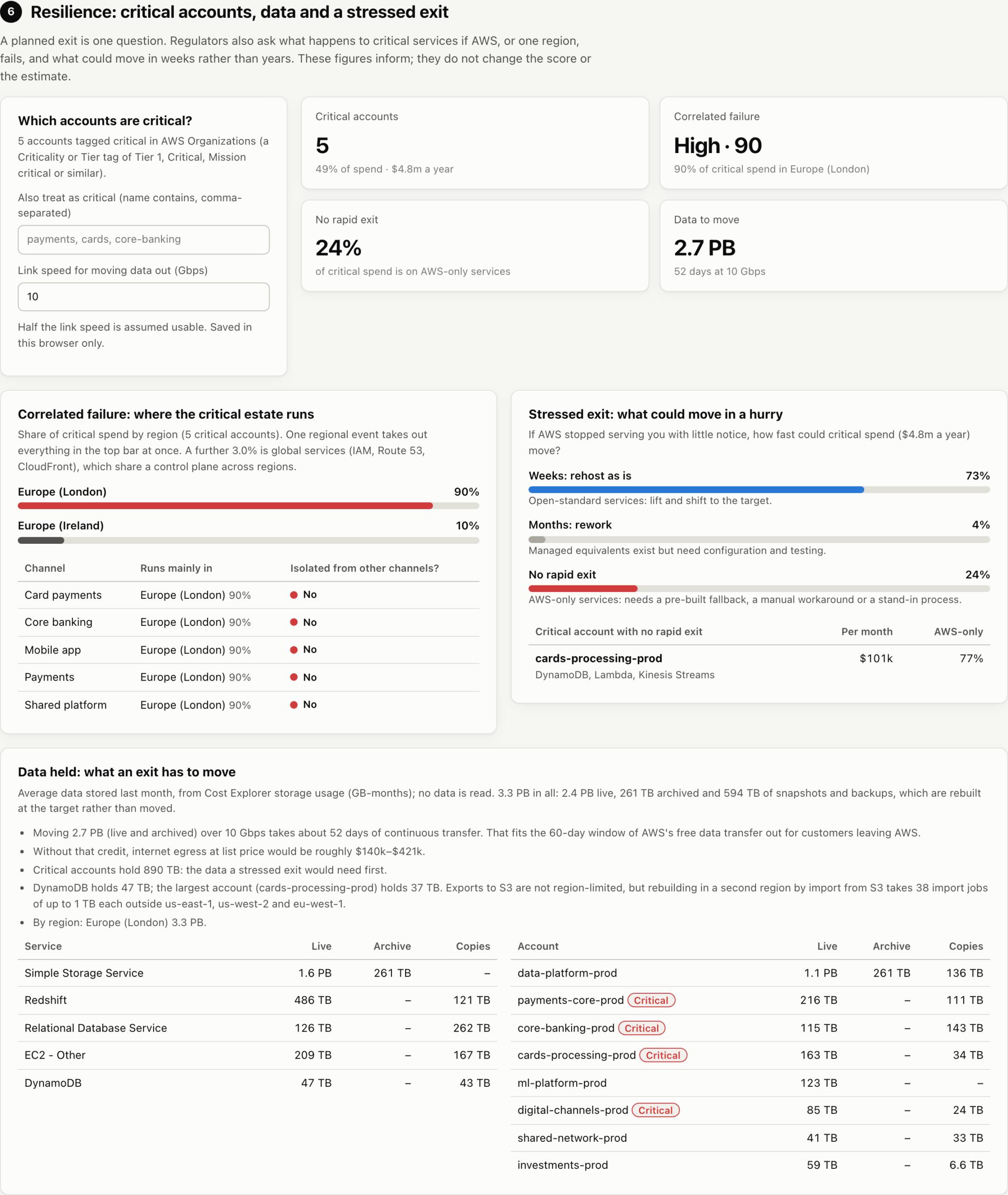
The multi region and exit views then show what a second region or a second platform would cost for those accounts only. You do not have to move everything to remove the concentration that matters. You move the right things, for the right reasons.
9. A Report You Can Take to an Exco
Export PDF produces a board ready report: the executive summary, charts, your questionnaire answers and the assumptions behind them, a data quality section that says what the report does not cover, and an appendix explaining every service’s tier, migration path and typical duration.
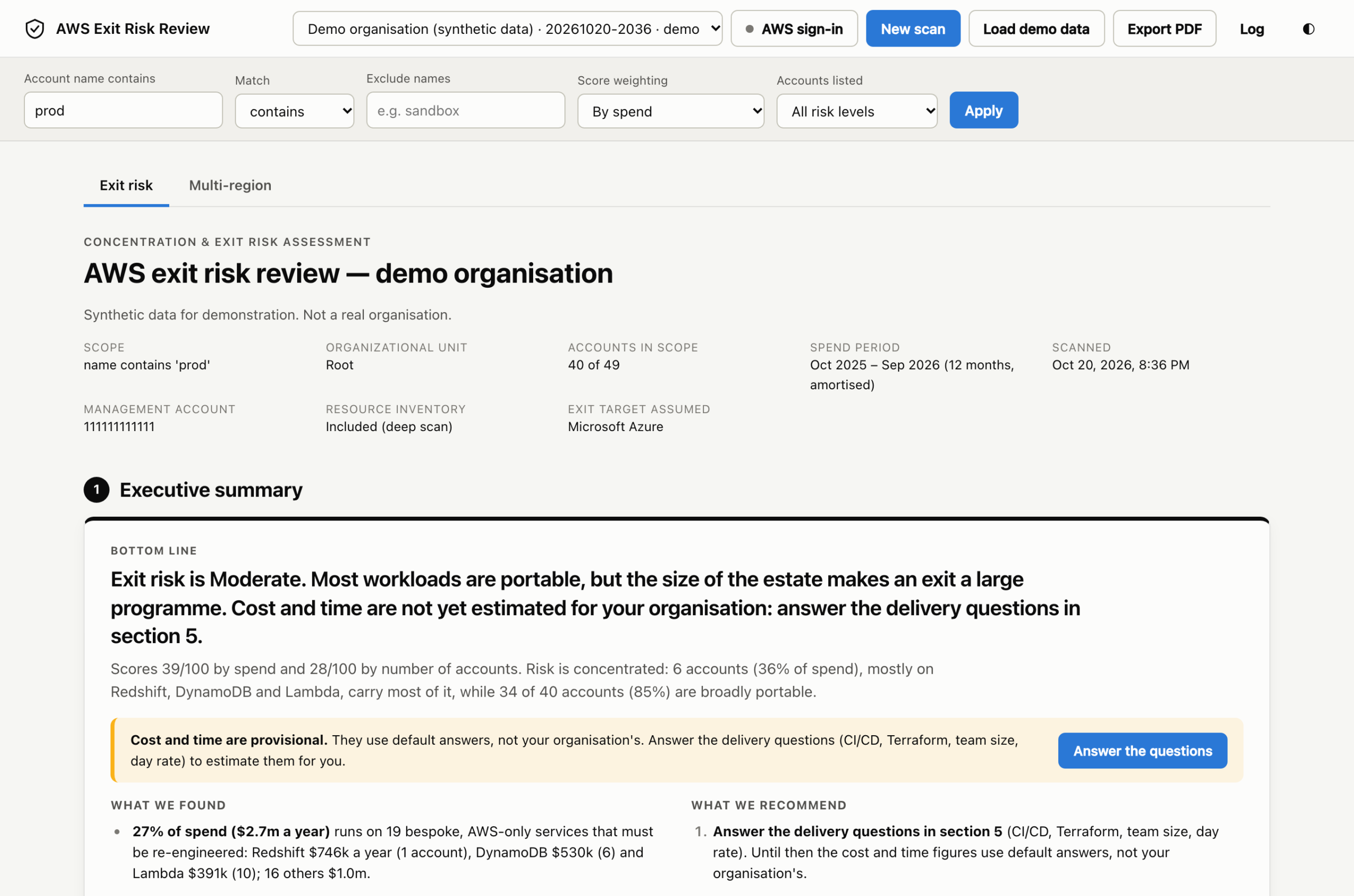
You can filter the report to production accounts by name (prod, prd, excluding sandbox), pick one or more OUs to scan, and choose whether low risk accounts are listed. There is an exco guide in the repo on how to present it.
10. Example Reports
Both reports below are complete PDFs exactly as the tool exports them, built from a made up demo organisation with invented account names and spend. Download them to see what an exco pack looks like before you run it on your own estate:
- AWS exit risk report (PDF): executive summary, both scores, the account ranking, services by lock in, the exit cost and time ranges with every assumption, the resilience view, data quality, and the appendix of every service’s tier, migration path and typical duration.
- Multi region report (PDF): the recommended second region and why, the cost to run and to build, the extra people needed, and the failover risks for each account, for a 3 hour recovery target.
Both carry a “Synthetic data” label, and each export records the tool and catalog versions it was built with, so a figure in a board paper can always be traced back.
11. Installing It
You need macOS or Linux. Paste this into a terminal. It installs uv if you do not already have it (uv also fetches Python 3.10 or later if needed), installs the tool from GitHub, and opens the console at http://127.0.0.1:8740:
(command -v uv >/dev/null 2>&1 || curl -LsSf https://astral.sh/uv/install.sh | sh) \
  && export PATH="$HOME/.local/bin:$PATH" \
  && uv tool install --force "git+https://github.com/andrewbakercloudscale/aws-regulatory-risk-review-framework" \
  && exitrisk serve
Run the same command again later to upgrade. If your security policy does not allow piping an installer into a shell, install uv from your package manager instead (brew install uv on macOS) and run only the uv tool install and exitrisk serve lines, or use pipx: pipx install git+https://github.com/andrewbakercloudscale/aws-regulatory-risk-review-framework.
No AWS access yet? Click Load demo data for a synthetic bank estate with made up numbers, and explore the whole report.
12. Connecting to AWS
The first screen walks you through three steps:
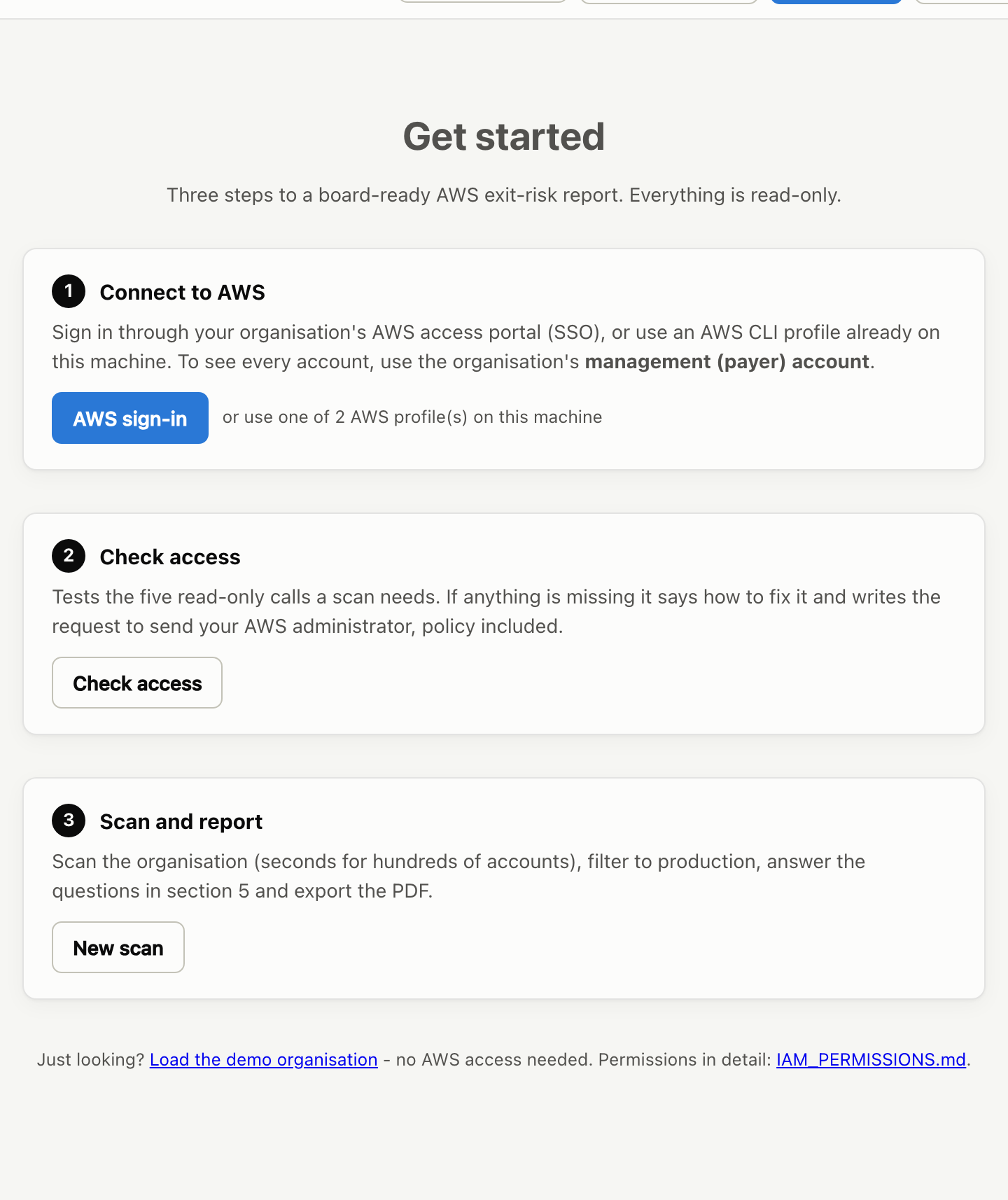
- Connect to AWS: sign in with AWS SSO (IAM Identity Center) from the header, or use any AWS CLI profile already on the machine. Use the management (payer) account, because that is where Organizations and the consolidated bill live.
- Check access: the tool tests the five read only calls a scan needs and shows a tick or a cross for each, with the fix. If anything is missing, it writes the request to send your AWS administrator, ready to copy.
- Scan and report: hundreds of accounts take seconds.
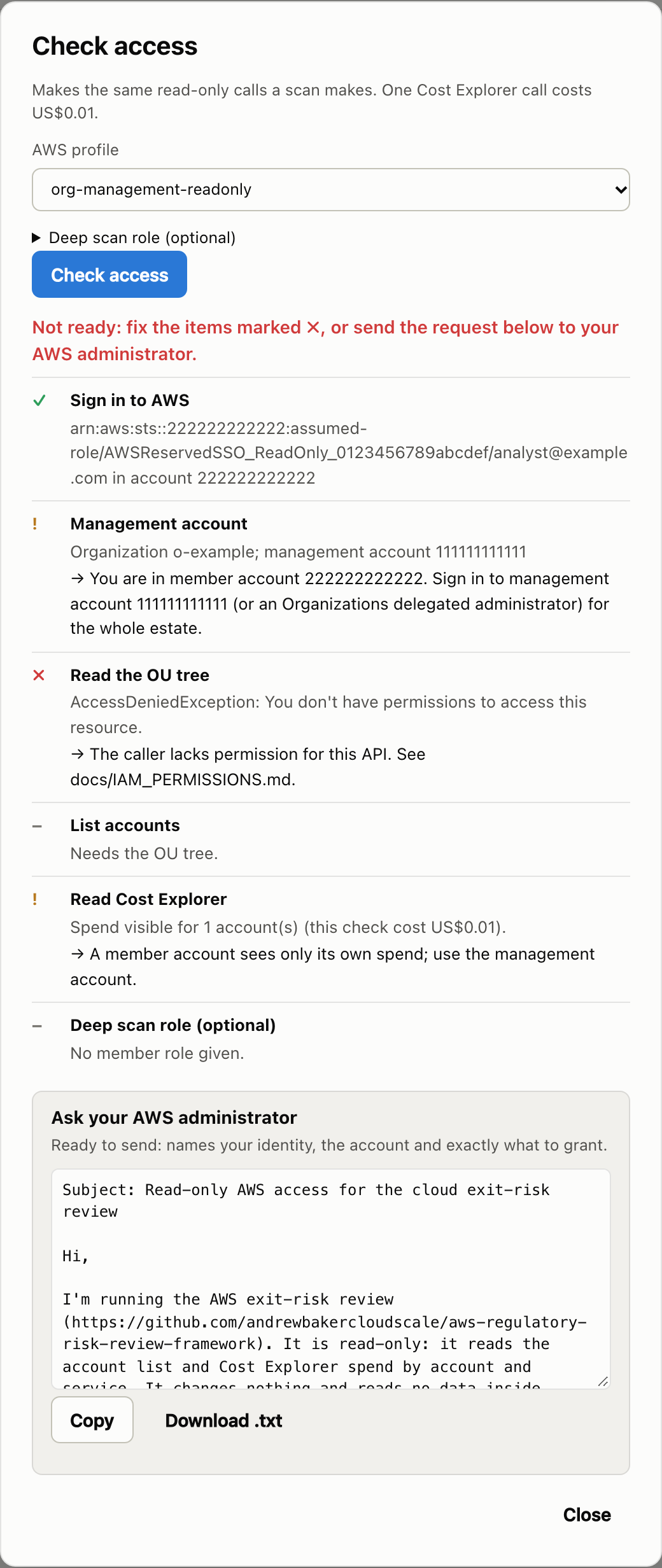
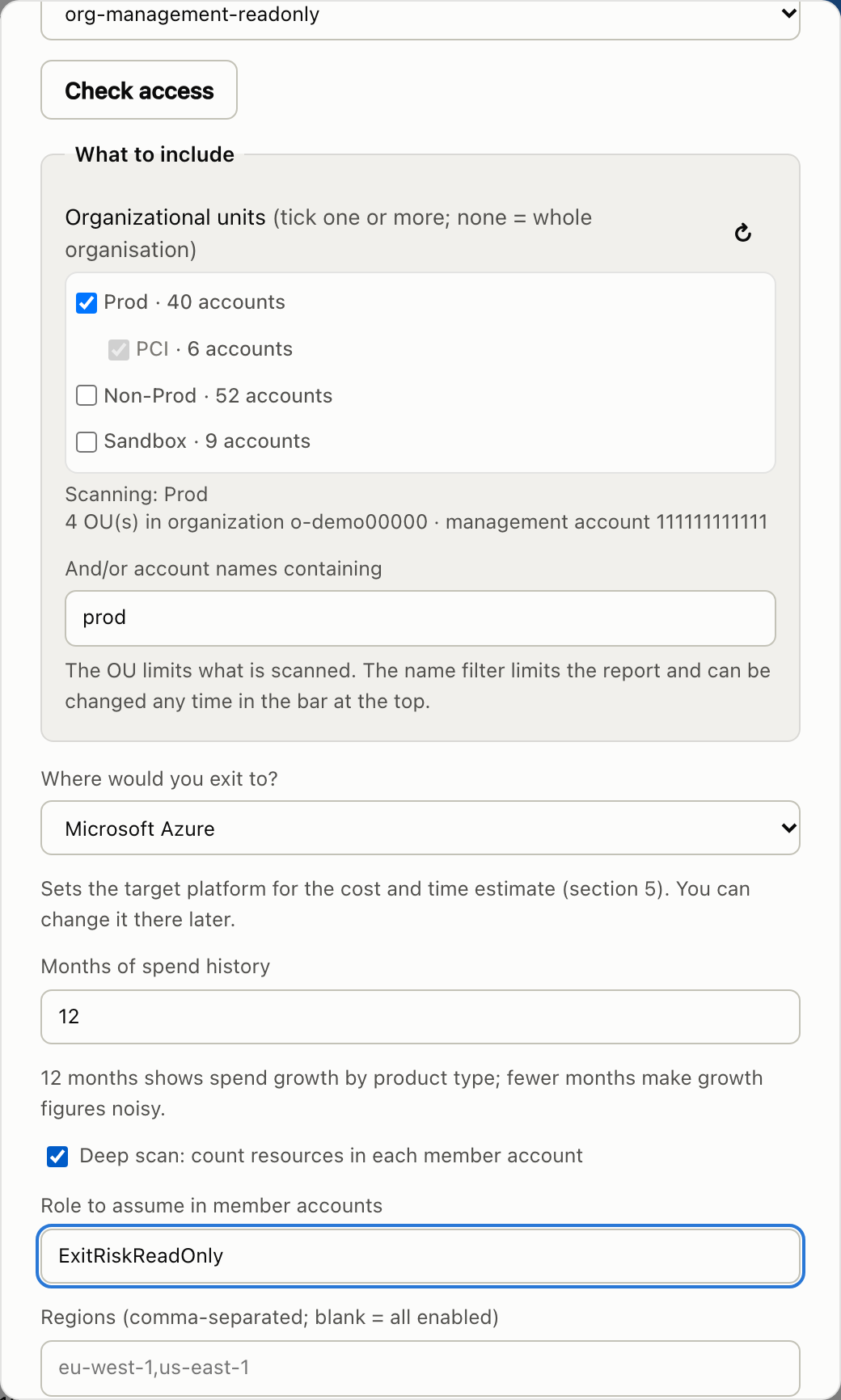
Everything is read only. The core score needs only Organizations and Cost Explorer read access in the management account; the repo includes the exact IAM policy, plus Terraform and CloudFormation for an IAM Identity Center permission set. AWS charges a small fee per Cost Explorer API request, so a scan is not quite free, though the cost is trivial next to the bill it reads. An optional deep scan counts resources (Lambda functions, DynamoDB tables and so on) in each member account through a list only role, which sharpens the effort estimate. Nothing leaves your machine: the console runs locally, and scans are stored in your home directory.
13. What It Does Not Do
It is honest about its limits, and so is the report:
- It measures technical exit difficulty from the services in use. It does not see contracts, data residency, licensing, or the skills you have in house.
- It sees which services an account uses, not how they are used. An EKS cluster running plain containers and one wired into IAM roles for service accounts, Secrets Manager and AWS specific controllers carry the same tier, and free services such as IAM never appear in the bill at all. The deep scan narrows this gap; it does not close it.
- Spend is a proxy for size. A cheap service can still be deeply embedded, which is why the deep scan and the account count score exist.
- It only knows which accounts carry critical or important business functions if you tell it, through account tags or names on the page. It does not classify business functions itself.
- The estimate is a planning range for an exit programme, not a quote. It excludes running costs on the target platform, licence changes and early termination of AWS commitments.
- The catalog reflects one view of each service. It is open precisely so it can be argued with and improved.
14. Get It
The code, documentation, methodology and service catalog are on GitHub: github.com/andrewbakercloudscale/aws-regulatory-risk-review-framework. Issues and pull requests are welcome, especially challenges to a service’s tier or a better migration path.
The purpose of a seventh pillar is not to discourage anyone from using AWS, nor to argue that every regulated institution should run across several clouds. It is to make supplier dependency a conscious, measured architectural decision, so that a regulated firm can explain what would happen if it had to leave, how long that would take, what it would cost, and which critical services would stay exposed in the meantime. Some proprietary services are well worth the dependency, and the point is to understand that trade before accepting it rather than discover it during an exit.
If your board has ever asked “how locked in are we?” and got a shrug, run it on your production OU. It turns the worry into a number, a ranked list of where the risk sits, a range for what leaving would take, and what a second region would cost. You cannot remove every dependency, but you can make sure none of them is invisible, and that is something a board can govern.